
การแนะนำ
The EWA A101C Mini Bluetooth Speaker is a compact and versatile audio device designed for portable use. It features Bluetooth connectivity for wireless audio streaming from smartphones, tablets, and computers. Additionally, it includes an FM radio function and a microSD card slot for MP3 playback, offering standalone audio capabilities. Its robust metallic casing, protected by silicone, provides enhanced resistance to impacts and drops. The speaker is also capable of stereo pairing with a second A101C unit for an expanded sound experience.

รูปที่ 1: EWA A101C Mini Bluetooth Speaker on a smartphone, demonstrating its compact size.
เนื้อหาแพ็คเกจ
กรุณาทำเครื่องหมายในช่องสำหรับรายการต่อไปนี้:
- EWA A101C Mini Bluetooth Speaker
- สายชาร์จไมโคร USB
- คู่มือเริ่มต้นอย่างรวดเร็ว
การตั้งค่า
3.1 การชาร์จลำโพง
Before first use, fully charge the speaker. Connect the supplied Micro-USB cable to the charging port on the speaker and the other end to a USB power adapter (not included) or a computer's USB port.

รูปที่ 2: Micro-USB charging port.
The charging indicator light will illuminate during charging and turn off or change color when fully charged (refer to the Quick Start Guide for specific indicator behavior).
3.2 เปิด/ปิดเครื่อง
- การเปิดเครื่อง: Press and hold the power button (usually located on the bottom or side) until you hear an audible prompt or see an indicator light.
- วิธีปิดเครื่อง: Press and hold the power button again until you hear an audible prompt or the indicator light turns off.
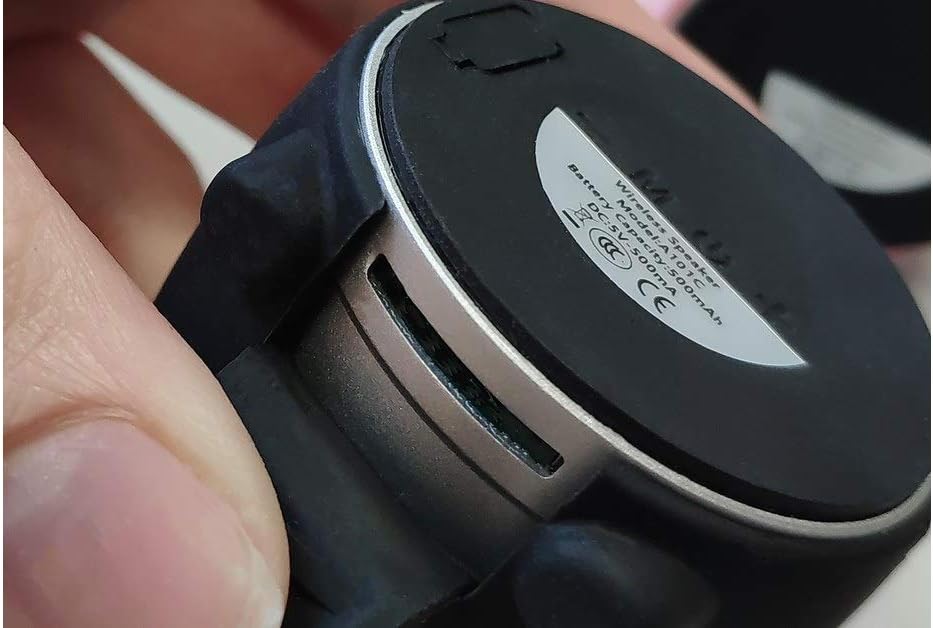
รูปที่ 3: Speaker bottom with power button and product information label.
3.3 การจับคู่บลูทูธ
- Ensure the speaker is powered on and in Bluetooth pairing mode (indicated by a flashing LED, refer to Quick Start Guide).
- บนสมาร์ทโฟน แท็บเล็ต หรือคอมพิวเตอร์ของคุณ ให้เปิดใช้งานบลูทูธ แล้วค้นหาอุปกรณ์ที่ใช้งานได้
- Select "EWA Audio A101C" from the list of devices.
- Once connected, you will hear a confirmation sound, and the LED indicator will typically stop flashing.
3.4 การจับคู่สเตอริโอ (ฟังก์ชัน TWS)
To create a stereo sound experience, you can connect two EWA A101C speakers together. One speaker will act as the left channel, and the other as the right channel.
- Power on both EWA A101C speakers.
- Double-press the power button on ทั้ง of the two speakers. You will hear a validation sound.
- A second confirmation sound will be heard from both speakers, indicating successful stereo pairing.
- Now, connect your Bluetooth device to "EWA Audio A101C". The audio will play in stereo through both speakers.

รูปที่ 4: Multiple EWA A101C speakers, illustrating the potential for stereo pairing.
3.5 การเล่นไฟล์จากการ์ด MicroSD
The speaker supports MP3 playback directly from a microSD card. Insert a microSD card (sold separately) with MP3 files into the designated slot. The speaker should automatically switch to microSD playback mode. Use the speaker's controls to navigate tracks.
3.6 ฟังก์ชั่นวิทยุ FM
To use the FM radio, power on the speaker. Press the mode button (if available, refer to Quick Start Guide) to switch to FM radio mode. The speaker will automatically scan and save available stations. Use the volume/track buttons to change stations.
คำแนะนำการใช้งาน
The EWA A101C speaker features intuitive controls, typically located on the bottom or side of the unit. Specific button functions may vary slightly; refer to the Quick Start Guide for detailed diagrams.
- ปุ่มเปิด/ปิด: Press and hold to power on/off. Short press for play/pause or to answer/end calls. Double-press for stereo pairing (TWS).
- เพิ่มระดับเสียง/เพลงถัดไป: Short press for volume up. Long press to skip to the next track/station.
- ลดระดับเสียง/เพลงก่อนหน้า: Short press for volume down. Long press to go to the previous track/station.
- ปุ่มโหมด (ถ้ามี): Short press to switch between Bluetooth, FM Radio, and MicroSD modes.
The integrated microphone allows for hands-free calling when connected via Bluetooth to a smartphone.
การซ่อมบำรุง
5.1 การทำความสะอาด
เช็ดลำโพงด้วยผ้าแห้งนุ่มๆ หรือผ้าชุบน้ำหมาดๆamp ผ้า ห้ามใช้น้ำยาทำความสะอาดที่มีฤทธิ์กัดกร่อน แอลกอฮอล์ หรือตัวทำละลายเคมี เพราะอาจทำให้พื้นผิวหรือส่วนประกอบภายในเสียหายได้
5.2 พื้นที่จัดเก็บ
เก็บลำโพงไว้ในที่แห้งและเย็น หลีกเลี่ยงแสงแดดโดยตรงและอุณหภูมิที่สูงหรือต่ำเกินไป หากเก็บไว้นาน ควรชาร์จแบตเตอรี่เป็นระยะเพื่อยืดอายุการใช้งาน
5.3 ความต้านทานน้ำ (IPX4)
The EWA A101C speaker is rated IPX4, meaning it is resistant to splashing water from any direction. It is not designed to be submerged in water. Ensure the charging port cover is securely closed to maintain water resistance.
การแก้ไขปัญหา
| ปัญหา | สาเหตุที่เป็นไปได้ | สารละลาย |
|---|---|---|
| ลำโพงไม่เปิดเครื่อง | แบตเตอรี่อ่อน | ชาร์จลำโพงโดยใช้สาย Micro-USB |
| ไม่สามารถจับคู่ผ่านบลูทูธได้ | ลำโพงไม่อยู่ในโหมดจับคู่; บลูทูธถูกปิดใช้งานบนอุปกรณ์; อุปกรณ์อยู่ไกลเกินไป | Ensure speaker is in pairing mode. Enable Bluetooth on your device. Move device closer to speaker (within 10 meters). |
| ไม่มีเสียง. | ระดับเสียงเบาเกินไป; ไม่ได้เชื่อมต่อลำโพง; โหมดไม่ถูกต้อง | Increase volume on both speaker and connected device. Re-pair Bluetooth. Check if speaker is in the correct mode (Bluetooth, MicroSD, FM). |
| การจับคู่สเตอริโอล้มเหลว | ขั้นตอนการจับคู่ไม่ถูกต้อง | Ensure both speakers are powered on. Double-press the power button on one speaker only. Wait for both confirmation sounds. |
| การ์ด microSD ไม่สามารถเล่นได้ | เสียบการ์ดไม่ถูกต้อง ไม่รองรับ file รูปแบบไฟล์เสียหาย; การ์ดเสียหาย | Reinsert the microSD card. Ensure files are in MP3 format. Try a different microSD card. |
ข้อมูลจำเพาะ
- แบบอย่าง: A101ซี
- ขนาด (ยาว x กว้าง x สูง): 7 x 7.5 x 7.5 ซม.
- น้ำหนัก: 200 กรัม
- การเชื่อมต่อ: บลูทูธ
- กำลังขับสูงสุดของลำโพง: 25 วัตต์
- คุณสมบัติพิเศษ: Shockproof, High-resolution audio, Integrated microphone, FM Radio, MicroSD MP3 Player
- ความต้านทานน้ำ: IPX4 (กันน้ำกระเด็น)
- แหล่งพลังงาน: Electric cable (Micro-USB charging)
- คำแนะนำการใช้: คอมพิวเตอร์ สมาร์ทโฟน แท็บเล็ต
- สี: Black (as per product details, other colors may exist)
ข้อมูลการรับประกัน
Specific warranty details for the EWA A101C speaker are not provided in the product information. Please refer to the documentation included in your product packaging or contact the retailer/manufacturer for warranty terms and conditions.
สนับสนุน
For technical assistance, troubleshooting beyond this manual, or customer service inquiries, please refer to the contact information provided in your product's Quick Start Guide or visit the official EWA webเว็บไซต์ (ถ้ามี)