
BTMETER BT-38B
BTMETER Digital Pen Multimeter BT-38B User Manual
Model: BT-38B (2000 Counts)
1. บทนำ
Thank you for choosing the BTMETER Digital Pen Multimeter BT-38B. This compact and versatile instrument is designed for accurate measurement of AC/DC voltage, resistance, and continuity. Its pen-type design, backlit screen, and integrated flashlight make it ideal for various electrical testing applications in residential, industrial, and DIY settings. Please read this manual thoroughly before operation to ensure safe and proper use.
2. ข้อมูลด้านความปลอดภัย
Always adhere to safety precautions when using electrical testing equipment. Failure to do so may result in electric shock, injury, or damage to the meter or equipment under test.
- ห้ามป้อนค่าเกินค่าสูงสุดที่กำหนดไว้สำหรับแต่ละช่วงการวัด
- ใช้ความระมัดระวังอย่างยิ่งเมื่อทำงานกับ voltages สูงกว่า 30V AC RMS, 42V peak หรือ 60V DC ปริมาตรเหล่านี้tagอาจทำให้เกิดอันตรายจากการช็อตได้
- ตรวจสอบสายทดสอบว่ามีรอยชำรุดเสียหายหรือไม่ก่อนใช้งานทุกครั้ง ห้ามใช้งานหากฉนวนชำรุด
- ตรวจสอบให้แน่ใจว่าสวิตช์ฟังก์ชันอยู่ในตำแหน่งที่ถูกต้องสำหรับการวัดที่ต้องการก่อนเชื่อมต่อเข้ากับวงจร
- ห้ามใช้งานมิเตอร์หากพบว่ามิเตอร์ชำรุดหรือทำงานไม่ถูกต้อง
- ระหว่างการทดสอบ ให้วางมือและนิ้วไว้ด้านหลังแผ่นกั้นของอุปกรณ์ตรวจวัด
- เปลี่ยนแบตเตอรี่ทันทีเมื่อไฟแสดงสถานะแบตเตอรี่อ่อนปรากฏขึ้นเพื่อให้แน่ใจว่าการอ่านค่าแม่นยำ
3. เนื้อหาบรรจุภัณฑ์

รูปที่ 3.1: สิ่งของในบรรจุภัณฑ์
The BTMETER BT-38B package typically includes:
- 1 x BTMETER Digital Pen Multimeter (BT-38B)
- 1 x คู่มือผู้ใช้
- 2 x AAA Batteries (may be included separately or pre-installed)
4. สินค้าหมดview และฟังก์ชั่นหลัก

รูปที่ 4.1: ฟังก์ชันหลักเหนือview
The BT-38B is designed for ease of use with clearly labeled components:
- Lamp แสงสว่าง: Provides illumination for working in dim environments.
- Test Lead Fixture: Securely holds the test leads.
- จอแสดงผล LCD: แสดงค่าการวัด หน่วย และตัวบ่งชี้
- สวิตช์สลับ: Used to select between OFF, Voltage (V), and Ohms (Ω) / Continuity / Diode Test modes.
- ปุ่ม HOLD: Press to hold the current reading on the display. Press again to exit.
- ปุ่มไฟแบ็คไลท์/ไฟฉาย: Press for more than 2 seconds to turn on the backlight. Press again for more than 2 seconds to turn it off. The backlight automatically turns off after 15 seconds. A short press activates the front LED flashlight.
- ปุ่มเลือก: In the Ohms/Continuity/Diode Test range, press this key to cycle through Resistance, Diode, and Continuity test modes. In Voltage mode, it switches between DC and AC voltagการวัดอี
- ฝาครอบแบตเตอรี่: Access point for battery installation and replacement.
- COM Input Test Lead: Common (negative) input for measurements.
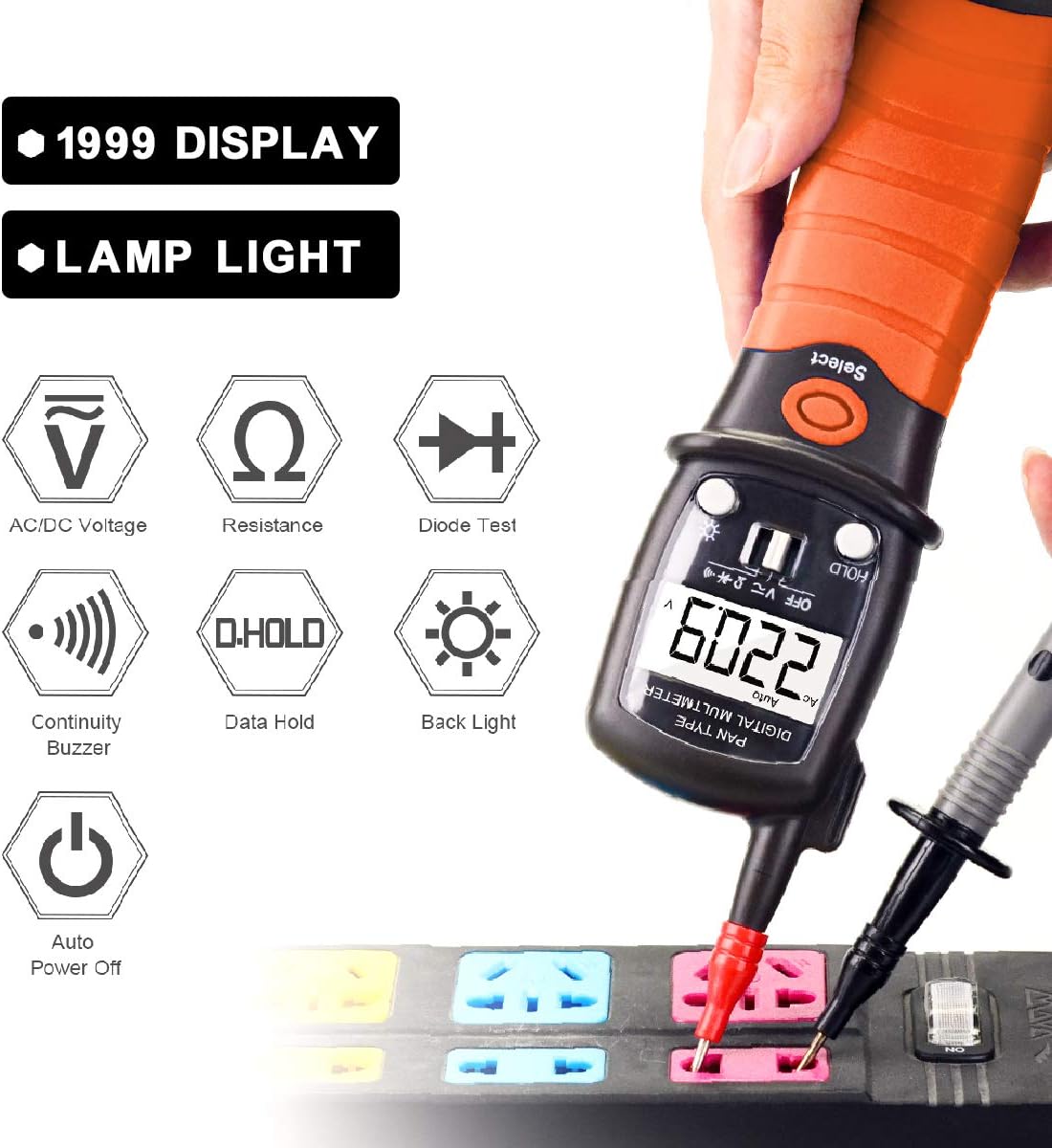
Figure 4.2: Functional Icons
5. การตั้งค่า
5.1 การติดตั้งแบตเตอรี่
The BTMETER BT-38B requires two AAA batteries for operation.

รูปที่ 5.1: การเปลี่ยนแบตเตอรี่
- Locate the battery cover at the bottom of the multimeter.
- Rotate the battery bin counter-clockwise until it pops up.
- Carefully pull out the battery bin.
- ใส่แบตเตอรี่ AAA สองก้อน โดยตรวจสอบให้แน่ใจว่าขั้วถูกต้อง (+/-)
- Slide the battery bin back into the multimeter and rotate clockwise to secure it.
เมื่อไอคอนแบตเตอรี่ 🔋 lights up on the screen, it indicates that the battery needs to be replaced.
6. คู่มือการใช้งาน
6.1. การดำเนินการทั่วไป
- Turn the toggle switch from OFF to the desired measurement function (Voltage or Ohms/Continuity/Diode).
- เชื่อมต่อสายวัดทดสอบเข้ากับวงจรหรือชิ้นส่วนที่ต้องการทดสอบ
- อ่านค่าการวัดจากหน้าจอ LCD
- The meter features an Auto Power Off function after 15 minutes of inactivity to conserve battery life. A "BEEP" warning will sound before auto power off.
6.2 โวลต์ AC/DCtagอีการวัด
The BT-38B can measure AC voltage from 2V to 600V and DC voltage ตั้งแต่ 200mV ถึง 600V
- Turn the toggle switch to the "V" position.
- กดปุ่ม เลือก button to switch between AC and DC voltage modes as needed. The display will indicate "AC" or "DC".
- Connect the red test lead to the positive (+) side of the circuit and the black test lead (COM) to the negative (-) side or ground.
- อ่านเล่มที่tagค่า e บนจอ LCD
6.3 การวัดความต้านทาน
Measure resistance from 200 Ohm to 20M Ohm.
- Turn the toggle switch to the "Ω" position.
- ตรวจสอบให้แน่ใจว่าวงจรถูกตัดพลังงานก่อนที่จะวัดความต้านทาน
- Connect the test leads across the component whose resistance you wish to measure.
- อ่านค่าความต้านทานบนจอ LCD
6.4 การทดสอบความต่อเนื่อง
The built-in buzzer sounds if resistance is less than 50Ω.
- Turn the toggle switch to the "Ω" position.
- กดปุ่ม เลือก button until the continuity symbol (a sound wave icon) appears on the display.
- เชื่อมต่อสายทดสอบข้ามวงจรหรือส่วนประกอบ
- หากมีการเชื่อมต่อต่อเนื่อง (ความต้านทานต่ำ) เสียงกริ่งจะดังขึ้น
6.5 ฟังก์ชั่นการเก็บข้อมูล
เพื่อหยุดการแสดงค่าปัจจุบันบนหน้าจอ:
- กดปุ่ม ถือ button during a measurement. The "HOLD" indicator will appear.
- กดปุ่ม ถือ button again to release the data hold and resume live readings.
6.6 ไฟแบ็คไลท์และไฟฉาย

Figure 6.1: LED Flashlight in Use
- แสงไฟด้านหลัง: Press and hold the backlight button (sun icon) for more than 2 seconds to turn on the LCD backlight. Press and hold again for more than 2 seconds to turn it off. The backlight will automatically turn off after 15 seconds.
- ไฟฉาย: A short press of the backlight button (sun icon) will activate the front LED flashlight, useful for illuminating dark work areas.
7. การบำรุงรักษา
7.1 การทำความสะอาด
Wipe the meter with a dry, clean cloth. Do not use abrasives or solvents.
7.2 การเปลี่ยนแบตเตอรี่
Refer to Section 5.1 for detailed instructions on battery replacement. Always use fresh AAA batteries.
7.3 พื้นที่จัดเก็บ
If the meter is not used for an extended period, remove the batteries to prevent leakage and damage. Store in a cool, dry place away from direct sunlight.
8 การแก้ไขปัญหา
| ปัญหา | สาเหตุที่เป็นไปได้ | สารละลาย |
|---|---|---|
| มิเตอร์ไม่ทำงาน | แบตเตอรี่เสียหรือติดตั้งไม่ถูกต้อง | ตรวจสอบขั้วแบตเตอรี่หรือเปลี่ยนแบตเตอรี่ |
| การอ่านที่ไม่ถูกต้อง | Low battery; incorrect function selected; damaged test leads. | Replace batteries; ensure correct function mode; inspect and replace test leads if damaged. |
| ไม่มีเสียงบี๊บแสดงความต่อเนื่อง | Not in continuity mode; open circuit; resistance too high. | Press SELECT to enter continuity mode; check circuit for breaks; ensure resistance is below 50Ω. |
| หน้าจอแสดง "OL" (Overload) | ค่าที่วัดได้เกินช่วงที่เลือกไว้ | ตรวจสอบให้แน่ใจว่าค่าที่วัดได้อยู่ในช่วงที่กำหนดไว้ของมิเตอร์ |
9. ข้อมูลจำเพาะ
| พารามิเตอร์ | ค่า |
|---|---|
| ยี่ห้อ | บีทีมิเตอร์ |
| แบบอย่าง | BT-38B (2000 Counts) |
| ประเภทการวัด | มัลติมิเตอร์, โวลต์มิเตอร์ |
| ฉบับ ACtagอี เรนจ์ | 2V ~ 600V |
| DC ฉบับที่tagอี เรนจ์ | 200mV~600V |
| ช่วงความต้านทาน | 200 Ohm ~ 20M Ohm |
| การทดสอบความต่อเนื่อง | Buzzer sounds if resistance < 50Ω |
| แสดง | Backlit LCD, 12mm tall digits |
| แหล่งพลังงาน | แบตเตอรี่ AAA 2 ก้อน |
| ปิดเครื่องอัตโนมัติ | หลังจากไม่มีการดำเนินการเป็นเวลา 15 นาที |
| น้ำหนักสินค้า | 200 กรัม (ประมาณ 7.1 ออนซ์) |
| วัสดุ | เอบีเอส |
| ตรงตามข้อกำหนด | CE |
10. การรับประกันและการสนับสนุน
BTMETER products are designed for reliability and performance. For warranty information, technical support, or any inquiries regarding your BT-38B Digital Pen Multimeter, please refer to the contact details provided with your purchase or visit the official BTMETER webเว็บไซต์.
BTMETER offers fast and effective 24x7 professional tech support.
Ask a question about this manual
Ask about setup, troubleshooting, compatibility, parts, safety, or missing instructions. Manuals+ will review the question and use this page’s manual context to help answer it.