
เบลดเรย์ BEL0904
คู่มือการใช้งานเครื่องดูดฝุ่นไร้สาย Beldray BEL0904 Airpower
รุ่น: BEL0904
การแนะนำ
This manual provides essential information for the safe and efficient operation, maintenance, and troubleshooting of your Beldray BEL0904 Airpower Cordless Vacuum Cleaner. Please read this manual thoroughly before first use and retain it for future reference.
The Beldray Airpower cordless vacuum cleaner is designed for swift and powerful cleaning, effectively removing dirt and grime from various surfaces. Its lightweight and compact design, combined with a brushless motor, offers strong suction and ease of use.
คำแนะนำด้านความปลอดภัยที่สำคัญ
ปฏิบัติตามข้อควรระวังด้านความปลอดภัยขั้นพื้นฐานเสมอเมื่อใช้เครื่องใช้ไฟฟ้า เพื่อลดความเสี่ยงต่อการเกิดไฟไหม้ ไฟฟ้าช็อต หรือการบาดเจ็บ
- ให้แน่ใจว่าปริมาตรtagค่า e ที่ระบุบนฉลากตรงกับระดับเสียงของแหล่งจ่ายไฟหลักของคุณtage ก่อนเชื่อมต่อเครื่อง
- Do not immerse the electrical components of the vacuum cleaner in water or any other liquid.
- เครื่องใช้ไฟฟ้านี้มีไว้สำหรับใช้ในครัวเรือนเท่านั้น ห้ามใช้เพื่อวัตถุประสงค์ทางการค้า
- เก็บเครื่องใช้ไฟฟ้าให้พ้นมือเด็ก ควรมีการดูแลอย่างใกล้ชิดเมื่อใช้งานใกล้เด็ก
- ห้ามเก็บวัสดุไวไฟหรือติดไฟได้ เถ้าร้อน หรือวัตถุมีคมขนาดใหญ่
- Regularly check the power cord and plug for damage. If damaged, do not use the appliance.
- Unplug the vacuum cleaner from the power supply before cleaning or performing any maintenance.
- ใช้เฉพาะอุปกรณ์เสริมที่ผู้ผลิตแนะนำเท่านั้น
ส่วนประกอบของผลิตภัณฑ์
Familiarize yourself with the parts of your Beldray Airpower Cordless Vacuum Cleaner:
- ตัวเครื่องหลัก (เครื่องดูดฝุ่นแบบมือถือ)
- ท่อต่อ
- แปรงขัดพื้นแบบมอเตอร์พร้อมไฟ LED
- หัวแปรงและหัวดูดฝุ่น 2in1
- Flexi Brush Tool
- ติดผนัง
- อะแดปเตอร์ชาร์จไฟ

Image: The Beldray BEL0904 Airpower Cordless Vacuum Cleaner shown in its full stick configuration and also in an upright, stored position, highlighting its compact design.

Image: A hand detaching the main handheld vacuum unit from its wall-mounted charging and storage bracket.
การตั้งค่า
การประกอบ
- แกะส่วนประกอบทั้งหมดออกจากกล่อง
- Attach the extension tube to the main handheld unit by aligning the connectors and pushing until it clicks into place.
- Connect the motorized floor brush to the other end of the extension tube, ensuring it clicks securely.
- For handheld use, attach the desired accessory (2-in-1 tool or flexi brush) directly to the main unit.
การชาร์จแบตเตอรี่
Before first use, fully charge the vacuum cleaner for approximately 4-5 hours. The battery indicator lights on the main unit will show the charging status.
- Connect the charging adapter to the charging port on the main unit.
- เสียบอะแดปเตอร์เข้ากับเต้ารับไฟฟ้าที่เหมาะสม
- The LED indicators will illuminate during charging and turn off or change color when fully charged (refer to specific indicator behavior in the operating section).

Image: The Beldray Airpower vacuum cleaner stored upright against a wall, demonstrating its compact storage capability.

ภาพ: รายละเอียด view of the Beldray Airpower vacuum cleaner securely attached to its wall mount for convenient storage and charging.
คำแนะนำการใช้งาน
โหมดเปิด/ปิดเครื่องและโหมดดูด
Press the power button on the main unit to turn the vacuum cleaner on. Press it again to turn off. Some models may have multiple suction modes (e.g., standard and max); press the mode selection button to switch between them.

ภาพ: จากบนลงล่าง view of the vacuum's handle, displaying the power button, mode selection button, and blue LED battery indicator lights.
การใช้เครื่องดูดฝุ่น
- การทำความสะอาดพื้น: Use the motorized floor brush for carpets and hard floors. The integrated LED lights illuminate the cleaning path, making dirt more visible.
- การทำความสะอาดด้วยอุปกรณ์พกพา: Detach the main unit from the extension tube to use it as a handheld vacuum. Attach the 2-in-1 crevice and brush tool or the flexi brush tool for cleaning furniture, car interiors, stairs, or hard-to-reach areas.
- อายุการใช้งานแบตเตอรี่: The vacuum provides up to 30 minutes of operating time on a full charge, depending on the suction mode used.

Image: A close-up of the vacuum's floor head, showing its LED lights illuminating a hard floor surface during operation.

Image: The vacuum's floor head with LED lights active, positioned on a carpeted stair, demonstrating its use on different floor types.

Image: A user operating the Beldray Airpower vacuum in handheld mode, cleaning dust from a bookshelf.

Image: The handheld vacuum being used to clean crumbs and debris from a sofa cushion.

Image: The handheld vacuum with an attachment being used to clean carpeted stairs.
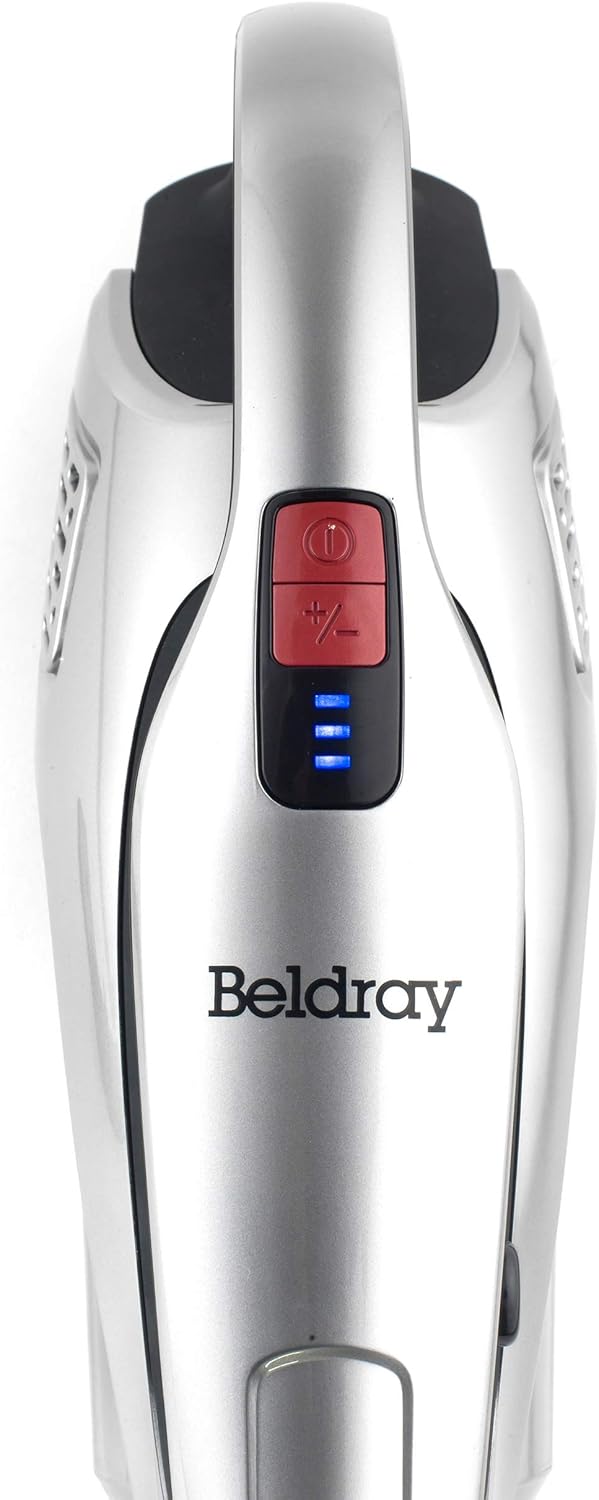
Image: The handheld vacuum unit, accompanied by a graphic indicating its capability of up to 30 minutes of continuous operation.
การซ่อมบำรุง
การเทฝุ่นออกจากถังเก็บฝุ่น
Empty the dust container regularly to maintain optimal suction performance. It has a 0.5-liter capacity.
- ตรวจสอบให้แน่ใจว่าเครื่องดูดฝุ่นปิดอยู่และถอดปลั๊กออกจากเครื่องชาร์จ
- Locate the dust container release button on the main unit.
- Press the button and detach the dust container.
- Hold the dust container over a waste bin and open the bottom flap to empty the contents.
- ปิดฝาและประกอบถังเก็บฝุ่นเข้ากับตัวเครื่องหลัก ตรวจสอบให้แน่ใจว่าล็อคแน่นสนิท

Image: A hand demonstrating the process of emptying collected debris from the vacuum's dust container into a waste bin.
การทำความสะอาดตัวกรอง
The filters should be cleaned regularly, ideally after every few uses, or when suction power decreases.
- ถอดถังเก็บฝุ่นออกตามที่อธิบายไว้ข้างต้น
- Carefully remove the filters from inside the dust container.
- Tap the filters gently over a bin to remove loose dust. For a deeper clean, rinse the filters under cold running water.
- Allow the filters to air dry completely for at least 24 hours before reinserting them. Do not use the vacuum with wet filters.
การทำความสะอาดแปรงลูกกลิ้ง
Periodically check the brush roll in the motorized floor brush for tangled hair or debris. Use scissors to cut away any tangled hair and remove it.
การแก้ไขปัญหา
| ปัญหา | สาเหตุที่เป็นไปได้ | สารละลาย |
|---|---|---|
| เครื่องดูดฝุ่นไม่เปิด | แบตเตอรี่ไม่ได้รับการชาร์จ | ชาร์จแบตเตอรี่ให้เต็ม |
| พลังดูดต่ำ. | Dust container is full; Filters are clogged; Blockage in nozzle/tube/brush roll. | Empty dust container; Clean or replace filters; Remove any blockages. |
| แปรงลูกกลิ้งไม่หมุน | Tangled hair or debris; Motor protection activated. | Clean brush roll; Check for blockages in the brush head. |
| ระยะเวลาการทำงานสั้น | Battery not fully charged; Battery degradation. | Ensure full charge; Contact customer support if battery life significantly reduced. |
ข้อมูลจำเพาะ
- ชื่อรุ่น : Beldray® BEL0904 AIRPOWER Cordless Vacuum Cleaner
- พลัง: 180 วัตต์
- เล่มที่tage: 22.2 โวลต์
- พลังดูด: 14 กิโลปาสคาล
- ความจุถังเก็บฝุ่น: 0.5 ลิตร
- ระดับเสียง: 64 เดซิเบล
- ขนาดสินค้า : 45.28 x 10.24 x 7.87 นิ้ว
- น้ำหนักสินค้า: 4.8 ปอนด์
- คุณสมบัติพิเศษ: Compact, Lightweight, LED Lights, Brushless Motor
- สี: สีแดง
การรับประกันและการสนับสนุน
For warranty information, product registration, or technical support, please refer to the official Beldray webหรือติดต่อฝ่ายบริการลูกค้า โปรดเก็บหลักฐานการซื้อไว้เพื่อใช้ในกรณีที่ต้องการเคลมประกัน
Webเว็บไซต์: www.beldray.com (โปรดทราบ: นี่เป็นเพียงตัวอย่างทั่วไป) URL. Refer to your product packaging or official documentation for the exact support webเว็บไซต์.)