
การแนะนำ
This manual provides detailed instructions for the safe and efficient use of your FONESTAR DOTS-N Bluetooth TWS Speaker. Please read this manual thoroughly before operating the device and retain it for future reference.
The FONESTAR DOTS-N is a portable Bluetooth TWS speaker featuring Bluetooth 4.2 and NFC connectivity. It offers powerful sound with enhanced bass, playback controls, and hands-free calling. Equipped with a rechargeable Li-Ion battery providing up to 10 hours of autonomy, it also includes a 3.5mm auxiliary input. Its compact design makes it suitable for home use.
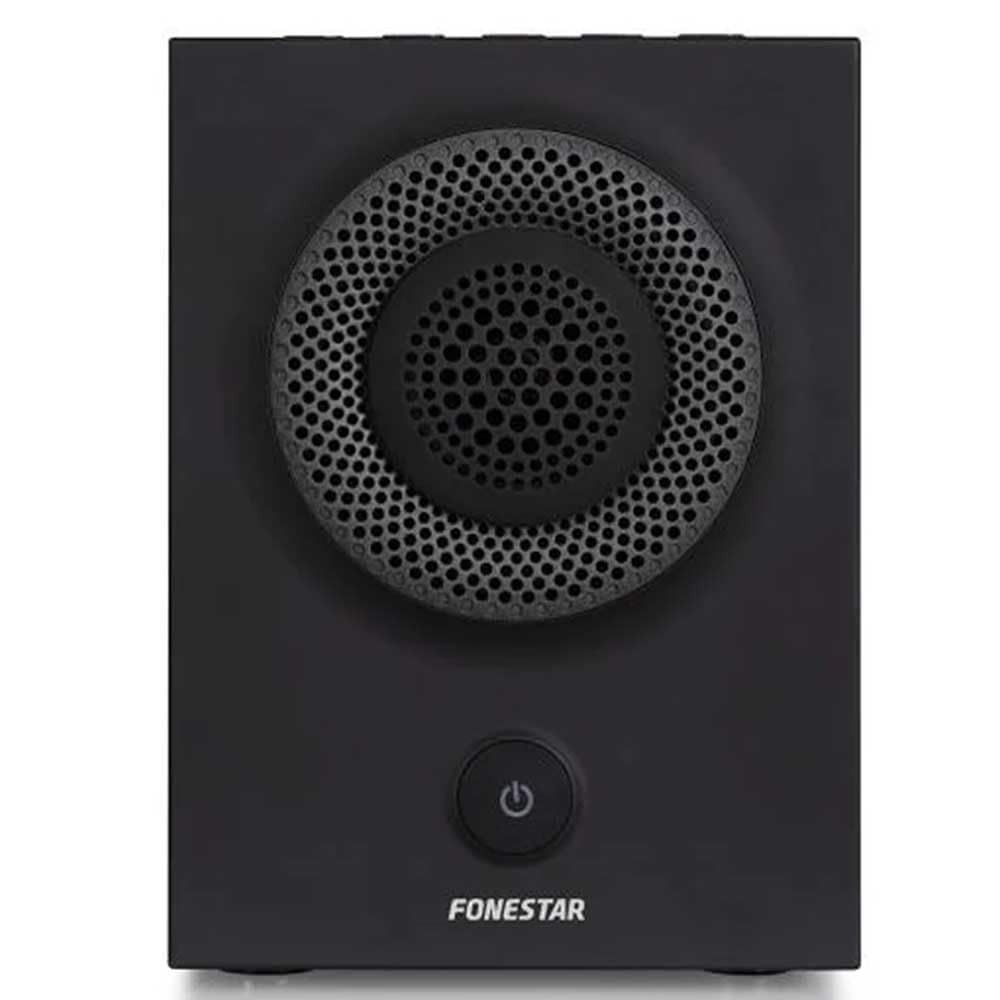
รูปที่ 1 : ด้านหน้า view of the FONESTAR DOTS-N Bluetooth TWS Speaker.
การตั้งค่า
1. การแกะกล่อง
นำส่วนประกอบทั้งหมดออกจากบรรจุภัณฑ์อย่างระมัดระวัง ตรวจสอบให้แน่ใจว่ามีอุปกรณ์ครบตามรายการด้านล่าง:
- FONESTAR DOTS-N Bluetooth TWS Speaker
- สายชาร์จ USB เป็น Micro USB
- สายสัญญาณเสียงสเตอริโอ 3.5 มม.
- คู่มือการใช้งาน (เอกสารนี้)
2. ชาร์จลำโพง
Before first use, fully charge the speaker. Connect the Micro USB end of the charging cable to the speaker's charging port and the USB-A end to a compatible USB power adapter (not included) or a computer's USB port.
- ไฟแสดงสถานะการชาร์จจะสว่างขึ้นขณะทำการชาร์จ
- เวลาในการชาร์จประมาณ 3 ชั่วโมงเมื่อชาร์จเต็ม
- ไฟแสดงสถานะจะเปลี่ยนสีหรือดับลงเมื่อการชาร์จเสร็จสมบูรณ์
3. การเปิด/ปิดเครื่อง
To power on the speaker, press and hold the power button (usually indicated by a ⏻ symbol) for a few seconds until you hear an audible prompt or see an indicator light. To power off, repeat the process.
คำแนะนำการใช้งาน
1. การจับคู่บลูทู ธ
ลำโพงรองรับ Bluetooth 4.2 สำหรับการสตรีมเสียงแบบไร้สาย
- Ensure the speaker is powered on and in pairing mode (usually indicated by a flashing LED). If not, press the Bluetooth pairing button or power button briefly to enter pairing mode.
- บนสมาร์ทโฟน แท็บเล็ต หรืออุปกรณ์อื่นๆ ที่เปิดใช้งาน Bluetooth ให้ไปที่การตั้งค่า Bluetooth
- ค้นหา available devices and select "FONESTAR DOTS-N" from the list.
- Once paired, the speaker will emit an audible confirmation, and the LED indicator will typically become solid.
2. การจับคู่ NFC (การสื่อสารระยะใกล้)
For devices with NFC, pairing can be done quickly:
- โปรดตรวจสอบให้แน่ใจว่าได้เปิดใช้งาน NFC บนอุปกรณ์ของคุณแล้ว และลำโพงเปิดอยู่
- Tap your NFC-enabled device gently against the NFC area on the speaker (refer to product diagram for exact location, if available).
- ยืนยันคำขอจับคู่บนอุปกรณ์ของคุณ
3. ฟังก์ชัน True Wireless Stereo (TWS)
The TWS function allows you to pair two FONESTAR DOTS-N speakers together for a stereo sound experience.
- Ensure both DOTS-N speakers are powered on and not connected to any other Bluetooth device.
- On one speaker (this will be the primary speaker), press and hold the TWS button (if available) or a designated button for TWS pairing.
- ลำโพงหลักจะค้นหาลำโพงรอง เมื่อเชื่อมต่อแล้ว ลำโพงทั้งสองจะส่งเสียงยืนยัน
- จากนั้นเชื่อมต่ออุปกรณ์บลูทูธของคุณกับลำโพงหลักตามที่อธิบายไว้ในส่วน "การจับคู่บลูทูธ" เสียงจะเล่นในระบบสเตอริโอผ่านลำโพงทั้งสองตัว
4. ช่องเสียบอินพุตเสริม (AUX)
For non-Bluetooth devices, use the included 3.5mm stereo audio cable.
- เชื่อมต่อปลายด้านหนึ่งของสายสัญญาณเสียงขนาด 3.5 มม. เข้ากับพอร์ต AUX-in บนลำโพง
- ต่อปลายอีกด้านหนึ่งเข้ากับช่องเสียบหูฟังหรือช่องสัญญาณเสียงออกของอุปกรณ์ของคุณ
- ลำโพงจะเปลี่ยนไปใช้โหมด AUX โดยอัตโนมัติ หรืออาจต้องเลือกโหมดด้วยตนเองผ่านปุ่มโหมด
5. Playback Control and Hands-Free Calls
The speaker features integrated controls for music playback and managing calls:
- เล่น/หยุดชั่วคราว: Press the Play/Pause button (often combined with the power button or a dedicated button).
- เพิ่ม/ลดระดับเสียง: ใช้ปุ่มปรับระดับเสียง (+ / -) on the speaker.
- เพลงถัดไป / ก่อนหน้า: Long press or double-press the volume buttons, or use dedicated track skip buttons if present.
- รับ/วางสาย: Press the Play/Pause button during an incoming call to answer, and again to end the call.
- ปฏิเสธสาย: กดปุ่มเล่น/หยุดชั่วคราวค้างไว้ขณะมีสายเรียกเข้า
การซ่อมบำรุง
1. การทำความสะอาด
- ปิดลำโพงทุกครั้งก่อนทำความสะอาด
- ใช้ผ้าแห้งนุ่มและไม่เป็นขุยเช็ดพื้นผิวภายนอก
- ห้ามใช้สารทำความสะอาดที่มีฤทธิ์กัดกร่อน ขี้ผึ้ง หรือตัวทำละลาย เพราะอาจทำให้พื้นผิวเสียหายได้
- หลีกเลี่ยงไม่ให้ความชื้นเข้าไปในช่องเปิดต่างๆ
2. การจัดเก็บ
- เก็บลำโพงไว้ในที่แห้งและเย็น หลีกเลี่ยงแสงแดดโดยตรงและอุณหภูมิที่สูงหรือต่ำเกินไป
- หากเก็บรักษาเป็นเวลานาน ควรชาร์จแบตเตอรี่ให้ได้ประมาณ 50% ทุกๆ สองสามเดือน เพื่อรักษาสภาพแบตเตอรี่ให้ดีอยู่เสมอ
3. การดูแลแบตเตอรี่
- Do not expose the battery to excessive heat, fire, or direct sunlight.
- หลีกเลี่ยงการปล่อยแบตเตอรี่จนหมดบ่อยครั้ง เพราะอาจทำให้มีอายุการใช้งานลดลง
- โปรดใช้สายชาร์จที่ให้มาหรือสายชาร์จที่ได้รับการรับรองเท่านั้น
การแก้ไขปัญหา
| ปัญหา | สาเหตุที่เป็นไปได้ | สารละลาย |
|---|---|---|
| ลำโพงไม่เปิดเครื่อง | แบตเตอรี่หมด | ชาร์จลำโพงโดยใช้สาย USB ที่ให้มา |
| ไม่สามารถจับคู่ผ่านบลูทูธได้ | ลำโพงไม่ได้อยู่ในโหมดจับคู่ อุปกรณ์อยู่ไกลเกินไป มีสัญญาณรบกวน | Ensure speaker is in pairing mode. Move device closer (within 10m). Turn off other Bluetooth devices. |
| ไม่มีเสียงหรือเสียงเบา | Volume too low on speaker or source device; incorrect input mode. | Increase volume on both speaker and source device. Check if the correct input (Bluetooth/AUX) is selected. |
| การจับคู่ TWS ล้มเหลว | Speakers are already paired to another device; incorrect TWS pairing procedure. | ตรวจสอบให้แน่ใจว่าลำโพงทั้งสองตัวไม่ได้เชื่อมต่อกับอุปกรณ์อื่น ทำตามขั้นตอนการจับคู่ TWS อย่างระมัดระวัง |
| ความผิดเพี้ยนของเสียง | ระดับเสียงสูงเกินไป; แบตเตอรี่เหลือน้อย; สัญญาณอ่อน | Reduce volume. Charge the speaker. Move source device closer to the speaker. |
ข้อมูลจำเพาะทางเทคนิค

Figure 2: Dimensions of the FONESTAR DOTS-N Bluetooth TWS Speaker.
| ชื่อรุ่น | DOTS-N |
| ยี่ห้อ | โฟนสตาร์ |
| เทคโนโลยีการเชื่อมต่อ | Bluetooth 4.2, NFC, 3.5mm AUX |
| ช่วงสาย | สูงถึง 10 เมตร (33 ฟุต) |
| โหมดเอาต์พุตเสียง | สเตอริโอ (พร้อม TWS) |
| ประเภทลำโพง | 3" Coaxial Woofer with Tweeter, 3" Subwoofer, 4" Passive Radiator |
| กำลังขับสูงสุดของลำโพง | 12 วัตต์ RMS |
| การตอบสนองความถี่ | 80 - 20,000 เฮิรตซ์ |
| อัตราส่วนสัญญาณต่อเสียงรบกวน | ≥ 75 เดซิเบล |
| แหล่งพลังงาน | ใช้พลังงานจากแบตเตอรี่ (แบตเตอรี่ลิเธียมไอออนแบบชาร์จได้) |
| ความจุของแบตเตอรี่ | 2200 มิลลิแอมป์ 7.4 โวลต์ |
| เอกราชของแบตเตอรี่ | สูงสุด 10 ชั่วโมง (ที่ระดับเสียง 50%) |
| เวลาในการชาร์จ | ประมาณ 3 ชั่วโมง |
| วิธีการควบคุม | สัมผัส (การสัมผัส) |
| คุณสมบัติพิเศษ | High-res audio, Bluetooth, Integrated microphone, USB port (for charging) |
| อุปกรณ์ที่รองรับ | สมาร์ทโฟนแท็บเล็ต |
| ข้อแนะนำการใช้ | For home |
| สี | สีดำ |
| ขนาด (กว้าง x สูง x ลึก) | 125 x 175 x 158 มม. (ประมาณ 4.9 x 6.9 x 6.2 นิ้ว) |
| น้ำหนักสินค้า | 1.82 กก. (ประมาณ 4.01 ปอนด์) |
| กันน้ำ | เลขที่ |
Note: Specifications are subject to change without prior notice. Battery autonomy may vary depending on usage, volume level, and music type.
ข้อมูลการรับประกัน
FONESTAR products are designed and manufactured to the highest quality standards. This product is covered by a limited warranty against manufacturing defects from the date of purchase. The specific terms and duration of the warranty may vary by region and retailer.
Please retain your proof of purchase (receipt or invoice) as it will be required for any warranty claims. The warranty does not cover damage caused by misuse, accident, unauthorized modification, or normal wear and tear.
For detailed warranty terms and conditions, please refer to the warranty card included with your product or contact your local FONESTAR distributor or retailer.
การสนับสนุนลูกค้า
If you encounter any issues that are not resolved by the troubleshooting guide, or if you require further assistance, please contact FONESTAR customer support or your authorized retailer.
เมื่อติดต่อฝ่ายสนับสนุน โปรดเตรียมข้อมูลต่อไปนี้ให้พร้อม:
- Product Model: FONESTAR DOTS-N
- วันที่ซื้อ
- คำอธิบายของปัญหา
- ข้อมูลการติดต่อของคุณ
For the most up-to-date support information, including contact details and FAQs, please visit the official FONESTAR webเว็บไซต์.