
การแนะนำ
Thank you for choosing the Zelotes F-35 2.4GHz Vertical Wireless Rechargeable Gaming Mouse. This ergonomic mouse is designed to provide a comfortable and efficient user experience, reducing wrist strain during extended use. Featuring multiple connectivity options and customizable buttons, it is ideal for both productivity and gaming on various devices.
คุณสมบัติผลิตภัณฑ์
- การออกแบบแนวตั้งตามหลักสรีรศาสตร์: Positions the hand in a natural handshake posture to minimize wrist and forearm strain.
- การเชื่อมต่อหลายโหมด: Supports 2.4GHz wireless via USB dongle, Bluetooth 1, and Bluetooth 2 for versatile device pairing.
- แบตเตอรี่แบบชาร์จไฟได้: แบตเตอรี่แบบชาร์จไฟได้ในตัวเพื่อความสะดวกสบาย
- DPI ที่ปรับได้: Up to 2400 DPI for precise cursor control, suitable for various tasks and gaming.
- ปุ่มตั้งโปรแกรมได้ 6 ปุ่ม: Includes left/right click, scroll wheel, DPI button, and forward/backward buttons for enhanced functionality.
- ออปติคัลเซนเซอร์: Reliable and accurate tracking on most surfaces.
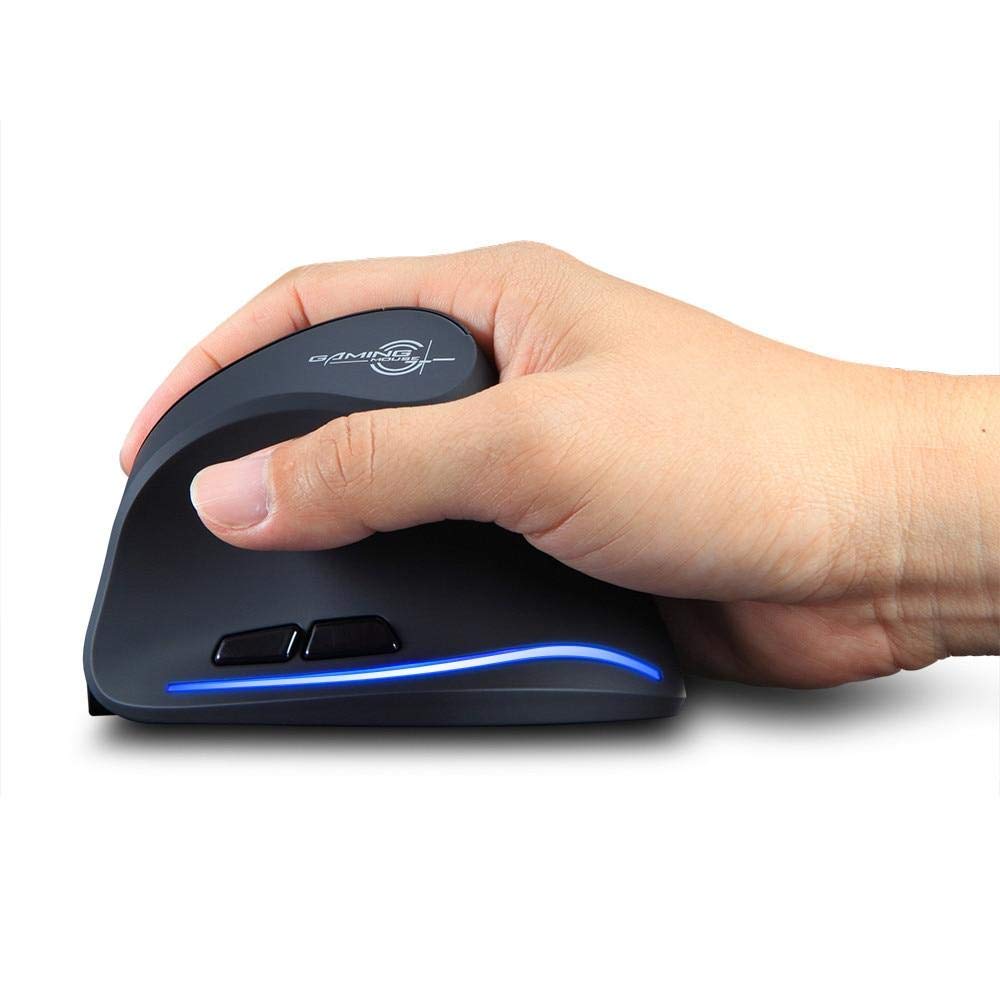
Image: The Zelotes F-35 Vertical Wireless Gaming Mouse, showcasing its unique ergonomic shape and illuminated accents.

Image: A visual comparison illustrating the natural hand position with a vertical mouse versus the twisted wrist position with a traditional horizontal mouse, highlighting the ergonomic benefits.
คำแนะนำการตั้งค่า
- เปิดเครื่อง: หาปุ่มเปิด/ปิดที่ด้านล่างของเมาส์ แล้วเลื่อนไปที่ตำแหน่ง 'เปิด'
- เลือกโหมดการเชื่อมต่อ: The mouse supports three connection modes: 2.4GHz wireless (via USB dongle), Bluetooth 1, and Bluetooth 2. Use the 'Mode Switch' button on the bottom of the mouse to cycle through these options. The corresponding indicator light will illuminate.
- การเชื่อมต่อไร้สาย 2.4GHz:
- Remove the USB receiver dongle from its storage slot on the bottom of the mouse.
- เสียบตัวรับสัญญาณ USB เข้ากับพอร์ต USB ที่มีอยู่ในคอมพิวเตอร์หรือแล็ปท็อปของคุณ
- เมาส์ควรเชื่อมต่อโดยอัตโนมัติ
- การเชื่อมต่อบลูทูธ (BT1/BT2):
- Switch the mouse to either Bluetooth 1 or Bluetooth 2 mode using the 'Mode Switch'.
- บนคอมพิวเตอร์หรือแล็ปท็อปของคุณ ให้ไปที่การตั้งค่าบลูทูธ แล้วค้นหาอุปกรณ์ใหม่
- Select 'Zelotes F-35' from the list of available devices to pair.

Image: The underside of the Zelotes F-35 mouse, highlighting the ON/OFF switch, mode switch, and the integrated storage slot for the 2.4GHz USB receiver dongle.
คำแนะนำการใช้งาน
The Zelotes F-35 mouse features 6 buttons designed for intuitive control and enhanced productivity:
- ปุ่มคลิกซ้าย: ฟังก์ชั่นคลิกหลักมาตรฐาน
- ปุ่มคลิกขวา: ฟังก์ชั่นคลิกรองมาตรฐาน
- ล้อเลื่อน: Scroll up or down for navigation. Can also be pressed for a middle-click function.
- ปุ่มปรับ DPI: Located near the scroll wheel, press to cycle through different DPI settings (e.g., 800/1200/1600/2400) to adjust cursor sensitivity.
- ปุ่มไปข้างหน้า: Located on the thumb rest, typically navigates forward in web เบราว์เซอร์หรือ file นักสำรวจ
- ปุ่มย้อนกลับ: Located on the thumb rest, typically navigates backward in web เบราว์เซอร์หรือ file นักสำรวจ
การชาร์จและแบตเตอรี่
The Zelotes F-35 mouse is equipped with a rechargeable battery for continuous use.
- พอร์ตชาร์จ: The mouse features a USB-C charging port, typically located at the front base of the mouse.
- การชาร์จ: Connect the provided USB-C cable to the mouse and the other end to a USB power source (e.g., computer USB port, wall adapter).
- ไฟแสดงสถานะแบตเตอรี่: The mouse may have an indicator light to show charging status or low battery. Refer to the product packaging for specific indicator behavior.
- อายุการใช้งานแบตเตอรี่: The average battery life is approximately 12 months, depending on usage.
การซ่อมบำรุง
- การทำความสะอาด: ใช้ผ้านุ่มและแห้งเช็ดทำความสะอาดพื้นผิวของเมาส์ สำหรับคราบสกปรกฝังแน่น ให้เช็ดเบาๆamp สามารถใช้ผ้าได้เพื่อให้แน่ใจว่าไม่มีความชื้นเข้าไปในส่วนประกอบภายใน
- การดูแลเซ็นเซอร์: รักษาเซ็นเซอร์ออปติคัลที่ด้านล่างของเมาส์ให้สะอาดและปราศจากฝุ่นหรือเศษต่างๆ เพื่อให้การติดตามแม่นยำ
- พื้นที่จัดเก็บ: When not in use for extended periods, turn off the mouse to conserve battery life. Store the USB receiver in its designated slot to prevent loss.
การแก้ไขปัญหา
- เมาส์ไม่ตอบสนอง:
- ตรวจสอบให้แน่ใจว่าเมาส์เปิดอยู่
- ตรวจสอบระดับแบตเตอรี่และชาร์จหากจำเป็น
- สำหรับการเชื่อมต่อ 2.4GHz โปรดตรวจสอบให้แน่ใจว่าตัวรับสัญญาณ USB เสียบเข้ากับคอมพิวเตอร์อย่างแน่นหนาแล้ว
- For Bluetooth connection, ensure Bluetooth is enabled on your device and the mouse is correctly paired. Try re-pairing if issues persist.
- การติดตามไม่แม่นยำ:
- ทำความสะอาดเซ็นเซอร์ออปติคอลที่ด้านล่างของเมาส์
- ตรวจสอบให้แน่ใจว่าคุณกำลังใช้เมาส์บนพื้นผิวที่เหมาะสม (ไม่สะท้อนแสง ไม่ใช่กระจก)
- ปรับการตั้งค่า DPI ให้เหมาะสมกับระดับที่ใช้งานได้ถนัดมือ
- การเชื่อมต่อหลุด:
- Ensure the mouse is within the effective range of your device (typically up to 10 meters for wireless).
- ลดการรบกวนจากอุปกรณ์ไร้สายอื่น ๆ
ข้อมูลจำเพาะ
| คุณสมบัติ | รายละเอียด |
|---|---|
| ยี่ห้อ | Zelotes |
| แบบอย่าง | เอฟ-35 |
| พิมพ์ | ไร้สาย 2.4GHz, บลูทูธ |
| โหมดการทำงาน | ออปโตอิเล็กทรอนิกส์ |
| จำนวนปุ่ม | 6 |
| จำนวนลูกกลิ้ง | 1 |
| การวางแนวมือ | ขวา |
| ประเภทอินเทอร์เฟซ | ยูเอสบี |
| ดีพีไอ | 2400 |
| คุณสมบัติพิเศษ | Rechargeable, Wireless |
| การตรวจจับการเคลื่อนไหว | ออฟติคอล |
| อุปกรณ์ที่รองรับ | แล็ปท็อป, คอมพิวเตอร์ส่วนบุคคล |
| ระบบปฏิบัติการ | Linux, Windows 7 (and newer) |
| อายุการใช้งานแบตเตอรี่โดยเฉลี่ย | 12 เดือน |
| แหล่งพลังงาน | ใช้พลังงานจากแบตเตอรี่ |
| สี | สีดำ |
| ประเทศต้นกำเนิด | จีน |
การรับประกันและการสนับสนุน
For warranty information and technical support, please refer to the documentation included with your product or visit the official Zelotes webไซต์ คุณยังสามารถติดต่อผู้ค้าปลีกที่คุณซื้อผลิตภัณฑ์เพื่อขอความช่วยเหลือได้