
1. บทนำและเรื่องอื่นๆview
This manual provides detailed instructions for the installation, operation, and maintenance of your Soundstream VRN-DD7HB Double DIN Bluetooth In-Dash Car Stereo Receiver. Please read this manual thoroughly before using the product to ensure proper functionality and to prevent damage.
The VRN-DD7HB is designed to enhance your in-car audio experience with features such as Smart Sense Glass Panel Touch Screen Technology, Bluetooth V4.0 for hands-free calling and A2DP wireless audio playback, and compatibility with OEM steering wheel controls and rear view กล้องถ่ายรูป
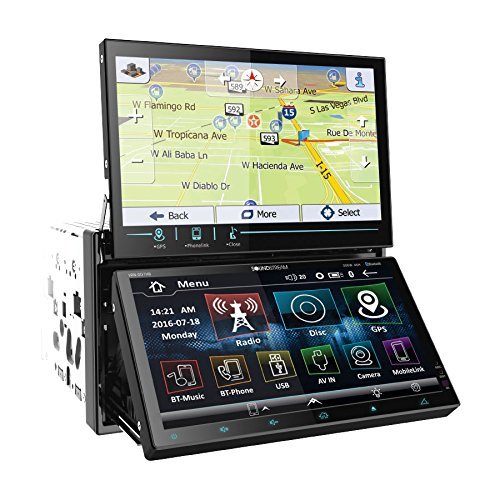
รูปที่ 1.1: ด้านหน้า view of the Soundstream VRN-DD7HB Car Stereo Receiver, showcasing its double DIN form factor and touchscreen display.
2. ข้อมูลด้านความปลอดภัย
เพื่อให้มั่นใจถึงความปลอดภัยในการใช้งานและป้องกันการบาดเจ็บหรือความเสียหาย โปรดปฏิบัติตามข้อควรระวังต่อไปนี้:
- อย่าใช้งานอุปกรณ์ในลักษณะที่รบกวนสมาธิในการขับขี่ ให้ความสำคัญกับความปลอดภัยบนท้องถนนเสมอ
- Consult a professional for installation to avoid electrical damage or improper wiring.
- ห้ามถอดชิ้นส่วนหรือดัดแปลงอุปกรณ์ การกระทำดังกล่าวอาจทำให้อุปกรณ์ทำงานผิดปกติหรือเกิดไฟฟ้าช็อตได้
- รักษาระดับเสียงให้อยู่ในระดับที่ยังสามารถได้ยินเสียงการจราจรจากภายนอกได้
- คำเตือนข้อเสนอ 65: ผลิตภัณฑ์นี้ประกอบด้วยสารเคมีที่รัฐแคลิฟอร์เนียทราบว่าก่อให้เกิดมะเร็งและข้อบกพร่องทางการเกิดหรืออันตรายต่อการสืบพันธุ์อื่น ๆ
3. การตั้งค่าและการติดตั้ง
Professional installation is highly recommended for this car stereo receiver. Incorrect wiring can cause severe damage to the unit or your vehicle's electrical system.
3.1 การเชื่อมต่อสายไฟ
Ensure all power, ground, speaker, and accessory wires are connected correctly according to your vehicle's wiring diagram and the unit's wiring harness. Pay close attention to the following:
- พาวเวอร์ (สีเหลือง): เชื่อมต่อกับแหล่งจ่ายไฟ 12V ที่คงที่
- อุปกรณ์เสริม (สีแดง): เชื่อมต่อกับแหล่งจ่ายไฟ 12V ที่มีสวิตช์ (สวิตช์กุญแจ)
- พื้น(สีดำ): Connect securely to a clean chassis ground point.
- เอาต์พุตลำโพง: เชื่อมต่อกับลำโพงของรถของคุณโดยให้แน่ใจว่าขั้วถูกต้อง
- หลัง View อินพุตกล้อง: Connect the video output of your rear view camera to the designated input on the receiver. Ensure the reverse trigger wire is connected to your vehicle's reverse light circuit.
- อินพุตการควบคุมพวงมาลัย: Connect to your vehicle's OEM steering wheel control interface (if applicable). Refer to your vehicle's manual and the steering wheel control interface instructions for proper connection.
3.2 การติดตั้ง
Mount the double DIN unit securely into your vehicle's dashboard using the provided mounting hardware. Ensure there is adequate space for ventilation and wiring.
4. คู่มือการใช้งาน
4.1 เปิด/ปิดเครื่อง
Press the power button (usually located on the front panel or a soft-touch button on the screen) to turn the unit on or off. The unit will also power on/off with your vehicle's ignition.
4.2 การใช้งานหน้าจอสัมผัส
The VRN-DD7HB features a Smart Sense Glass Panel Touch Screen. Navigate menus, select functions, and adjust settings by touching the corresponding icons or areas on the display.
4.3 การเชื่อมต่อบลูทูธ
- การจับคู่อุปกรณ์:
- ตรวจสอบให้แน่ใจว่าได้เปิดใช้งาน Bluetooth บนอุปกรณ์มือถือของคุณ
- On the VRN-DD7HB, navigate to the Bluetooth menu.
- ค้นหา available devices on your mobile phone. The unit should appear as "Soundstream VRN-DD7HB" or similar.
- Select the unit on your phone to pair. Enter the PIN (usually "0000") if prompted.
- เมื่อจับคู่แล้ว เครื่องจะยืนยันการเชื่อมต่อ
- การโทรแบบแฮนด์ฟรี: After pairing, you can make and receive calls directly through the unit using the built-in front panel Bluetooth microphone and your car's speakers.
- A2DP Audio Playback: Stream audio wirelessly from your paired device. Select the Bluetooth audio source on the receiver and control playback (play/pause, skip) from the unit or your phone.
4.4 ด้านหลัง View อินพุตกล้อง
When the vehicle is shifted into reverse, the unit will automatically display the image from the connected rear view camera on its 800x480 widescreen resolution display. This feature provides assistance for parking and maneuvering.
4.5 ระบบควบคุมพวงมาลัย
If an OEM steering wheel control interface is connected, you can program the unit to respond to your vehicle's steering wheel buttons for functions such as volume control, track skipping, and mode selection. Refer to the unit's settings menu for steering wheel control configuration.
5. การบำรุงรักษา
Proper maintenance ensures the longevity and optimal performance of your car stereo receiver.
- การทำความสะอาดหน้าจอ: ใช้ผ้านุ่มไม่เป็นขุยเช็ดหน้าจอสัมผัสเบาๆ สำหรับรอยเปื้อนฝังแน่น ให้เช็ดเบาๆampชุบผ้าด้วยน้ำหรือน้ำยาทำความสะอาดที่ปลอดภัยต่อหน้าจอ หลีกเลี่ยงวัสดุที่มีฤทธิ์กัดกร่อนหรือสารเคมีรุนแรง
- การทำความสะอาดทั่วไป: เก็บตัวเครื่องให้สะอาดปราศจากฝุ่นและเศษผง ใช้แปรงขนนุ่มหรือลมอัดทำความสะอาดช่องระบายอากาศและบริเวณปุ่มต่างๆ
- หลีกเลี่ยงอุณหภูมิที่สูงหรือต่ำเกินไป: อย่าให้เครื่องโดนความร้อนหรือความเย็นจัด เพราะอาจส่งผลต่อประสิทธิภาพและอายุการใช้งานได้
6 การแก้ไขปัญหา
If you encounter issues with your VRN-DD7HB, refer to the following common problems and solutions:
| ปัญหา | สาเหตุที่เป็นไปได้ / วิธีแก้ไข |
|---|---|
| เครื่องไม่เปิด |
|
| ไม่มีเสียงออกจากลำโพง |
|
| อุปกรณ์บลูทูธไม่สามารถจับคู่ได้ |
|
| หลัง view ภาพจากกล้องไม่แสดง |
|
7. ข้อมูลจำเพาะ
| คุณสมบัติ | รายละเอียด |
|---|---|
| หมายเลขรุ่น | VRN-DD7HB |
| แสดง | Smart Sense Glass Panel Touch Screen, 800x480 Widescreen Resolution |
| เวอร์ชันบลูทูธ | V4.0 (Hands-Free Calling, A2DP Audio Playback) |
| ไมโครโฟน | Built-in Front Panel Bluetooth Microphone |
| เทคโนโลยีการเชื่อมต่อ | บลูทูธ, USB, แจ็ค 3.5 มม. |
| อุปกรณ์ที่รองรับ | สมาร์ทโฟน ลำโพง |
| ประเภทตัวควบคุม | Android (via Bluetooth/USB connection) |
| โหมดเอาต์พุตเสียง | สเตอริโอ |
| การกำหนดค่าช่องเสียงรอบทิศทาง | 4.0 |
| กำลังขับ | 220 วัตต์ |
| สี | สีดำ |
| ขนาดสินค้า | 11.3 x 4.7 x 9.2 นิ้ว |
| น้ำหนักสินค้า | 9.01 ปอนด์ |
8. การรับประกันและการสนับสนุน
This product is offered as a renewed item. Renewed products are professionally inspected and tested to work and look like new. If not satisfied with the purchase, renewed products are typically eligible for replacement or refund under the Amazon Renewed Guarantee. Please refer to the specific terms and conditions of the Amazon Renewed Guarantee for details regarding your purchase.
For technical support or further assistance, please contact the seller or refer to the Soundstream official webเว็บไซต์สำหรับข้อมูลผลิตภัณฑ์ทั่วไป