
1. บทนำ
The AstralPool NA6888 is a sophisticated regulator, controller, and display unit designed for integration with AstralPool heat pump systems. This device provides essential control and monitoring functionalities for your heat pump, ensuring efficient and reliable operation. Please note that this unit is not compatible with remote control systems.
This manual provides detailed instructions for the proper installation, operation, and maintenance of your NA6888 unit. Please read this manual thoroughly before installation and use to ensure safe and optimal performance.
2. ข้อมูลด้านความปลอดภัย
โปรดปฏิบัติตามคำแนะนำด้านความปลอดภัยต่อไปนี้เสมอ เพื่อป้องกันการบาดเจ็บหรือความเสียหายต่ออุปกรณ์:
- ความปลอดภัยทางไฟฟ้า: This unit operates on 220V AC. All electrical connections must be performed by a qualified electrician in accordance with local electrical codes and regulations. Ensure the power supply is disconnected before any installation or maintenance work.
- การปกป้องสิ่งแวดล้อม: The NA6888 unit has an IP65 protection rating, meaning it is protected against dust ingress and low-pressure water jets from any direction. However, avoid direct high-pressure water jets or submersion.
- การใช้งานที่เหมาะสม: Use the device only for its intended purpose as a regulator, controller, and display for AstralPool heat pumps. Do not attempt to modify the unit.
- การจัดการ: Handle the unit with care to avoid physical damage.
3. คุณสมบัติของผลิตภัณฑ์
The NA6888 unit offers a range of features for comprehensive heat pump management:
- การควบคุมแบบบูรณาการ: Combines regulation, control, and display functions in a single compact unit.
- อินพุตเซ็นเซอร์: Supports dedicated inputs for a Temperature Sensor (T1) and a Defrost Sensor (T2).
- อินพุตสัญญาณเตือน: Features three external alarm signal inputs (S1, S2, S3) for enhanced system monitoring.
- การควบคุมเอาต์พุต: Provides control outputs for key heat pump components including Water Pump, Fan, Valve, and Compressor.
- การออกแบบที่ทนทาน: IP65 rated enclosure for protection against dust and water splashes.

รูปที่ 3.1 : ด้านหน้า view of the NA6888 controller display, showing the digital readout and control buttons.
4. เนื้อหาบรรจุภัณฑ์
เมื่อเปิดบรรจุภัณฑ์ ตรวจสอบว่ามีส่วนประกอบทั้งหมดดังต่อไปนี้:
- 1x NA6888 Regulator-Controller-Display Unit
- 1x Wiring Harness/Cables
- คลิปยึด 2x

Figure 4.1: Included wiring harness.

Figure 4.2: Mounting clips.
5. การตั้งค่าและการติดตั้ง
Installation of the NA6888 unit requires careful attention to electrical connections. It is strongly recommended that installation be performed by a qualified and licensed professional.
5.1. การติดตั้งตัวเครื่อง
- Identify a suitable location for the controller, ensuring it is protected from direct sunlight, extreme temperatures, and excessive vibration.
- Cut an appropriate opening in the mounting panel or enclosure, matching the dimensions of the NA6888 unit.
- Insert the NA6888 unit into the opening from the front.
- Secure the unit in place using the provided mounting clips on the sides, ensuring a snug fit.
5.2. การเชื่อมต่อสายไฟ
Refer to the wiring diagram printed on the back of the NA6888 unit for precise connection points. Ensure all connections are secure and correctly polarized.
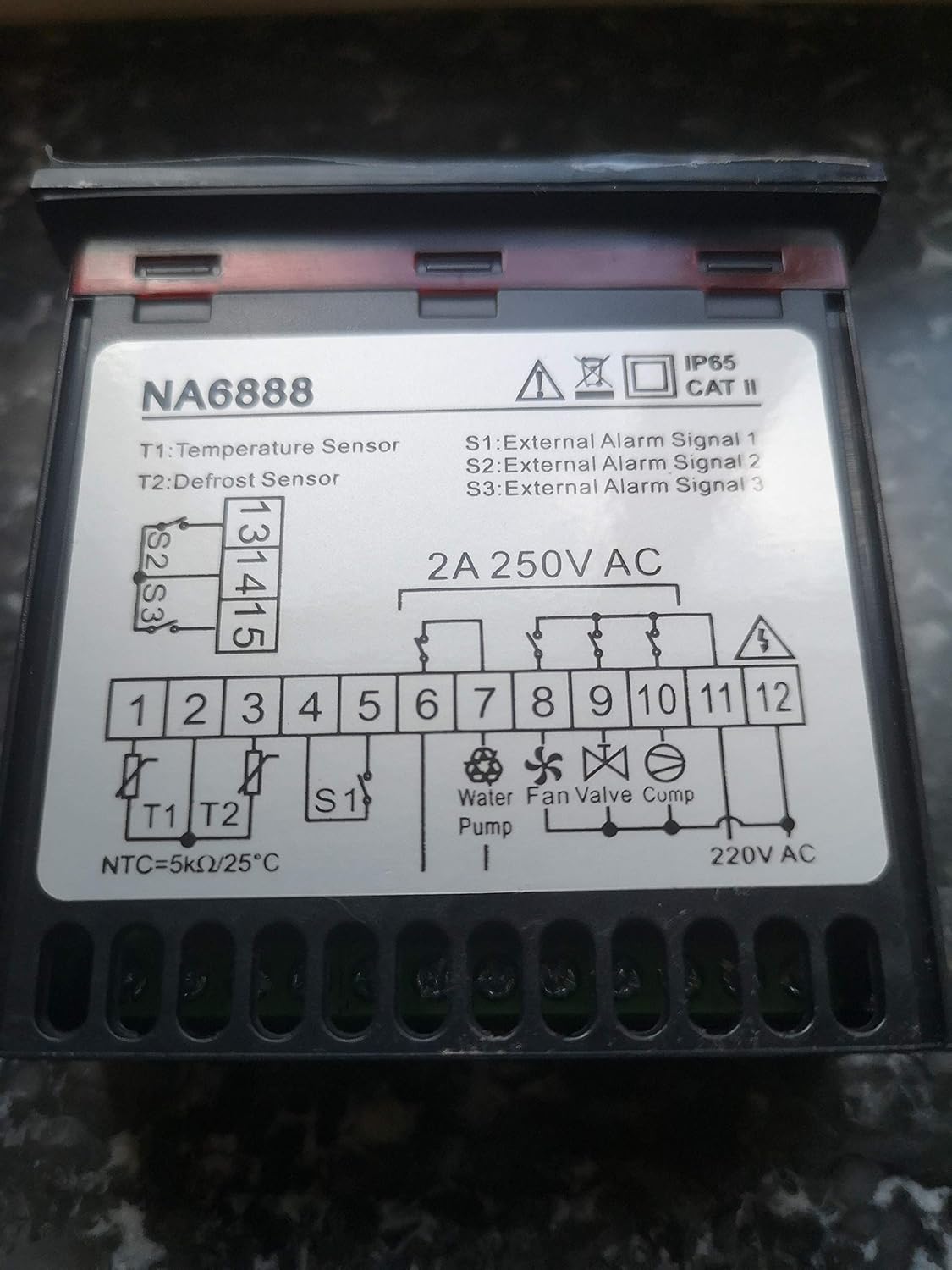
Figure 5.1: NA6888 Wiring Diagram.
คำอธิบายเทอร์มินัล:
| เทอร์มินัล | คำอธิบาย | หมายเหตุ |
|---|---|---|
| T1 | เซ็นเซอร์วัดอุณหภูมิ | Connect the main temperature sensor (NTC=5kΩ/25°C). |
| T2 | เซ็นเซอร์ละลายน้ำแข็ง | Connect the defrost sensor. |
| S1, S2, S3 | External Alarm Signals | Inputs for external alarm triggers. |
| 1, 2 | กำลังไฟเข้า | Connect to 220V AC power supply. |
| 6, 7 | Water Pump Output | Control output for the water pump. |
| 8, 9 | พัดลมเอาท์พุต | Control output for the fan. |
| 10, 11 | เอาท์พุทวาล์ว | Control output for the valve. |
| 11, 12 | เอาต์พุตของคอมเพรสเซอร์ | Control output for the compressor. Note shared terminal 11 with Valve. |
After all connections are made, double-check the wiring against the diagram to prevent damage to the unit or connected components.
6. คู่มือการใช้งาน
Once installed and powered on, the NA6888 display will illuminate, showing current system parameters. The unit features several buttons for navigation and setting adjustments:
- ขึ้น (^) ปุ่ม: ใช้เพื่อเพิ่มค่าหรือเลื่อนขึ้นไปยังตัวเลือกในเมนู
- ลง (v) ปุ่ม: ใช้เพื่อลดค่าหรือเลื่อนลงผ่านตัวเลือกในเมนู
- ปุ่ม ตลท.: Used to enter a menu, confirm a selection, or save a setting.
- ปุ่ม M (เมนู): Used to access the main menu or exit a sub-menu.
6.1. การทำงานพื้นฐาน
- เปิดเครื่อง: Ensure the unit is correctly wired and power is supplied. The display will show the current temperature or system status.
- Viewพารามิเตอร์: Use the Up/Down buttons to cycle through various displayed parameters (e.g., temperature readings from T1/T2, set points, operational status).
- การปรับแต่งการตั้งค่า:
- กดปุ่ม ชุด button to enter the setting mode for the currently displayed parameter, or press the M ปุ่มเพื่อเข้าสู่เมนูหลัก
- Use the Up/Down buttons to adjust the value.
- กด ชุด again to confirm and save the new value.
- กด M to exit the menu or setting mode.
For detailed programming and advanced settings, refer to the specific programming guide for your AstralPool heat pump model, as the NA6888 acts as the interface for these settings.
7. การบำรุงรักษา
The NA6888 unit is designed for low maintenance. Regular checks can help ensure its longevity and proper function:
- การทำความสะอาด: ควรเช็ดทำความสะอาดหน้าจอเป็นระยะ และ...asing กับ d อ่อนamp ผ้า ห้ามใช้น้ำยาทำความสะอาดที่มีฤทธิ์กัดกร่อนหรือตัวทำละลาย ตรวจสอบให้แน่ใจว่าไม่มีของเหลวเข้าไปในตัวเครื่อง
- ตรวจสอบการเชื่อมต่อ: Annually, or if issues arise, have a qualified technician check all electrical connections for tightness and signs of corrosion.
- สภาพแวดล้อม : Ensure the unit remains within its specified operating environment (temperature, humidity) and that its IP65 rating is not compromised by physical damage.
8 การแก้ไขปัญหา
If you encounter issues with your NA6888 unit, consider the following common troubleshooting steps. For complex problems, always consult a qualified technician.
| ปัญหา | สาเหตุที่เป็นไปได้ | สารละลาย |
|---|---|---|
| การแสดงผลว่างเปล่า | No power supply; Loose connection; Unit failure. | Check power source (220V AC). Verify wiring connections. If power is present and connections are secure, the unit may require replacement. |
| การอ่านอุณหภูมิไม่ถูกต้อง | Faulty sensor (T1 or T2); Loose sensor connection. | Check sensor wiring. Test sensor resistance (NTC=5kΩ/25°C). Replace sensor if faulty. |
| Outputs (Pump, Fan, etc.) not activating | Incorrect settings; Wiring issue; Component failure. | Verify controller settings. Check wiring to the respective component. Test the component itself. |
| External alarm not registering | Incorrect wiring to S1/S2/S3; Faulty external alarm device. | Check wiring to alarm inputs. Test the external alarm device. |
If troubleshooting steps do not resolve the issue, contact AstralPool customer support or a certified service technician. Information regarding spare parts availability is not provided.
9. ข้อมูลจำเพาะ
| พารามิเตอร์ | ค่า |
|---|---|
| หมายเลขรุ่น | NA6888 |
| ยี่ห้อ | แอสตรัลพูล |
| แหล่งจ่ายไฟ | 220V AC, 2A max |
| อินพุตเซ็นเซอร์อุณหภูมิ | T1 (NTC=5kΩ/25°C) |
| Defrost Sensor Input | T2 |
| อินพุตสัญญาณเตือนภายนอก | S1, S2, S3 |
| เอาต์พุตควบคุม | Water Pump, Fan, Valve, Compressor |
| ระดับการป้องกัน | IP65 |
| หมวดหมู่การติดตั้ง | CAT II |
| ASIN | B07XGCN44T |
| วันที่พร้อมใช้งานครั้งแรก | 21 มิถุนายน 2021 |
10. การรับประกันและการสนับสนุน
Specific warranty terms for the NA6888 unit are typically provided at the point of purchase or can be obtained directly from AstralPool. Please retain your proof of purchase for warranty claims.
For technical support, service, or inquiries regarding spare parts, please contact AstralPool customer service or your authorized dealer. Contact information can usually be found on the AstralPool official webไซต์หรือบนเอกสารการซื้อของคุณ