
การแนะนำ
This manual provides comprehensive instructions for the proper use and maintenance of your ELECTROPRIME 8GB Rechargeable USB LCD Digital Voice Recorder, Model ASH20BEBUBEB26998. Please read this manual thoroughly before operating the device to ensure optimal performance and longevity. Keep this manual for future reference.
สินค้าเกินview
The ELECTROPRIME Digital Voice Recorder is a compact and versatile device designed for high-quality audio recording and MP3 playback. It features an LCD screen for easy navigation, 8GB of internal storage, and a rechargeable battery.
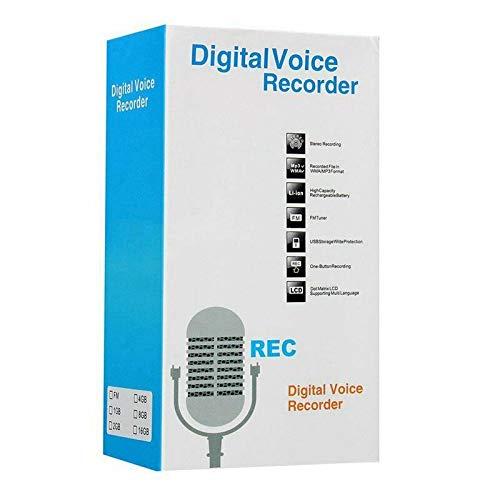
Figure 1: ELECTROPRIME Digital Voice Recorder with included accessories, including earphones, USB cable, and telephone adapter.
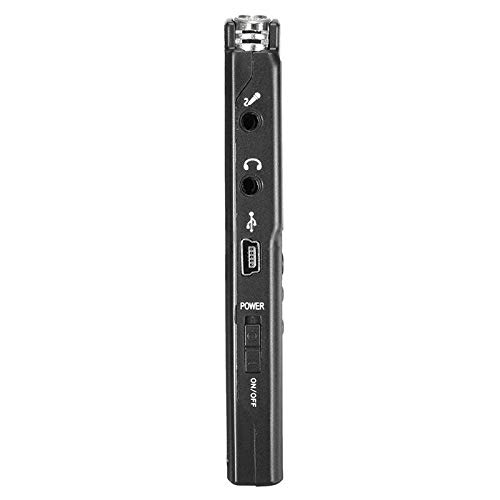
รูปที่ 2: ด้านข้าง view of the recorder, highlighting the USB port, headphone jack, microphone input, and power switch.
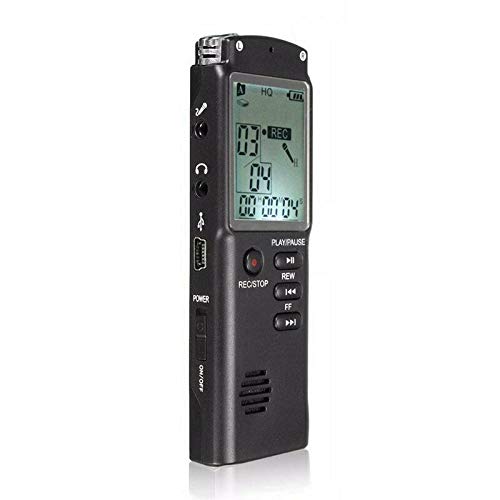
รูปที่ 3 : ด้านหน้า view of the recorder, displaying the LCD screen with recording information and control buttons.
การตั้งค่า
- การชาร์จอุปกรณ์: Connect the recorder to a computer's USB port or a USB wall adapter using the provided USB cable. The LCD screen will indicate charging status. A full charge typically takes 2-3 hours.
- การเปิด/ปิดเครื่อง: Locate the ON/OFF switch on the side of the device. Slide it to the "ON" position to power on and to the "OFF" position to power off.
- ตั้งค่าเริ่มต้น: Upon first power-on, you may need to set the date and time. Use the navigation buttons (REW, FF) and Play/Pause button to adjust and confirm settings.
คำแนะนำการใช้งาน
การบันทึกเสียง
- เริ่มการบันทึก: เมื่อเปิดเครื่องแล้ว ให้กดปุ่ม บันทึก/หยุด button once. The LCD will display "REC" and a timer, indicating that recording has started.
- หยุดการบันทึกชั่วคราว: ระหว่างการบันทึก ให้กดปุ่ม เล่น/หยุดชั่วคราว button to pause. Press it again to resume.
- หยุดการบันทึก: กดปุ่ม บันทึก/หยุด button again to stop recording. The recording will be saved automatically.
การเล่นกลับการบันทึก
- การบันทึกการเข้าถึง: In standby mode, use the รว. or FF buttons to navigate through your saved recordings.
- เล่น/หยุดชั่วคราว: กดปุ่ม เล่น/หยุดชั่วคราว button to start playback of the selected recording. Press again to pause.
- ปรับระดับเสียง: Use the volume control buttons (if present, typically on the side or via menu) to adjust playback volume.
การโอนย้าย Fileไปที่คอมพิวเตอร์
- เชื่อมต่อ: Connect the recorder to your computer using the USB cable.
- อุปกรณ์ที่ใช้ในการเข้าถึง: เครื่องบันทึกจะปรากฏเป็นไดรฟ์แบบถอดได้บนคอมพิวเตอร์ของคุณ
- โอน: Open the drive, locate your audio files (usually in a folder like "RECORD" or "VOICE"), and copy them to your computer.
Using as an MP3 Player
อุปกรณ์รองรับการเล่นไฟล์เสียง MP3 ถ่ายโอนไฟล์ MP3 files to the device's internal storage via USB connection. Use the รว. และ FF ปุ่มสำหรับเลือกแทร็กและ เล่น/หยุดชั่วคราว เพื่อควบคุมการเล่น
การซ่อมบำรุง
- การทำความสะอาด: ใช้ผ้าแห้งเนื้อนุ่มเช็ดทำความสะอาดภายนอกของอุปกรณ์ ห้ามใช้น้ำยาทำความสะอาดหรือสารละลายใดๆ
- การดูแลแบตเตอรี่ เพื่อยืดอายุการใช้งานแบตเตอรี่ ควรหลีกเลี่ยงการปล่อยให้แบตเตอรี่หมดจนเกลี้ยงบ่อยๆ ชาร์จอุปกรณ์เป็นประจำ แม้ว่าจะไม่ได้ใช้งานเป็นเวลานานก็ตาม
- พื้นที่จัดเก็บ: เก็บอุปกรณ์ไว้ในที่แห้งและเย็น หลีกเลี่ยงแสงแดดโดยตรง อุณหภูมิที่สูงหรือต่ำเกินไป และความชื้นสูง
- หลีกเลี่ยงผลกระทบ: ปกป้องอุปกรณ์จากการตกหล่นและแรงกระแทกซึ่งอาจทำให้ส่วนประกอบภายในเสียหายได้
การแก้ไขปัญหา
| ปัญหา | วิธีแก้ปัญหาที่เป็นไปได้ |
|---|---|
| อุปกรณ์ไม่เปิดเครื่อง | Ensure the battery is charged. Connect to a USB power source and try again. Check the ON/OFF switch position. |
| ไม่สามารถบันทึกเสียงได้ | Check if the device has sufficient memory. Delete old files if necessary. Ensure the microphone is not obstructed. |
| คอมพิวเตอร์ไม่รับรู้อุปกรณ์ | ลองใช้พอร์ต USB หรือสายเคเบิลอื่นดู ตรวจสอบให้แน่ใจว่าอุปกรณ์เปิดอยู่ขณะเชื่อมต่อ รีสตาร์ทคอมพิวเตอร์ของคุณ |
| คุณภาพเสียงไม่ดี | Ensure the recording environment is quiet. Keep the device close to the audio source. Check recording settings (if adjustable). |
ข้อมูลจำเพาะ
- ยี่ห้อ: อิเล็คโตรไพรม์
- หมายเลขรุ่น: ASH20BEBUBEB26998
- ความจุหน่วยความจำ: 8GB
- รูปแบบเสียง: เอ็มพี 3
- อินเทอร์เฟซฮาร์ดแวร์: ยูเอสบี
- อุปกรณ์ที่รองรับ: เครื่องเล่น MP3
- แหล่งพลังงาน: แบตเตอรี่แบบชาร์จไฟได้ (ชาร์จ USB)
การรับประกันและการสนับสนุน
Specific warranty information for this product is not provided in the available documentation. For warranty claims or technical support, please contact your retailer or the manufacturer, ELECTROPRIME, directly. Retain your proof of purchase for any warranty-related inquiries.
For further assistance, please refer to the official ELECTROPRIME webเว็บไซต์หรือติดต่อฝ่ายบริการลูกค้าของพวกเขา