
1. บทนำ
This manual provides detailed instructions for the proper use and maintenance of your ELECTROPRIME SK-892 Mini Digital Voice Recorder. Please read this manual thoroughly before operating the device to ensure optimal performance and longevity. Keep this manual for future reference.
2. สินค้าหมดview
The ELECTROPRIME SK-892 is a compact and portable digital voice recorder designed for discreet audio capture and playback. It features 8GB of internal storage and a simple one-switch operation.
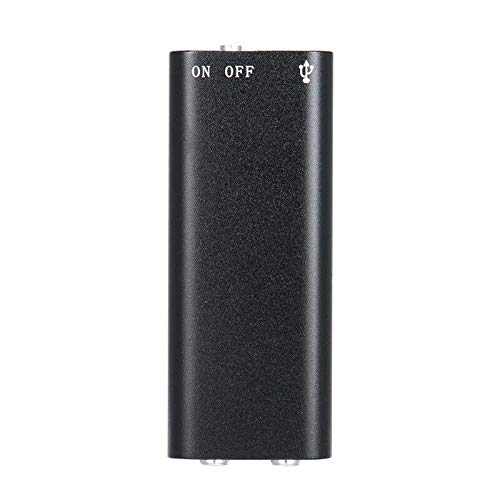
รูปที่ 2.1: สูงสุด view of the ELECTROPRIME SK-892 Mini Digital Voice Recorder, highlighting the ON/OFF switch and the USB port for connectivity.
ส่วนประกอบอุปกรณ์:
- สวิตช์เปิด/ปิด: Controls power and recording functions.
- พอร์ต USB: ใช้สำหรับชาร์จอุปกรณ์และเชื่อมต่อกับคอมพิวเตอร์เพื่อถ่ายโอนข้อมูล
- แจ็คหูฟัง (3.5 มม.): For audio playback using earphones.
- ไฟแสดงสถานะ: แสดงสถานะการทำงาน (เช่น กำลังบันทึก กำลังชาร์จ)
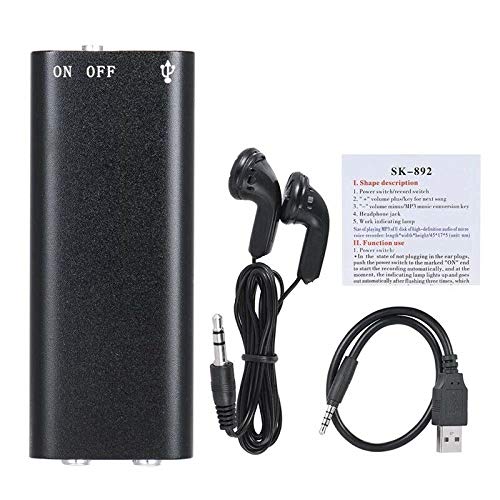
รูปที่ 2.2: The SK-892 recorder shown with its accessories, including wired headphones and a USB charging/data cable. The small instruction card is also visible.
3. การตั้งค่า
3.1 การชาร์จอุปกรณ์
- Connect the small end of the provided USB cable to the USB port on the recorder.
- Connect the other end of the USB cable to a powered USB port on a computer or a USB wall adapter (not included).
- The indicator light will illuminate during charging. Once fully charged, the light may change color or turn off.
- โดยทั่วไปการชาร์จเต็มจะใช้เวลาประมาณ 2-3 ชั่วโมง
3.2 การเปิดเครื่องครั้งแรก
To power on the device, slide the ON/OFF switch to the "ON" position. The indicator light will briefly flash, indicating the device is ready for operation.
4. คู่มือการใช้งาน
4.1 การบันทึกเสียง
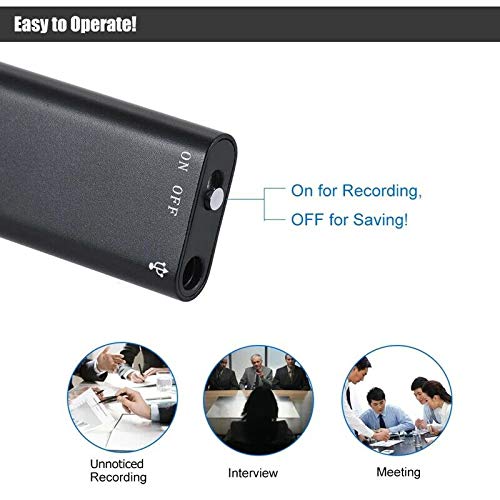
รูปที่ 4.1: Detail of the SK-892's ON/OFF switch, illustrating its dual function for initiating recording and saving files.
- ตรวจสอบให้แน่ใจว่าอุปกรณ์มีแบตเตอรี่เพียงพอ
- To begin recording, slide the ON/OFF switch to the "ON" position. The device will automatically start recording. The indicator light will typically flash or remain steadily lit during recording, then turn off to indicate discreet operation.
- To stop recording and save the audio file, slide the ON/OFF switch to the "OFF" position. The indicator light will flash a few times and then turn off, confirming the recording has been saved and the device is powered down.
บันทึก: Ensure the switch is fully in the "OFF" position to properly save your recordings and prevent data loss.
4.2 การเล่นเสียงบันทึก
- Connect the provided headphones (or your own 3.5mm headphones) to the headphone jack on the recorder.
- Slide the ON/OFF switch to the "ON" position. The device will typically begin playing the most recent recording or cycle through recordings.
- Further controls for playback (e.g., next track, volume) may be available through the connected headphones if they feature inline controls, or by briefly toggling the ON/OFF switch (refer to the small instruction card for specific playback controls if available).
- To stop playback, slide the ON/OFF switch to the "OFF" position.
4.3 การเชื่อมต่อกับคอมพิวเตอร์
To transfer recordings to your computer or manage files:
- Ensure the recorder is powered "OFF".
- Connect the recorder to your computer using the supplied USB cable.
- Your computer should recognize the device as a removable disk (similar to a USB flash drive).
- Navigate to the device's storage to access your recorded audio files (usually in a folder named "RECORD" or similar).
- คุณสามารถคัดลอก ย้าย หรือลบ fileตามความจำเป็น
- Safely eject the device from your computer before disconnecting the USB cable to prevent data corruption.
5. การบำรุงรักษา
- เก็บอุปกรณ์ให้แห้ง หลีกเลี่ยงการสัมผัสกับความชื้นหรือของเหลว
- ทำความสะอาดอุปกรณ์ด้วยผ้านุ่มและแห้ง ห้ามใช้สารเคมีรุนแรงหรือน้ำยาทำความสะอาดที่มีฤทธิ์กัดกร่อน
- หลีกเลี่ยงการทำอุปกรณ์หล่นหรือกระแทกอย่างรุนแรง
- เก็บอุปกรณ์ไว้ในที่แห้งและเย็นเมื่อไม่ใช้งาน
- ชาร์จอุปกรณ์เป็นประจำ แม้จะไม่ได้ใช้งานบ่อยก็ตาม เพื่อรักษาสุขภาพแบตเตอรี่
6 การแก้ไขปัญหา
| ปัญหา | วิธีแก้ปัญหาที่เป็นไปได้ |
|---|---|
| อุปกรณ์ไม่เปิดเครื่อง | Ensure the device is fully charged. Connect to a USB power source and check the indicator light. |
| ไม่สามารถบันทึกเสียงได้ | Check if the device has sufficient battery. Ensure the ON/OFF switch is moved fully to the "ON" position. Verify there is enough free storage space. |
| การบันทึกไม่สำเร็จ | Ensure the ON/OFF switch is moved fully to the "OFF" position to properly save the file. Do not disconnect power during recording or saving. |
| ไม่สามารถฟังเสียงเล่นได้ | Ensure headphones are securely connected. Check headphone functionality with another device. Verify the device is powered "ON" for playback. |
| คอมพิวเตอร์ไม่รับรู้อุปกรณ์ | Ensure the recorder is powered "OFF" before connecting to the computer. Try a different USB port or cable. Restart your computer. |
7. ข้อมูลจำเพาะ
- แบบอย่าง: เอสเค-892
- ความจุหน่วยความจำ: 8GB
- รูปแบบเสียง: เอ็มพี 3
- อินเทอร์เฟซฮาร์ดแวร์: ยูเอสบี
- อุปกรณ์ที่รองรับ: MP3 Player (for playback)
- ผู้ผลิต: อิเล็คโตรไพรม์
- หมายเลขชิ้นส่วน: ASHA20BEBUBEB19894
8. การรับประกันและการสนับสนุน
For warranty information or technical support, please refer to the documentation included with your purchase or contact ELECTROPRIME customer service through their official channels. Please have your model number (SK-892) and purchase details ready when contacting support.
หากต้องการความช่วยเหลือเพิ่มเติม คุณสามารถไปที่ ELECTROPRIME brand page on Amazon.