
พรูทูคิท 6เอส
คู่มือผู้ใช้หูฟังไร้สาย Prtukyt 6S
Model: 6S | Brand: Prtukyt
การแนะนำ
Thank you for choosing the Prtukyt 6S Wireless Headphones. This manual provides detailed instructions on how to set up, operate, and maintain your headphones to ensure optimal performance and longevity. Please read this manual thoroughly before using the product.

Image: Prtukyt 6S Wireless Headphones in black and red, showcasing การออกแบบโดยรวม
คุณสมบัติหลัก
- HI-FI Stereo Sound: High-definition audio with deep bass and crystal-clear treble, powered by a 57mm driver for precise sound reproduction.
- บลูทูธขั้นสูง 5.0: Ensures fast, stable connections and low latency for audio/video streaming.
- อายุการใช้งานแบตเตอรี่ยาวนาน: Up to 40 hours of continuous playtime on a single charge, thanks to a 500mAh lithium-polymer battery.
- การออกแบบที่สะดวกสบาย: Features super soft, skin-texture simulating ear cushions and an adjustable, padded headband for extended wear comfort.
- พับได้และพกพาสะดวก: Ergonomic, foldable design for easy storage and transport, ideal for travel and daily use.
- การเล่นหลายโหมด: Supports wireless Bluetooth, wired 3.5mm audio connection, Micro SD/TF card playback, and FM radio.
- ไมโครโฟนในตัว: High-quality microphone for clear, hands-free calls.

ภาพ: เหนือview of the headphones' key features, including Hi-Fi sound, comfortable earmuffs, radio receiver, long battery life, foldable design, and HD call capability.

Image: Close-up of the headphone earcup highlighting the Bluetooth 5.0 chip, Hi-Fi sound, 57mm driver, and extra bass capabilities.
เนื้อหาแพ็คเกจ
กรุณาทำเครื่องหมายในช่องสำหรับรายการต่อไปนี้:
- Prtukyt 6S Wireless Headphones
- สายชาร์จ USB
- สายสัญญาณเสียงขนาด 3.5 มม.
- คู่มือการใช้งาน

Image: Visual representation of the items included in the product packaging: the headphones, a USB charging cable, and a 3.5mm audio cable.
การตั้งค่า
1. การชาร์จหูฟัง
Before first use, fully charge the headphones. A full charge takes approximately 3 hours and provides up to 40 hours of playtime.
- Connect the small end of the USB charging cable to the charging port on the headphone earcup.
- เชื่อมต่อปลายด้านที่ใหญ่กว่าของสายชาร์จ USB เข้ากับอะแดปเตอร์ไฟ USB (ไม่รวมอยู่ด้วย) หรือพอร์ต USB ของคอมพิวเตอร์
- The LED indicator light will show charging status (e.g., red for charging, off when fully charged).

Image: Visual representation of the headphones' long battery life, indicating up to 40 hours of playtime on a single charge.
2. การจับคู่บลูทู ธ
Pair your headphones with your Bluetooth-enabled device (smartphone, tablet, PC).
- ตรวจสอบให้แน่ใจว่าหูฟังชาร์จแล้วและปิดอยู่
- กดปุ่มเปิด/ปิดค้างไว้จนกว่าไฟ LED จะกะพริบเป็นสีน้ำเงินและสีแดงสลับกัน ซึ่งแสดงว่าเข้าสู่โหมดจับคู่แล้ว
- บนอุปกรณ์ของคุณ เปิดใช้งานบลูทูธและค้นหาอุปกรณ์ที่มีอยู่
- เลือก "6S" จากรายการอุปกรณ์ที่พบ
- เมื่อจับคู่เสร็จแล้ว ไฟ LED จะกะพริบเป็นสีน้ำเงินช้าๆ และคุณจะได้ยินเสียงยืนยัน
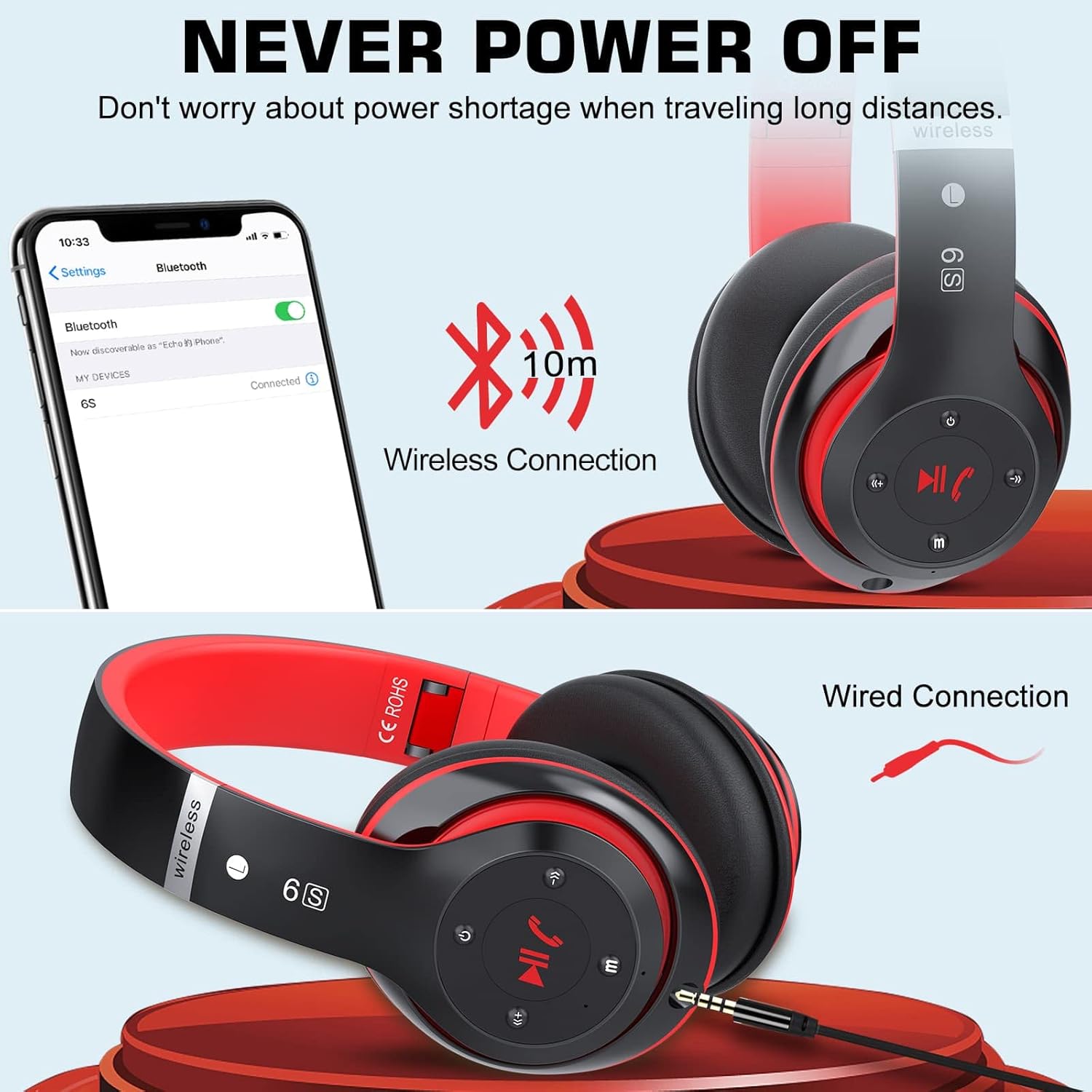
Image: Demonstrates both wireless Bluetooth connection (up to 10m range) and wired connection options for the headphones.
3. การเชื่อมต่อแบบมีสาย (โหมด Aux)
Use the included 3.5mm audio cable for a wired connection, especially when the battery is low or for non-Bluetooth devices.
- Plug one end of the 3.5mm audio cable into the audio input port on the headphone earcup.
- เสียบปลายอีกด้านเข้ากับแจ็คเสียงขนาด 3.5 มม. ของอุปกรณ์ของคุณ
- หูฟังจะเปลี่ยนเป็นโหมดสายโดยอัตโนมัติ
4. การเล่นไฟล์จาก Micro SD/TF Card
Insert a Micro SD/TF card loaded with MP3 audio fileเสียบหูฟังเข้าไปในช่องที่กำหนดไว้บนหูฟัง
- Locate the Micro SD/TF card slot on the headphone earcup.
- Gently insert the Micro SD/TF card until it clicks into place.
- The headphones will automatically switch to TF card playback mode. Use the control buttons to navigate tracks.
5. โหมดวิทยุ FM
The headphones can receive FM radio signals. For best reception, ensure the 3.5mm audio cable is plugged in, as it acts as an antenna.
- เปิดหูฟัง
- กดปุ่ม "M" (โหมด) เพื่อเปลี่ยนเป็นโหมดวิทยุ FM
- กดปุ่มเล่น/หยุดชั่วคราวเพื่อสแกนหาและบันทึกสถานีวิทยุ FM ที่ใช้งานได้โดยอัตโนมัติ
- ใช้ปุ่ม "ก่อนหน้า" และ "ถัดไป" เพื่อสลับระหว่างสถานีที่บันทึกไว้
คำแนะนำการใช้งาน
Familiarize yourself with the control buttons located on the earcup for easy operation.

Image: Detailed diagram showing the location and function of each button on the headphone earcup, including power, track control, volume, mode, and call handling.
| ปุ่ม/การดำเนินการ | การทำงาน |
|---|---|
| ปุ่มเปิด/ปิด (เปิด/ปิด) | กดค้างไว้เพื่อเปิด/ปิด |
| Play/Pause / Answer/Hang Up | Press once to play/pause music. Press once to answer/end a call. Press and hold to reject a call. |
| Previous Song / Volume Down (-) | Short press for previous song. Long press to decrease volume. |
| Next Song / Volume Up (+) | Short press for next song. Long press to increase volume. |
| ปุ่มโหมด (M) | Press to switch between Bluetooth, TF Card, and FM Radio modes. |
| Audio Cable Link Hole | Connect 3.5mm audio cable for wired playback. |
การซ่อมบำรุง
- การทำความสะอาด: ใช้ผ้านุ่มและแห้งเช็ดทำความสะอาดหูฟัง ห้ามใช้น้ำยาทำความสะอาดหรือสารละลายที่มีฤทธิ์กัดกร่อน
- พื้นที่จัดเก็บ: เมื่อไม่ใช้งาน ให้เก็บหูฟังไว้ในที่แห้งและเย็น หลีกเลี่ยงแสงแดดโดยตรงและอุณหภูมิที่สูงหรือต่ำเกินไป ดีไซน์แบบพับได้ช่วยให้จัดเก็บได้อย่างกะทัดรัด
- การดูแลแบตเตอรี่ เพื่อยืดอายุการใช้งานแบตเตอรี่ ควรหลีกเลี่ยงการใช้หูฟังจนหมดบ่อย ควรชาร์จหูฟังเป็นประจำ แม้จะไม่ได้ใช้งานเป็นเวลานานก็ตาม
- หลีกเลี่ยงความชื้น: อย่าให้หูฟังโดนน้ำหรือความชื้นมากเกินไป

Image: The headphones in their folded state, illustrating their compact and portable design for easy carrying and storage.
การแก้ไขปัญหา
| ปัญหา | สาเหตุที่เป็นไปได้ | สารละลาย |
|---|---|---|
| หูฟังไม่สามารถเปิดเครื่องได้ | แบตเตอรี่อ่อน | ชาร์จหูฟังให้เต็ม |
| ไม่สามารถจับคู่กับอุปกรณ์บลูทูธได้ | หูฟังไม่ได้อยู่ในโหมดจับคู่ อุปกรณ์ Bluetooth ปิดอยู่ ห่างจากอุปกรณ์มากเกินไป | ตรวจสอบให้แน่ใจว่าหูฟังอยู่ในโหมดจับคู่ (ไฟสีน้ำเงิน/แดงกะพริบ) เปิดบลูทูธบนอุปกรณ์ของคุณ ขยับหูฟังให้ใกล้กับอุปกรณ์มากขึ้น (ภายในระยะ 10 เมตร) |
| ไม่มีเสียงในโหมดบลูทูธ | Volume too low; not properly paired; wrong audio output selected on device. | Increase headphone and device volume. Re-pair the headphones. Select "6S" as the audio output on your device. |
| การรับสัญญาณวิทยุ FM ไม่ดี | No antenna connected; weak signal. | Plug in the 3.5mm audio cable (acts as antenna). Try auto-scanning again. Move to an area with better signal. |
| Micro SD/TF card not recognized. | Card not inserted correctly; unsupported format. | Re-insert the card firmly. Ensure card contains MP3 files. |
ข้อมูลจำเพาะ
| คุณสมบัติ | รายละเอียด |
|---|---|
| ชื่อรุ่น | 6S |
| ยี่ห้อ | ปรุตกิต |
| เทคโนโลยีการเชื่อมต่อ | ไร้สาย (บลูทูธ 5.0) |
| เทคโนโลยีการสื่อสารไร้สาย | บลูทูธ |
| อินพุตเสียง | แจ็คขนาด 3.5 มม. |
| ฟอร์มแฟกเตอร์ | หูฟังแบบครอบหู (Circum-Auricular) |
| ประเภทแบตเตอรี่ | แบตเตอรี่ลิเธียมโพลิเมอร์ (500 mAh) |
| เวลาเล่น | นานถึง 40 ชั่วโมง |
| เวลาในการชาร์จ | ประมาณ 3 ชั่วโมง |
| ช่วงสาย | สูงถึง 10 เมตร (33 ฟุต) |
| วัสดุ | หนัง, พลาสติก |
| สี | สีดำ/สีแดง |

Image: Illustration of a 40mm stereo driver, emphasizing its role in delivering sound purity and precision.
การรับประกันและการสนับสนุน
Prtukyt provides a 12-month warranty for this product. If you encounter any issues or have questions regarding your Prtukyt 6S Wireless Headphones, please contact our customer support for assistance. We are committed to ensuring your satisfaction.
โดยทั่วไป ข้อมูลการติดต่อฝ่ายสนับสนุนจะอยู่ที่บรรจุภัณฑ์ของผลิตภัณฑ์หรือเว็บไซต์อย่างเป็นทางการของแบรนด์ webเว็บไซต์.
Ask a question about this manual
Ask about setup, troubleshooting, compatibility, parts, safety, or missing instructions. Manuals+ will review the question and use this page’s manual context to help answer it.