
1. บทนำ
The Protmex PT625A is a handheld digital anemometer designed for measuring air velocity and airflow. This device is suitable for various applications, including environmental monitoring, HVAC system analysis, outdoor sports, and industrial use. It provides accurate and fast readings with multiple measurement units and data handling capabilities.
2. สินค้าหมดview
2.1 ส่วนประกอบ
- Air Velocity Flow Sensor: The fan blade assembly at the top of the device.
- แสดง: LCD screen for showing measurement readings and indicators.
- ปุ่มควบคุม: Power, Function, Unit, Max/Min/Avg, Data Hold, Record.
- ช่องใส่แบตเตอรี่: ตั้งอยู่ด้านหลังสำหรับการติดตั้งแบตเตอรี่
- พอร์ตไมโครยูเอสบี: For data connection (on some models, not explicitly stated for PT625A but mentioned in video).
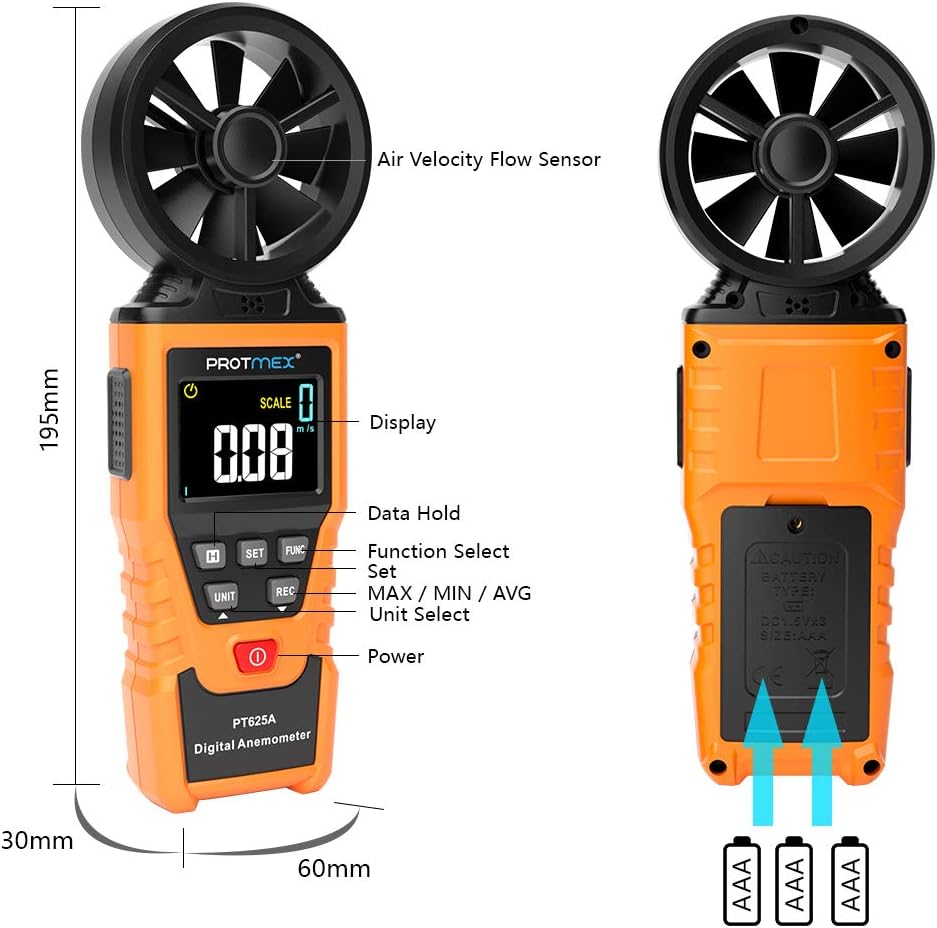
รูปที่ 1 : ด้านหน้า view of the Protmex PT625A Anemometer with key components labeled, including the air velocity flow sensor, display, and control buttons.
2.2 คุณสมบัติ
- High accuracy for wind speed measurement (0.4~40 m/s).
- Multiple units for wind speed: m/s, km/h, ft/s, knots, mil/h, fp/m.
- Air volume measurement in CFM, CMM, CMS.
- 8-blade aviation wing fan for sensitive and accurate readings.
- MAX/MIN/AVG data display.
- ฟังก์ชันการเก็บข้อมูลค้าง (Data Hold)
- ปิดเครื่องอัตโนมัติ
- ไฟแสดงสถานะแบตเตอรี่ต่ำ
- Air duct area setting for airflow calculation.
3. การตั้งค่า
3.1 การติดตั้งแบตเตอรี่
- ค้นหาช่องใส่แบตเตอรี่ที่ด้านหลังของอุปกรณ์
- ใช้ไขควงเปิดฝาช่องใส่แบตเตอรี่
- ใส่แบตเตอรี่ 9V ที่ให้มา โดยตรวจสอบให้แน่ใจว่าขั้วถูกต้อง (+/-)
- ใส่ฝาปิดช่องใส่แบตเตอรี่และขันให้แน่นด้วยสกรู

รูปที่ 2: ย้อนกลับ view of the anemometer, indicating the battery compartment where a 9V battery is inserted. A screwdriver is required to open the compartment.
4. คู่มือการใช้งาน
4.1 เปิด/ปิดเครื่อง
กดปุ่ม พลัง ปุ่ม ( ) to turn the device on or off. The device features an auto power-off function to conserve battery life.
4.2 Measuring Air Velocity
- Turn on the anemometer.
- Point the air velocity flow sensor (fan) directly into the airflow you wish to measure. Ensure the airflow passes through the fan blades.
- The current air velocity reading will be displayed on the LCD screen.
- กดปุ่ม หน่วย button to cycle through different measurement units (m/s, km/h, ft/s, knots, mil/h, fp/m).

Figure 3: The anemometer being used to measure wind speed in an outdoor environment, demonstrating how to position the sensor into the airflow.
4.3 Airflow Measurement (CFM/CMM/CMS)
- Turn on the anemometer.
- กดปุ่ม ฟังค์ชั่น button to enter airflow measurement mode.
- ใช้ ชุด button to input the cross-sectional area of the air duct or channel. This is crucial for accurate airflow calculation.
- Once the area is set, point the sensor into the airflow. The device will display the airflow volume in CFM, CMM, or CMS.
- กดปุ่ม หน่วย button to select the desired airflow unit.

Figure 4: Illustration of the anemometer displaying airflow measurement after setting the air duct area. The screen shows both area input and calculated flow.
4.4 Data Hold, Max/Min/Avg, and Record Functions
- การเก็บข้อมูล: กดปุ่ม ถือ กดปุ่มเพื่อหยุดค่าที่แสดงบนหน้าจอ กดอีกครั้งเพื่อปล่อย
- ค่าสูงสุด/ค่าต่ำสุด/ค่าเฉลี่ย: กดปุ่ม สูงสุด / นาที / เฉลี่ย button to cycle through maximum, minimum, and average readings during a measurement session.
- บันทึก: กดปุ่ม บันทึก button to initiate data recording. (Note: Specific details on data storage and retrieval may be in the full manual or software).
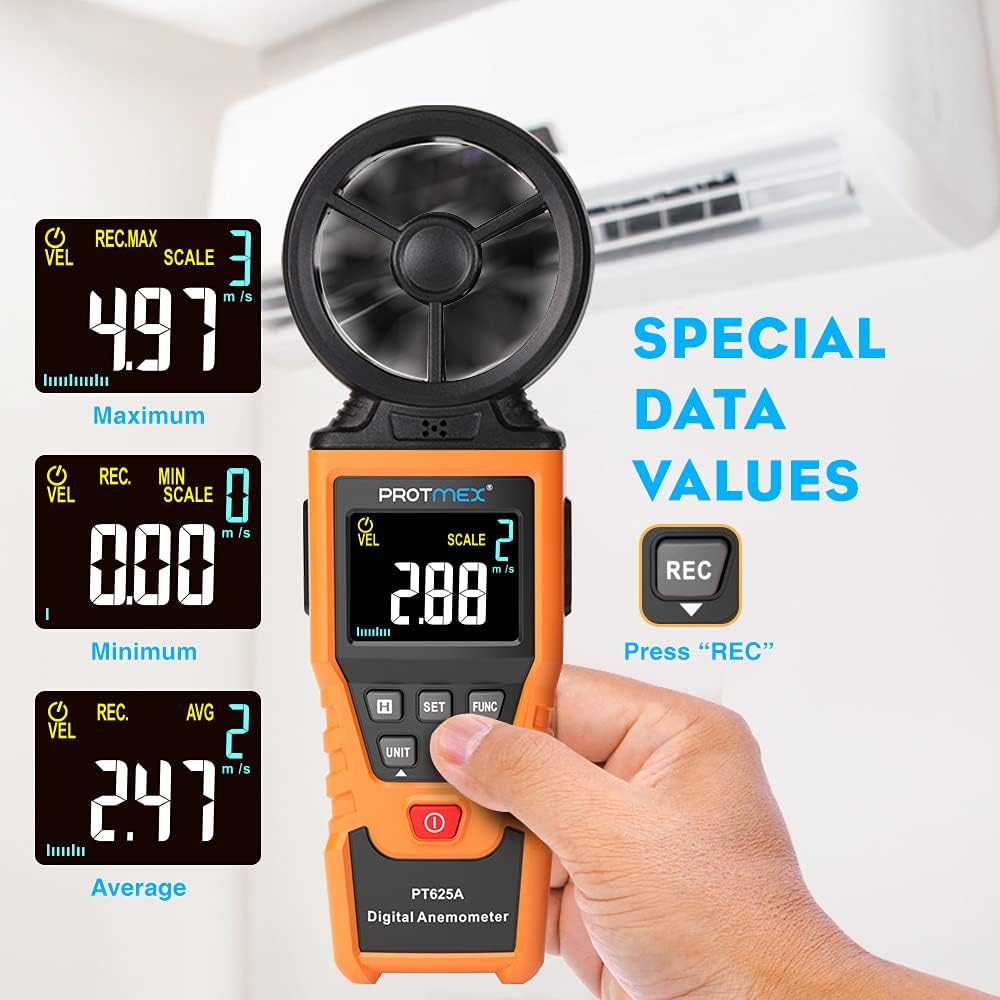
Figure 5: The anemometer's display showing maximum, minimum, and average wind velocity readings, accessible via the dedicated buttons.
5. การบำรุงรักษา
- รักษาอุปกรณ์ให้สะอาดและแห้ง เช็ดด้วยผ้านุ่มๆamp ผ้า ห้ามใช้สารทำความสะอาดที่มีฤทธิ์กัดกร่อนหรือตัวทำละลาย
- Ensure the fan blades are free from dust and debris to maintain measurement accuracy.
- เมื่อไม่ได้ใช้งานเป็นเวลานาน ควรถอดแบตเตอรี่ออกเพื่อป้องกันการรั่วไหล
- Store the anemometer in its protective case in a cool, dry place.
6 การแก้ไขปัญหา
- ไม่มีภาพแสดง/อุปกรณ์ไม่เปิดใช้งาน:
- ตรวจสอบว่าได้ติดตั้งแบตเตอรี่ถูกต้องและขั้วถูกหรือไม่
- เปลี่ยนแบตเตอรี่หากแบตเตอรี่เหลือน้อยหรือหมด
- การอ่านค่าที่ไม่ถูกต้อง:
- Ensure the fan blades are clean and spinning freely.
- Verify that the sensor is pointed directly into the airflow.
- Check if the correct measurement unit is selected.
- For airflow measurements, confirm the air duct area setting is accurate.
- ปุ่มไม่ตอบสนอง:
- ปิดเครื่องแล้วเปิดใหม่อีกครั้ง
- เปลี่ยนแบตเตอรี่
7. ข้อมูลจำเพาะ
| พารามิเตอร์ | ค่า |
|---|---|
| ช่วงความเร็วลม | 0.4~40 ม./วินาที |
| หน่วยความเร็วลม | m/s, km/h, ft/s, knots, mil/h, fp/m |
| Air Volume Units | CFM, CMM, CMS |
| Sampเวลาหลิง | Approx. 0.5s/time |
| ค่าการแสดงผลสูงสุด | 9999 |
| แหล่งจ่ายไฟ | แบตเตอรี่ 9V |
| ขนาด (กว้าง x ยาว x สูง) | 8.85 x 4.52 x 1.77 นิ้ว |
| น้ำหนักสินค้า | 10 ออนซ์ |
| วัสดุ | ยาง |

Figure 6: A detailed screen introduction showing various symbols and their descriptions, including MAX, MIN, AVG, VEL, FLOW, AREA, and different units of measurement.
8. การรับประกันและการสนับสนุน
Protmex products are designed for quality and reliability. For any issues or support, please refer to the contact information provided with your purchase or visit the official Protmex website. The product is CE (LVE, EMC), RoHS approved.
Protmex offers 24/7 online friendly support. Your satisfaction is our priority.