
1. สินค้าหมดview
The Schneider SC600SND is a versatile 2.0 channel soundbar designed to enhance your audio experience. It offers a total output power of 30W (15W x 2) and supports multiple connectivity options including Bluetooth, HDMI (ARC), Optical, and Aux. A unique feature of this soundbar is its convertible design, allowing it to be used as a single horizontal unit or split into two vertical speaker columns.

Image 1.1: The Schneider SC600SND Soundbar in its standard monoblock configuration.
2. การตั้งค่า
2.1 การแกะและการจัดวาง
Carefully remove all components from the packaging. Ensure you have the soundbar unit, remote control, and 3.5mm Jack cable.
The SC600SND soundbar offers two primary placement options:
- Monoblock Configuration: Use the soundbar as a single horizontal unit, ideal for placing below your television.
- Split Column Configuration: The soundbar can be separated into two vertical speaker columns. This allows for flexible placement on either side of your television or entertainment unit. To split, gently twist and pull the two halves apart at the central connection point. Attach the provided bases to each column for stability.

Image 2.1: Detail of the central connection point, allowing the soundbar to be split into two columns.
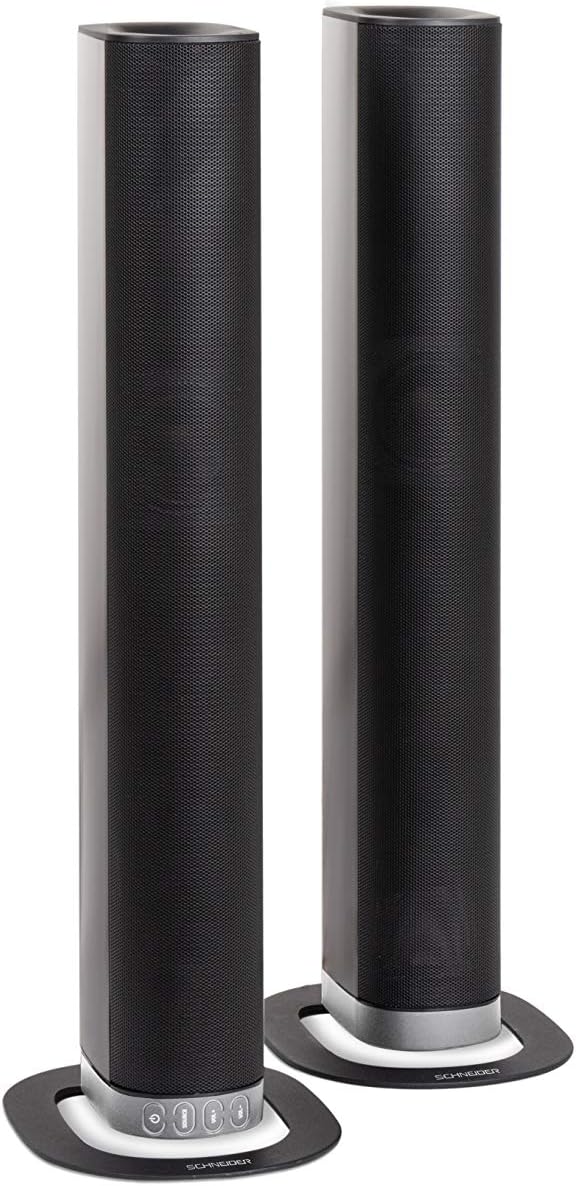
Image 2.2: The soundbar configured as two independent vertical speaker columns.
2.2 การเชื่อมต่อกับแหล่งจ่ายไฟ
Connect the power cable to the soundbar's power input and then to a suitable wall outlet. The soundbar will enter standby mode.
2.3 การเชื่อมต่อเสียง
เลือกวิธีการเชื่อมต่อแหล่งกำเนิดเสียงของคุณวิธีใดวิธีหนึ่งต่อไปนี้:
- HDMI (อาร์ค): For optimal audio quality and control, connect an HDMI cable from the soundbar's HDMI ARC port to your TV's HDMI ARC port. This allows your TV remote to control the soundbar's volume.
- ออปติคอล: Connect an optical cable from the soundbar's OPTICAL input to your TV's optical output.
- ช่องเสริม: Use the included 3.5mm Jack cable to connect the soundbar's AUX input to the headphone jack or audio output of your device (e.g., TV, smartphone, MP3 player).
- บลูทูธ: For wireless connection, refer to the Bluetooth pairing instructions in the Operating section.
3. คู่มือการใช้งาน
3.1 เปิด/ปิดเครื่อง
กดปุ่ม พลัง กดปุ่มบนซาวด์บาร์หรือรีโมทคอนโทรลเพื่อเปิดหรือปิดเครื่อง
3.2 การเลือกแหล่งที่มา
กดปุ่ม แหล่งที่มา button on the soundbar or the remote control to cycle through the available input sources: Bluetooth (BT), HDMI (ARC), Optical, and AUX.

Image 3.1: On-unit control buttons for power, source selection, and volume adjustment.
3.3 การควบคุมระดับเสียง
ใช้ เล่ม+ และ ฉบับ- กดปุ่มบนซาวด์บาร์หรือรีโมทคอนโทรลเพื่อปรับระดับเสียง กดปุ่ม MUTE กดปุ่มบนรีโมทเพื่อปิดเสียงชั่วคราว
3.4 การจับคู่บลูทูธ
- Select Bluetooth as the source input. The soundbar will enter pairing mode, indicated by a flashing LED.
- บนอุปกรณ์เคลื่อนที่ของคุณ (สมาร์ทโฟน แท็บเล็ต ฯลฯ) เปิดใช้งานบลูทูธและค้นหาอุปกรณ์ที่มีอยู่
- Select "SC600SND" from the list of devices.
- Once paired, the LED indicator on the soundbar will stop flashing and remain solid. You can now play audio wirelessly from your device.
โหมดเสียง 3.5 โหมด
The remote control includes dedicated buttons for different sound modes to optimize your listening experience:
- ข่าว: ช่วยเพิ่มความชัดเจนของเสียงพูดสำหรับการออกอากาศข่าวและการสนทนา
- ภาพยนตร์: Provides a more immersive soundstage สำหรับภาพยนตร์
- ดนตรี: ปรับแต่งเสียงให้เหมาะสมสำหรับการเล่นเพลง

Image 3.2: The included remote control with dedicated buttons for power, source, volume, mute, and sound modes.
4. การบำรุงรักษา
เพื่อให้ซาวด์บาร์ของคุณมีอายุการใช้งานยาวนานและมีประสิทธิภาพเหมาะสมที่สุด โปรดปฏิบัติตามคำแนะนำในการบำรุงรักษาดังต่อไปนี้:
- การทำความสะอาด: Use a soft, dry cloth to clean the exterior surfaces of the soundbar. Do not use liquid cleaners, aerosols, or abrasive materials, as these can damage the finish or internal components.
- การระบายอากาศ : Ensure that the soundbar's ventilation openings are not blocked. Proper airflow prevents overheating.
- พื้นที่จัดเก็บ: If storing the soundbar for an extended period, disconnect it from power and store it in a cool, dry place, away from direct sunlight and extreme temperatures.
- การจัดการ: อย่าทำลำโพงซาวด์บาร์ตกหรือกระแทกอย่างแรง
5 การแก้ไขปัญหา
If you encounter issues with your SC600SND soundbar, refer to the following common problems and solutions:
- ไม่มีไฟฟ้า:
- ตรวจสอบให้แน่ใจว่าสายไฟเชื่อมต่อกับซาวด์บาร์และเต้ารับไฟฟ้าที่ใช้งานได้สนิทแล้ว
- ตรวจสอบว่าเต้ารับไฟฟ้าใช้งานได้หรือไม่โดยเสียบอุปกรณ์อื่นเข้าไป
- ไม่มีเสียง:
- Verify that the correct input source (HDMI, Optical, AUX, Bluetooth) is selected on the soundbar.
- Increase the volume on both the soundbar and your connected audio source (e.g., TV, smartphone).
- โปรดตรวจสอบให้แน่ใจว่าซาวด์บาร์ไม่ได้ถูกปิดเสียงอยู่
- Check all audio cables for secure connections and damage. Try a different cable if possible.
- If using HDMI ARC, ensure your TV's HDMI ARC function is enabled in its settings.
- Poor Sound Quality / Distorted Audio:
- Adjust the volume levels to avoid distortion.
- Try switching between the different sound modes (NEWS, MOVIE, MUSIC) to see if one improves the audio for your content.
- Ensure the soundbar is placed on a stable surface and not vibrating excessively.
- หากใช้บลูทูธ โปรดตรวจสอบให้แน่ใจว่าอุปกรณ์ของคุณอยู่ในระยะทำการและไม่มีสิ่งกีดขวางใดๆ ที่ก่อให้เกิดการรบกวน
- ปัญหาการจับคู่บลูทูธ:
- ตรวจสอบให้แน่ใจว่าซาวด์บาร์อยู่ในโหมดจับคู่บลูทูธ (ไฟ LED กระพริบ)
- Make sure your device's Bluetooth is enabled and it is searching for new devices.
- ย้ายอุปกรณ์ของคุณให้เข้าใกล้ซาวด์บาร์มากขึ้น
- หากเคยจับคู่ไว้แล้ว ให้ลองยกเลิกการจับคู่แล้วจับคู่กับอุปกรณ์อีกครั้ง
- รีโมทคอนโทรลไม่ทำงาน:
- ตรวจสอบและเปลี่ยนแบตเตอรี่ในรีโมทคอนโทรล
- ตรวจสอบให้แน่ใจว่าไม่มีสิ่งกีดขวางระหว่างรีโมทคอนโทรลและเซ็นเซอร์ของซาวด์บาร์
- ชี้รีโมทไปที่ซาวด์บาร์โดยตรง
6. ข้อมูลจำเพาะ
| คุณสมบัติ | ข้อมูลจำเพาะ |
|---|---|
| หมายเลขรุ่น | SC600SND |
| ช่องทางการ | 2.0 |
| กำลังขับ | 30 วัตต์ (15 วัตต์ x 2) |
| เทคโนโลยีการเชื่อมต่อ | Bluetooth, HDMI (ARC), Optical, Aux |
| การสื่อสารแบบไร้สาย | บลูทูธ |
| วิธีการควบคุม | รีโมทคอนโทรล |
| ประเภทลำโพง | ซาวด์บาร์ |
| ขนาดลำโพง | 2 นิ้ว |
| แหล่งพลังงาน | เคเบิลไฟฟ้า |
| Product Dimensions (Monoblock) | 80.5 x 6.2 x 9 ซม. |
| น้ำหนักผลิตภัณฑ์ | 2.5 กิโลกรัม |
| ส่วนประกอบที่รวมอยู่ | Remote Control, 3.5mm Jack Cable |
| สี | สีดำ |
7. การรับประกันและการสนับสนุน
7.1 การรับประกันแบบจำกัด
This Schneider SC600SND Soundbar is covered by a Limited Warranty. Please refer to the warranty card included with your product or contact your retailer for specific terms and conditions regarding warranty coverage and duration.
7.2 การสนับสนุนลูกค้า
For technical assistance, troubleshooting beyond this manual, or warranty claims, please contact the retailer where you purchased the product or visit the official Schneider webเว็บไซต์สำหรับข้อมูลสนับสนุน