
1. บทนำ
Thank you for choosing the Kungfuking Surge Protector Power Strip with USB Ports. This device is designed to provide convenient power access and surge protection for your electronic devices. It features two AC outlets and two USB ports, along with a 6.56 ft extension cord and a flat plug for versatile placement. This manual provides essential information for safe installation, operation, and maintenance of your power strip.

Figure 1: Kungfuking Surge Protector Power Strip (Model: Kungfuking 2AC+2USB)
2. คำแนะนำด้านความปลอดภัยที่สำคัญ
โปรดอ่านและทำความเข้าใจคำแนะนำด้านความปลอดภัยทั้งหมดก่อนใช้ผลิตภัณฑ์นี้ การไม่ปฏิบัติตามคำแนะนำเหล่านี้อาจส่งผลให้เกิดไฟฟ้าช็อต ไฟไหม้ หรือบาดเจ็บสาหัสได้
- อย่าทำ exceed the electrical ratings of 120V, 12A, 60Hz, and 2.1A for USB ports.
- อย่าทำ use in wet environments or near water.
- อย่าทำ disassemble or modify the device.
- อย่าทำ use with aquariums or other water-related products.
- อย่าทำ เสียบปลั๊กไฟอื่นที่เคลื่อนย้ายได้
- อย่าทำ use if the cord or plug is damaged.
- เก็บให้พ้นจากมือเด็ก
- ตรวจสอบให้แน่ใจว่าเสียบปลั๊กเข้ากับเต้ารับติดผนังจนสุดแล้ว
- ผลิตภัณฑ์นี้สำหรับใช้ภายในอาคารเท่านั้น
3. คุณสมบัติของผลิตภัณฑ์
The Kungfuking Surge Protector Power Strip is designed for convenience and safety, offering multiple power options in a compact form factor.
- เต้ารับไฟฟ้ากระแสสลับ 2 ช่อง: Provides standard power for electronic devices.
- พอร์ต USB-A จำนวน 2 พอร์ต: Delivers 5V/2.1A for charging smartphones, tablets, and other USB-powered devices.
- สายต่อพ่วงยาว 6.56 ฟุต: Offers flexibility in placement, reaching distant outlets.
- การออกแบบปลั๊กแบน: Minimizes obstruction and allows furniture to be placed closer to the wall.
- การป้องกันไฟกระชาก: ปกป้องอุปกรณ์ที่เชื่อมต่อจากไฟกระชากและไฟกระชาก
- โครงสร้างทนทาน: Built with fireproof ABS+PC materials for enhanced safety.
- การออกแบบที่ติดตั้งได้: Can be easily mounted on or under desks, walls, or other surfaces.

รูปที่ 2: คุณสมบัติหลักและข้อมูลจำเพาะ

Figure 3: All-in-One Charging Station in use
4. การตั้งค่าและการติดตั้ง
The power strip can be installed in various locations to suit your needs. Mounting screws are included for secure installation.
4.1 ตัวเลือกการติดตั้ง
The power strip offers flexible mounting options:
- Under Desk/Table: Mount horizontally or vertically under a desk or table to keep surfaces clear.
- ติดผนัง: Secure to a wall for convenient access, such as near a TV or bedside.
- Side of Cabinets/Headboards: Install vertically on the side of furniture for discreet power access.

Figure 4: Installation Options and Dimensions
4.2 ขั้นตอนการติดตั้ง
- เลือกตำแหน่ง: Select a flat, stable surface for mounting, ensuring it is within reach of a wall outlet and your devices.
- ทำเครื่องหมายรูสกรู: Place the power strip in the desired position and mark the locations for the mounting screws using a pencil.
- เจาะรูนำร่อง (ไม่จำเป็น): For wood surfaces, you may pre-drill small pilot holes to prevent wood splitting.
- Secure the Power Strip: Use the provided screws to firmly attach the power strip to the surface. Ensure it is securely fastened before use.
- เชื่อมต่อกับพลังงาน: Plug the power strip's flat plug into a standard 120V wall outlet. The flat plug design allows for placement behind furniture.
4.3 อดีตampไฟล์การติดตั้ง
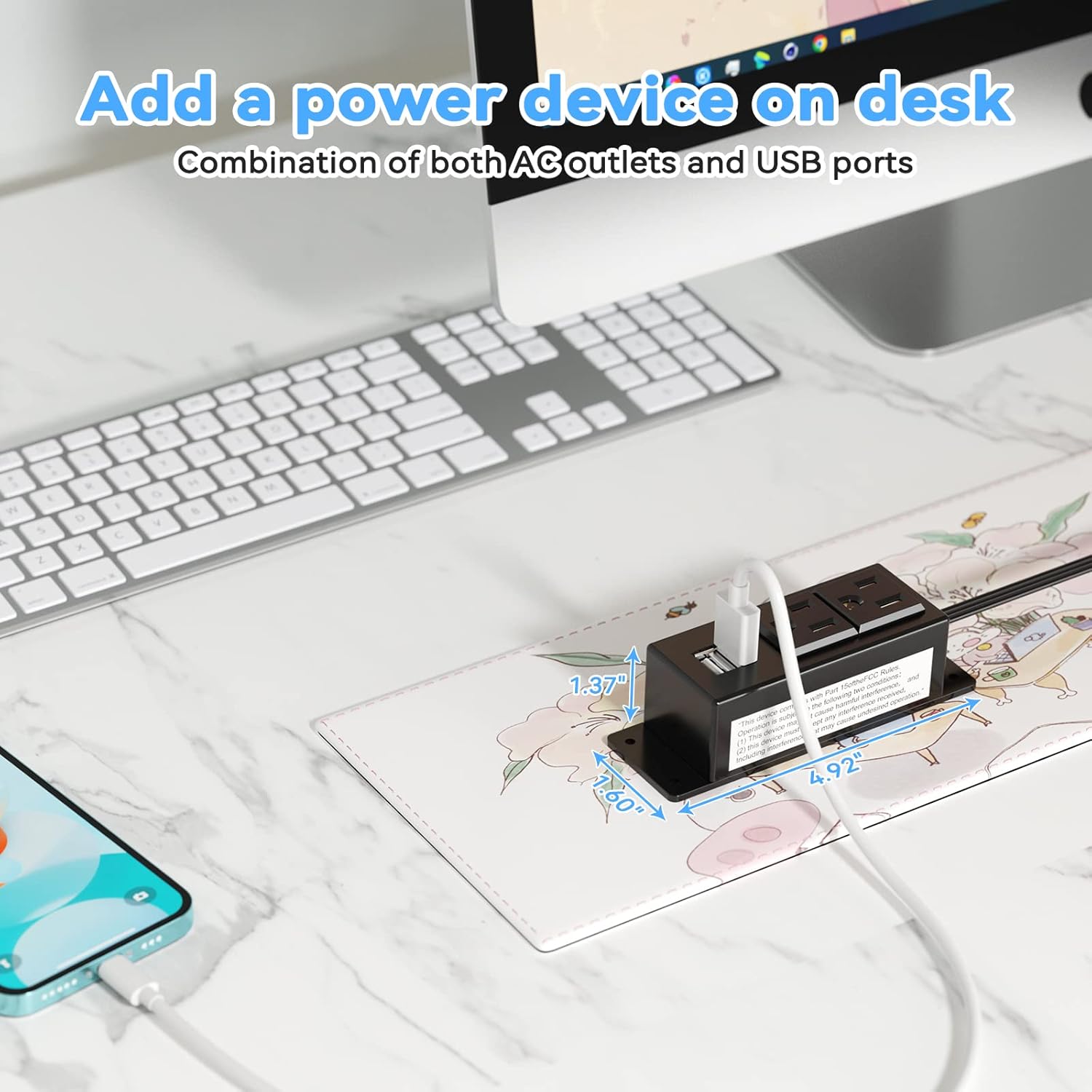
Figure 5: Desk Surface Installation

Figure 6: Under-Desk Installation

Figure 7: Wall-Mounted for TV

Figure 8: Nightstand Installation

Figure 9: Kitchen Cabinet Installation

Figure 10: Flat Plug for Space-Saving Placement
5. คู่มือการใช้งาน
Using your Kungfuking Surge Protector Power Strip is straightforward:
- เสียบเข้ากับเต้ารับบนผนัง: Ensure the power strip's flat plug is securely connected to a grounded 120V AC wall outlet.
- เชื่อมต่ออุปกรณ์ไฟฟ้ากระแสสลับ: Insert the power cords of your electronic devices into the two AC outlets.
- เชื่อมต่ออุปกรณ์ USB: Plug your USB charging cables into the two USB-A ports to charge compatible devices.
- เปิดเครื่อง: The power strip is designed for continuous operation once plugged in. There is no on/off switch.
- ตรวจสอบการใช้งาน: Avoid overloading the power strip by ensuring the total power consumption of connected devices does not exceed the rated capacity (12A, 120V).
6 การแก้ไขปัญหา
หากคุณพบปัญหาเกี่ยวกับปลั๊กพ่วง โปรดดูปัญหาและวิธีแก้ไขที่พบบ่อยต่อไปนี้:
| ปัญหา | สาเหตุที่เป็นไปได้ | สารละลาย |
|---|---|---|
| ไม่มีไฟจากปลั๊กไฟหรือพอร์ต USB |
|
|
| อุปกรณ์ USB ชาร์จไฟไม่เข้า |
|
|
| Power strip feels hot. |
|
|
7. ข้อมูลจำเพาะ
| คุณสมบัติ | รายละเอียด |
|---|---|
| แบบอย่าง | Kungfuking 2AC+2USB |
| AC Outlets AC | 2 |
| พอร์ต USB | 2 (ยูเอสบี-เอ) |
| อินพุต Voltage | กระแสสลับ 120 โวลต์ |
| พิกัดกระแสไฟ AC | 12เอ |
| ความถี่ | 60เฮิรตซ์ |
| เอาท์พุต USB | 5V / 2.1A (Total) |
| ความยาวสายไฟ | 6.56 ฟุต (2 เมตร) |
| ประเภทปลั๊ก | ปลั๊กแบน |
| วัสดุ | ทนไฟ ABS+PC |
| ขนาด (โดยประมาณ) | 4.92 x 3.74 x 1.37 นิ้ว (ยาว x กว้าง x สูง) |
| น้ำหนัก (โดยประมาณ) | 10.5 ออนซ์ |
| คุณสมบัติพิเศษ | Surge Protection, Mountable Design |
8. การบำรุงรักษา
Proper maintenance ensures the longevity and safe operation of your power strip:
- การทำความสะอาด: Disconnect the power strip from the wall outlet before cleaning. Use a dry, soft cloth to wipe the exterior. Do not use liquid cleaners or sprays.
- การตรวจสอบ: Periodically inspect the power cord, plug, and housing for any signs of damage, such as cuts, fraying, or cracks. If damage is found, discontinue use immediately.
- พื้นที่จัดเก็บ: เมื่อไม่ได้ใช้งานเป็นเวลานาน ควรเก็บปลั๊กพ่วงไว้ในที่แห้งและเย็น หลีกเลี่ยงแสงแดดโดยตรงและความชื้น
9. การรับประกันและการสนับสนุน
Kungfuking products are designed for reliability and performance. For warranty information, technical support, or any questions regarding your product, please refer to the contact information provided at the point of purchase or visit the official Kungfuking webเว็บไซต์.
โปรดเก็บหลักฐานการซื้อของคุณไว้เพื่อเรียกร้องการรับประกัน