
1. บทนำ
The Walfront HT-1202 Digital Water Quality Tester is a versatile instrument designed for accurate measurement of pH and mV values, along with temperature, in various aqueous solutions. This device is suitable for a wide range of applications including environmental monitoring, wastewater treatment, chemical laboratories, pharmaceutical research, fermentation processes, chemical engineering, and water supply analysis. Its high measurement accuracy and user-friendly design make it an essential tool for professionals and enthusiasts alike.

Image 1.1: Walfront HT-1202 Digital Water Quality Tester
2. คุณสมบัติของผลิตภัณฑ์
- ช่วงการวัดกว้าง: Measures pH from 0 to 14 with a 0.01 resolution and mV from -415mV to 415mV.
- ความแม่นยำสูง: Provides pH measurements with an accuracy of up to ±0.05pH and mV measurements with ±0.1% FS.
- การชดเชยอุณหภูมิ: Features automatic temperature compensation for accurate readings across a range of 0℃ to 60℃.
- จอ LCD ขนาดใหญ่: Equipped with a large LCD that simultaneously displays pH or mV and temperature. The backlight activates automatically for clear viewในสภาพแสงต่างๆ
- ปิดเครื่องอัตโนมัติ: Includes an automatic power-off function after 4 minutes of inactivity to conserve battery life.
- ตรวจสอบการสอบเทียบ: Incorporates a calibration check function to validate instrument performance and ensure reliability.

Image 2.1: Key components of the HT-1202 Digital Water Quality Tester
3. เนื้อหาบรรจุภัณฑ์
เมื่อเปิดบรรจุภัณฑ์ โปรดตรวจสอบว่าประกอบด้วยสิ่งของต่อไปนี้ทั้งหมด:
- 1 x Walfront HT-1202 Digital Water Quality Tester
- 1 x Combined Electrode
- 1 x Package of Standard Buffer Reagents (for calibration)
- 1 x Electrode Soaking Liquid
- 1 x คู่มือการใช้งาน
- 1 x Black Carrying Case

Image 3.1: HT-1202 tester and its accessories

Image 3.2: HT-1202 kit in its protective carrying case
4. การตั้งค่า
4.1 การติดตั้งแบตเตอรี่
- ค้นหาฝาครอบช่องใส่แบตเตอรี่ที่ด้านหลังของอุปกรณ์
- เลื่อนหรือปลดคลิปฝาครอบเพื่อเปิดช่อง
- Insert the required batteries (typically AA, refer to the compartment label for exact type and polarity) ensuring correct orientation.
- ปิดฝาช่องใส่แบตเตอรี่ให้แน่น
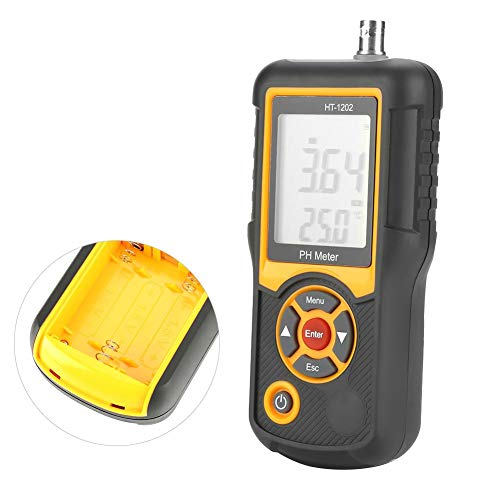
Image 4.1: Battery compartment of the HT-1202
4.2 การเชื่อมต่ออิเล็กโทรด
- Carefully remove the protective cap from the combined electrode.
- Connect the electrode cable to the host interface port located at the top of the HT-1202 tester. Ensure a firm and secure connection.
4.3 การเตรียมการเบื้องต้น
- Electrode Soaking: Before first use or after prolonged storage, soak the electrode in the provided electrode soaking liquid for at least 30 minutes to ensure optimal performance.
- Buffer Solution Preparation: When preparing buffer solutions for calibration using the provided reagents, use distilled water that has been boiled for 15-30 minutes and then cooled. This process removes dissolved carbon dioxide, which can affect pH accuracy. Avoid prolonged exposure to air during cooling to prevent re-absorption of carbon dioxide.
5. คู่มือการใช้งาน
5.1 เปิด/ปิดเครื่อง
- หากต้องการเปิดเครื่อง ให้กดปุ่ม พลัง button. The LCD backlight will automatically activate.
- The device will automatically power off after 4 minutes of inactivity to save energy. To manually power off, press and hold the พลัง ปุ่ม.
5.2 การสอบเทียบ
Regular calibration is crucial for maintaining the accuracy of your HT-1202 tester. Use the provided standard buffer reagents to prepare calibration solutions (e.g., pH 4.00, pH 6.86, pH 9.18).
- เปิดเครื่องมิเตอร์
- ล้างอิเล็กโทรดด้วยน้ำกลั่น แล้วซับให้แห้งเบาๆ ด้วยกระดาษทิชชูสะอาด
- Immerse the electrode into the first standard buffer solution (e.g., pH 6.86).
- กดปุ่ม เมนู button to enter calibration mode. Follow the on-screen prompts to select the appropriate buffer value.
- กด เข้า to confirm. The meter will automatically recognize the buffer and calibrate. Wait for the reading to stabilize and for the calibration indicator to confirm completion.
- Repeat the process for other buffer solutions (e.g., pH 4.00 and pH 9.18) as needed for multi-point calibration.
- After calibration, rinse the electrode thoroughly with distilled water.
5.3 การวัด
- Ensure the meter is calibrated and the electrode is clean.
- จุ่มอิเล็กโทรดลงในสารละลายample solution to be tested. Ensure the electrode tip is fully submerged.
- คนสารละลายเบา ๆ เพื่อให้เป็นเนื้อเดียวกันและรอให้ค่าที่วัดได้คงที่
- Read the pH or mV value and temperature displayed on the LCD screen.
- หลังจากทำการวัดเสร็จแล้ว ให้ล้างอิเล็กโทรดด้วยน้ำกลั่นและใส่ฝาครอบป้องกันกลับเข้าที่

Image 5.1: HT-1202 in operation
6. การบำรุงรักษา
6.1 การดูแลรักษาอิเล็กโทรด
- Always keep the electrode tip moist. Store it in the provided electrode soaking liquid or a suitable storage solution when not in use. Never store the electrode dry.
- Rinse the electrode thoroughly with distilled water before and after each measurement to prevent cross-contamination and residue buildup.
- If the electrode becomes dirty or readings become sluggish, clean it according to the electrode manufacturer's instructions (typically involving a mild cleaning solution).
6.2 การเปลี่ยนแบตเตอรี่
When the low power indicator appears on the screen, replace the batteries promptly to ensure continuous and accurate operation. Refer to Section 4.1 for battery installation instructions.
6.3 พื้นที่จัดเก็บ
Store the HT-1202 tester and its accessories in the provided black carrying case in a cool, dry place, away from direct sunlight and extreme temperatures. Ensure the electrode is properly stored with its protective cap and soaking solution.
7 การแก้ไขปัญหา
- No Power / Display Off: ตรวจสอบการติดตั้งแบตเตอรี่และให้แน่ใจว่าแบตเตอรี่ไม่หมด เปลี่ยนแบตเตอรี่หากจำเป็น
- การอ่านค่าที่ไม่ถูกต้อง:
- Recalibrate the meter using fresh standard buffer solutions.
- Ensure the electrode is clean and properly soaked.
- Verify that the temperature compensation is functioning correctly.
- Check for any damage to the electrode.
- เวลาตอบสนองช้า: The electrode may be dry or dirty. Clean and re-soak the electrode.
- ไฟแสดงสถานะพลังงานต่ำ: เปลี่ยนแบตเตอรี่ทันที
8. ข้อมูลจำเพาะ
| พารามิเตอร์ | ค่า |
|---|---|
| ช่วงการวัด (pH) | ค่า pH 0.00 - 14.00 |
| Measurement Range (mV) | -415mV - 415mV |
| Resolution (pH) | 0.01 pH |
| ความละเอียด (มิลลิโวลต์) | 1 mV |
| ความแม่นยำ (pH) | ±0.05พีเอช |
| Accuracy (mV) | ±0.1% ฟอซ. |
| ช่วงการชดเชยอุณหภูมิ | 0℃ - 60℃ |
| Measured Solution Temperature | 5℃ - 60℃ |
| จอแสดงผล LCD | Three and a half digits |
| ปิดเครื่องอัตโนมัติ | 4 นาที |
| ขนาดสินค้า | 6.5 x 2.95 x 1.34 นิ้ว (165 x 75 x 32 มม.) |
| น้ำหนัก | ประมาณ 1.54 ปอนด์ (692 กรัม) |
| ผู้ผลิต | Walfront |

Image 8.1: HT-1202 product dimensions
9. Environmental Conditions for Use
To ensure optimal performance and longevity of the instrument, adhere to the following environmental conditions:
- อุณหภูมิแวดล้อม: 5℃ - 40℃
- ความชื้นสัมพัทธ์: ≤85% RH (ไม่กลั่นตัว)
- การสั่นสะเทือน: Operate in an environment free from vibrations that could affect performance.
- ก๊าซกัดกร่อน: Ensure the surrounding air is free from corrosive gases.
- การรบกวนทางแม่เหล็ก: Avoid other magnetic field interference outside the Earth's magnetic field.
10. การรับประกันและการสนับสนุน
For information regarding warranty coverage, technical support, or service inquiries for your Walfront HT-1202 Digital Water Quality Tester, please refer to the contact information provided with your purchase documentation or visit the official Walfront webไซต์ โปรดเก็บใบเสร็จรับเงินของคุณไว้เป็นหลักฐานการซื้อสำหรับการเรียกร้องการรับประกันใดๆ