
1. บทนำ
This manual provides essential instructions for the safe and efficient operation of your Areyourshop 12/24V 50A MPPT Solar Charge Controller. Please read this manual thoroughly before installation and use to ensure proper functionality and longevity of the device. This controller is designed to manage power flow from solar panels to batteries and loads, optimizing charging efficiency.
2. สินค้าหมดview
The Areyourshop MPPT Solar Charge Controller is a robust device designed for solar power systems. It features an LCD display for monitoring, dual USB outputs for charging external devices, and comprehensive protection mechanisms.
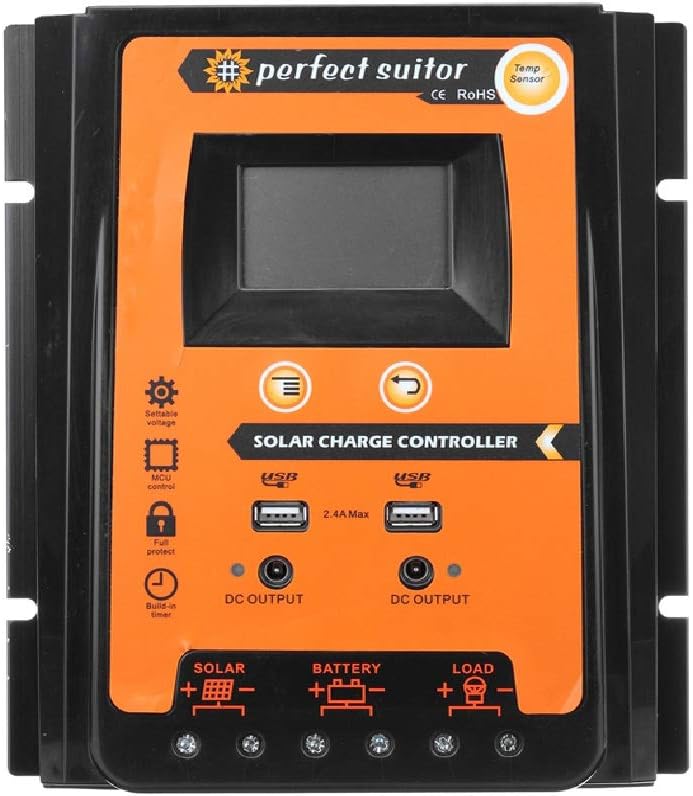
ภาพ: ด้านหน้า view of the Areyourshop 50A MPPT Solar Charge Controller, showing the LCD screen, control buttons, USB ports, and connection terminals.
คุณสมบัติหลัก:
- MPPT Charging: Utilizes Maximum Power Point Tracking technology for efficient solar energy conversion.
- ปริมาตรอัตโนมัติtagการปรับตัว: ตรวจจับแรงดันไฟระบบ 12V หรือ 24V โดยอัตโนมัติtage.
- จอแสดงผล LCD: Provides real-time monitoring of system status and parameters.
- เอาต์พุต USB แบบคู่: Two 2.4A USB ports for charging mobile devices.
- การป้องกันที่ครอบคลุม: Includes overcharge, over-discharge, overcurrent, and short-circuit protection.
- พารามิเตอร์ที่ปรับได้: Control parameters can be adjusted to suit various battery types.
- การชดเชยอุณหภูมิ: Automatic temperature compensation for accurate charging and discharging voltage.

Image: Diagram highlighting features such as high conversion efficiency MPPT, intelligent LCD display, battery charge voltage/current/power, PV voltage/current power generation, perfect protection, and load power consumption work mode.
3. ข้อมูลจำเพาะ
| พารามิเตอร์ | ค่า |
|---|---|
| แบบอย่าง | E401-A002 (PVSC50A) |
| ประเภทการชาร์จ | เอ็มพีพีที |
| เล่มระบบtage | 12V / 24V (ระบุอัตโนมัติ) |
| กระแสไฟชาร์จ/ปล่อยที่กำหนด | 50เอ |
| สูงสุด พีวีฉบับtage | 50โวลต์ |
| เอาท์พุต USB | Dual USB, 2.4A each (5V total) |
| โอเวอร์ชาร์จโวลtage | 13.7V (for 12V system) / 27.4V (for 24V system) |
| โอเวอร์ดิสชาร์จโวลtage | 10.5-11V (for 12V system) / 21-22V (for 24V system) |
| Recovery Discharge Voltage | 12.6V (for 12V system) / 25.2V (for 24V system) |
| การชดเชยอุณหภูมิ | -3mv/℃/cell |
| Empty Load Wastage | <45มิลลิแอมป์ |
| วงโวลtage วาง | <200mv |
| แสดง | จอแสดงผล LCD |
| Dimensions (50A) | 21 x 19.2 x 4 ซม. (ประมาณ 8.27 x 7.56 x 1.57 นิ้ว) |
| น้ำหนักสินค้า | ประมาณ 1.98 ปอนด์ |
| วัสดุ | พลาสติก |
| คุณสมบัติพิเศษ | กันน้ำ |

Image: The 50A solar charge controller with its physical dimensions (21cm, 19.2cm, 4cm) indicated.
4. การตั้งค่าและการติดตั้ง
การติดตั้งอย่างถูกต้องมีความสำคัญอย่างยิ่งต่อการทำงานที่ปลอดภัยและมีประสิทธิภาพของตัวควบคุมการชาร์จพลังงานแสงอาทิตย์ของคุณ โปรดปฏิบัติตามขั้นตอนเหล่านี้อย่างระมัดระวัง
หมายเหตุด้านความปลอดภัยที่สำคัญ:
- This controller is designed exclusively for LEAD-ACID batteries. Do not use with other battery types (e.g., Lithium-ion, NiMH) as this may cause damage to the controller or battery.
- Ensure all connections are secure and correct polarity is observed to prevent damage.
- Install the controller in a well-ventilated area, away from direct sunlight and moisture.
วิธีการเชื่อมต่อ:
เชื่อมต่อส่วนประกอบตามลำดับต่อไปนี้:
- เชื่อมต่อแบตเตอรี่: First, connect the battery to the controller's battery terminals (marked with a battery symbol). Ensure correct polarity (+ to + and - to -). The controller will automatically detect 12V or 24V system voltage.
- เชื่อมต่อแผงโซล่าเซลล์: Next, connect the solar panel to the controller's solar terminals (marked with a solar panel symbol). Ensure correct polarity.
- เชื่อมต่อโหลด: Finally, connect your DC load to the controller's load terminals (marked with a light bulb symbol). Ensure correct polarity.

Image: A clear diagram illustrating the correct connection sequence: Solar Panel to Controller, Battery to Controller, and Load to Controller.
5. คู่มือการใช้งาน
The controller features an intuitive LCD display and control buttons for monitoring and adjusting settings.
จอแสดงผล LCD และปุ่มกด:

ภาพ: รายละเอียด view of the controller's LCD display and control buttons. Labels indicate: 1. Solar panel, 2. Battery, 3. Load, 4. Warming, 5. Digital display, 6. Voltage, 7. Timer setting, 8. Unit symbol value. The 'Menu' button switches display or function, and 'Return' button is also shown.
- Digital Display (5): แสดงพารามิเตอร์ต่างๆ เช่น ปริมาตรtage, current, and charge status.
- ปุ่มเมนู: Press to cycle through different display screens or functions. Long press to enter setting mode for adjustable parameters.
- ปุ่มย้อนกลับ: Used to exit setting mode or confirm selections.
การปรับพารามิเตอร์:
The controller allows adjustment of certain parameters to optimize performance for your specific lead-acid battery. Refer to the LCD display and use the Menu/Return buttons to navigate and modify settings such as overcharge voltage, ปริมาตรการคายประจุเกินtage, and load control mode. Consult your battery's specifications for recommended voltagการตั้งค่าอี
เอาท์พุต USB:
The dual 2.4A USB ports provide 5V output for charging small electronic devices. These outputs are active when the controller is powered.
6. การบำรุงรักษา
การบำรุงรักษาอย่างสม่ำเสมอจะช่วยให้ตัวควบคุมการชาร์จพลังงานแสงอาทิตย์ของคุณมีอายุการใช้งานยาวนานและทำงานได้อย่างมีประสิทธิภาพสูงสุด
- ความสะอาด : รักษาตัวควบคุมให้สะอาด ปราศจากฝุ่นและเศษขยะ ใช้ผ้าแห้งเช็ดทำความสะอาด
- การเชื่อมต่อ: ตรวจสอบการเชื่อมต่อสายไฟทั้งหมดเป็นระยะเพื่อให้แน่ใจว่าแน่นหนาและปราศจากการกัดกร่อน การเชื่อมต่อที่หลวมอาจทำให้ไฟฟ้าดับหรือเกิดความร้อนสูงเกินไป
- การระบายอากาศ : ตรวจสอบให้แน่ใจว่าบริเวณที่ติดตั้งมีการระบายอากาศที่ดี เพื่อป้องกันไม่ให้ตัวควบคุมร้อนเกินไป
- สุขภาพแบตเตอรี่: Monitor your battery's health and electrolyte levels (for flooded lead-acid batteries) as per the battery manufacturer's recommendations.
7 การแก้ไขปัญหา
ส่วนนี้จะกล่าวถึงปัญหาทั่วไปที่คุณอาจพบเจอเกี่ยวกับตัวควบคุมการชาร์จพลังงานแสงอาทิตย์ของคุณ
- ไม่มีจอแสดงผล/ไม่มีพลังงาน: ตรวจสอบการเชื่อมต่อแบตเตอรี่และตรวจสอบให้แน่ใจว่าแบตเตอรี่มีประจุเพียงพอ ตรวจสอบการเชื่อมต่อแผงโซลาร์เซลล์ด้วย
- Controller Stops Output to Load: The controller is designed to protect the battery from over-discharge. If the battery voltage drops below the set over-discharge voltage (e.g., 10.5-11V for 12V systems), the load output will be disconnected. The output will automatically recover once the solar panel charges the battery back to the recovery discharge voltage (e.g., 12.6V for 12V systems).
- แบตเตอรี่ไม่ชาร์จ: Verify solar panel connections and ensure the panel is receiving adequate sunlight. Check for any shading or damage to the solar panel. Ensure the battery is properly connected and not severely discharged.
- การป้องกันการชาร์จไฟเกิน: The controller will stop charging the battery once it reaches the overcharge voltage (e.g., 13.7V for 12V systems) to prevent damage.
- Vol .ไม่ถูกต้องtage การอ่าน: Ensure all connections are secure. Temperature compensation is automatic, but extreme temperatures can affect readings.
8. หมายเหตุและคำเตือนที่สำคัญ
- Lead-Acid Batteries Only: This controller is specifically designed for use with LEAD-ACID batteries. Using it with other battery chemistries may result in damage to the battery or the controller, and poses a safety risk.
- Simple MPPT Controller: This product is a simple MPPT controller. While it offers efficient charging, it does not include advanced features such as communication interfaces found in higher-end multifunctional MPPT controllers.
- สถานการณ์การใช้งาน: This controller is suitable for various applications including farm solar power systems, solar street lights, solar patio lights, solar billboards, outdoor camping solar systems, and ship solar systems.

ภาพ: ภาพตัวอย่างamples of suitable application scenarios for the solar charge controller, including residential solar, water pumping, street lighting, and recreational use.
9. การรับประกันและการสนับสนุน
For any technical assistance or warranty inquiries, please contact Areyourshop customer support. Keep your purchase receipt as proof of purchase.
Manufacturer: Areyourshop


