
1. บทนำ
The Symcode MJ-X5 is a versatile 3-in-1 barcode scanner designed for efficient data capture. It supports USB wired, 2.4G wireless, and Bluetooth 4.1 wireless connectivity, offering flexibility for various operating environments. Its compact and lightweight design makes it highly portable, suitable for a wide range of applications from retail to inventory management.
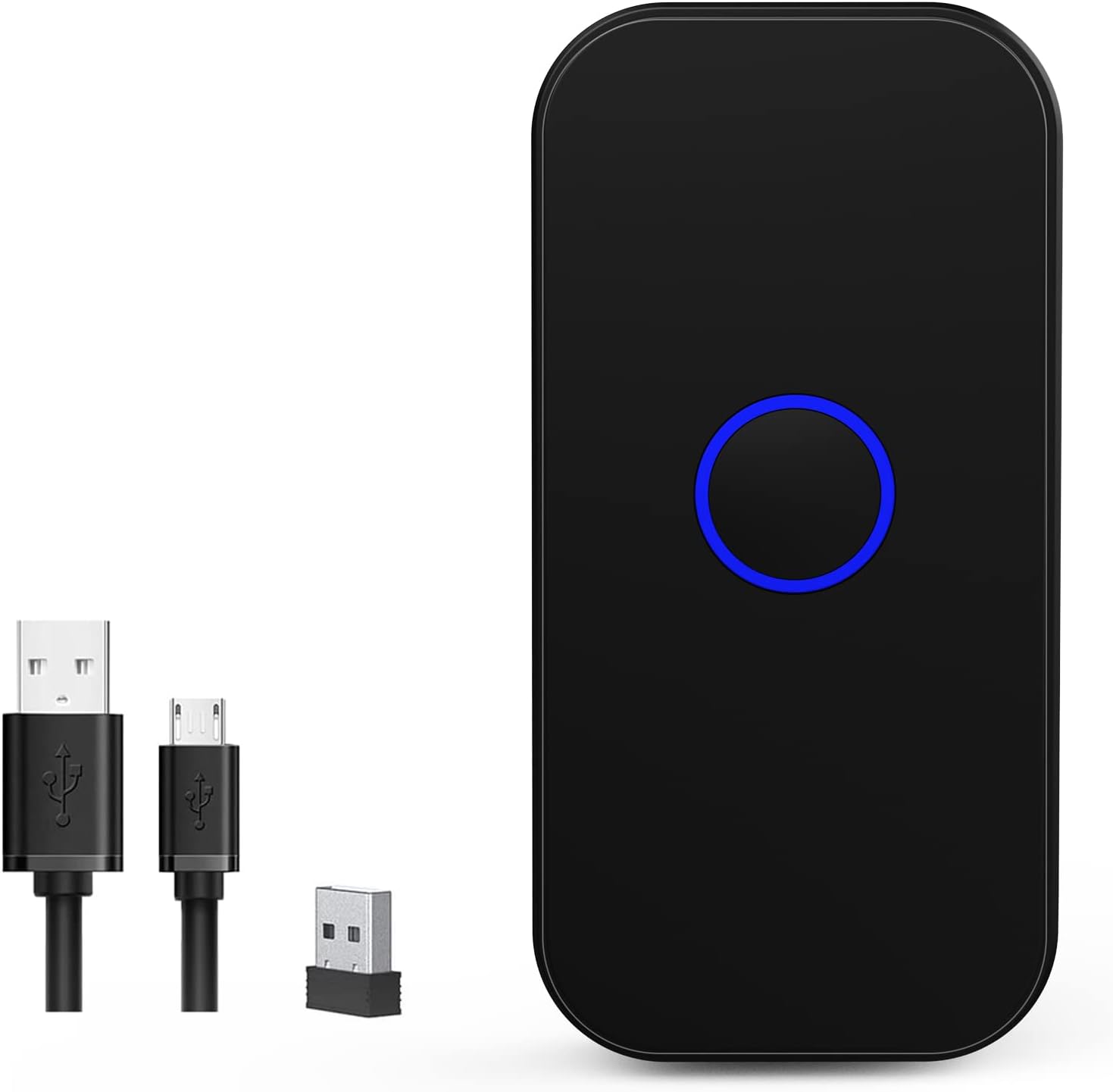
Figure 1: Symcode MJ-X5 Barcode Scanner and accessories.
คุณสมบัติหลัก:
- การเชื่อมต่อ 3-in-1: Seamlessly switch between USB wired, 2.4G wireless, and Bluetooth 4.1 modes.
- ขนาดกะทัดรัดและพกพาสะดวก: Weighing only 35g (1.23oz), its mini size ensures easy portability.
- การตอบสนองทางสัมผัส: Provides a mild vibration upon successful scan, in addition to buzzer and LED light. The buzzer can be muted for quiet operation.
- ความเข้ากันได้ในวงกว้าง: Works with Windows XP/7/8/10, Mac OS, Linux, Android, and iOS devices.
- โหมดอัปโหลดสองโหมด: Supports instant upload for real-time data transfer and storage mode for offline scanning (16MB capacity, over 100,000 barcodes).
- อายุการใช้งานแบตเตอรี่ยาวนาน: Built-in 650mAh rechargeable battery offers up to 5 hours of continuous scanning and 30 days standby time after a 2-hour charge.
- ระยะการส่งสัญญาณที่ขยายออกไป: Up to 150m (492ft) in barrier-free environments for 2.4G wireless mode, and up to 50m (164ft) for Bluetooth mode.
- การถอดรหัสขั้นสูง: Capable of reading common 1D and 2D barcodes from labels and mobile displays, including blurred or incomplete codes.
- ตัวเลือกการปรับแต่ง: Allows for turning sound and vibration on/off, adding/hiding custom prefixes/suffixes, deleting characters, and adding keyboard keys.

Figure 2: The compact and portable design of the MJ-X5 scanner.
2. เนื้อหาบรรจุภัณฑ์
โปรดตรวจสอบว่าสินค้าทั้งหมดมีอยู่ในแพ็คเกจของคุณ:
- 1x Symcode MJ-X5 2D Barcode Scanner
- สายชาร์จ USB 1x
- 1x ดองเกิล USB 2.4G
- 1x คู่มือผู้ใช้ (เอกสารนี้)
3. โหมดการตั้งค่าและการเชื่อมต่อ
The Symcode MJ-X5 scanner offers three distinct connection methods to suit your operational needs.

รูปที่ 3: เกินview of the 3-in-1 connection capabilities.
3.1. การเชื่อมต่อผ่านสาย USB
- เสียบสายชาร์จ USB เข้ากับพอร์ตชาร์จของเครื่องสแกน
- เสียบปลายอีกด้านของสาย USB เข้ากับพอร์ต USB ที่ว่างอยู่บนคอมพิวเตอร์หรืออุปกรณ์โฮสต์ของคุณ
- The scanner will automatically enter USB wired mode. No additional drivers are typically required.
- Open a text editor or application on your computer and begin scanning barcodes. The data will appear directly.
3.2. การเชื่อมต่อไร้สาย 2.4G
- เสียบดองเกิล USB 2.4G เข้ากับพอร์ต USB ที่ว่างอยู่บนคอมพิวเตอร์หรืออุปกรณ์โฮสต์ของคุณ
- เปิดเครื่องสแกนเนอร์ เครื่องจะเชื่อมต่อกับดองเกิลโดยอัตโนมัติ
- Open a text editor or application on your computer and begin scanning barcodes. The data will appear directly.
3.3. การเชื่อมต่อไร้สายบลูทูธ
- ตรวจสอบให้แน่ใจว่าสแกนเนอร์เปิดอยู่
- On your host device (smartphone, tablet, computer), navigate to the Bluetooth settings.
- Long press the scan button on the MJ-X5 scanner for approximately 8 seconds until the indicator light flashes, indicating it is in pairing mode.
- ค้นหา available Bluetooth devices. The scanner should appear as "BarCode Scanner HID" or similar.
- Select the scanner to pair. Once connected, the indicator light will stabilize.
- Open an application (e.g., notes app, spreadsheet) and scan a barcode to confirm the connection.

Figure 4: Demonstrating 2.4G and Bluetooth connection setups.

รูปที่ 5: ขีดความสามารถด้านระยะการส่งสัญญาณไร้สาย
Video: Symcode Barcode Scanner Function Introduction
วิดีโอ 1: วิดีโอนี้ให้ข้อมูลโดยละเอียดเกี่ยวกับเรื่องนี้view of the Symcode MJ-X5 barcode scanner's functions, including demonstrations of USB, Bluetooth, and 2.4GHz wireless connections, various barcode decoding capabilities, and the instant upload and offline storage modes. It serves as a visual guide for initial setup and operation.
4. โหมดการทำงาน
The MJ-X5 scanner supports different modes for data handling and scanning activation.
4.1 โหมดการอัปโหลดข้อมูล
- โหมดอัปโหลดทันใจ: In this mode, scanned barcode data is immediately transmitted to your connected device. This is ideal for real-time inventory updates or point-of-sale operations.
- โหมดจัดเก็บข้อมูลแบบออฟไลน์: When out of range or not connected, the scanner can store up to 100,000 barcodes in its 16MB internal memory. Data can be uploaded to your device later when a connection is re-established.

Figure 6: Instant Upload Mode vs. Offline Storage Mode.
4.2. Scanning Activation Modes
The scanner can be configured for different trigger behaviors:
- Trigger Mode (Manual): The scanner will only activate and scan when the scan button is pressed.
- โหมดการตรวจจับอัตโนมัติ: The scanner automatically detects a barcode within its scanning range and activates the scan without requiring a button press.
Refer to the included quick setup guide or the full manual (if provided separately) for specific barcodes to switch between these modes.
5. Decoding Capabilities
The Symcode MJ-X5 scanner is equipped with advanced decoding technology to read a wide array of 1D and 2D barcodes, even those that are blurred or incomplete.
สัญลักษณ์ที่รองรับ:
- บาร์โค้ด 1 มิติ: JAN/EAN-13, JAN/EAN-8, UPC-A, UPC-E, Code11, Code32, Code39, Code 39 Full ASCII, Code93, Code128, Codabar (NW-7), Interleaved 2 of 5, Matrix 2 of 5, Industrial 2 of 5, Standard 2 of 5, PLESSEY, MSI, ITF14, ISBN, ISSN, GS1 Databar, GS1-128 (UCC/EAN128), ISBT-128.
- บาร์โค้ด 2 มิติ: รหัส QR, Data Matrix, PDF417, รหัส Aztec, Maxicode
6. ตัวเลือกการปรับแต่ง
The scanner offers several customization features to enhance user experience and integrate seamlessly with various systems.
6.1. Sound and Vibration Control
You can enable or disable the sound and vibration feedback for successful scans according to your preference or working environment. This is particularly useful in quiet settings or when tactile feedback is preferred over audible alerts.

Figure 7: Sound and Vibration settings.
6.2. Prefix/Suffix and Keyboard Key Settings
The scanner supports advanced configurations such as adding custom prefixes or suffixes to scanned data, deleting specific characters, and embedding keyboard keys (like TAB or CR&LF for new lines) into the scanning output. These settings are typically configured by scanning specific setup barcodes found in the detailed product manual.
7. การชาร์จและแบตเตอรี่
The MJ-X5 scanner is equipped with a 650mAh rechargeable Lithium-Ion battery.
- เวลาในการชาร์จ: ประมาณ 2 ชั่วโมงสำหรับการชาร์จเต็ม
- เวลาทำงานต่อเนื่อง: สามารถสแกนต่อเนื่องได้นานสูงสุด 5 ชั่วโมง
- เวลาสแตนด์บาย: นานถึง 30 วัน
To charge the scanner, connect it to a power source using the provided USB charging cable.

Figure 8: Battery specifications and charging.
8. การบำรุงรักษา
Proper maintenance ensures the longevity and optimal performance of your Symcode MJ-X5 barcode scanner.
- การทำความสะอาด: ใช้ผ้าแห้งเนื้อนุ่มเช็ดทำความสะอาดภายนอกเครื่องสแกน สำหรับช่องสแกน ให้ใช้ผ้าที่ไม่เป็นขุยเช็ดเบาๆampล้างออกด้วยน้ำยาทำความสะอาดที่ไม่รุนแรงและไม่ทำให้เกิดรอยขีดข่วน หลีกเลี่ยงสารเคมีรุนแรงหรือวัสดุที่มีฤทธิ์กัดกร่อน
- พื้นที่จัดเก็บ: เก็บเครื่องสแกนเนอร์ไว้ในที่แห้งและเย็น หลีกเลี่ยงแสงแดดโดยตรงและอุณหภูมิที่สูงหรือต่ำเกินไป
- การจัดการ: While the scanner is designed to sustain drops from up to 5ft (as shown in Figure 9), avoid unnecessary drops or impacts to prevent damage.

Figure 9: Scanner durability and drop height.
9 การแก้ไขปัญหา
If you encounter issues with your Symcode MJ-X5 scanner, please refer to the following common problems and solutions:
- เครื่องสแกนเชื่อมต่อไม่ได้: Ensure the scanner is charged, powered on, and within range of the host device. For Bluetooth, verify it's in pairing mode and selected in your device's Bluetooth settings. For 2.4G, ensure the dongle is properly inserted. For USB, check the cable connection.
- ไม่มีการส่งข้อมูลใดๆ หลังจากการสแกน: Verify the scanner is successfully connected to your device. Ensure you have an active text input field or application open to receive the data. Check if the scanner is in offline storage mode; if so, upload the stored data.
- ไม่สามารถสแกนบาร์โค้ดบางประเภทได้: Ensure the barcode is clean, undamaged, and within the scanner's optimal reading range and angle. Confirm that the specific barcode symbology is supported by the MJ-X5 scanner (refer to Section 5).
- Scanner beeps but no data: This often indicates a successful scan but a communication issue. Re-establish the connection or try a different connection mode.
- อายุการใช้งานแบตเตอรี่สั้น: Ensure the scanner is fully charged. Reduce continuous scanning time or adjust power-saving settings if available (refer to the full manual for advanced settings).
If the problem persists, please contact Symcode customer support for further assistance.
10. ข้อมูลจำเพาะ
| คุณสมบัติ | ข้อมูลจำเพาะ |
|---|---|
| ขนาดสินค้า | 3.15 x 1.57 x 0.79 นิ้ว |
| น้ำหนักสินค้า | 3.2 ออนซ์ |
| หมายเลขรุ่นสินค้า | MJ-X5 |
| ประเภทแบตเตอรี่ | แบตเตอรี่ลิเธียมไอออน 1 ก้อน (รวมอยู่ด้วย) |
| แหล่งพลังงาน | ใช้พลังงานจากแบตเตอรี่ ไฟฟ้าแบบมีสาย |
| ยี่ห้อ | สัญลักษณ์ |
| เทคโนโลยีการเชื่อมต่อ | บลูทูธ, สาย USB, ระบบไร้สาย 2.4G |
| อุปกรณ์ที่รองรับ | Smartphone, PC, POS, Laptop, Tablet, iPhone, iPad |
11. การรับประกันและการสนับสนุน
Symcode products are designed for reliability and performance. For warranty information, please refer to the documentation included with your purchase or visit the official Symcode webเว็บไซต์.
For technical support, troubleshooting assistance, or any inquiries regarding your MJ-X5 barcode scanner, please contact Symcode customer service. Contact details can typically be found on the product packaging or the official brand webเว็บไซต์.


