
1. บทนำ
Thank you for choosing the Lowell JM Plus PL3300 Digital Watch. This watch is designed to provide accurate timekeeping along with advanced fitness tracking features, including optical heart rate monitoring, a pedometer, and calorie calculation. This manual will guide you through the setup, operation, and maintenance of your new watch.
2. ข้อมูลด้านความปลอดภัย
- Do not attempt to open or modify the watch. This may damage the device and void the warranty.
- Keep the watch away from extreme temperatures, direct sunlight for prolonged periods, and strong magnetic fields.
- เช็ดนาฬิกาด้วยผ้าแห้งเนื้อนุ่ม หลีกเลี่ยงการใช้น้ำยาทำความสะอาดที่มีสารเคมี
- The watch is water resistant to 3 ATM (30 meters). This means it is suitable for daily use, splashes, and brief immersion in water. It is not suitable for swimming, diving, or showering with hot water.
- If irritation occurs from wearing the watch, discontinue use and consult a physician.
3. เนื้อหาบรรจุภัณฑ์
กรุณาตรวจสอบว่าแพ็คเกจของคุณมีรายการต่อไปนี้:
- Lowell JM Plus PL3300 Digital Watch
- คู่มือการใช้งาน (เอกสารนี้)
4. คอยดูแลview
Familiarize yourself with the watch's display and button functions.
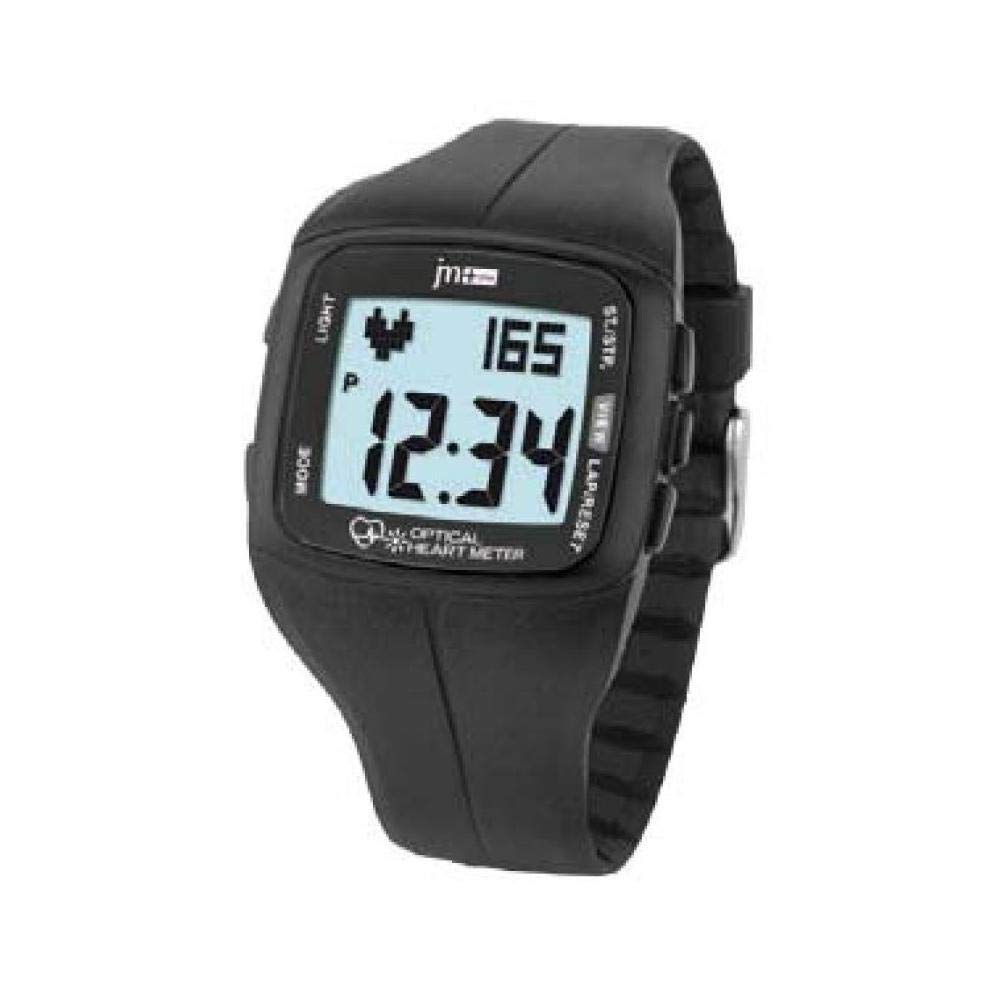
Figure 4.1: Lowell JM Plus PL3300 Digital Watch Display and Buttons
This image displays the Lowell JM Plus PL3300 digital watch. The watch features a black plastic case and strap. The digital display shows the time as 12:34, a heart rate reading of 165 beats per minute, and a 'P' indicator, likely for Pedometer or Pulse. Buttons are labeled 'LIGHT' on the top left, 'MODE' on the bottom left, 'ST./STP.' on the top right, and 'VIEW LAP/RESET' on the bottom right. The phrase 'OPTICAL HEART METER' is visible at the bottom of the display.
ปุ่มฟังก์ชั่น:
- แสงสว่าง: Activates the EL backlight for the display.
- เส้นทาง: Cycles through different operating modes (Time, Heart Rate, Pedometer, Training, Stopwatch, Countdown, Alarm).
- ST./STP. (Start/Stop): Starts or stops functions like stopwatch, countdown, or training mode.
- VIEW LAP/RESET: Views lap times in stopwatch mode or resets values. Also used for setting adjustments.
5. การตั้งค่า
5.1 การเปิดเครื่องครั้งแรก
The watch typically comes pre-charged or with a battery installed. If the display is blank, press any button to activate it.
5.2 การตั้งเวลาและวันที่
- จากโหมดแสดงเวลา ให้กดปุ่มค้างไว้ โหมด กดปุ่มค้างไว้จนกว่าตัวเลขบอกเวลาจะเริ่มกะพริบ
- กดปุ่ม VIEW รอบ/รีเซ็ต ปุ่มสำหรับปรับค่าการกระพริบ (เช่น ชั่วโมง นาที ปี เดือน วัน)
- กดปุ่ม ST./STP. ปุ่มเพื่อไปยังรายการการตั้งค่าถัดไป
- Repeat steps 2 and 3 until all desired settings (time, date, 12/24-hour format) are configured.
- กดปุ่ม โหมด ปุ่มอีกครั้งเพื่อออกจากโหมดการตั้งค่า
5.3 ผู้ใช้ Profile Setup (for accurate fitness tracking)
For accurate heart rate, calorie, and distance calculations, it is recommended to set up your personal profile. This typically includes age, gender, height, and weight. Refer to the watch's on-screen prompts or specific menu options accessed via the โหมด button to enter these details.
6. โหมดการทำงาน
6.1 โหมดเวลา
This is the default display mode, showing the current time and date. Press แสงสว่าง เพื่อเพิ่มความสว่างให้กับจอแสดงผล
6.2 การตรวจวัดอัตราการเต้นของหัวใจ
The watch features an optical heart rate sensor.
- Ensure the watch is worn snugly on your wrist, with the sensor making good contact with your skin.
- กดปุ่ม โหมด button until you reach the Heart Rate mode (indicated by a heart icon or "HR").
- The watch will begin to measure your heart rate. Your current heart rate in beats per minute (BPM) will be displayed.
6.3 Pedometer (Step Counter)
The integrated pedometer tracks your daily steps.
- กดปุ่ม โหมด button to navigate to the Pedometer mode (often indicated by a 'P' or a step icon).
- Your current step count for the day will be displayed.
- The watch automatically resets the step count at midnight.
6.4 Training Mode (Calories, Distance, Pace)
This mode allows you to track specific workout sessions.
- กดปุ่ม โหมด button until you reach the Training mode.
- กด ST./STP. to start a new training session. The watch will begin recording duration, heart rate, speed, pace, distance, and estimated calories burned.
- ในระหว่างเซสชั่น ให้กด VIEW รอบ/รีเซ็ต ถึง view lap data if applicable.
- กด ST./STP. again to pause or end the training session.
- To reset the training data, press and hold VIEW รอบ/รีเซ็ต after stopping the session.
6.5 นาฬิกาจับเวลา
- กดปุ่ม โหมด button to enter Stopwatch mode.
- กด ST./STP. เพื่อเริ่มนาฬิกาจับเวลา
- กด ST./STP. again to pause. Press again to resume.
- กด VIEW รอบ/รีเซ็ต to record a lap time while the stopwatch is running.
- When paused, press and hold VIEW รอบ/รีเซ็ต เพื่อรีเซ็ตนาฬิกาจับเวลาเป็นศูนย์
6.6 นาฬิกาจับเวลาถอยหลัง
- กดปุ่ม โหมด button to enter Countdown Timer mode.
- ในการตั้งเวลาถอยหลัง ให้กดค้างไว้ VIEW รอบ/รีเซ็ต until the digits flash. Use VIEW รอบ/รีเซ็ต เพื่อปรับค่าและ ST./STP. การเคลื่อนตัวระหว่างชั่วโมง นาที และวินาที
- กด โหมด เพื่อยืนยันการตั้งค่า
- กด ST./STP. เพื่อเริ่มนับถอยหลัง
- จะมีเสียงเตือนดังขึ้นเมื่อนับถอยหลังถึงศูนย์
ปลุก 6.7
- กดปุ่ม โหมด button to enter Alarm mode.
- ในการตั้งเวลาปลุก ให้กดปุ่มค้างไว้ VIEW รอบ/รีเซ็ต until the digits flash. Use VIEW รอบ/รีเซ็ต เพื่อปรับค่าและ ST./STP. เพื่อสลับระหว่างชั่วโมงและนาที
- กด โหมด เพื่อยืนยันการตั้งค่า
- หากต้องการเปิดหรือปิดสัญญาณเตือน ให้กดปุ่ม ST./STP. while in Alarm mode. An alarm icon will appear on the display when activated.
7. การบำรุงรักษา
7.1 การทำความสะอาด
Wipe the watch case and strap regularly with a soft, slightly damp cloth. For the optical sensor on the back, ensure it is clean and free of debris for accurate readings. Avoid using harsh chemicals or abrasive materials.
7.2 การเปลี่ยนแบตเตอรี่
The watch uses a standard watch battery. When the display dims or functions become erratic, it may be time to replace the battery. It is recommended to have the battery replaced by a qualified watch technician to ensure the water resistance seal is maintained.
8 การแก้ไขปัญหา
- Watch not turning on / Display blank: Press any button. If still blank, the battery may be depleted. Refer to Section 7.2 for battery replacement.
- การอ่านค่าอัตราการเต้นของหัวใจที่ไม่แม่นยำ: Ensure the watch is worn snugly on your wrist, not too loose or too tight. Clean the optical sensor on the back of the watch. Avoid excessive movement during measurement.
- การอ่านค่าเครื่องนับก้าวไม่แม่นยำ: Ensure your user profile (height, weight) is correctly set up. Arm movements can sometimes affect step counting; try to keep your arm relatively still during walking for best accuracy.
- Water Resistance Concerns: Always ensure the watch's back cover is securely fastened after any maintenance. Avoid pressing buttons underwater.
- ปุ่มไม่ตอบสนอง: Try pressing firmly. If unresponsive, the watch may require a reset (consult support) or battery replacement.
9. ข้อมูลจำเพาะ
| คุณสมบัติ | รายละเอียด |
|---|---|
| หมายเลขรุ่น | PL3300 |
| ประเภทจอภาพ | Digital, EL Backlit |
| ประเภทการเคลื่อนไหว | ควอตซ์ |
| วัสดุตัวเรือน | Plastic (40 x 35 mm) |
| ประเภทคริสตัล | Plexi (Plastic) |
| วัสดุสายรัด | พลาสติก |
| สีสายรัด | สีดำ |
| ความต้านทานต่อน้ำ | 3 ATM (30 เมตร) |
| น้ำหนัก | 42 กรัม |
| คุณสมบัติพิเศษ | Optical Heart Rate Monitor, Pedometer, Calorie Counter, Training Mode, Stopwatch, Countdown Timer, Alarm, Calendar |
10. การรับประกันและการสนับสนุน
For warranty information and customer support, please refer to the documentation provided at the time of purchase or visit the official Lowell webไซต์นี้ โปรดเก็บหลักฐานการซื้อไว้เพื่อใช้ยืนยันการรับประกัน