
1. บทนำ
The Dual DAB 3A Digital Radio Adapter is designed to upgrade your existing audio system with modern digital radio reception and Bluetooth streaming capabilities. This adapter allows you to enjoy DAB+ and FM radio broadcasts with clear digital quality and stream audio wirelessly from compatible devices. Its user-friendly interface and remote control ensure convenient operation.
2. ข้อมูลด้านความปลอดภัย
- แหล่งจ่ายไฟ: ใช้เฉพาะอะแดปเตอร์แปลงไฟ AC ที่ให้มาเท่านั้น ตรวจสอบให้แน่ใจว่าได้ปรับแรงดันไฟฟ้าให้เหมาะสมแล้วtagตรงตามข้อกำหนดที่ระบุไว้บนอะแดปเตอร์
- น้ำและความชื้น: Do not expose the device to rain, moisture, or dripping/splashing liquids. Keep it away from water sources.
- การระบายอากาศ : Ensure adequate ventilation around the unit. Do not block ventilation openings. Avoid placing the device on soft surfaces that may obstruct airflow.
- แหล่งความร้อน: ควรวางอุปกรณ์ให้ห่างจากแหล่งความร้อน เช่น เครื่องทำความร้อน ช่องระบายความร้อน เตา หรือเครื่องใช้ไฟฟ้าอื่นๆ ที่ให้ความร้อน
- การทำความสะอาด: ถอดปลั๊กไฟก่อนทำความสะอาด ใช้ผ้าแห้งนุ่มๆ เช็ดทำความสะอาด ห้ามใช้น้ำยาทำความสะอาดหรือสเปรย์กระป๋อง
- การบริการ: อย่าพยายามให้บริการผลิตภัณฑ์นี้ด้วยตนเอง ส่งต่อการบริการทั้งหมดไปยังช่างบริการที่ผ่านการรับรอง
3. เนื้อหาบรรจุภัณฑ์
โปรดตรวจสอบว่ารายการทั้งหมดที่ระบุไว้ด้านล่างรวมอยู่ในแพ็คเกจของคุณหรือไม่:
- Dual DAB 3A Digital Radio Adapter
- อะแดปเตอร์ AC
- รีโมทคอนโทรล
- คู่มือของเจ้าของ
- External Wire Antenna
4. สินค้าหมดview
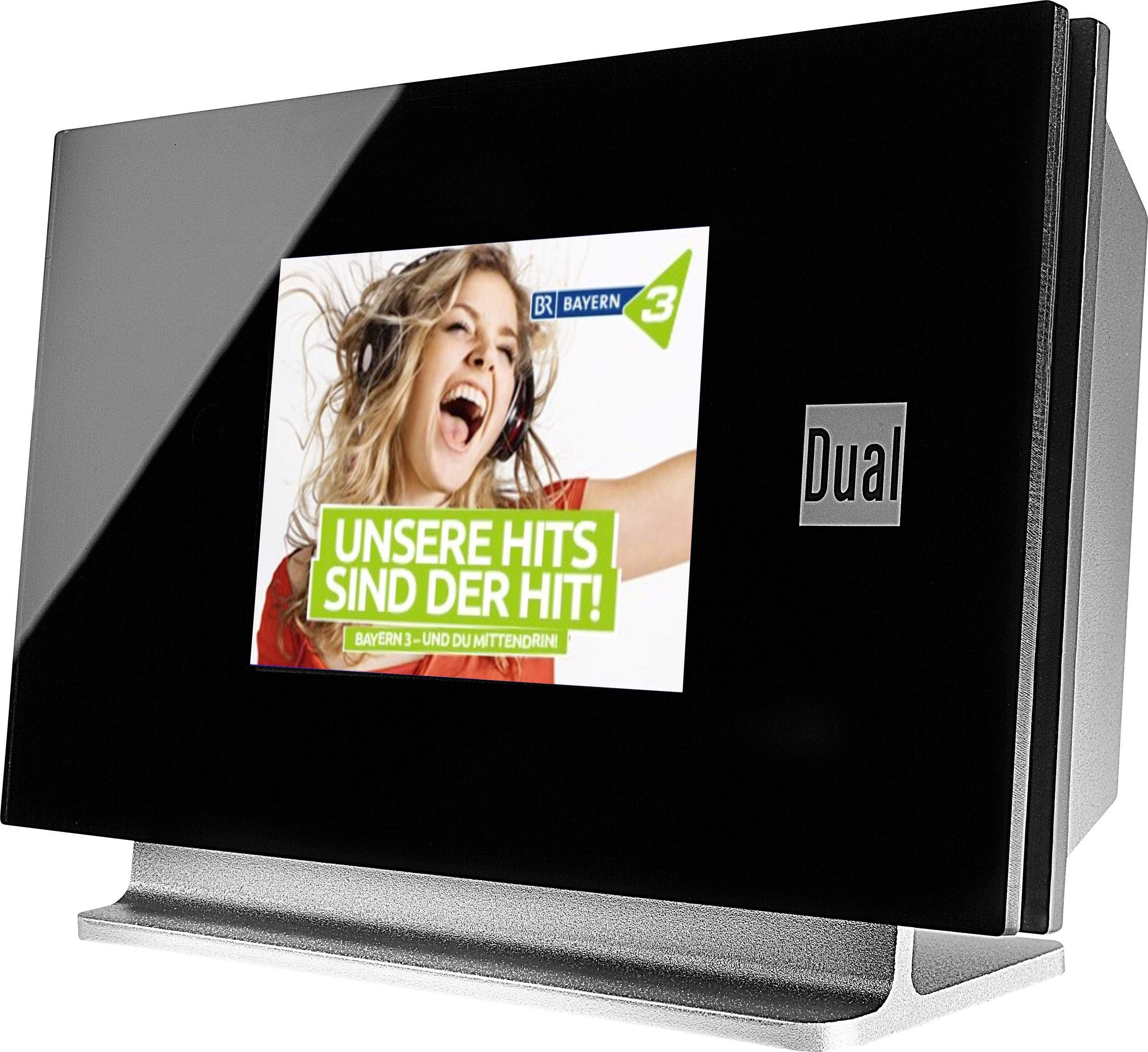
This image displays the Dual DAB 3A Digital Radio Adapter from a front-side angle. The front features a large, black TFT color display showing a radio station's album art and text. The side view indicates the product dimensions: 15 cm (width), 6 cm (depth), and 10.49 cm (height).
แผงด้านหน้า
- จอแสดงผลสี TFT: Shows station information, track details, album art, and menu options.
การเชื่อมต่อแผงด้านหลัง
- อินพุตเสาอากาศ: For connecting the external wire antenna or a commercially available antenna.
- AUX-ออก: Audio output for connecting to an external ampลิไฟเออร์หรือระบบเครื่องเสียง
- กำลังไฟเข้า: สำหรับเชื่อมต่ออะแดปเตอร์ไฟฟ้ากระแสสลับ
รีโมทคอนโทรล
The included remote control provides full functionality for navigating menus, changing stations, adjusting volume, and selecting input modes.
5. การตั้งค่า
- เชื่อมต่อเสาอากาศ: Connect the supplied external wire antenna to the antenna input on the rear panel of the DAB 3A adapter. For optimal reception, extend the antenna fully.
- เชื่อมต่อกับระบบเสียง: Use an appropriate audio cable (not included) to connect the AUX-OUT port on the rear of the DAB 3A to an available audio input (e.g., AUX-IN, Line-IN) on your existing ampไลไฟเออร์หรือระบบสเตอริโอ
- เชื่อมต่อพลังงาน: Plug the AC power adapter into the power input on the rear of the DAB 3A, then plug the adapter into a wall outlet.
- เปิดเครื่อง: Press the Power button on the unit or the remote control to turn on the adapter. The display will illuminate.
- Initial Scan (DAB+): Upon first power-on, the unit may automatically perform a scan for available DAB+ stations. Allow this process to complete.
6. ปฏิบัติการ
เปิด/ปิดเครื่อง
- กดปุ่ม พลัง button on the unit or remote control to turn the device on or off.
DAB+ Radio Mode
- กดปุ่ม โหมด button on the remote control until DAB+ mode is selected.
- If no stations are found or you wish to rescan, navigate to the 'Full Scan' option in the menu and confirm. The adapter will search for available DAB+ stations.
- ใช้ ขึ้น/ลง navigation buttons on the remote to browse through the list of available stations.
- กด ตกลง/ป้อน เพื่อเลือกสถานี
- The TFT display will show station name, program information, and potentially album art or weather data.
โหมดวิทยุ FM
- กดปุ่ม โหมด button on the remote control until FM mode is selected.
- หากต้องการค้นหาสถานีโดยอัตโนมัติ ให้กดปุ่มค้างไว้ สแกน button (or equivalent on remote). The adapter will tune to the next strong station.
- หากต้องการจูนด้วยตนเอง ให้ใช้ ขึ้น/ลง navigation buttons to adjust the frequency.
โหมดบลูทู ธ
- กดปุ่ม โหมด button on the remote control until Bluetooth mode is selected. The display will show 'Bluetooth Pairing' or similar.
- บนสมาร์ทโฟนหรือแท็บเล็ตของคุณ ให้เปิดใช้งาน Bluetooth และค้นหาอุปกรณ์ที่มีอยู่
- Select 'Dual DAB 3A' from the list of devices to pair.
- Once paired, you can stream audio from your device to the DAB 3A adapter.
โหมด AUX-IN
- Connect an external audio source (e.g., MP3 player, CD player) to the AUX-IN port on the rear of the DAB 3A using a 3.5mm audio cable (not included).
- กดปุ่ม โหมด button on the remote control until AUX-IN mode is selected.
- Audio from the connected external device will now play through your audio system.
7. การบำรุงรักษา
- การทำความสะอาดหน่วย: Disconnect the power adapter before cleaning. Use a soft, dry, lint-free cloth to wipe the surface of the unit. Do not use abrasive cleaners, waxes, or solvents.
- การทำความสะอาดจอแสดงผล: Gently wipe the TFT display with a soft, dry microfiber cloth. Avoid pressing hard on the screen.
- พื้นที่จัดเก็บ: หากต้องเก็บรักษาเครื่องไว้เป็นเวลานาน ควรตัดการเชื่อมต่อจากแหล่งจ่ายไฟและเก็บไว้ในที่แห้งและเย็น หลีกเลี่ยงแสงแดดโดยตรงและอุณหภูมิที่สูงหรือต่ำเกินไป
8 การแก้ไขปัญหา
| ปัญหา | สาเหตุที่เป็นไปได้ | สารละลาย |
|---|---|---|
| ไม่มีไฟฟ้า | ไม่ได้เชื่อมต่ออะแดปเตอร์ไฟหรือเต้ารับไฟฟ้าชำรุด | ตรวจสอบให้แน่ใจว่าอะแดปเตอร์ไฟฟ้าเชื่อมต่อกับอุปกรณ์อย่างแน่นหนาและมีเต้ารับไฟฟ้าที่ใช้งานได้ |
| การรับสัญญาณ DAB+/FM ไม่ดี | Antenna not properly connected or poor signal strength. | Ensure the antenna is fully extended and properly connected. Try repositioning the antenna or the unit. Consider using a stronger external antenna if available. |
| การจับคู่บลูทูธล้มเหลว | Bluetooth not enabled on source device or adapter is not in pairing mode. | Ensure Bluetooth is enabled on your smartphone/tablet and the DAB 3A is in Bluetooth mode. Try restarting both devices. |
| ไม่มีเสียง | Volume too low, incorrect input selected on amplifier, or audio cable issue. | Increase the volume on both the DAB 3A and your ampเครื่องขยายเสียง ตรวจสอบให้แน่ใจว่าของคุณ amplifier is set to the correct input (e.g., AUX-IN). Check the audio cable connections. |
9. ข้อมูลจำเพาะ
- แบบอย่าง: 75862
- เทคโนโลยีจูนเนอร์: DAB Plus, FM
- การเชื่อมต่อ: บลูทูธ
- คลื่นวิทยุที่รองรับ: เอฟเอ็ม, ดีเอบี+
- ประเภทจอภาพ: จอแสดงผลสี
- แหล่งพลังงาน: อะแดปเตอร์ AC
- อินเทอร์เฟซฮาร์ดแวร์: บลูทูธ
- อุปกรณ์ที่รองรับ: Smartphone, Laptop
- คุณสมบัติพิเศษ: Bluetooth, Remote Control
- ขนาดสินค้า : 15 x 6 x 10.5 ซม.
- น้ำหนักสินค้า: 540 กรัม
10. การรับประกันและการสนับสนุน
This product comes with a standard manufacturer's warranty. For detailed warranty information, please refer to the warranty card included in your package or visit the official Dual website. For technical support, troubleshooting assistance, or service inquiries, please contact Dual customer support through their official channels.