
การแนะนำ
This manual provides detailed instructions for the installation, operation, and maintenance of your UNITOPSCI Android Car Stereo. This double DIN unit features a 10-inch HD touchscreen, GPS navigation, Bluetooth, Wi-Fi, FM radio, Mirror Link, and supports steering wheel control and a backup camera. Please read this manual thoroughly before use to ensure proper functionality and safety.
คุณสมบัติผลิตภัณฑ์
- หน้าจอสัมผัส HD ขนาด 10 นิ้ว: Designed for improved handling and display clarity.
- อินพุต USB คู่: Provides multiple connectivity options.
- Wi-Fi ในตัว: Enables online application downloads, video streaming, and music playback.
- การนำทาง GPS: Supports both online and offline maps (HERE WE GO application pre-installed).
- ฟังก์ชั่นบลูทูธ: Hands-free calling, music streaming, and automatic phone book loading.
- วิทยุ FM: 18 preset stations for real-time broadcasts.
- หลัง View การสนับสนุนกล้อง: Automatic switching to display when reversing (backup camera included).
- ระบบควบคุมพวงมาลัย: Compatible with existing steering wheel controls.
- Driving Recorder (DVR) Support: Allows connection of a driving recorder for playback.
- ระบบ Mirror Link แบบคู่: Supports one-way projection for iOS (5s-7plus) and two-way connection for Android (4.0-7.1).
เนื้อหาแพ็คเกจ
โปรดตรวจสอบว่าสินค้าทั้งหมดมีอยู่ในแพ็คเกจ:
- เครื่องเล่น MP5 สำหรับรถยนต์ (ตัวเครื่องหลัก)
- สายไฟ
- เสาอากาศ GPS
- สายเคเบิลอินพุตกล้อง
- กล้องสำรอง
- RCA Input and Output Cables
- สายเคเบิล 2 x USB
- โครงโลหะ 2 ชิ้น
- สกรู 4 ตัว
- คู่มือการใช้งาน

ภาพ: เหนือview of the UNITOPSCI car stereo package contents, including the main unit, various cables, a backup camera, and mounting accessories.
การติดตั้งและการตั้งค่า
Installation of the car stereo requires technical knowledge. It is recommended to seek professional assistance if you are unfamiliar with car audio system installation. Ensure the vehicle's power is disconnected before beginning installation.
ขนาด
The unit has a 10.1-inch display. The main body dimensions are approximately 24.99 x 14.5 x 8 cm. Refer to the diagram for detailed measurements to ensure compatibility with your vehicle's dashboard.

Image: Detailed dimensional drawing of the UNITOPSCI car stereo, indicating the 10.1-inch screen size and overall unit measurements for installation planning.
ข้อควรพิจารณาในการเดินสายไฟ
- สายรัด: The product includes a generic wire harness. A vehicle-specific harness may be required and should be purchased separately if needed for your car model.
- Audio Output with Ampเครื่องฟอก: If your car is equipped with an amplifier and you experience no audio from Bluetooth or video, ensure the blue/white harness wire is connected to a 12V ACC power source.
- หลัง View กล้อง: Connect the camera input cable. The car stereo will automatically switch to the camera view when the vehicle is in reverse gear. Ensure the red wire on the video cable is connected to the positive reverse light for proper triggering.
- ระบบควบคุมพวงมาลัย: Connect the appropriate wires for steering wheel control functionality. Note that the steering wheel control module itself is not included in the package.
คำแนะนำการใช้งาน
การดำเนินงานทั่วไป
The unit operates via its 10-inch HD touchscreen. Basic controls for power, volume, and menu navigation are available on the left side of the unit. The screen can be calibrated if it becomes unresponsive.
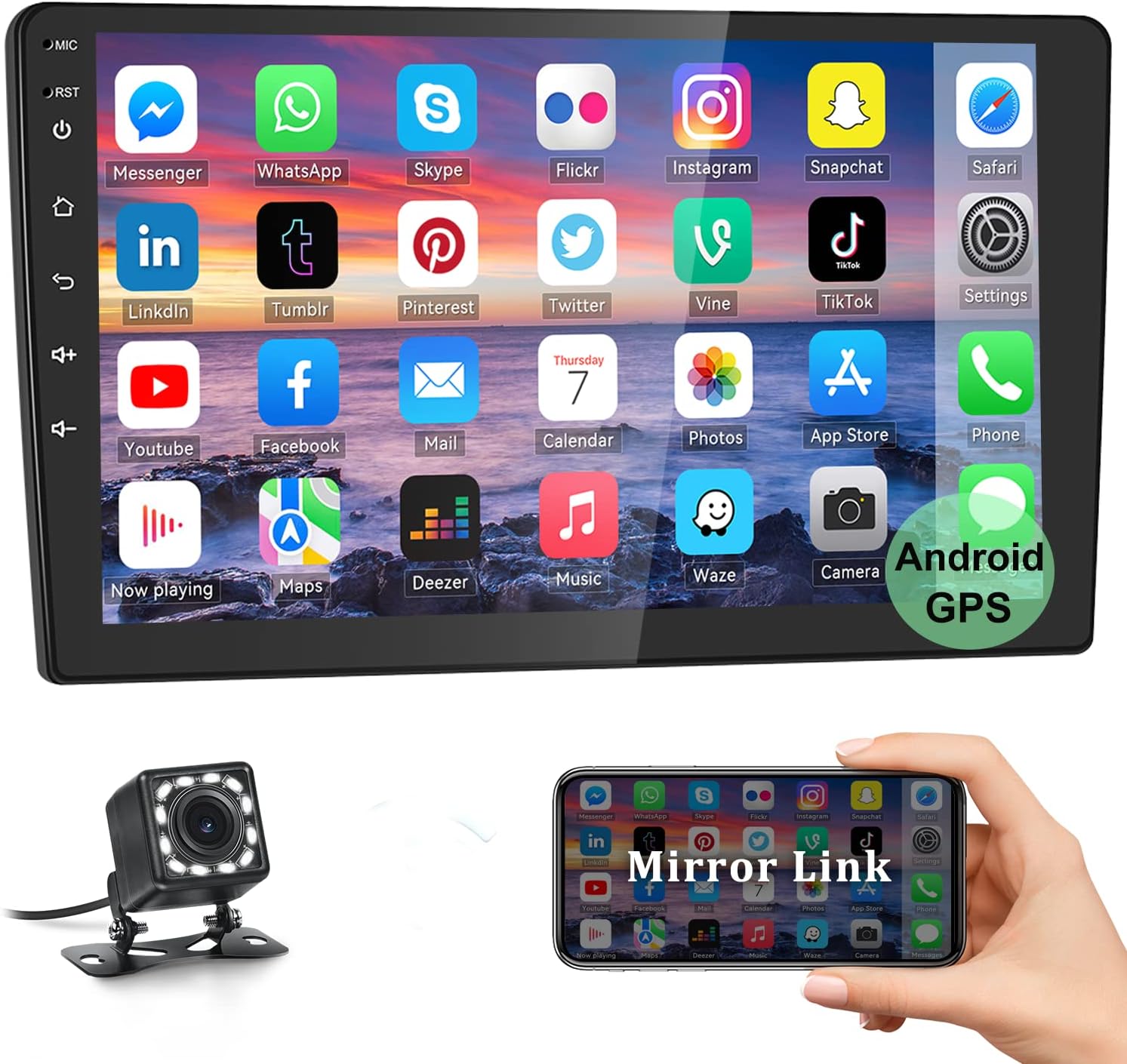
Image: The main interface of the UNITOPSCI Android Car Stereo, showing a grid of application icons for common functions like messaging, social media, and navigation.
ฟังก์ชั่นบลูทู ธ
Activate Bluetooth on your mobile device and search for the car stereo. Pair the devices to enable hands-free calling, Bluetooth music playback, and automatic phone book synchronization. This enhances driving safety and enjoyment.

Image: Visual representation of the Bluetooth interface on the car stereo, illustrating features such as hands-free calling, music control, and call history.
ระบบนำทาง GPS
The unit comes with a built-in GPS module. You can use the pre-installed HERE WE GO application for offline maps. For online maps and real-time traffic updates, connect the unit to Wi-Fi. Time settings can be adjusted automatically or manually.

Image: The car stereo screen showing a GPS navigation map, highlighting a route and points of interest, with icons for HERE WE GO, Waze, and Sygic navigation apps.
การเชื่อมต่อ Wi-Fi
Utilize the built-in Wi-Fi module to connect to the internet. This allows you to download applications from the Play Store, stream online videos, listen to music, and browse the web directly from the car stereo.

Image: The car stereo displaying the YouTube application interface, demonstrating its built-in Wi-Fi capability for online content streaming.
ฟังก์ชั่นการเชื่อมโยงกระจก
The Mirror Link feature supports one-way projection for iOS devices (5s-7plus) and two-way connection for Android devices (4.0-7.1). This allows you to display and interact with your phone's screen on the car stereo.

Image: Illustration of the Mirror Link function, showing a smartphone screen being mirrored onto the car stereo display for both Android and iOS devices.
วิทยุเอฟเอ็ม
Access the FM radio function to tune into local stations. The unit supports 18 preset stations, allowing you to quickly switch between your favorite broadcasts for news, music, or weather updates.
หลัง View กล้อง
When connected, the included backup camera provides an HD view of the area behind your vehicle. The display automatically switches to the camera feed when the car is put into reverse, aiding in safe parking and maneuvering. It features clear night vision and a 170-degree wide-angle view.

Image: A visual breakdown of the HD Rear View Camera's capabilities, including clear night vision, 170-degree wide angle, and waterproof design, with examples of daytime and night vision displays.
ระบบควบคุมพวงมาลัย
The car stereo supports connection to your vehicle's existing steering wheel controls, allowing you to manage audio and other functions without taking your hands off the wheel. Refer to the wiring diagram for proper connection.
ส่วนต่อประสานผู้ใช้มากกว่าview
The Android operating system provides a customizable user interface. Various applications and settings are accessible via icons on the home screen. The left-side buttons can be illuminated for easier control at night.

Image: A collage of screenshots showcasing various aspects of the car stereo's user interface, including the main menu, radio tuner, Bluetooth settings, and system configurations.
การซ่อมบำรุง
- การทำความสะอาดหน้าจอ: ใช้ผ้านุ่มที่ไม่เป็นขุยทำความสะอาดหน้าจอสัมผัส หลีกเลี่ยงน้ำยาทำความสะอาดหรือตัวทำละลายที่มีฤทธิ์กัดกร่อน
- การอัปเดตซอฟต์แวร์: ตรวจสอบการอัปเดตซอฟต์แวร์เป็นระยะเพื่อให้มั่นใจถึงประสิทธิภาพที่เหมาะสมที่สุดและการเข้าถึงฟีเจอร์ใหม่ๆ
- สภาพแวดล้อม : หลีกเลี่ยงการให้เครื่องสัมผัสกับอุณหภูมิที่สูงหรือต่ำเกินไป แสงแดดโดยตรงเป็นเวลานาน หรือความชื้นที่มากเกินไป
การแก้ไขปัญหา
- No Audio from Bluetooth/Video: ถ้าหากรถของคุณมี amplifier, ensure the blue/white harness wire is connected to a 12V ACC power source.
- หน้าจอไม่ตอบสนอง: If the screen is unresponsive, perform a screen calibration.
- Radio Issues (e.g., changing stations unexpectedly): Check antenna connection and ensure proper installation.
- GPS Navigation App Slow to Load: The app may take 10-15 seconds to load initially, but should run smoothly afterward.
- ปัญหาการเชื่อมต่อ Wi-Fi: Ensure the unit is within range of a strong Wi-Fi signal.
- การตั้งค่าไม่บันทึก: Some settings may require a specific confirmation or exit procedure to save. Re-check the settings menu.
- การควบคุมระดับเสียง: If volume control feels imprecise, adjust settings within the audio menu for finer tuning.
ข้อมูลจำเพาะ
| ขนาดสินค้า | 24.99 x 14.5 x 8 ซม. ; 1.46 กก. |
| หมายเลขรุ่น | คำถามที่ 3162 |
| ขนาดจอแสดงผล | 10 นิ้ว |
| ปณิธาน | 1024 x 600 |
| เทคโนโลยีการเชื่อมต่อ | บลูทูธ, ยูเอสบี, ไวไฟ |
| ประเภทแผนที่ | Canada Map, North America, Online and offline Map, Worldwide |
| โหมดเอาต์พุตเสียง | สเตอริโอ |
| ประเภทการติดตั้ง | แผงหน้าปัด |
| คุณสมบัติพิเศษ | Steering wheel control & Rear View Backup Input, Support Mirror Link Function |
| คำสั่งเสียง | ปุ่ม, หน้าจอสัมผัส |
ข้อมูลการรับประกัน
This product comes with a 1-year warranty from the date of purchase. Please retain your proof of purchase for warranty claims. The warranty covers manufacturing defects but does not cover damage caused by improper installation, misuse, accidents, or unauthorized modifications.
สนับสนุน
For technical support, troubleshooting assistance, or warranty inquiries, please contact UNITOPSCI customer service. Refer to the product packaging or the official UNITOPSCI webเว็บไซต์สำหรับข้อมูลการติดต่อล่าสุด