
1. บทนำ
ขอบคุณสำหรับการซื้อasing the LUPO Digital Pocket Scale. This precision instrument is designed for accurate weighing of small items up to 200 grams with a 0.01 gram graduation. Its compact and portable design makes it ideal for various applications, including weighing jewelry, food ingredients, herbs, and other small objects. Please read this manual carefully to ensure proper operation and longevity of your scale.
คุณสมบัติหลัก:
- ความจุสูงสุด: 200g
- จบการศึกษา: 0.01g
- Multiple Weighing Units: g, gn, oz, ozt, ct, tl, dwt
- Durable Stainless Steel Platform
- หน้าจอ LCD เรืองแสง
- ฟังก์ชัน Tare
- ปิดเครื่องอัตโนมัติ
- ไฟแสดงสถานะแบตเตอรี่ต่ำ
- ระบบป้องกันการโอเวอร์โหลด
2. เนื้อหาบรรจุภัณฑ์
- 1 x LUPO 200g Digital Pocket Scale
- แบตเตอรี่ AAA 2 ก้อน
- 1 x คู่มือผู้ใช้
3. การตั้งค่า
3.1 การติดตั้งแบตเตอรี่
The scale requires 2 AAA batteries (included). To install or replace batteries:
- เปิดฝาช่องใส่แบตเตอรี่ที่อยู่ด้านล่างของเครื่องชั่ง
- ใส่แบตเตอรี่ AAA 2 ก้อน โดยตรวจสอบให้แน่ใจว่าขั้วถูกต้อง (+/-)
- ปิดฝาช่องใส่แบตเตอรี่ให้แน่น
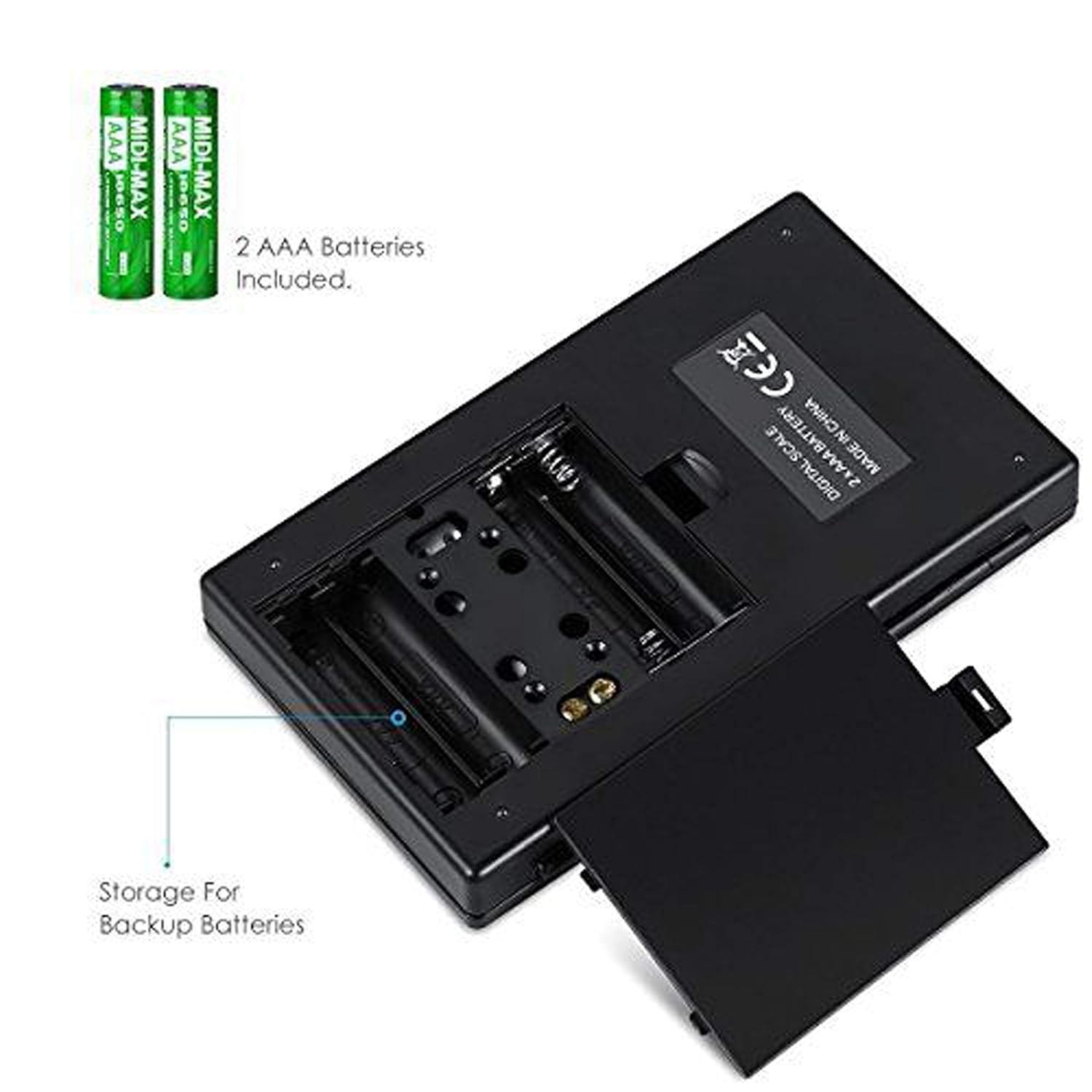
รูปที่ 3.1: ช่องใส่แบตเตอรี่พร้อมแบตเตอรี่ AAA
3.2 การจัดวางเริ่มต้น
For accurate readings, place the scale on a hard, flat, and stable horizontal surface. Avoid placing it on soft or uneven surfaces, or near sources of vibration or electromagnetic interference.
4. การดำเนินการ
4.1 การชั่งน้ำหนักพื้นฐาน
- กดปุ่ม เปิด/ปิด ปุ่มเพื่อเปิดเครื่องชั่ง
- Wait for the display to show "0.00" (or "0") before placing any items on the weighing platform.
- Gently place the item(s) you wish to weigh onto the center of the stainless steel weighing platform.
- น้ำหนักจะแสดงบนหน้าจอ LCD

Figure 4.1: Quick start guide for basic weighing.
4.2 การแปลงหน่วย
เครื่องชั่งรองรับหน่วยวัดน้ำหนักได้หลายหน่วย หากต้องการเปลี่ยนหน่วยวัด:
- เมื่อเปิดเครื่องชั่งแล้วและแสดง "0.00" ให้กดปุ่ม โหมด ปุ่มซ้ำๆ
- The display will cycle through the available units: grams (g), grains (gn), ounces (oz), troy ounces (ozt), carats (ct), and pennyweights (dwt).
- หยุดกด โหมด when your desired unit is displayed.
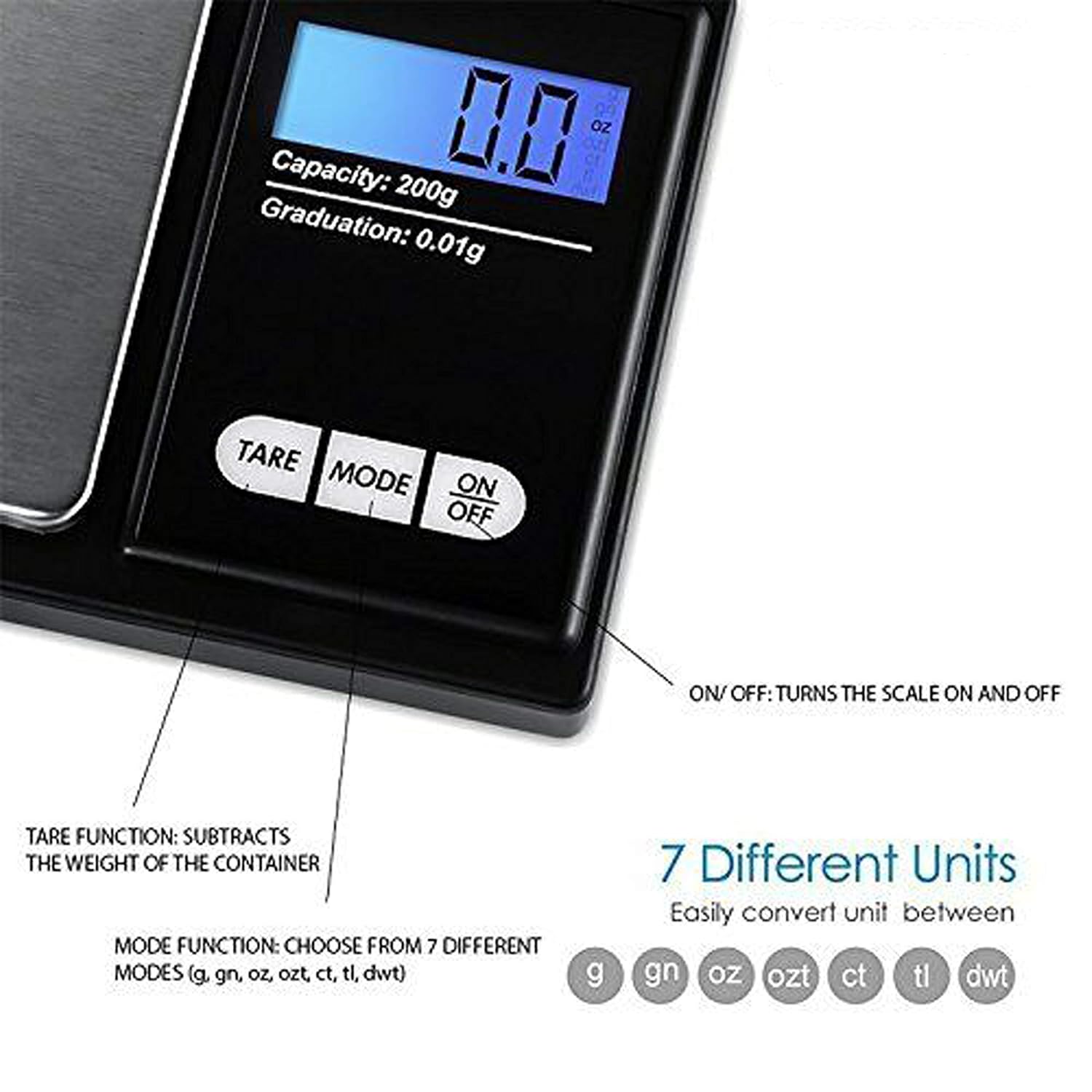
Figure 4.2: Available weighing units and button functions.
4.3 ฟังก์ชันทดน้ำหนัก
ฟังก์ชันการหักน้ำหนักภาชนะ (tare) ช่วยให้คุณหักน้ำหนักของภาชนะออก เพื่อให้คุณวัดได้เฉพาะน้ำหนักสุทธิของสิ่งของที่บรรจุอยู่ภายในเท่านั้น
- วางภาชนะเปล่าบนแท่นชั่งน้ำหนัก
- กดปุ่ม ทดค่า กดปุ่ม หน้าจอจะรีเซ็ตเป็น "0.00"
- Now, place the item(s) you wish to weigh into the container. The display will show only the weight of the item(s).
5. การสอบเทียบ
Calibration ensures the accuracy of your scale. It is recommended to calibrate the scale periodically or if you notice inconsistent readings. A 200g calibration weight is required (not included).
- เปิดเครื่องชั่งโดยกดปุ่ม เปิด/ปิด ปุ่ม.
- รอจนกว่าหน้าจอจะแสดง "0.00"
- กดปุ่มค้างไว้ โหมด button until the display shows "CAL", then release the button.
- กดปุ่ม โหมด button again. The display will show "CAL" followed by the required calibration weight (e.g., "200.00g").
- Place the exact 200g calibration weight onto the center of the weighing platform.
- The display will show "PASS" and then return to normal weighing mode.
- Remove the calibration weight. Calibration is complete.
Note: If you do not have a 200g calibration weight, you may need to acquire one separately for accurate calibration.
6. การบำรุงรักษา
6.1 การทำความสะอาด
เช็ดสเกลด้วย d . เล็กน้อยamp cloth. Do not immerse the scale in water or use abrasive cleaners. Keep the weighing platform clean and free of debris.
6.2 พื้นที่จัดเก็บ
Store the scale in a clean, dry environment. If the scale will not be used for an extended period, it is recommended to remove the batteries to prevent leakage.
7 การแก้ไขปัญหา
If you encounter issues with your scale, consider the following:
- การอ่านค่าที่ไม่ถูกต้อง:
- ตรวจสอบให้แน่ใจว่าเครื่องชั่งอยู่บนพื้นผิวที่ได้ระดับและมั่นคง
- Avoid placing the scale near strong radio frequency interference.
- Keep the scale away from high humidity, air currents (e.g., fans, open windows), and extreme temperatures.
- Minimize vibration during weighing.
- Perform a calibration (refer to Section 5).
- "Lo" or "Low Battery" Display: เปลี่ยนแบตเตอรี่ AAA
- "O-Ld" or "Overload" Display: The item on the platform exceeds the maximum capacity of 200g. Remove the item immediately to prevent damage to the scale.
- สเกลไม่เปิด: ตรวจสอบการติดตั้งแบตเตอรี่และให้แน่ใจว่าแบตเตอรี่ไม่หมด

Figure 7.1: Overload and Low Battery indicators.
8. ข้อมูลจำเพาะ
| คุณสมบัติ | รายละเอียด |
|---|---|
| ยี่ห้อ | ลูโป |
| หมายเลขรุ่น | BHT2018376_200g_pock |
| ความจุ | 0.05กรัมถึง200กรัม |
| การสำเร็จการศึกษา | 0.01กรัม |
| หน่วยการชั่งน้ำหนัก | g, gn, oz, ozt, ct, tl, dwt |
| ประเภทจอภาพ | LCD พร้อม Backlight |
| แหล่งพลังงาน | แบตเตอรี่ AAA 2 ก้อน (รวมอยู่ด้วย) |
| วัสดุ | Plastic, Stainless Steel Platform |
| ขนาด (โดยประมาณ) | 14.8 x 9 x 2.4 cm (Package); 5.0 x 3.0 x 0.8 inches (Scale) |
| น้ำหนัก (โดยประมาณ) | 140 grams (Package) |
| คุณสมบัติพิเศษ | Backlit display, Auto-off, Tare function, Lightweight, Portable |
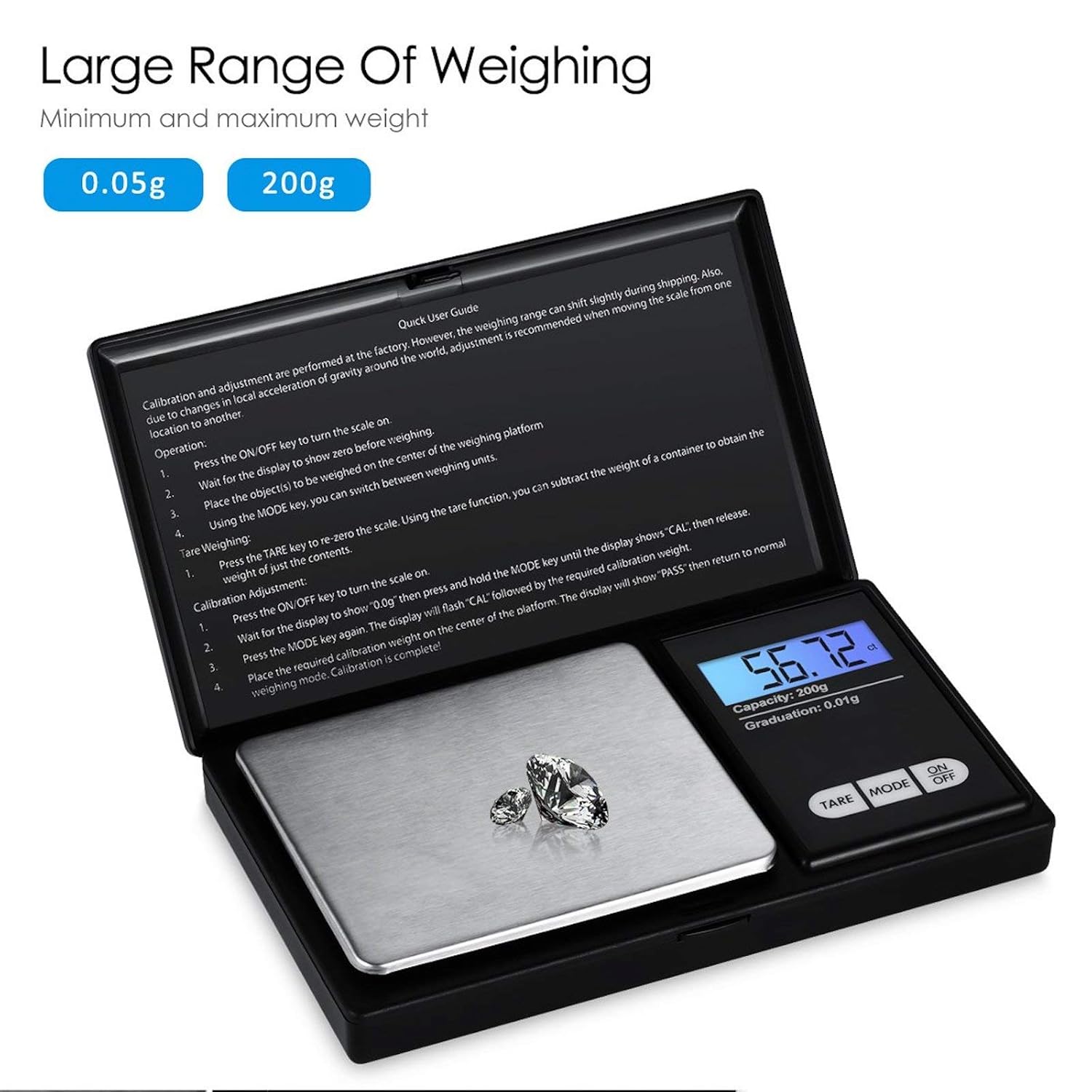
Figure 8.1: Weighing range of the scale.
9. การรับประกันและการสนับสนุน
Warranty information for this product is not explicitly specified in the provided details. For any support inquiries or warranty claims, please contact the retailer or manufacturer directly.