
1. บทนำ
Thank you for choosing the MOTORHEAD 24-Inch Smart Digital Level. This precision tool is designed to provide accurate angle measurements for various applications, from construction to home improvement. Featuring a large LCD display, audible alerts, and a durable aluminum construction, this digital level ensures reliable and consistent results. Please read this manual thoroughly before use to ensure proper operation and to maximize the lifespan of your tool.
2. อะไรอยู่ในกล่อง
Carefully unpack your MOTORHEAD Smart Digital Level and ensure all items are present:

Image: Contents of the product box, including the digital level, carrying case, and batteries.
- MOTORHEAD 24-Inch Smart Digital Level
- Heavy-Duty Padded Carrying Bag/Sleeve with Shoulder Strap and Handles
- แบตเตอรี่ AAA 2 ก้อน
- คู่มือการเริ่มต้นฉบับย่อ (คู่มือนี้)
3. สินค้าหมดview
คุณสมบัติหลักและส่วนประกอบ

ภาพ: รายละเอียด view of the digital level's control panel and display.
- จอ LCD ขนาดใหญ่: Provides exact angle readings in degrees, percent slope, and inches/feet.
- ปุ่มเปิด/ปิด: เปิดหรือปิดเครื่อง
- Toggle Readings Button (∠ In/ft %): Cycles through angle, percent slope, and inches/feet display modes.
- Hold/Record Button: หยุดการอ่านค่าปัจจุบันบนจอแสดงผล
- Angle Finder Function / Reference Button: Sets the current position as a 0° reference point for relative measurements.
- ปุ่มปรับเทียบ: Initiates the recalibration process for the level.
- Backlight On/Off & Audible Alert On/Off Button: Controls the display backlight and the audible alerts.

ภาพ: อดีตamples of angle, inches/feet, and percentage readings on the LCD screen.
โครงสร้างทนทาน
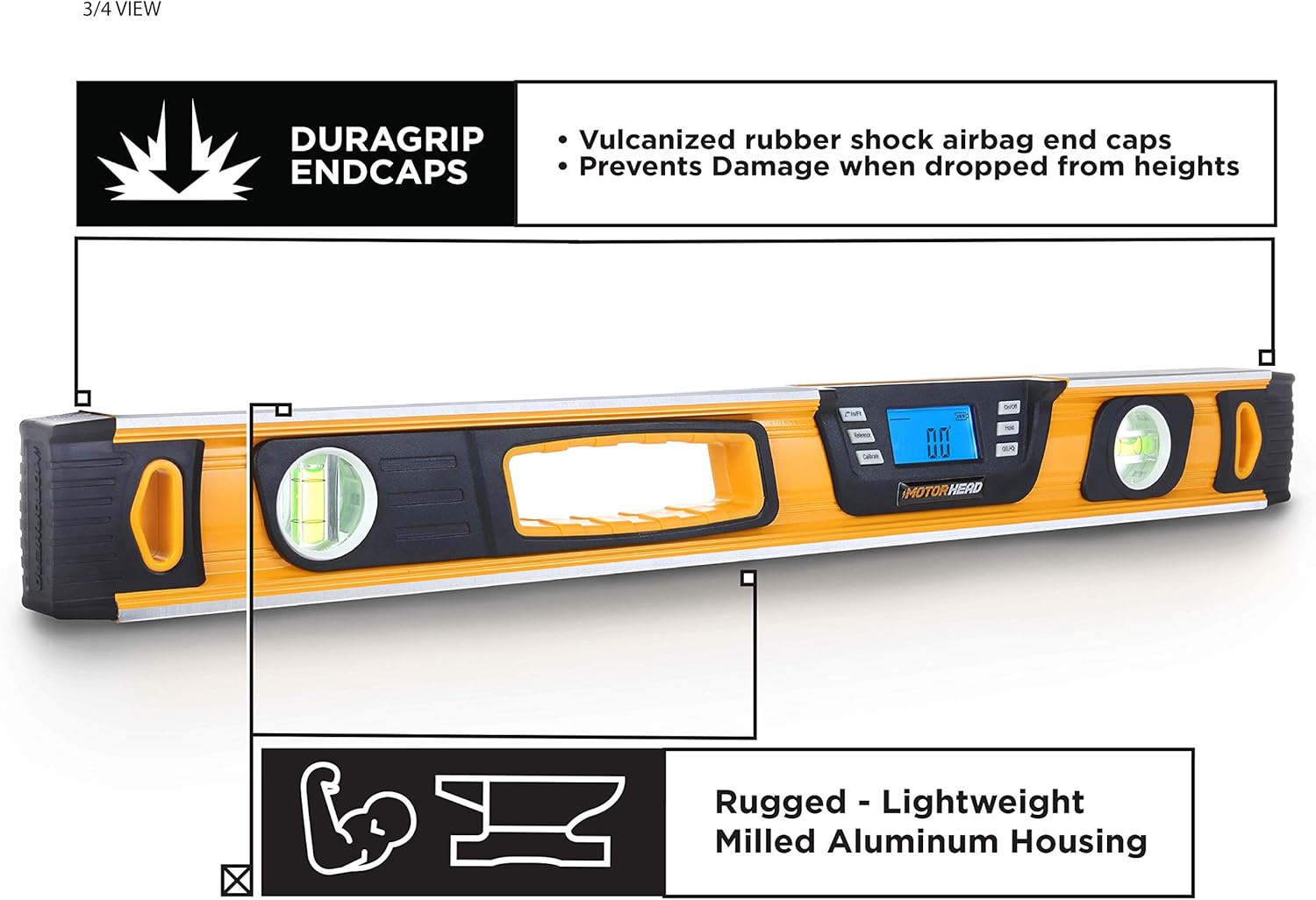
ภาพ: View แสดงasing the robust construction of the digital level.
- Solid Milled Aluminum Construction: Rigorously CNC-machined from solid aluminum blocks for precision and durability.
- DURAGRIP Endcaps: Integrated vulcanized rubber shock-absorbing endcaps prevent damage from accidental drops and falls.
- High-Visibility Finish: Bright paint job makes the level easy to spot on job sites.
คุณสมบัติเพิ่มเติม

Image: Underside and side view of the digital level, detailing its magnetic base and battery compartment.
- Magnetic Bottom: Allows for easy and secure attachment to metal surfaces for hands-free operation.
- 0° and 90° Vials: Traditional bubble vials provide quick visual checks for level and plumb.
- ด้ามจับ: ออกแบบตามหลักสรีรศาสตร์เพื่อการจัดการที่สะดวกสบายและปลอดภัย
- สิ่งที่แนบมาด้วยตะขอ: For convenient storage or hanging.
4. การตั้งค่า
การติดตั้งแบตเตอรี่
The MOTORHEAD Smart Digital Level requires 2 AAA batteries (included).
Image: Location of the battery compartment.
- Locate the battery compartment cover on the side of the level.
- เลื่อนหรือปลดคลิปฝาครอบเพื่อเปิดช่อง
- ใส่แบตเตอรี่ AAA สองก้อน โดยตรวจสอบให้แน่ใจว่าขั้วบวก/ลบถูกต้องตามที่ระบุไว้ภายในช่องใส่แบตเตอรี่
- ใส่ฝาปิดช่องใส่แบตเตอรี่กลับเข้าที่อย่างแน่นหนา
5. คู่มือการใช้งาน
การทำงานพื้นฐาน
- เปิด/ปิดเครื่อง: กดปุ่ม เปิด/ปิด button to turn the level on. Press and hold the เปิด/ปิด ปุ่มเพื่อปิด
- เลือกโหมดการวัด: กดปุ่ม ∠ In/ft % button to cycle through the display modes: degrees (°), percent slope (%), and inches/feet (in/ft).
- Hold/Record Reading: กดปุ่ม Hold/Record button to freeze the current measurement on the display. Press it again to release.
- Backlight & Audible Alert: กดปุ่ม Backlight/Audible Alert button to toggle the display backlight. Press and hold this button to turn the audible alerts on or off. Audible alerts sound at 0°, 45°, and 90°.
การสอบเทียบ
For optimal accuracy, it is recommended to calibrate the level periodically or if you suspect inaccurate readings.
- Place the level on a flat, stable surface.
- กดปุ่ม การปรับเทียบ button. The display will show 'CAL 1'.
- Rotate the level 180 degrees on the same surface, keeping it in the same position.
- กดปุ่ม การปรับเทียบ button again. The display will show 'CAL 2'.
- The level is now calibrated.
Angle Finder Function (Relative Measurement)
This function allows you to set a custom 0° reference point for measuring relative angles.
- Place the level on the surface you wish to use as your reference (e.g., an existing slope).
- กดปุ่ม อ้างอิง button. The display will show 0.0° and a small 'REF' indicator.
- Move the level to the new surface. The display will now show the angle relative to your set reference point.
- To exit reference mode, press the อ้างอิง ปุ่มอีกครั้ง
6. การบำรุงรักษา
- การทำความสะอาด: Wipe the level with a soft, damp ผ้า ห้ามใช้สารทำความสะอาดที่มีฤทธิ์กัดกร่อนหรือตัวทำละลาย
- พื้นที่จัดเก็บ: Store the level in its padded carrying bag in a dry, cool place when not in use. Remove batteries if storing for extended periods to prevent leakage.
- การเปลี่ยนแบตเตอรี่: เปลี่ยนแบตเตอรี่เมื่อไฟแสดงสถานะแบตเตอรี่ต่ำปรากฏขึ้นบนหน้าจอ LCD
7 การแก้ไขปัญหา
| ปัญหา | สาเหตุที่เป็นไปได้ | สารละลาย |
|---|---|---|
| จอแสดงผลไม่เปิด | แบตเตอรี่หมดหรือติดตั้งไม่ถูกต้อง | ตรวจสอบขั้วแบตเตอรี่ เปลี่ยนแบตเตอรี่ใหม่ |
| การอ่านที่ไม่ถูกต้อง | จำเป็นต้องปรับเทียบ | Perform the calibration procedure as described in Section 5. |
| การแจ้งเตือนด้วยเสียงไม่ทำงาน | Audible alert is turned off | กดปุ่มค้างไว้ Backlight/Audible Alert ปุ่มเพื่อเปิดมัน |
| หน้าจอมืด | Low battery or backlight off | เปลี่ยนแบตเตอรี่ กดปุ่ม Backlight/Audible Alert ปุ่มเพื่อเปิดไฟแบ็คไลท์ |
8. ข้อมูลจำเพาะ
| คุณสมบัติ | รายละเอียด |
|---|---|
| ยี่ห้อ | มอเตอร์เฮด |
| หมายเลขรุ่น | MH-02-DL-B1-24-1 |
| วัสดุ | อลูมิเนียม |
| ขนาดสินค้า | 24"L x 24"W (Note: This seems to be a typo in source data, likely 24"L x ~2"W) |
| สไตล์ | ระดับดิจิตอล |
| น้ำหนักสินค้า | 2.29 ปอนด์ (1.04 กิโลกรัม) |
| โหมดการทำงาน | คู่มือ |
| แบตเตอรี่ที่จำเป็น | แบตเตอรี่ AAA จำนวน 2 ก้อน (รวมอยู่ด้วย) |
| ประเภทเซลล์แบตเตอรี่ | ด่าง |
| ประเภทจอภาพ | จอแอลซีดี |
| การแจ้งเตือนด้วยเสียง | At 0°, 45°, and 90° |
| คุณสมบัติพิเศษ | Magnetic bottom, DURAGRIP endcaps, High-visibility finish |
9. การรับประกันและการสนับสนุน
The MOTORHEAD 24-Inch Smart Digital Level is protected by a รับประกัน 2 ปี. An extended warranty may also be available. For warranty claims, technical assistance, or any product-related inquiries, please contact MOTORHEAD USA-Based support. Refer to the contact information provided with your product packaging or visit the official MOTORHEAD webเว็บไซต์สำหรับรายละเอียด
10. วิดีโอผลิตภัณฑ์
สินค้าเกินview วีดีโอ
วิดีโอนี้ให้ข้อมูลที่ครอบคลุมview of the MOTORHEAD 10-Inch Smart Digital Level, demonstrating its key features, display modes, and durable construction. It highlights the LCD screen, audible alerts, solid-milled aluminum body, and magnetic bottom, along with the included carrying bag.