
1. บทนำ
This manual provides essential instructions for the safe and efficient operation of your Ishida Digital Counting Scale CX-α 6000. Please read this manual thoroughly before using the scale and keep it for future reference. This scale is designed for precise weighing and accurate piece counting in various applications, with a maximum capacity of 6kg.
2. ข้อมูลด้านความปลอดภัย
To ensure safe operation and prevent damage to the device or injury to users, observe the following precautions:
- แหล่งจ่ายไฟ: Use only the specified AC adapter. Ensure the power outlet matches the adapter's voltagข้อกำหนดอี
- การจัดวาง: Place the scale on a stable, level, and vibration-free surface. Avoid direct sunlight, extreme temperatures, high humidity, and strong air currents.
- สิ่งแวดล้อม: Do not operate the scale in environments with explosive gases or flammable materials. Keep liquids away from the scale to prevent electrical shock or damage.
- การจัดการ: Do not drop, strike, or subject the scale to excessive force. Do not attempt to disassemble or modify the scale; this will void the warranty and may cause malfunction.
- การทำความสะอาด: ถอดปลั๊กไฟก่อนทำความสะอาด ใช้ผ้าเนื้อนุ่มและแห้งamp ผ้า ห้ามใช้สารทำความสะอาดที่มีฤทธิ์กัดกร่อนหรือตัวทำละลาย
3. เนื้อหาบรรจุภัณฑ์
ตรวจสอบว่าสินค้าทั้งหมดอยู่ครบถ้วนและไม่ได้รับความเสียหายเมื่อแกะกล่อง:
- Ishida Digital Counting Scale CX-α 6000 Unit
- จานชั่งน้ำหนัก
- อะแดปเตอร์ AC
- คู่มือการใช้งาน (เอกสารนี้)
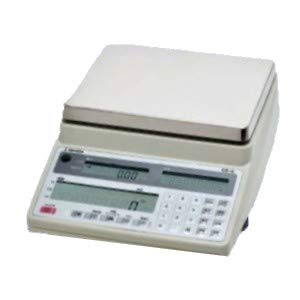
รูปที่ 1: Ishida Digital Counting Scale CX-α 6000. This image shows the complete scale unit with its weighing pan and control panel, featuring dual displays for weight and count, and a numeric keypad.
4. การตั้งค่า
- การแกะกล่อง: Carefully remove the scale and all accessories from the packaging. Retain the packaging for future transport or storage.
- การจัดวาง: Place the scale on a firm, level, and stable surface. Ensure there are no vibrations, drafts, or rapid temperature changes in the vicinity that could affect measurement accuracy.
- Install Weighing Pan: Gently place the weighing pan onto the scale's platform. Ensure it is seated correctly and securely.
- การเชื่อมต่อไฟฟ้า: Connect the AC adapter to the power input port on the scale, then plug the adapter into a suitable electrical outlet.
- เปิดเครื่องครั้งแรก: กดปุ่ม พลัง button to turn on the scale. The display will perform a self-test and then show "0.000" or similar, indicating it is ready for use.
- การปรับระดับ: Check the bubble level indicator (if present, typically on the front or side of the scale) and adjust the scale's feet until the bubble is centered. This ensures accurate measurements.
5. คู่มือการใช้งาน
5.1 การชั่งน้ำหนักพื้นฐาน
- เปิดเครื่อง: กดปุ่ม พลัง button. Wait for the display to stabilize at "0.000".
- รายการสถานที่: วางสิ่งของที่จะชั่งน้ำหนักลงตรงกลางถาดชั่งอย่างระมัดระวัง
- อ่านจอแสดงผล: The weight will be shown on the main display. Wait for the stability indicator (if present) to confirm a stable reading.
- ฟังก์ชั่นทดน้ำหนัก: If using a container, place the empty container on the pan and press the ทดค่า button. The display will reset to "0.000". Now, add the items to be weighed into the container; only the net weight of the items will be displayed.
5.2. ฟังก์ชั่นการนับ
The counting function allows for rapid and accurate counting of uniform items by determining their average unit weight.
- Enter Counting Mode: กดปุ่ม โหมด or นับ button to switch to counting mode. The display may show "PCS" or a similar indicator.
- เซ็ต Sampปริมาณ: Use the numeric keypad to enter the number of sample pieces you will place on the pan (e.g., 10, 20, 50). Press the เข้า or ชุด ปุ่มเพื่อยืนยัน
- สถานที่ampเลอ: Carefully place the exact number of sample pieces (e.g., 10 pieces) onto the center of the weighing pan.
- Confirm Unit Weight: The scale will calculate and display the average unit weight. Press เข้า or การคำนวณแคล to confirm this unit weight. The display will then show the sample quantity (e.g., "10 PCS").
- Add Items for Counting: ถอด sample pieces. Now, place the bulk quantity of items to be counted onto the pan. The scale will display the total count of the items.
- Clear Count: To start a new count, remove all items and press the ศูนย์ or ชัดเจน ปุ่ม.
6. การบำรุงรักษา
- การทำความสะอาด: Regularly clean the scale's exterior and weighing pan with a soft, slightly damp cloth. Do not use harsh detergents, solvents, or abrasive materials, as these can damage the finish or internal components. Ensure no liquid enters the scale's housing.
- พื้นที่จัดเก็บ: When not in use for extended periods, store the scale in a dry, stable environment, away from direct sunlight and extreme temperatures.
- การสอบเทียบ: For continued accuracy, periodic calibration may be required. Refer to the detailed calibration section in the full technical manual or contact authorized service personnel for calibration procedures.
- การตรวจสอบ: Periodically inspect the power cord and adapter for any signs of damage. If damaged, discontinue use and replace with an authorized Ishida part.
7 การแก้ไขปัญหา
If you encounter issues with your scale, consult the table below before contacting service.
| ปัญหา | สาเหตุที่เป็นไปได้ | สารละลาย |
|---|---|---|
| เครื่องชั่งน้ำหนักไม่สามารถเปิดได้ | No power, faulty AC adapter, or power outlet issue. | Check AC adapter connection. Ensure power outlet is functional. Try a different outlet. |
| ค่าที่วัดได้ไม่คงที่ | Unstable surface, drafts, vibrations, or temperature fluctuations. | Place scale on a firm, level surface. Avoid drafts. Ensure stable environment. Re-level the scale. |
| แสดงข้อความ "Err" หรือ "OL" | เกิดการโอเวอร์โหลดหรือข้อผิดพลาดภายใน | Remove excess weight from the pan. Power cycle the scale. If error persists, contact service. |
| การนับที่ไม่ถูกต้อง | ไม่ถูกต้องample quantity, non-uniform items, or unit weight not properly set. | มั่นใจ sample quantity matches the number entered. Use uniform items. Re-establish unit weight with a precise sampเล. |
If the problem persists after attempting these solutions, please contact Ishida customer support or an authorized service center.
8. ข้อมูลจำเพาะ
- แบบอย่าง: CX-α 6000
- ยี่ห้อ: อิชิดะ
- ความจุสูงสุด: 6 กก.
- แหล่งจ่ายไฟ: อะแดปเตอร์ AC (แรงดันไฟฟ้าจำเพาะ)tage/current details typically on adapter label)
- อุณหภูมิในการทำงาน: 0°C ถึง 40°C (32°F ถึง 104°F) (Assumed typical range for scales, if not specified)
- แสดง: Dual LCD (Weight and Count)
9. การรับประกันและการสนับสนุน
การรับประกัน: This Ishida Digital Counting Scale CX-α 6000 is covered by a manufacturer's warranty. Please refer to the warranty card included with your purchase or contact your local Ishida distributor for specific warranty terms and conditions. Keep your proof of purchase for warranty claims.
การสนับสนุนลูกค้า: For technical assistance, service, or spare parts, please contact your authorized Ishida dealer or visit the official Ishida website for contact information in your region. When contacting support, please have your model number (CX-α 6000) and serial number (if applicable) ready.