
1. บทนำ
The UMLIFE XH-W3001 is a digital LED temperature controller module designed for precise temperature management. It features a waterproof sensor probe and supports both heating and cooling modes, making it suitable for various applications such as incubation, equipment cases, and air conditioning systems. This manual provides detailed instructions for the safe and effective use of your XH-W3001 thermostat.
2. ข้อมูลด้านความปลอดภัย
- ตรวจสอบแหล่งจ่ายไฟ voltage matches the device's rated voltagอี (220V)
- All wiring should be performed by a qualified individual to prevent electrical shock or damage.
- อย่าให้เครื่องสัมผัสกับความชื้นมากเกินไปหรืออุณหภูมิที่สูงเกินช่วงการทำงานที่กำหนด
- เก็บอุปกรณ์ให้ห่างจากวัสดุไวไฟ
- โปรดตัดกระแสไฟก่อนทำการเดินสายไฟหรือบำรุงรักษาใดๆ
3. สินค้าหมดview
The XH-W3001 features a clear digital LED display for current temperature readings and control settings. It includes two buttons for easy parameter adjustment and an indicator light to show output status.

รูปที่ 3.1 : ด้านหน้า view of the XH-W3001 Thermostat.
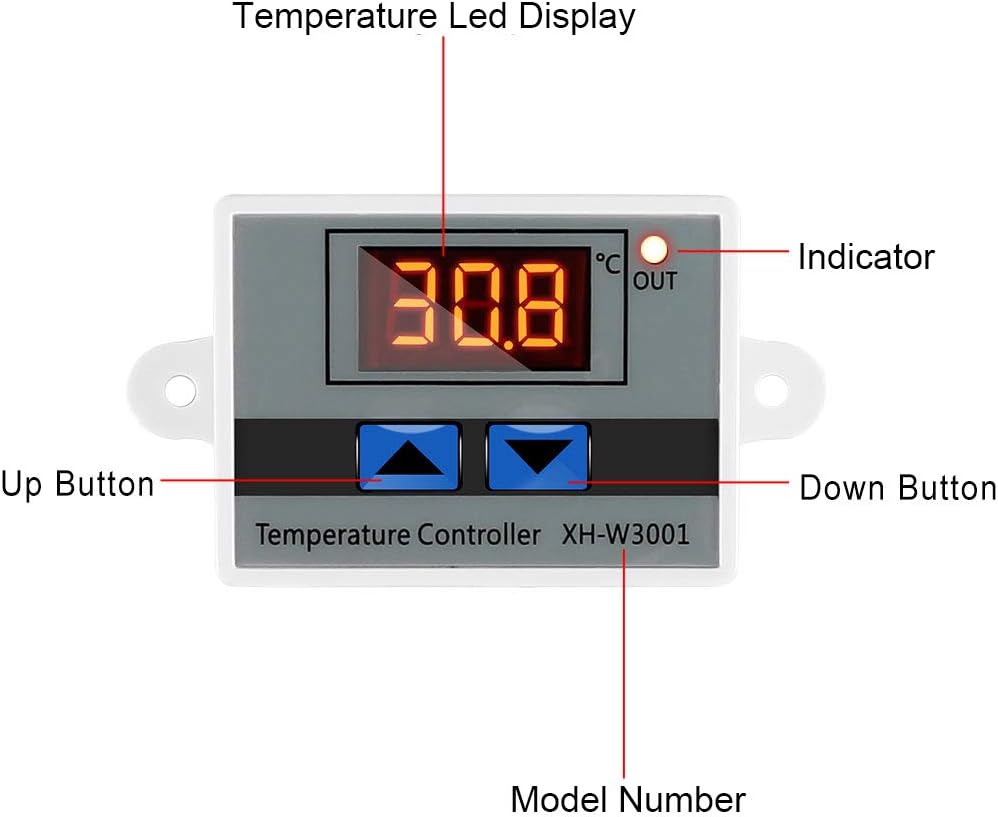
Figure 3.2: Labeled components of the XH-W3001 Thermostat.
คุณสมบัติหลัก:
- ไฟแสดงสถานะ LED: Displays the current output status.
- Digital Display Tube: Shows measuring temperature with high accuracy (0.1℃ precision).
- สองโหมดการทำงาน: Heating (start temperature < stop temperature) and Cooling (start temperature > stop temperature).
- ช่วงอุณหภูมิที่กว้าง: -50℃ to 110℃.
- โครงสร้างทนทาน: ABS flame retardant housing.
- โพรบกันน้ำ: 1-meter NTC10K stainless steel probe.
4. ข้อมูลจำเพาะ
| คุณสมบัติ | ข้อมูลจำเพาะ |
|---|---|
| แบบอย่าง | XH-W3001 |
| เล่มที่tage | 220V (also suitable for 110V) |
| ช่วงอุณหภูมิ | -50℃ ถึง 110℃ |
| ความแม่นยำในการควบคุมอุณหภูมิ | 0.1℃ |
| ประเภทจอภาพ | นำ |
| ประเภทโพรบ | NTC10K (1 meter, waterproof) |
| วัสดุ | ABS (Acrylonitrile Butadiene Styrene), Stainless Steel |
| ส่วนประกอบที่รวมอยู่ | 1pcs Temperature Controller |
5. การติดตั้งและการเดินสายไฟ
Proper wiring is crucial for the safe and correct operation of the XH-W3001. Refer to the diagram below and follow the instructions carefully.

Figure 5.1: XH-W3001 220V Wiring Connection Diagram.
คำแนะนำในการเดินสายไฟ:
- Power Input (220V): Connect the two wires from your 220V AC power supply to the terminals labeled 'N' (Neutral) and 'L' (Live) on the controller. These are typically the two leftmost terminals.
- Load Output (220V): Connect the device you wish to control (e.g., a heater or fan) to the output terminals. One wire from the load connects to the 'N' terminal (Neutral) of the output, and the other wire connects to the 'L' terminal (Live) of the output. Ensure the load's voltage matches the controller's output.
- หัววัดเซ็นเซอร์: Plug the waterproof NTC10K temperature sensor probe into the dedicated two-pin connector on the controller. The probe can be placed in the environment where temperature needs to be measured.
- การต่อลงดิน: If applicable, ensure proper grounding for your power supply and load according to local electrical codes.
Warning: Always ensure power is disconnected before making any wiring connections to prevent electrical shock.
6. คู่มือการใช้งาน
การเพิ่มพลังเริ่มต้น:
After correct wiring, apply power to the controller. The LED display will show the current measured temperature. The red indicator light will illuminate when the output is active.
การตั้งค่าพารามิเตอร์อุณหภูมิ:
The XH-W3001 has two main parameters: Start Temperature (P0) and Stop Temperature (P1).
- Set Start Temperature (P0):
กดปุ่มค้างไว้ UP button for approximately 3 seconds. The display will flash. Use the UP or ลง buttons to adjust the desired start temperature. Press the UP button again to confirm and exit, or wait 5 seconds for automatic exit. - Set Stop Temperature (P1):
กดปุ่มค้างไว้ ลง button for approximately 3 seconds. The display will flash. Use the UP or ลง buttons to adjust the desired stop temperature. Press the ลง button again to confirm and exit, or wait 5 seconds for automatic exit.
Working Modes (Heating/Cooling):
- โหมดการให้ความร้อน: หากมีการ Start Temperature (P0) ถูกตั้งไว้ ต่ำกว่า กว่า Stop Temperature (P1), the controller operates in heating mode. The output will activate when the current temperature drops below P0 and deactivate when it reaches P1.
- โหมดทำความเย็น: หากมีการ Start Temperature (P0) ถูกตั้งไว้ สูงกว่า กว่า Stop Temperature (P1), the controller operates in cooling mode. The output will activate when the current temperature rises above P0 and deactivate when it reaches P1.
การตั้งค่าขั้นสูง:
To access advanced settings, press and hold both UP และ ลง buttons simultaneously for approximately 3 seconds. The display will show 'P0'. Use the UP or ลง buttons to cycle through the parameters (P0-P6). Press the UP button to enter the selected parameter's adjustment mode, then use UP or ลง to change its value. Press UP again to save and exit the parameter, or wait 5 seconds for automatic exit.
- P0: Heating/Cooling Mode (Set Start Temp) - (As described above, this is the primary start temperature setting)
- P1: Stop Temperature (Set Stop Temp) - (As described above, this is the primary stop temperature setting)
- P2: Temperature Correction: Adjusts the measured temperature by a certain offset (e.g., to calibrate the sensor). Range: -10.0℃ to 10.0℃.
- P3: Delay Start: Sets a delay time (in minutes) before the output activates after the temperature condition is met. Range: 0 to 10 minutes.
- P4: High Temperature Alarm: Sets a temperature threshold. If the current temperature exceeds this value, an alarm may be triggered (visual or audible, depending on implementation).
- P5: Low Temperature Alarm: Sets a temperature threshold. If the current temperature falls below this value, an alarm may be triggered.
- P6: Data Lock: Locks the settings to prevent accidental changes.
รีเซ็ตเป็นการตั้งค่าจากโรงงาน:
To restore all settings to their factory defaults, power off the controller. Then, press and hold both the UP และ ลง buttons simultaneously while powering the device back on. The display will show '888' indicating a successful reset.
7. การบำรุงรักษา
- การทำความสะอาด: Gently wipe the device's exterior with a dry, soft cloth. Do not use abrasive cleaners or solvents.
- การดูแลโพรบ: Ensure the sensor probe is clean and free from debris for accurate readings. The stainless steel probe is waterproof, but avoid unnecessary physical damage.
- การเชื่อมต่อ: ตรวจสอบการเชื่อมต่อสายไฟทั้งหมดเป็นระยะๆ เพื่อให้แน่ใจว่ามีความปลอดภัยและไม่มีการกัดกร่อน
8 การแก้ไขปัญหา
- จอแสดงผลว่างเปล่า:
Check power connections. Ensure the voltage supply is correct (220V). - Temperature reading is inaccurate:
Verify the sensor probe is correctly connected and placed in the desired measurement area. Use the P2 (Temperature Correction) setting to calibrate if necessary. - Controller not switching output:
Check if the Start (P0) and Stop (P1) temperatures are set correctly for the desired heating or cooling mode. Ensure the load is properly wired and functional. Check if P3 (Delay Start) is active. - Settings cannot be changed:
Check if P6 (Data Lock) is enabled. Disable it to adjust settings.
9. การรับประกันและการสนับสนุน
This product is covered by a standard manufacturer's warranty against defects in materials and workmanship. For specific warranty terms and conditions, please refer to the product packaging or contact the retailer where the product was purchased.
For technical support, troubleshooting assistance, or inquiries regarding product operation, please contact UMLIFE customer service through the retailer's platform or the official UMLIFE webเว็บไซต์.