
คำแนะนำด้านความปลอดภัยที่สำคัญ
Please read these instructions carefully before using your Coredy R650 Ultra Robot Vacuum and retain them for future reference. Failure to follow these instructions may result in electric shock, fire, or serious injury.
- เด็กอายุตั้งแต่ 8 ปีขึ้นไป รวมไปถึงบุคคลที่มีความบกพร่องทางร่างกาย ประสาทสัมผัส หรือจิตใจ หรือขาดประสบการณ์และความรู้ สามารถใช้เครื่องใช้ไฟฟ้านี้ได้ หากมีการดูแลหรือได้รับคำแนะนำเกี่ยวกับการใช้เครื่องใช้ไฟฟ้าในลักษณะที่ปลอดภัย และเข้าใจถึงอันตรายที่อาจเกิดขึ้น
- ควรมีผู้ดูแลเด็กเพื่อให้แน่ใจว่าไม่ได้เล่นกับเครื่องใช้ไฟฟ้าดังกล่าว
- การทำความสะอาดและการบำรุงรักษาผู้ใช้ไม่ควรทำโดยเด็กโดยไม่มีผู้ดูแล
- โปรดใช้เฉพาะอะแดปเตอร์แปลงไฟที่ผู้ผลิตให้มาเท่านั้น
- ห้ามใช้หุ่นยนต์ดูดฝุ่นในสภาพแวดล้อมที่เปียกชื้นหรือใกล้แหล่งน้ำ
- ถอดสายเคเบิลที่หลวม วัตถุขนาดเล็ก และสิ่งของเปราะบางทั้งหมดออกจากพื้นก่อนดำเนินการเพื่อป้องกันการพันกันหรือความเสียหาย
- Do not operate the robot vacuum in areas with open flames or flammable materials.
- ตรวจสอบให้แน่ใจว่าได้วางแท่นชาร์จบนพื้นผิวเรียบชิดผนัง โดยมีพื้นที่ว่างรอบๆ อย่างเพียงพอ
- Do not carry the robot vacuum by its handle when it is powered on.
- ปิดเครื่องดูดฝุ่นหุ่นยนต์และถอดปลั๊กแท่นชาร์จก่อนทำการบำรุงรักษาหรือทำความสะอาดใดๆ
เนื้อหาแพ็คเกจ
ตรวจสอบว่าส่วนประกอบทั้งหมดอยู่ครบและอยู่ในสภาพดีเมื่อแกะกล่อง
- 1x Coredy R650 Ultra Robotic Vacuum Cleaner
- แท่นชาร์จ 1x
- 1x 500ml Dust Bin (pre-installed)
- 2x Side Brushes (one pair)
- 1x Filter (pre-installed)
- 1x รีโมทคอนโทรล
- อะแดปเตอร์ไฟฟ้า 1x
- 1x Cleaning Tool
- 1x คู่มือผู้ใช้

Image: The Coredy R650 Ultra Robot Vacuum, its remote control, and a smartphone displaying the Coredy app interface.
สินค้าเกินview
ส่วนประกอบของหุ่นยนต์ดูดฝุ่น
- ฝาครอบด้านบน: Houses the power button and Wi-Fi indicator.
- ปุ่มเปิด/ปิด: Initiates or pauses cleaning, powers on/off.
- ถังขยะ: Collects debris, located at the rear of the robot.
- แปรงด้านข้าง: Two rotating brushes on the front sides for edge and corner cleaning.
- แปรงหลัก: V-shaped roller brush located underneath for deep cleaning.
- ล้อขับเคลื่อน: Two large wheels for movement across various surfaces.
- ล้อสากล: Front wheel for navigation.
- หน้าสัมผัสการชาร์จ: Two metal strips on the bottom for connecting to the charging base.
- เซ็นเซอร์ตรวจจับการตกหล่น: Located on the bottom to prevent falls.
- เซ็นเซอร์อินฟราเรด: Front-facing sensors for obstacle detection.
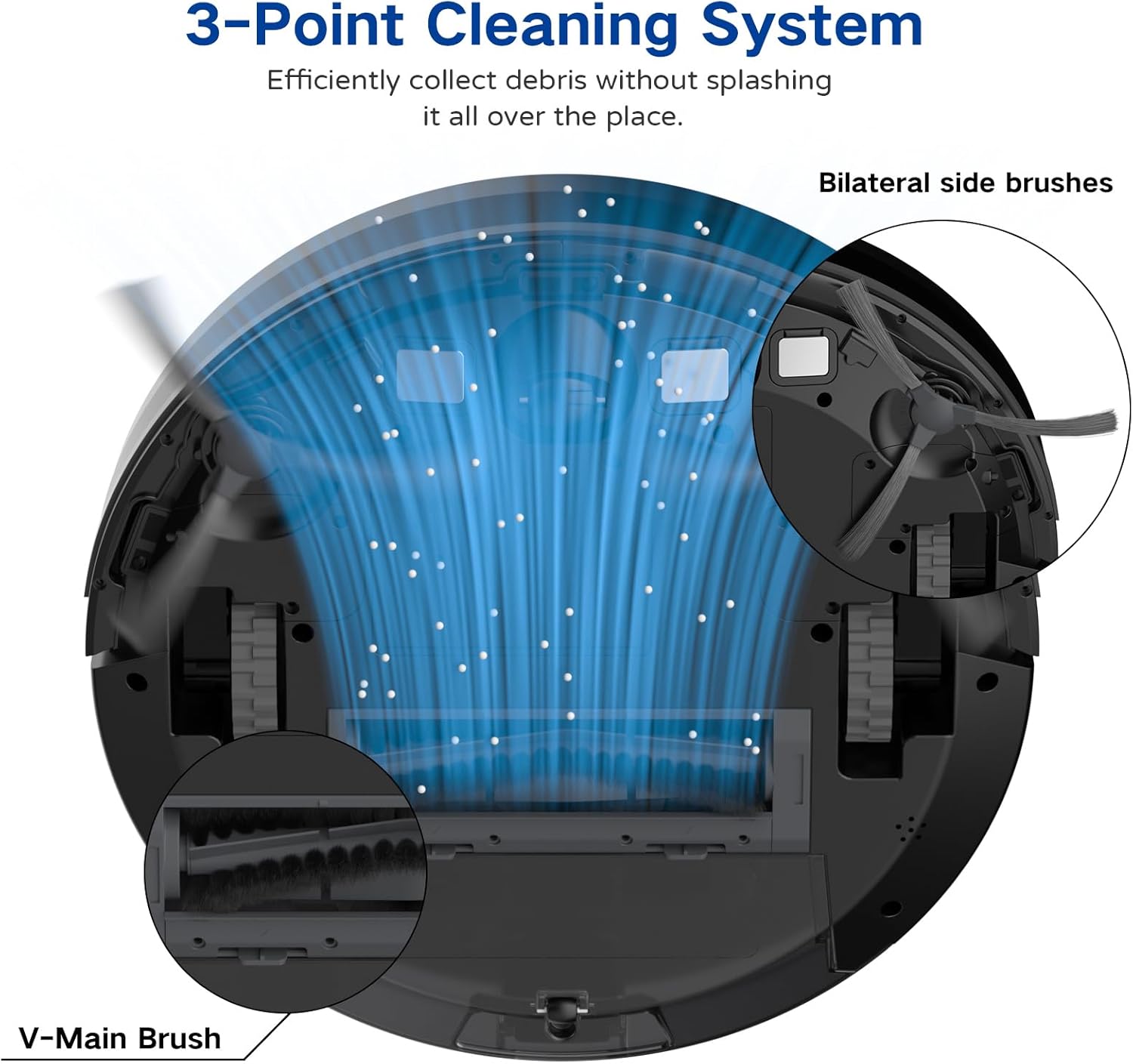
Image: A diagram illustrating the robot vacuum's 3-Point Cleaning System, showing bilateral side brushes and the V-main brush efficiently collecting debris.
ส่วนประกอบฐานชาร์จ
- หมุดชาร์จ: เชื่อมต่อกับจุดชาร์จของหุ่นยนต์
- ไฟแสดงสถานะพลังงาน: แสดงสถานะการชาร์จ
- พอร์ตไฟ: เชื่อมต่อกับอะแดปเตอร์ไฟ
การตั้งค่า
1. Positioning the Charging Base
Place the charging base on a hard, level surface against a wall. Ensure there is at least 3 feet (1 meter) of clear space to the front and 1.5 feet (0.5 meters) to each side of the charging base to allow the robot to dock properly. Plug the power adapter into the charging base and then into a wall outlet.
2. การชาร์จครั้งแรก
Place the robot vacuum onto the charging base, ensuring the charging contacts align. The robot will begin charging automatically. For first-time use, charge the robot for at least 5-6 hours until the indicator light turns solid green, indicating a full charge.
3. การติดตั้งแปรงด้านข้าง
Attach the two side brushes to the posts on the bottom of the robot by pressing them down until they click into place. Ensure they are securely fastened.
4. Connecting to the Coredy App
- Download the 'Coredy' app from the App Store (iOS) or Google Play Store (Android).
- ลงทะเบียนบัญชีและเข้าสู่ระบบ
- Follow the in-app instructions to add your R650 Ultra robot vacuum to your account. This typically involves connecting your phone to a 2.4GHz Wi-Fi network and then connecting the robot to the same network.

Image: A hand interacting with a smartphone showing the Coredy app, which displays a real-time map of the robot's cleaning path and offers control options.
5. การผสานรวมผู้ช่วยเสียง (Alexa/Google Assistant)
Once connected to the Coredy app, you can link your robot vacuum to Amazon Alexa or Google Assistant for voice control.
- เปิดแอป Alexa หรือ Google Home
- ไปที่ส่วน 'ทักษะและเกม' (Alexa) หรือ 'ทำงานร่วมกับ Google' (Google Home)
- ค้นหา the 'Coredy' skill/service and enable it.
- Log in with your Coredy app account credentials when prompted.
- Discover devices. You can now use voice commands like "Alexa, turn on Coredy R650 Ultra" or "Hey Google, start cleaning with Coredy R650 Ultra."

Image: The Coredy R650 Ultra Robot Vacuum positioned near its charging dock, with an Amazon Echo Dot in the background, illustrating voice control capabilities.
การใช้งานหุ่นยนต์ดูดฝุ่น
เริ่ม/หยุดการทำความสะอาด
- เริ่มต้นด้วยตนเอง: Press the power button on the robot or the 'Clean' button on the remote control.
- การควบคุมแอพ: Use the Coredy app to start or stop cleaning.
- การควบคุมด้วยเสียง: Use compatible voice assistants (e.g., "Alexa, start Coredy R650 Ultra").
- หยุดชั่วคราว: Press the power button on the robot or the 'Clean' button on the remote during operation to pause. Press again to resume.
โหมดการทำความสะอาด
The R650 Ultra offers various cleaning modes to suit different needs:
- ทำความสะอาดอัตโนมัติ: The robot automatically cleans in a Z-shaped path, adjusting to different floor types.
- การทำความสะอาดเฉพาะจุด: The robot intensely cleans a specific small area in a spiral pattern.
- การทำความสะอาดขอบ: หุ่นยนต์ทำความสะอาดตามผนังและขอบเฟอร์นิเจอร์
- ควบคุมด้วยมือ: Use the remote control or app to direct the robot manually.

Image: The Coredy R650 Ultra Robot Vacuum cleaning a hard floor, illustrating its Gyroscopic Dynamic Navigation and Z-shaped cleaning path for thorough coverage.
การจัดตารางการทำความสะอาด
You can schedule cleaning times using the Coredy app or the remote control. Refer to the app's interface or the remote control section of this manual for detailed instructions on setting schedules.
การปรับกำลังดูด
The R650 Ultra features adjustable suction power, with a maximum of 2200 Pa. It also includes an Auto Carpet Boost feature that automatically increases suction when carpet is detected.
การชาร์จอัตโนมัติ
When the battery level is low or a cleaning cycle is complete, the robot will automatically return to its charging base to recharge.
การซ่อมบำรุง
การบำรุงรักษาตามปกติจะช่วยให้หุ่นยนต์ดูดฝุ่นของคุณทำงานได้อย่างเหมาะสมที่สุดและยืดอายุการใช้งาน
1. การล้างถังขยะ
It is recommended to empty the dustbin after each use.
- กดปุ่มปลดล็อกถังขยะและดึงถังขยะออกมา
- Open the dustbin cover and empty the contents into a trash bin.

Image: The Coredy R650 Ultra Robot Vacuum on a wooden floor, with its 500ml dustbin detached and placed beside it, highlighting its capacity.
2. การทำความสะอาดตัวกรอง
Clean the filter weekly, or more frequently if you have pets or high usage.
- ถอดตัวกรองออกจากถังขยะ
- เคาะตัวกรองเบาๆ เพื่อกำจัดสิ่งสกปรกที่หลุดร่วง
- Rinse the filter under running water. Ensure it is completely dry before reinstalling.
3. การทำความสะอาดแปรงหลัก
ทำความสะอาดแปรงหลักทุกสัปดาห์
- พลิกหุ่นยนต์กลับด้านแล้วถอดฝาครอบแปรงหลักออก
- ยกแปรงหลักออก
- Use the provided cleaning tool to remove hair and debris wrapped around the brush.
- ติดตั้งแปรงหลักและฝาครอบกลับเข้าที่
4. การทำความสะอาดแปรงด้านข้าง
ตรวจสอบแปรงด้านข้างเป็นประจำเพื่อดูว่ามีเส้นผมพันกันหรือมีเศษสิ่งสกปรกติดอยู่หรือไม่
- ค่อยๆ ดึงแปรงด้านข้างขึ้นด้านบนเพื่อถอดออก
- กำจัดขนหรือเศษสิ่งสกปรกออก
- ประกอบแปรงด้านข้างกลับเข้าไปใหม่ โดยตรวจสอบให้แน่ใจว่ามันล็อกเข้าที่แล้ว
5. การทำความสะอาดเซ็นเซอร์และหน้าสัมผัสการชาร์จ
Wipe the drop sensors, infrared sensors, and charging contacts on both the robot and the charging base with a clean, dry cloth monthly.
การแก้ไขปัญหา
If you encounter issues with your Coredy R650 Ultra, refer to the table below for common problems and solutions.
| ปัญหา | สาเหตุที่เป็นไปได้ | สารละลาย |
|---|---|---|
| หุ่นยนต์ไม่เปิดขึ้น | แบตเตอรี่ต่ำ; ปิดสวิตช์ไฟ | Charge the robot; Ensure power switch is on. |
| หุ่นยนต์ไม่ชาร์จ | Charging contacts dirty; Charging base unplugged | ทำความสะอาดจุดสัมผัสการชาร์จ ตรวจสอบให้แน่ใจว่าเสียบแท่นชาร์จแล้ว |
| หุ่นยนต์ติดขัดบ่อยมาก | Obstacles on floor; Robot stuck under furniture | Clear floor of cables/small items; Use boundary strips or block off low-clearance areas. |
| ประสิทธิภาพการทำความสะอาดแย่ | ถังขยะเต็ม แปรงพันกัน ตัวกรองอุดตัน | เทถังเก็บฝุ่น; ทำความสะอาดแปรงหลักและแปรงด้านข้าง; ทำความสะอาดหรือเปลี่ยนแผ่นกรอง |
| ไม่สามารถเชื่อมต่อ Wi-Fi/แอปได้ | รหัสผ่าน Wi-Fi ไม่ถูกต้อง; เครือข่าย Wi-Fi 5GHz; หุ่นยนต์อยู่ไกลจากเราเตอร์เกินไป | ยืนยันรหัสผ่าน; ตรวจสอบให้แน่ใจว่าใช้ Wi-Fi 2.4GHz; ขยับหุ่นยนต์ให้ใกล้เราเตอร์มากขึ้น |
ข้อมูลจำเพาะ
Technical specifications for the Coredy R650 Ultra Robot Vacuum.
| คุณสมบัติ | รายละเอียด |
|---|---|
| ยี่ห้อ | คอรีดี้ |
| ชื่อรุ่น | Coredy R650 Ultra Robotic Vacuum Cleaner |
| พลังดูด | สูงถึง 2200 Pa |
| อายุการใช้งานแบตเตอรี่ | สูงสุด 120 นาที |
| ความจุของถังขยะ | 500 มิลลิลิตร |
| ขนาดสินค้า | ยาว 12.7 นิ้ว x กว้าง 12.7 นิ้ว x สูง 2.76 นิ้ว |
| วิธีการควบคุม | App, Remote Control, Voice Control |
| อุปกรณ์ที่รองรับ | Amazon Echo, Google Home, สมาร์ทโฟน |
| ประเภทตัวกรอง | ไส้กรอง (HEPA) |
| ประเภทการนำทาง | Gyroscopic Dynamic Navigation |

Image: A technical drawing illustrating the top and side dimensions of the Coredy R650 Ultra Robot Vacuum, showing its 12.7-inch diameter and 2.72-inch height.
การรับประกันและการสนับสนุน
For warranty information, please refer to the warranty card included in your product packaging or visit the official Coredy website. If you require technical support or have questions not covered in this manual, please contact Coredy customer service through the contact information provided on their webไซต์หรือในเอกสารการซื้อของคุณ