
1. สินค้าหมดview
The MEAN WELL HDR-150-24 is a 150W Ultra Slim Step Shape DIN Rail Power Supply designed for industrial control applications. It provides a stable +24V DC output at 6.25 Amps, converting AC input power efficiently. Its compact design allows for easy integration into control cabinets and systems.

รูปที่ 1 : ด้านหน้า view of the HDR-150-24 DIN Rail Power Supply.
2. ข้อมูลจำเพาะ
| คุณสมบัติ | คำอธิบาย |
|---|---|
| หมายเลขรุ่น | เอชดีอาร์-150-24 |
| อินพุต Voltage | 100-240VAC (50/60เฮิรตซ์) |
| ปริมาณการส่งออกtage | 24VDC |
| กระแสไฟขาออก | 6.25 Amps |
| กำลังขับ | 150วัตต์ |
| ขนาด | ขนาด 4 x 5 x 4 นิ้ว (โดยประมาณ) |
| น้ำหนัก | 0.31 กิโลกรัม |
| การติดตั้ง | ราง DIN |
| การทำให้เย็น | Passive (vented enclosure) |
| ตัวบ่งชี้ | ไฟ LED DC ตกลง |
| ความสามารถในการปรับเปลี่ยนได้ | ปริมาณการส่งออกtage adjustable via potentiometer |
3. ข้อมูลด้านความปลอดภัย
Please read and understand all safety instructions before installing or operating the power supply. Failure to follow these instructions may result in electric shock, fire, or serious injury.
- บุคลากรที่ผ่านการรับรอง: การติดตั้งและบำรุงรักษาควรดำเนินการโดยบุคลากรที่มีคุณสมบัติเท่านั้น
- สภาพแวดล้อมที่ควบคุม: This device is intended for use in a controlled environment.
- การตัดการเชื่อมต่อไฟฟ้า: ควรตัดกระแสไฟก่อนทำการติดตั้ง เดินสายไฟ หรือบำรุงรักษาทุกครั้ง
- การต่อสายดินที่ถูกต้อง: ตรวจสอบให้แน่ใจว่าแหล่งจ่ายไฟได้รับการต่อสายดินอย่างถูกต้องเพื่อป้องกันไฟฟ้าช็อต
- การระบายอากาศ : Maintain adequate clearance around the unit for proper passive cooling. Do not block ventilation holes.
- แรงบิดที่ปลายสาย: Ensure all terminal screws are tightened to the specified torque (typically 3.0 Lb-In for input/output terminals) to prevent loose connections and overheating.
4. การตั้งค่า
4.1 การติดตั้ง
The HDR-150-24 is designed for mounting on a standard DIN rail. Locate the DIN rail clip on the back of the unit. To mount, hook the top edge of the power supply onto the DIN rail, then push the bottom edge firmly until it clicks into place. To remove, pull down the release lever at the bottom of the clip and lift the unit off the rail.
4.2 การเดินสายไฟ
Refer to the wiring diagram below for proper connection of input and output terminals. Ensure all wires are stripped to the appropriate length and securely inserted into the screw terminals before tightening.
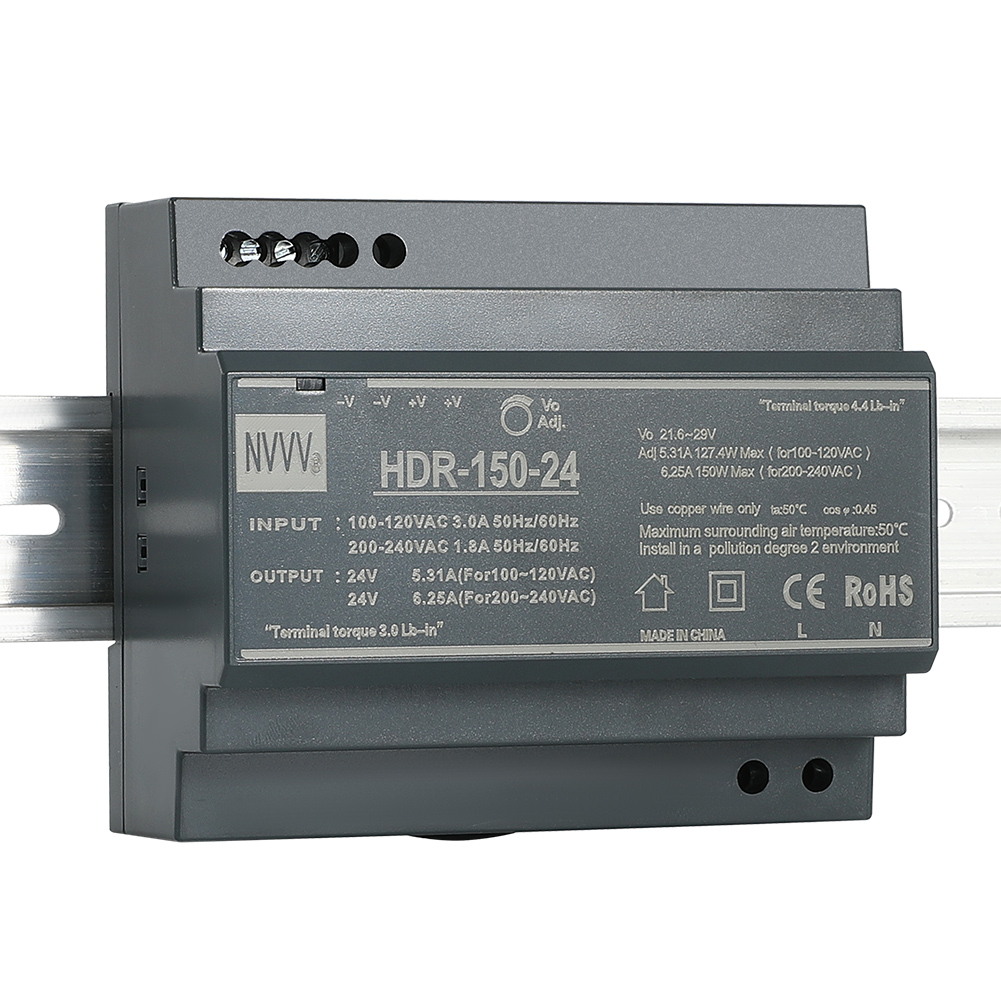
Figure 2: Wiring Diagram for HDR-150-24. Input terminals (L, N, PE) are at the bottom, and output terminals (+V, -V) are at the top. An adjustable potentiometer is also visible.
- การเชื่อมต่ออินพุต: Connect the AC Line (L), Neutral (N), and Protective Earth (PE) wires to the corresponding input terminals.
- การเชื่อมต่อขาออก: Connect the positive (+V) and negative (-V) DC load wires to the corresponding output terminals. The unit provides multiple output terminals for convenience.
4.3 เอาท์พุทVoltagการปรับแต่ง
ปริมาณการส่งออกtage can be finely adjusted using the potentiometer located on the front panel. Use a small screwdriver to turn the potentiometer clockwise to increase the voltage or counter-clockwise to decrease it. Always verify the output voltage with a multimeter after adjustment.
Video 1: This video demonstrates the physical features, unboxing, and basic wiring of the HDR-150-24 DIN Rail Power Supply, including the terminal connections and voltagอี การปรับ
5. คู่มือการใช้งาน
Once properly installed and wired, the power supply is ready for operation.
- เปิดเครื่อง: Apply AC input power to the L and N terminals.
- DC OK Indicator: Observe the 'DC OK' LED on the front panel. A green light indicates that the output voltage อยู่ภายในช่วงการทำงานปกติ
- หมดแรง: Disconnect the AC input power to shut down the unit.
6. การบำรุงรักษา
To ensure optimal performance and longevity of your HDR-150-24 power supply, follow these maintenance guidelines:
- การตรวจสอบปกติ: Periodically inspect the unit for any signs of damage, loose connections, or excessive dust accumulation.
- การทำความสะอาด: If dust accumulates, gently clean the ventilation holes and the unit's surface with a soft, dry cloth or compressed air. Ensure power is disconnected before cleaning.
- สภาพแวดล้อม : ตรวจสอบให้แน่ใจว่าสภาพแวดล้อมในการทำงานอยู่ในช่วงอุณหภูมิและความชื้นที่กำหนด เพื่อป้องกันความเสียหายก่อนกำหนด
7 การแก้ไขปัญหา
If you encounter issues with your power supply, refer to the following troubleshooting steps:
- No Power / No DC OK LED:
- Check the AC input power source and connections.
- ตรวจสอบว่าปริมาณอินพุตtage อยู่ในช่วงที่กำหนด (100-240VAC)
- Inspect for any tripped circuit breakers or blown fuses in the input line.
- ไม่มีเอาท์พุทVoltage / DC OK LED Off:
- Check the output connections for shorts or open circuits.
- Ensure the load connected does not exceed the power supply's maximum output current (6.25A) or power (150W). Overload protection may have activated.
- If the unit has been overloaded, disconnect the load, power cycle the unit, and re-test with a reduced load.
- ระดับเสียงเอาต์พุตไม่ถูกต้องtage:
- ใช้มัลติมิเตอร์วัดปริมาตรเอาต์พุตtage.
- ปรับปริมาณการส่งออกtage potentiometer as described in Section 4.3.
8. การรับประกันและการสนับสนุน
The MEAN WELL HDR-150-24 power supply comes with a standard manufacturer's warranty. For warranty claims, technical support, or service inquiries, please contact your authorized MEAN WELL distributor or visit the official MEAN WELL webเว็บไซต์สำหรับข้อมูลการติดต่อ
9. แหล่งข้อมูลเพิ่มเติม
Video 2: This video provides a comprehensive full view of the product, highlighting its design and features.