
Nestling HK-688
Nestling HK-688 Walkie Talkies User Manual
รุ่น: HK-688
1. บทนำ
This manual provides comprehensive instructions for the safe and effective operation of your Nestling HK-688 Walkie Talkies. These mini 2-way radios are designed for clear communication over long distances, making them ideal for children's outdoor adventures, camping, hiking, and general play.
The Nestling HK-688 Walkie Talkies feature 22 UHF channels, a generous range, and user-friendly controls. Please read this manual thoroughly before using the device to ensure proper functionality and to maximize your experience.

Image: Three Nestling HK-688 walkie talkies in camo blue, camo pink, and camo green, displayed with their product packaging.
2. สินค้าหมดview
2.1 เนื้อหาบรรจุภัณฑ์
แพ็คเกจมาตรฐานประกอบด้วยรายการต่อไปนี้:
- 3x Nestling HK-688 Camo Kids Walkie Talkies (Camo Blue, Camo Pink, Camo Green)
- 1x คู่มือผู้ใช้ (เอกสารนี้)
- หมายเหตุ: ไม่รวมแบตเตอรี่ AAA ต้องซื้อแยกต่างหาก
2.2 คุณสมบัติหลัก
- ช่องสัญญาณ FRS/GMRS จำนวน 22 ช่อง: มีตัวเลือกการสื่อสารหลากหลายรูปแบบ
- ระยะยาว: Up to 3km (1.9 miles) in typical conditions, and up to 5km (3.1 miles) in open fields.
- คุณภาพเสียงที่ชัดเจน: Ensures effective communication.
- จอแสดงผลแอลซีดีแบ็คไลท์: เพื่อความสะดวก viewing of channel, battery status, and other indicators.
- Built-in Mini LED Torch: Useful for low-light conditions.
- Automatic Channel Scan: Quickly finds active channels.
- ระบบตัดเสียงรบกวนอัตโนมัติ: Reduces background noise for clearer reception.
- CTCSS 99 Sub-codes: เพิ่มความเป็นส่วนตัวด้วยการกรองสัญญาณที่ไม่พึงประสงค์
- โทรแจ้งเตือน: Notifies you of incoming calls.
- ล็อคช่อง: ป้องกันการเปลี่ยนช่องโดยไม่ตั้งใจ
- PTT/VOX Function: Push-to-Talk for manual transmission or Voice Operated Exchange for hands-free communication.
- ฟังก์ชันประหยัดพลังงานแบตเตอรี่: ช่วยยืดอายุการใช้งานแบตเตอรี่
- การแจ้งเตือนพลังงานต่ำ: แสดงสถานะเมื่อแบตเตอรี่เหลือน้อย
- ปริมาณที่ปรับได้: Control the listening level.
- น้ำหนักเบาและพกพาสะดวก: Designed for easy carrying with a built-in belt clip.
- Drop Resistant Design: Enhanced durability for active use.

Image: Visual representation of the walkie talkie's dimensions and key features like drop resistance, low battery alert, flashlight, and communication range.

Image: Features of the walkie talkie, including 22 channels with privacy codes, extended range, noise reduction, drop resistance, and a built-in flashlight.
2.3 ส่วนประกอบของอุปกรณ์

Image: Detailed diagram illustrating the various parts of the walkie talkie, including buttons, display, and audio components.
- เสาอากาศ: สำหรับการส่งและรับสัญญาณ
- Lamp (Flashlight): ไฟ LED ในตัว
- ไมโครโฟน: For speaking into the device.
- ปุ่ม PTT (กดเพื่อพูด): กดค้างเพื่อส่งเสียงของคุณ
- จอแสดงผล LCD: Shows channel, battery level, and other indicators.
- Call Lock Button: ล็อกช่องสัญญาณปัจจุบัน
- ปุ่มมอนิเตอร์: Allows listening to weak signals on the current channel.
- Lamp ปุ่มสแกน: Activates the flashlight and initiates channel scan.
- ปุ่มลง: ใช้สำหรับเลื่อนดูเมนูหรือลดค่าต่างๆ
- ปุ่มเปิด/ปิดเครื่อง: Turns the device on/off and accesses the menu.
- ผู้บรรยาย: For listening to incoming transmissions.
3. การตั้งค่า
3.1 การติดตั้งแบตเตอรี่
Each Nestling HK-688 Walkie Talkie requires 4x AAA batteries (not included).
- Release the Belt Clip: Press the lock on the top of the belt clip and lift the clip up to detach it from the radio.
- เปิดช่องใส่แบตเตอรี่: Locate the battery cover on the back of the walkie talkie. Gently push down on the tab and slide the cover off.
- ใส่แบตเตอรี่: Insert 4x AAA batteries into the compartment, ensuring correct polarity (+/-) as indicated inside the compartment.
- ปิดช่องใส่แบตเตอรี่: Replace the battery cover and slide it until it clicks securely into place. Reattach the belt clip if desired.
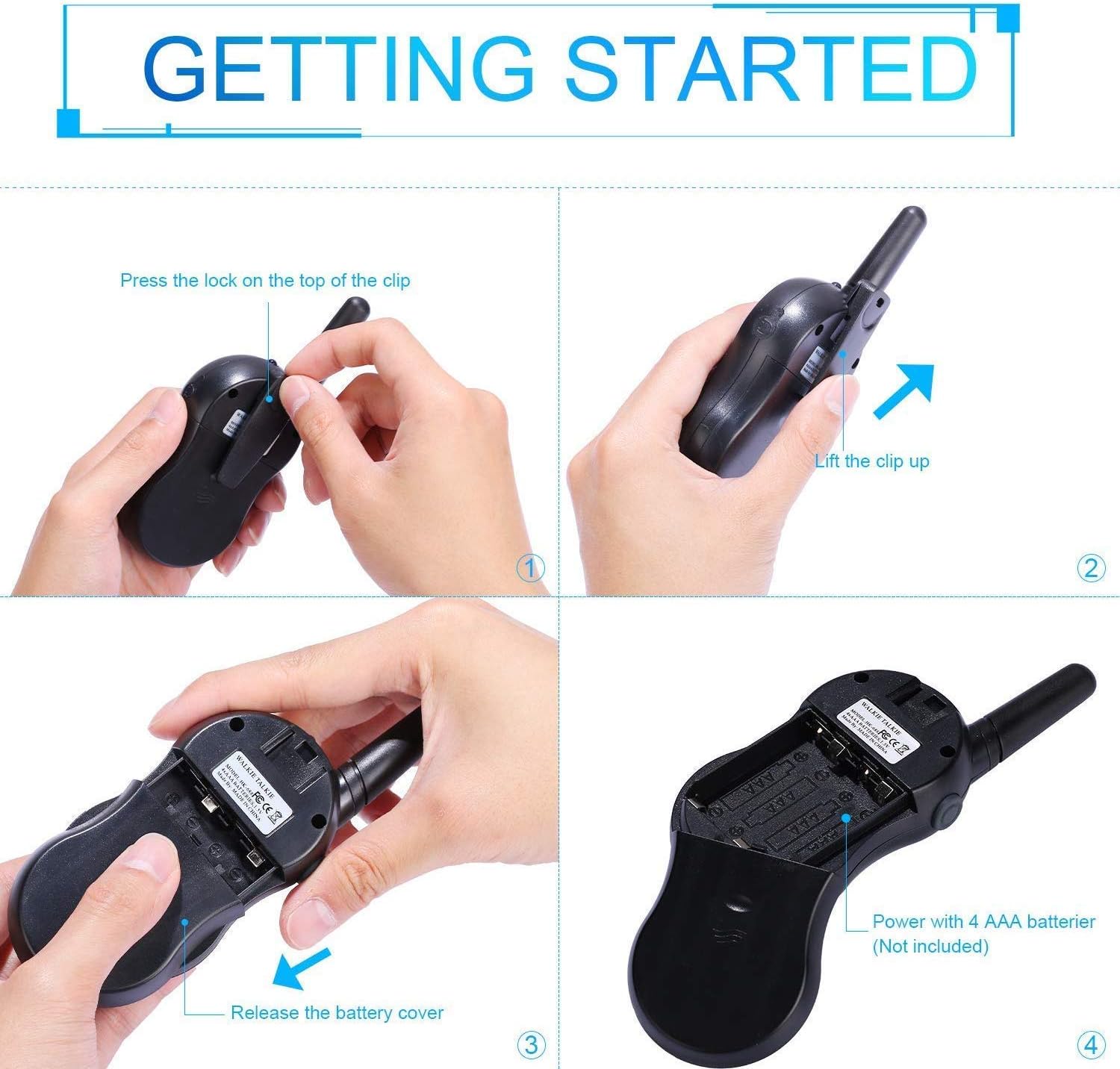
Image: Step-by-step instructions for opening the battery compartment and inserting AAA batteries into the walkie talkie.

Image: An open battery compartment of the walkie talkie, ready for battery insertion.
3.2 การเปิด/ปิดเครื่อง
To turn the walkie talkie on or off, press and hold the พลังงาน/เมนู button until the LCD screen illuminates or turns off.
4. คู่มือการใช้งาน
4.1 Basic Communication (Push-to-Talk)
- เลือกช่อง: Ensure all walkie talkies you wish to communicate with are set to the same channel and sub-code. Use the Up และ ลง ปุ่มเปลี่ยนช่อง
- ส่ง: กดปุ่มค้างไว้ ปตท. button (located on the side of the radio). Speak clearly into the microphone, holding the radio approximately 2-3 inches from your mouth.
- รับ: ปล่อยตัว ปตท. button to listen for incoming transmissions.
Tip: For optimal range and clarity, avoid obstructions like buildings, dense foliage, or large metal objects. Adverse weather conditions can also affect range.
4.2 Channel Selection and Sub-codes (CTCSS/DCS)
Your walkie talkie supports 22 FRS/GMRS channels and 99 CTCSS/DCS sub-codes. Sub-codes help filter out unwanted conversations on the same channel, enhancing privacy.
- กดปุ่ม เมนู กดปุ่มหนึ่งครั้งเพื่อเข้าสู่โหมดเลือกช่อง หมายเลขช่องจะกะพริบ
- ใช้ Up or ลง ปุ่มเพื่อเลือกช่องที่ต้องการ (1-22)
- กดปุ่ม เมนู button again to enter sub-code selection mode. The sub-code number will flash.
- ใช้ Up or ลง buttons to select your desired sub-code (0-99). Setting to 0 disables the sub-code.
- กดปุ่ม ปตท. button or wait a few seconds for the setting to be saved and exit the menu.
4.3 ฟังก์ชัน VOX (การแลกเปลี่ยนด้วยเสียง)
The VOX function allows for hands-free communication. When activated, the radio will automatically transmit when it detects your voice.
- กดปุ่ม เมนู button multiple times until the VOX icon (VOX) appears on the LCD and flashes.
- ใช้ Up or ลง buttons to select the VOX sensitivity level (e.g., 1-3, with 1 being most sensitive). Select "OFF" to disable VOX.
- กดปุ่ม ปตท. button or wait a few seconds to save the setting and exit.
4.4 การใช้งานไฟฉาย
To turn the built-in LED flashlight on or off, briefly press the Lamp button (often combined with the Scan button).
4.5 Call Alert Tone
To send a call alert tone to other radios on the same channel, briefly press the เรียก button (often represented by a musical note icon).
4.6 ล็อคช่อง
To prevent accidental channel changes, you can lock the current channel.
- กดปุ่มค้างไว้ Call Lock button (often represented by a key icon) until a key icon appears on the LCD.
- หากต้องการปลดล็อค ให้กดค้างไว้ Call Lock กดปุ่มซ้ำๆ จนกว่าไอคอนรูปกุญแจจะหายไป

ภาพ: อดีตamples of suitable scenarios for using the walkie talkies, such as outdoor play, family activities, and leisure.

Image: Illustrations of walkie talkies being used for communication in both play and household settings.
5. การบำรุงรักษา
5.1 การดูแลแบตเตอรี่
- ควรใช้แบตเตอรี่ AAA คุณภาพสูงและใหม่เสมอ
- Remove batteries from the walkie talkie if it will not be used for an extended period to prevent leakage and damage.
- ทิ้งแบตเตอรี่ที่ใช้แล้วอย่างรับผิดชอบตามข้อบังคับท้องถิ่น
5.2 การทำความสะอาดและการเก็บรักษา
- ทำความสะอาดวิทยุสื่อสารด้วยผ้าเนื้อนุ่มและแห้งamp ผ้า. อย่าใช้สารเคมีที่รุนแรงหรือน้ำยาทำความสะอาดที่มีฤทธิ์กัดกร่อน
- Do not immerse the walkie talkie in water, as it is not water-resistant.
- เก็บวิทยุสื่อสารไว้ในที่แห้งและเย็น หลีกเลี่ยงแสงแดดโดยตรงและอุณหภูมิที่สูงหรือต่ำเกินไป
6 การแก้ไขปัญหา
| ปัญหา | สาเหตุที่เป็นไปได้ | สารละลาย |
|---|---|---|
| ไม่มีไฟฟ้า | แบตเตอรี่หมดหรือติดตั้งไม่ถูกต้อง | เปลี่ยนแบตเตอรี่ใหม่โดยตรวจสอบให้แน่ใจว่าใส่ขั้วถูกต้อง |
| ไม่สามารถส่งหรือรับได้ | Not on the same channel/sub-code; out of range; PTT button not pressed/released. | Ensure all radios are on the same channel and sub-code. Move closer to the other radio. Press and hold PTT to transmit, release to receive. |
| คุณภาพเสียงไม่ดี / สัญญาณรบกวน | Out of range; obstructions; low battery; squelch setting. | Move closer. Avoid obstructions. Replace batteries. Check squelch settings. |
| ช่องเปลี่ยนโดยไม่ได้ตั้งใจ | Channel lock is not activated. | Activate the channel lock function. |
| VOX ไม่ทำงาน | VOX sensitivity too low or VOX is off. | Adjust VOX sensitivity to a higher level or ensure VOX is enabled. |
7. ข้อมูลจำเพาะ
| คุณสมบัติ | รายละเอียด |
|---|---|
| ยี่ห้อ | ลูกนก |
| แบบอย่าง | HK-688 |
| ช่วงความถี่ | 400-470เมกะเฮิรตซ์ |
| ช่องทางการ | ช่อง FRS/GMRS จำนวน 22 ช่อง |
| รหัสย่อย | ซีทีซีเอส 99 |
| กำลังส่ง | <=0.5วัตต์ |
| ประเภทการมอดูเลชั่น | เอฟเอ็ม-เอฟ3อี |
| พิสัย | Up to 3km (1.9 miles) typical, MAX 5km (3.1 miles) in open field |
| สเควลช์ | สควลช์อัตโนมัติ |
| ประเภทจอภาพ | จอ LCD Backlit |
| แจ็คหูฟัง | 2.5mm / 0.1inch |
| แหล่งจ่ายไฟ | 4x AAA batteries per radio (Not Included) |
| ขนาดสินค้า (สูง x ยาว x ลึก) | 14 ซม. x 5.5 ซม. x 3.5 ซม. (5.5 x 2.2 x 1.4 นิ้ว) |
| น้ำหนักแพ็คเกจ | 370กรัม |
| สี | Camo Blue, Camo Pink, Camo Green |
| ระดับความต้านทานต่อน้ำ | ไม่ทนน้ำ |
8. การรับประกันและการสนับสนุน
Nestling HK-688 Walkie Talkies come with a รับประกัน 12 เดือน ตั้งแต่วันที่ซื้อสินค้า
For any support inquiries, troubleshooting assistance beyond this manual, or warranty claims, please refer to the contact information provided on the product packaging or the retailer's webเว็บไซต์ที่ซื้อผลิตภัณฑ์นั้น
Ask a question about this manual
Ask about setup, troubleshooting, compatibility, parts, safety, or missing instructions. Manuals+ will review the question and use this page’s manual context to help answer it.