
1. บทนำ
ขอบคุณสำหรับการซื้อasing the UHAPPY U18 Portable Mini HD LED Projector. This manual provides essential information for the safe and efficient operation of your device. Please read it thoroughly before use and retain it for future reference.
ข้อควรระวังเพื่อความปลอดภัย
- อย่ามองตรงเข้าไปในเลนส์โปรเจ็กเตอร์เมื่อลamp อยู่บนแล้ว
- ตรวจสอบให้แน่ใจว่ามีการระบายอากาศที่เหมาะสมรอบๆ โปรเจ็กเตอร์เพื่อป้องกันความร้อนสูงเกินไป
- อย่าให้โปรเจ็กเตอร์โดนฝนหรือความชื้น
- ใช้เฉพาะอะแดปเตอร์ไฟฟ้าที่มาพร้อมกับโปรเจ็กเตอร์เท่านั้น
- ห้ามเปิดหรือซ่อมโปรเจคเตอร์ด้วยตนเอง โปรดส่งซ่อมโดยช่างผู้ชำนาญการเท่านั้น
2. สินค้าหมดview
Familiarize yourself with the components and ports of your UHAPPY U18 projector.
เนื้อหาแพ็คเกจ
The following items are included in your projector package:

Image: Contents of the UHAPPY U18 projector package, including the projector, power adapter, AV cable, remote control, and user manual.
- UHAPPY U18 Mini LED Projector
- อะแดปเตอร์แปลงไฟ
- เคเบิ้ล AV
- รีโมทคอนโทรล
- คู่มือการใช้งาน (เอกสารนี้)
Projector Components and Ports

Image: Angled top-down view of the UHAPPY U18 projector, highlighting the lens, focus adjustment, and control panel.

ภาพ: ด้านบน view of the UHAPPY U18 projector, showing the integrated control buttons.

ภาพ: ด้านหน้า view of the UHAPPY U18 projector, focusing on the projection lens.
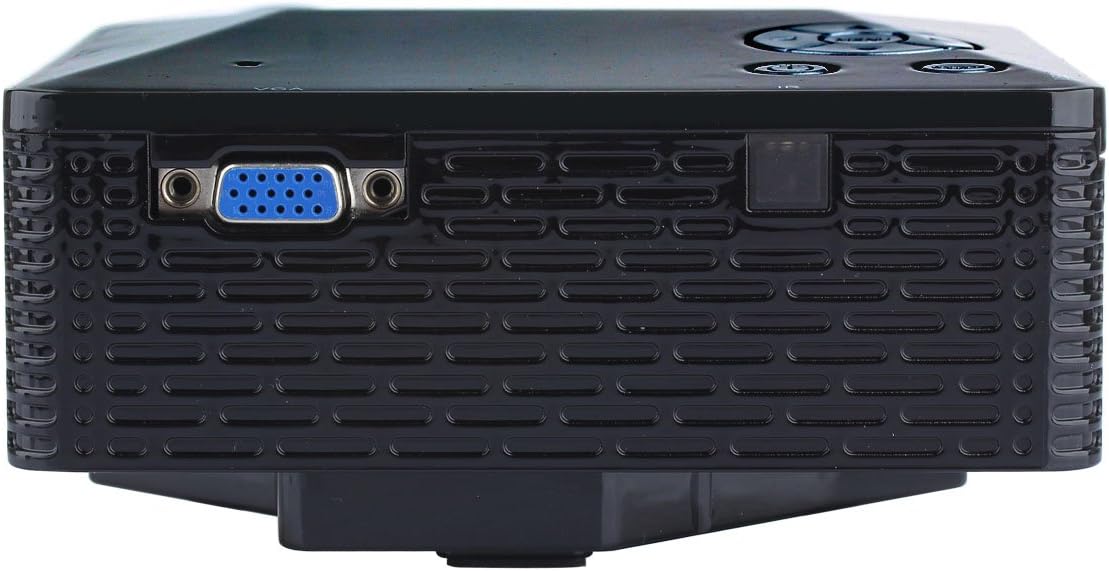
ภาพ: ด้านข้าง view of the UHAPPY U18 projector, illustrating the VGA input port.
The projector features various input ports for connectivity:
- อินพุต HDMI: For connecting devices like laptops, gaming consoles, or media players.
- พอร์ต USB: สำหรับเชื่อมต่ออุปกรณ์จัดเก็บข้อมูล USB เพื่อเล่นสื่อโดยตรง
- ช่องเสียบการ์ด SD: For inserting SD memory cards to play media directly.
- อินพุต AV: For connecting older devices using the included AV cable.
- อินพุต VGA: For connecting computers or laptops with a VGA output.
- DC-IN: พอร์ตอินพุตไฟ
- เอาท์พุตหูฟัง: สำหรับเชื่อมต่ออุปกรณ์เสียงภายนอกหรือหูฟัง
- ปุ่มปรับโฟกัส: Located near the lens for adjusting image clarity.
3. การตั้งค่า
3.1 การจัดวาง
Place the projector on a stable, flat surface. Ensure there is adequate space around the projector for ventilation. The ideal projection distance is between 1 to 4 meters, yielding an image size of 20 to 80 inches.
3.2 การเชื่อมต่อสายไฟ
- ต่ออะแดปเตอร์แปลงไฟเข้ากับพอร์ต DC-IN บนโปรเจ็กเตอร์
- เสียบอะแดปเตอร์จ่ายไฟเข้ากับเต้ารับไฟฟ้าที่เหมาะสม
3.3 การเชื่อมต่ออุปกรณ์ป้อนข้อมูล
Choose the appropriate cable and port based on your source device:
- ช่องต่อ HDMI: Connect an HDMI cable from your device (e.g., laptop, DVD player) to the projector's HDMI port.
- VGA: เชื่อมต่อสาย VGA จากคอมพิวเตอร์ของคุณเข้ากับพอร์ต VGA ของโปรเจ็กเตอร์
- เอวี: Use the provided AV cable to connect devices with AV output (e.g., older DVD players, set-top boxes) to the projector's AV port.
- ยูเอสบี/การ์ด SD: เสียบแฟลชไดรฟ์ USB เข้ากับพอร์ต USB หรือเสียบการ์ด SD เข้ากับช่องเสียบการ์ด SD
4. คู่มือการใช้งาน
4.1 การเปิด/ปิดเครื่อง
- การเปิดเครื่อง: Press the power button on the projector or the remote control. The LED indicator will light up.
- วิธีปิดเครื่อง: Press the power button again. It is recommended to allow the projector to cool down for a few minutes before unplugging it.
4.2 การเลือกแหล่งที่มา
After powering on, you may need to select the input source:
- Press the 'Source' button on the projector or the remote control.
- Use the navigation buttons to select the desired input (HDMI, VGA, AV, USB, SD) and press 'OK' or 'Enter'.
4.3 การปรับโฟกัส
If the projected image appears blurry:
- Rotate the focus knob located near the projector lens until the image becomes clear and sharp.
4.4 การนำทางเมนู
Use the 'Menu' button on the projector or remote to access settings. Use the navigation arrows to move through options and 'OK' or 'Enter' to confirm selections. The projector supports multiple languages including English, Czech, Slovak, Danish, German, Spanish, French, Croatian, Italian, Hungarian, Dutch, Norwegian, Polish, Portuguese, Romanian, Slovene, Serbian, Finnish, Swedish, Bulgarian, Greek, Russian, and Chinese.
4.5 รูปแบบสื่อที่รองรับ
When playing media directly from USB or SD card, the projector supports the following formats:
- ภาพ: BMP, JPEG, PNG
- วีดีโอ: MPEG1, MPEG2, MPEG4, RM, RMVB, AVI, FLV, WMV
5. การบำรุงรักษา
5.1 การทำความสะอาดเลนส์
ใช้ผ้าเนื้อนุ่ม ปราศจากขน ที่ออกแบบมาสำหรับเลนส์โดยเฉพาะ เช็ดเลนส์โปรเจคเตอร์เบาๆ หลีกเลี่ยงการใช้วัสดุที่มีฤทธิ์กัดกร่อนหรือสารเคมีรุนแรง
5.2 การทำความสะอาดทั่วไป
Wipe the projector's exterior with a soft, dry cloth. Do not use liquid cleaners directly on the device. Ensure ventilation openings are free from dust and obstructions.
5.3 พื้นที่จัดเก็บ
When not in use, store the projector in a cool, dry place, away from direct sunlight and extreme temperatures. It is advisable to cover the lens to protect it from dust.
6 การแก้ไขปัญหา
หากคุณพบปัญหาเกี่ยวกับโปรเจ็กเตอร์ของคุณ โปรดดูปัญหาทั่วไปและวิธีแก้ไขต่อไปนี้:
| ปัญหา | สาเหตุที่เป็นไปได้ | สารละลาย |
|---|---|---|
| ไม่มีภาพบนหน้าจอ | เลือกแหล่งอินพุตไม่ถูกต้อง การเชื่อมต่อสายเคเบิลหลวม อุปกรณ์ต้นทางไม่ได้เปิดใช้งาน | เลือกแหล่งสัญญาณเข้าที่ถูกต้อง ตรวจสอบการเชื่อมต่อสายเคเบิลทั้งหมด ตรวจสอบให้แน่ใจว่าอุปกรณ์ต้นทางเปิดอยู่และส่งสัญญาณออกมา |
| ภาพเบลอ | ไม่ได้ปรับโฟกัส | Rotate the focus knob until the image is clear. |
| ไม่มีเสียง | เสียงเบาเกินไป External audio device not connected การตั้งค่าเสียงของอุปกรณ์ต้นทาง | เพิ่มระดับเสียงของโปรเจ็กเตอร์ Connect external speakers/headphones to the audio output. ตรวจสอบการตั้งค่าเสียงบนอุปกรณ์ต้นทางของคุณ |
| โปรเจ็กเตอร์ร้อนเกินไปและปิดเครื่อง | การระบายอากาศที่ถูกบล็อก การใช้งานในสภาพแวดล้อมที่ร้อนเป็นเวลานาน | ตรวจสอบให้แน่ใจว่าช่องระบายอากาศโล่ง Allow the projector to cool down. Operate in a well-ventilated area. |
7. ข้อมูลจำเพาะ
Technical specifications for the UHAPPY U18 Portable Mini HD LED Projector:
- ระบบภาพ: จอแอลซีดี
- ความละเอียดดั้งเดิม: ขนาด 320x240
- Lamp: นำ
- อายุการใช้งาน LED: 20,000 ชั่วโมง
- ความสว่าง: 60 ลูเมน
- ตัดกัน: 300:1 น.
- เลนส์: เอฟ=125
- ขนาดภาพ: 20-80 นิ้ว
- ระยะฉายภาพ: 1-4 เมตร
- โหมดฉายภาพ: การฉายภาพด้านหน้า
- โหมดการทำงาน: คู่มือ/รีโมทคอนโทรล
- ช่องเสียบอินพุต: AV, VGA, USB, SD, HDMI
- เอาท์พุต: หูฟัง
- พลัง: 24วัตต์
- สี: 16.77 ล้านสี
- ผู้บรรยาย: 1.0วัตต์*2
- อุณหภูมิในการทำงาน: 10-35 องศาเซลเซียส
- ขนาด : 135 x 132 x 52 มม.
- น้ำหนัก: 0.44 กก.
8. การรับประกันและการสนับสนุน
This product is manufactured by Generic. For warranty information and technical support, please refer to the documentation provided at the time of purchase or contact your retailer. Keep your purchase receipt as proof of purchase.