
1. บทนำ
This manual provides comprehensive instructions for the setup, operation, maintenance, and troubleshooting of your Canyon CNS-SW71SS Smartwatch. Please read this manual carefully before using your device to ensure proper function and longevity.
The Canyon CNS-SW71SS Smartwatch is designed to help you monitor your fitness activities and stay connected. It features a 1.22-inch color screen, multi-sport modes, heart rate monitoring, sleep tracking, and notification alerts. Its IP68 water resistance makes it suitable for various environments.
2. สินค้าหมดview
2.1 คุณสมบัติหลัก
- 1.22-inch color touch screen display.
- Multi-sport mode for tracking various activities.
- Daily activity monitoring: calories, steps, heart rate, and sleep.
- Notifications for incoming calls, SMS, emails, calendar events, and social media.
- Music control and remote camera function.
- Smart alarm and weather data display.
- อายุการใช้งานแบตเตอรี่นานถึง 7 วัน
- IP68 water resistance (submersible up to 1 meter for 30 minutes).
- การเชื่อมต่อบลูทูธ 4.0
- Compatible with iOS and Android operating systems.
- Comes with two interchangeable wristbands: metal and TPU.
2.2 ส่วนประกอบ
The Canyon CNS-SW71SS Smartwatch consists of the main watch unit, interchangeable wristbands, and a charging cable.

รูปที่ 1 : ด้านหน้า view of the Canyon CNS-SW71SS Smartwatch, showing the display with steps, distance, calories, and heart rate data.

รูปที่ 2: มุม view of the Canyon CNS-SW71SS Smartwatch, featuring a silver metal mesh strap and a round display.
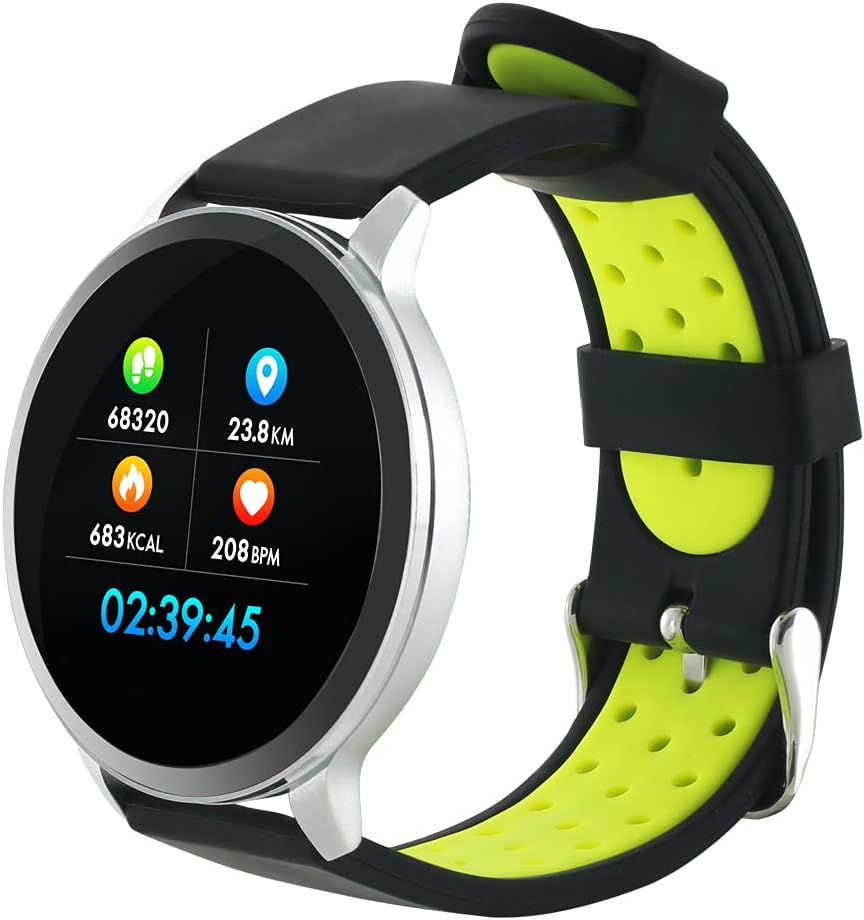
Figure 3: The Canyon CNS-SW71SS Smartwatch shown with an alternative black and lime green TPU strap, highlighting its interchangeable design.

รูปที่ 4: ด้านหลัง view of the Canyon CNS-SW71SS Smartwatch, displaying the optical heart rate sensor and magnetic charging contacts.

Figure 5: The retail packaging for the Canyon CNS-SW71SS Smartwatch, illustrating key features and the included two straps.
3. การตั้งค่า
3.1 การชาร์จสมาร์ทวอทช์
- เชื่อมต่อสายชาร์จเข้ากับอะแดปเตอร์แปลงไฟ USB (ไม่ได้รวมอยู่ในชุด) หรือพอร์ต USB ของคอมพิวเตอร์
- Align the magnetic charging pins of the cable with the charging contacts on the back of the smartwatch. The watch will vibrate and display a charging icon.
- Allow approximately 2-3 hours for a full charge. A full charge provides up to 7 days of usage.
3.2 Installing the Canyon Fit Application
- Scan the QR code provided in the packaging or search for "Canyon Fit" in your smartphone's app store (Google Play Store for Android, Apple App Store for iOS).
- ดาวน์โหลดและติดตั้งแอปพลิเคชัน
- Open the Canyon Fit app and follow the on-screen instructions to create an account and set up your profile.
3.3 การจับคู่กับสมาร์ทโฟนของคุณ
- ตรวจสอบให้แน่ใจว่าสมาร์ทวอทช์ของคุณชาร์จและเปิดอยู่
- เปิดใช้งานบลูทูธบนสมาร์ทโฟนของคุณ
- เปิดแอปพลิเคชัน Canyon Fit
- Navigate to the device pairing section within the app (usually found under 'Device' or 'Profile-
- Select your smartwatch (e.g., "CNS-SW71SS") from the list of available devices.
- หากระบบแจ้งให้ยืนยันการจับคู่ โปรดยืนยันคำขอจับคู่ทั้งบนสมาร์ทโฟนและสมาร์ทวอทช์ของคุณ
3.4 Attaching/Changing Wristbands
The smartwatch comes with two wristbands (metal and TPU) that can be interchanged. To attach or change a wristband, locate the quick-release pins on the underside of the strap. Slide the pin to detach the current strap and then align and slide the pin of the new strap into the corresponding holes on the watch body until it clicks into place.
4. คู่มือการใช้งาน
4.1 การนำทางพื้นฐาน
- หน้าจอสัมผัส: Swipe left/right to navigate through different functions and menus. Swipe up/down to view การแจ้งเตือนหรือการตั้งค่าด่วน
- ปุ่มด้านข้าง: Press the side button to return to the main watch face or to wake up the screen. A long press may access power options or specific features depending on the context.
4.2 การติดตามฟิตเนส
- โหมดมัลติสปอร์ต: Access the 'Workout' or 'Sport' menu on your watch. Select your desired activity (e.g., running, cycling, walking) to start tracking. The watch will record duration, distance, calories burned, and heart rate.
- กิจวัตรประจำวัน: นาฬิกาจะติดตามจำนวนก้าว ระยะทาง และปริมาณแคลอรี่ที่เผาผลาญไปในแต่ละวันโดยอัตโนมัติ View these statistics on the watch face or in the Canyon Fit app.
- การตรวจสอบอัตราการเต้นของหัวใจ: The watch continuously monitors your heart rate. You can also manually initiate a heart rate measurement from the heart rate interface.
- การติดตามการนอนหลับ: Wear the smartwatch to bed, and it will automatically track your sleep patterns, including deep sleep, light sleep, and wake times. View detailed sleep analysis in the Canyon Fit app.
4.3 การแจ้งเตือน
Once paired with your smartphone and with notification permissions granted in the Canyon Fit app, your smartwatch will display alerts for:
- สายเรียกเข้า
- ข้อความ SMS
- อีเมล์
- กิจกรรมปฏิทิน
- Social Media Apps (e.g., WhatsApp, Facebook, Instagแกะ)
ปัดขึ้นบนหน้าปัดนาฬิกาเพื่อ view recent notifications. You can dismiss notifications from the watch.
4.4 ฟังก์ชั่นเพิ่มเติม
- การควบคุมเพลง: While music is playing on your phone, you can use the watch to play/pause, skip tracks, and adjust volume.
- กล้องจากระยะไกล: Open the camera function in the Canyon Fit app. Use your smartwatch as a remote shutter button to take photos on your phone.
- ปลุกอัจฉริยะ: Set alarms through the Canyon Fit app. The watch will vibrate to wake you up gently.
- ข้อมูลสภาพอากาศ: Once connected to your phone, the watch will display current weather conditions and forecasts for your location.
5. การบำรุงรักษา
5.1 การทำความสะอาด
- เช็ดหน้าจอและตัวเรือนนาฬิกาด้วยผ้านุ่มๆamp ผ้า.
- For the metal strap, use a soft brush to gently clean any debris. For the TPU strap, wash with mild soap and water.
- ตรวจสอบให้แน่ใจว่าหน้าสัมผัสการชาร์จสะอาดและแห้งก่อนชาร์จ
- หลีกเลี่ยงการใช้สารเคมีรุนแรงหรือวัสดุขัดถูในการทำความสะอาด
5.2 ความต้านทานน้ำ (IP68)
The Canyon CNS-SW71SS Smartwatch is IP68 rated, meaning it is resistant to dust and can be immersed in water up to 1 meter deep for a maximum of 30 minutes. While it can withstand splashes, rain, and brief immersion, it is not recommended for hot showers, saunas, or diving, as steam and high water pressure can compromise the seals.
- Do not press any buttons while the watch is submerged.
- เช็ดนาฬิกาให้แห้งสนิทหลังจากโดนน้ำ
5.3 การดูแลแบตเตอรี่
- หลีกเลี่ยงการปล่อยแบตเตอรี่จนหมดบ่อยครั้ง
- ชาร์จอุปกรณ์เป็นประจำ แม้จะไม่ได้ใช้งาน เพื่อรักษาสุขภาพแบตเตอรี่
- เก็บนาฬิกาไว้ในที่แห้งและเย็นเมื่อไม่ได้ใช้งานเป็นเวลานาน
6 การแก้ไขปัญหา
- นาฬิกาไม่เปิด: ตรวจสอบให้แน่ใจว่านาฬิกาชาร์จเต็มแล้ว เสียบนาฬิกาเข้ากับเครื่องชาร์จอย่างน้อย 30 นาที
- ไม่สามารถจับคู่กับสมาร์ทโฟนได้:
- ตรวจสอบให้แน่ใจว่าเปิดใช้งานบลูทู ธ บนโทรศัพท์ของคุณแล้ว
- Ensure the Canyon Fit app has necessary permissions.
- รีสตาร์ททั้งโทรศัพท์และสมาร์ทวอทช์ของคุณ
- ลองยกเลิกการจับคู่แล้วจับคู่อุปกรณ์ใหม่ผ่านแอป
- การแจ้งเตือนไม่ปรากฏ:
- Check notification settings in the Canyon Fit app and your phone's system settings.
- ตรวจสอบให้แน่ใจว่านาฬิกาเชื่อมต่อผ่านบลูทูธ
- Inaccurate heart rate/activity data:
- ตรวจสอบให้แน่ใจว่าสวมนาฬิกาให้พอดีกับข้อมือ ไม่แน่นหรือหลวมเกินไป
- ทำความสะอาดเซ็นเซอร์ที่ด้านหลังของนาฬิกา
- Environmental factors or certain movements can affect accuracy.
- หน้าจอไม่ตอบสนอง: Try restarting the smartwatch by holding down the side button. If unresponsive, allow the battery to fully drain and then recharge.
7. ข้อมูลจำเพาะ
| ชื่อรุ่น | CNS-SW71SS |
| ยี่ห้อ | CANYON |
| ขนาดจอแสดงผล | 1.22 นิ้ว |
| ความเข้ากันได้ของระบบปฏิบัติการ | แอนดรอยด์, ไอโอเอส |
| เทคโนโลยีการเชื่อมต่อ | บลูทูธ 4.0 |
| ระดับการต้านทานน้ำ | IP68 |
| คุณสมบัติพิเศษ | Wireless Charging (implied by product data), Multi-Sport Mode, Heart Rate Monitor, Sleep Tracker, Notifications |
| อุปกรณ์ที่รองรับ | สมาร์ทโฟน |
| แบตเตอรี่ | แบตเตอรี่แบบชาร์จไฟได้ (มีให้ 1 เครื่อง) |
| ตัวเลือกสี | Black, Lime Green, Silver |
8. การรับประกันและการสนับสนุน
For warranty information and technical support, please refer to the documentation included with your purchase or visit the official Canyon website. You can also contact Canyon customer service for assistance with product issues or inquiries.
การสนับสนุนทางออนไลน์: https://canyon.eu/support/ (อดีตamp(โปรดตรวจสอบลิงก์อย่างเป็นทางการ)