
การแนะนำ
This manual provides detailed instructions for the safe and effective use of your SKYBASIC S113-5.5mm Industrial Endoscope Inspection Camera. This device is designed for visual inspection in hard-to-reach areas, featuring a 1080P HD camera, a 4.3-inch LCD screen, adjustable LED lighting, and a semi-rigid cable. Please read this manual thoroughly before operation.
เนื้อหาแพ็คเกจ
ตรวจสอบว่ารายการทั้งหมดที่ระบุไว้ด้านล่างนี้รวมอยู่ในแพ็คเกจของคุณ:
- LCD Digital Endoscope Unit
- คู่มือการใช้งาน
- สายชาร์จ USB
- Accessories: Hook, Magnet, Side Mirror, Protective Cap
- การ์ด Micro SD 32GB

รูปที่ 1: เนื้อหาแพ็คเกจที่รวมอยู่
คุณสมบัติหลัก
- หน้าจอ LCD HD ขนาด 4.3 นิ้ว: ให้ข้อมูลที่ชัดเจนและละเอียด view ของพื้นที่ตรวจสอบ
- กล้อง HD 1080P: Captures high-resolution images and videos.
- การหมุนภาพ 180°: Allows for easy adjustment of the viewมุมอิง
- ไฟ LED ปรับได้ 6 ดวง: Ensures optimal illumination in various dark environments.
- หัววัดกันน้ำ IP67: Suitable for use in wet or submerged conditions.
- สายเคเบิลกึ่งแข็ง: Offers flexibility for navigating tight spaces while maintaining shape.
- การทำงานแบบปลั๊กแอนด์เพลย์: No external phone or Wi-Fi connection required.
- การ์ดไมโคร SD ขนาด 32GB: Included for storing captured images and videos.

Figure 2: 4.3-inch HD LCD Screen and Camera Specifications
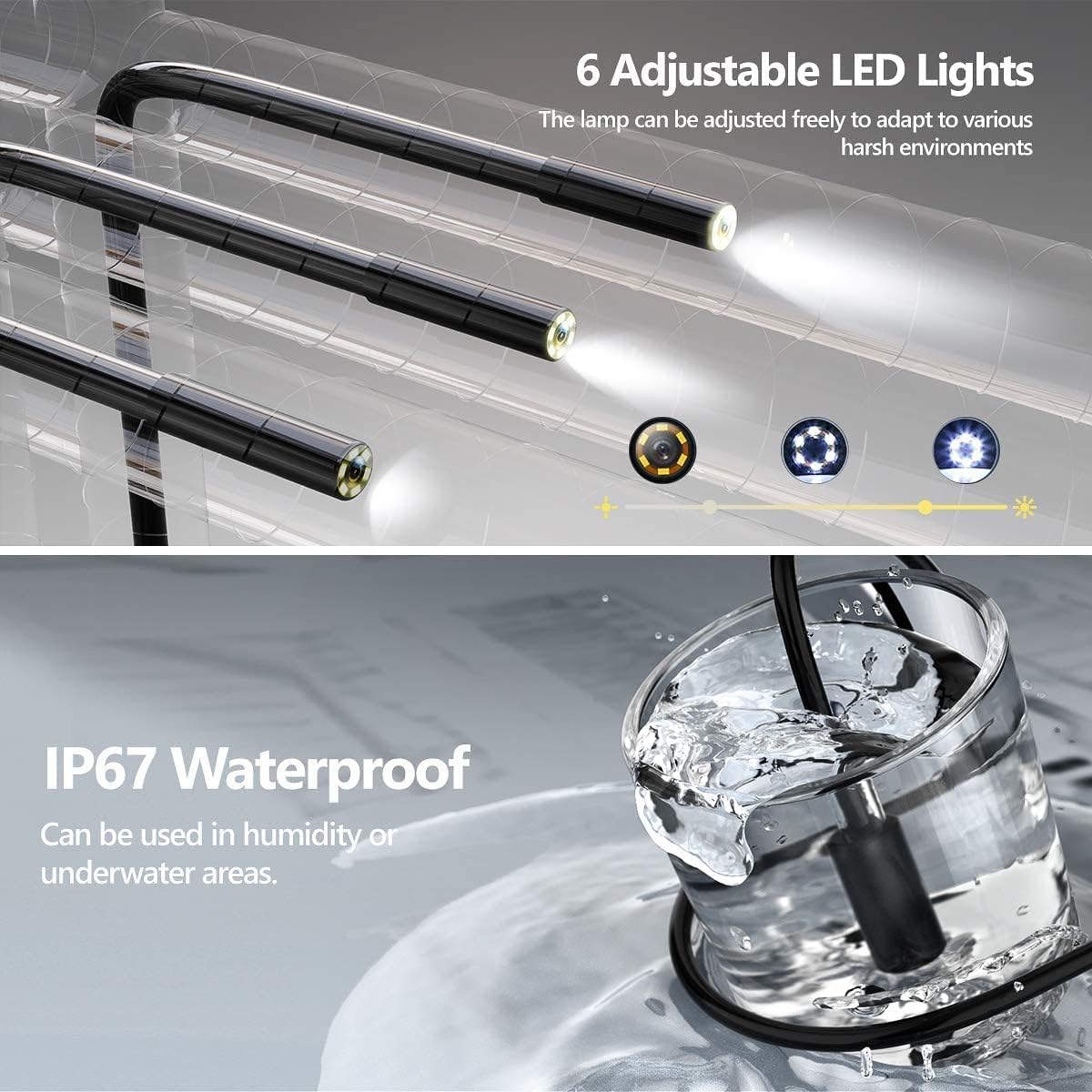
Figure 3: Adjustable LED Lights and IP67 Waterproof Probe

Figure 4: Semi-Rigid Cable Design
คำแนะนำการตั้งค่า
- ชาร์จอุปกรณ์: Before first use, fully charge the endoscope unit using the provided USB charging cable. Connect the cable to the unit's charging port and a standard USB power adapter (not included). The charging indicator will show the charging status.
- ใส่การ์ด Micro SD: Locate the Micro SD card slot on the side of the unit. Gently insert the included 32GB Micro SD card until it clicks into place. Ensure the card is inserted correctly to enable photo and video recording.
- เปิดเครื่อง: Press and hold the power button (usually marked with a power symbol) for a few seconds until the screen illuminates. The device is designed for "plug and play" operation, meaning it's ready for use immediately after powering on.
- ติดอุปกรณ์เสริม (ทางเลือก): If needed, attach the hook, magnet, or side mirror to the camera probe tip. These accessories are designed to assist in retrieving objects or viewในมุมต่างๆ

รูปที่ 5: การใช้งานแบบเสียบปลั๊กและใช้งานได้ทันที
คำแนะนำการใช้งาน
การทำงานพื้นฐาน
- เปิด/ปิดเครื่อง: กดปุ่มเปิด / ปิดค้างไว้เพื่อเปิดหรือปิดอุปกรณ์
- นำทางเมนู: Use the directional buttons (Up/Down/Left/Right) to navigate through menu options.
- ยืนยันการเลือก: Press the "OK" button to confirm a selection or enter a menu.
- กลับ: Press the "M" (Menu) button to return to the previous screen or exit a menu.
ฟังก์ชั่นกล้อง
- ปรับไฟ LED: Use the dedicated light adjustment button (often marked with a light bulb icon or up/down arrows) to increase or decrease the brightness of the 6 LED lights on the camera probe. This helps illuminate dark inspection areas.
- ถ่ายภาพ: ในขณะที่ viewing the live feed, press the photo capture button (usually marked with a camera icon) to take a still image. The image will be saved to the inserted Micro SD card.
- บันทึกวิดีโอ: Press the video recording button (usually marked with a video camera icon) to start recording. Press it again to stop recording. Videos will be saved to the Micro SD card.
- การหมุนภาพ 180°: If the image orientation is incorrect, press the image rotation button (often marked with a circular arrow) to rotate the image 180 degrees. This feature is useful when the probe is inverted.
- ระยะโฟกัส: The optimal focusing distance for clear images is between 3cm and 10cm from the object. Position the camera within this range for best results.
การบำรุงรักษาและการดูแล
- การทำความสะอาดโพรบ: The camera probe is IP67 waterproof. After use in dirty or wet environments, gently wipe the probe with a damp cloth. For stubborn dirt, a mild detergent can be used, followed by a clean, damp cloth. Ensure the probe is dry before storage.
- การทำความสะอาดตัวเครื่องหลัก: The main unit is ไม่ waterproof. Clean it with a soft, dry cloth. Avoid using liquid cleaners or abrasive materials.
- พื้นที่จัดเก็บ: Store the endoscope in a cool, dry place, away from direct sunlight and extreme temperatures. Coil the semi-rigid cable loosely to prevent damage.
- การดูแลแบตเตอรี่ To prolong battery life, charge the device regularly, even if not in frequent use. Avoid completely draining the battery for extended periods.
- การจัดการการ์ด SD: Periodically transfer photos and videos from the Micro SD card to a computer to free up space and back up your data. Format the SD card through the device's menu if performance degrades.
การแก้ไขปัญหา
| ปัญหา | สาเหตุที่เป็นไปได้ | สารละลาย |
|---|---|---|
| อุปกรณ์ไม่เปิดเครื่อง | แบตเตอรี่อ่อน | ชาร์จอุปกรณ์ให้เต็มโดยใช้สาย USB |
| ไม่มีภาพปรากฏบนหน้าจอ | Cable not properly connected; device malfunction. | Ensure the camera cable is securely connected. Restart the device. If the problem persists, contact support. |
| ไม่สามารถถ่ายภาพ/บันทึกวีดีโอได้ | No Micro SD card inserted; SD card full or corrupted. | Insert a Micro SD card. Check if the SD card has sufficient space or format it (this will erase all data). |
| ภาพเบลอ | Camera lens dirty; object out of focus range. | Clean the camera lens. Adjust the distance between the camera and the object to be within 3cm-10cm. |
| ไฟ LED ไม่ทำงาน. | Lights turned off; malfunction. | Press the light adjustment button to turn on/increase brightness. If still not working, contact support. |
ข้อมูลจำเพาะ
| คุณสมบัติ | รายละเอียด |
|---|---|
| ยี่ห้อ | สกายเบสิก |
| หมายเลขรุ่น | S113-5.5 มม |
| แสดง | จอ LCD ขนาด 4.3 นิ้ว |
| ความละเอียดในการบันทึกวิดีโอ | 720p (Note: Product title mentions 1080P HD, but specifications list 720p. User should be aware of this discrepancy.) |
| การหมุนภาพ | 360° (as per product title) / 180° (as per image feature) |
| เส้นผ่านศูนย์กลางของกล้อง | 5.5mm (implied by model number) |
| ไฟ LED | ไฟ LED ปรับได้ 6 ดวง |
| ระดับความต้านทานต่อน้ำ | IP67 (for probe only) |
| เทคโนโลยีการเชื่อมต่อ | ยูเอสบี |
| สื่อบันทึกข้อมูล | Micro SDXC Card (32GB included) |
| แบตเตอรี่ | 1. แบตเตอรี่ลิเธียมโพลิเมอร์ (รวมอยู่ในชุด) |
| น้ำหนักสินค้า | 549 กรัม |
| ขนาดแพ็คเกจ | 19.89 x 13.31 x 7.9 ซม. |
Note: Some specifications, such as video resolution and image rotation degrees, may vary slightly between product descriptions and detailed specifications. Refer to the device's on-screen information for the most accurate details.
ข้อมูลด้านความปลอดภัย
- ห้ามถอดประกอบหรือดัดแปลงอุปกรณ์โดยเด็ดขาด การกระทำดังกล่าวอาจทำให้เกิดความเสียหายและทำให้การรับประกันเป็นโมฆะ
- Keep the main unit away from water and liquids, as it is not waterproof.
- อย่าให้เครื่องสัมผัสกับอุณหภูมิที่สูงหรือต่ำเกินไป แสงแดดโดยตรง หรือความชื้นสูง
- ใช้เฉพาะสาย USB ที่ให้มาในการชาร์จ
- เก็บให้พ้นจากมือเด็ก
- กำจัดอุปกรณ์และแบตเตอรี่ตามระเบียบข้อบังคับท้องถิ่น
การใช้งานทั่วไป
The SKYBASIC S113-5.5mm Industrial Endoscope is suitable for a variety of inspection tasks in hard-to-reach areas. Common applications include:
- การบำรุงรักษายานยนต์: Inspecting engine components, cylinders, and other vehicle parts.
- Drainpipe Inspection: Checking for blockages, corrosion, or damage in pipes and plumbing systems.
- การตรวจสอบระบบปรับอากาศ (HVAC): Examining air conditioning ducts and ventilation systems.
- Electrical Repair: Inspecting wiring in walls or conduits.
- การตรวจสอบบ้าน: Looking into wall cavities, behind appliances, or other confined spaces.

Figure 6: Endoscope in various inspection scenarios