
การแนะนำ
This manual provides detailed instructions for the setup, operation, and maintenance of your Clarity D714 base unit and D704HS cordless amplified telephone system. This system utilizes DECT 6.0 technology for clear, interference-free communication and includes features designed for enhanced usability, such as amplified sound, caller ID, and an integrated answering machine. Please read this manual thoroughly to ensure proper use and to maximize the benefits of your new telephone system.
เนื้อหาแพ็คเกจ
โปรดตรวจสอบว่ารายการทั้งหมดที่ระบุไว้ด้านล่างมีอยู่ในแพ็คเกจของคุณหรือไม่:
- Clarity D714 Base Unit
- Clarity D704HS Cordless Handset(s) (Quantity may vary based on purchase)
- อะแดปเตอร์ไฟ AC สำหรับยูนิตฐาน
- สายโทรศัพท์
- Rechargeable Batteries for Handset(s)
- คู่มือการใช้งาน (เอกสารนี้)
สินค้าเกินview
Base Unit and Handset Overview

ภาพที่ 1: The Clarity D714 base unit shown with three D704HS cordless handsets docked in their charging cradles. This image provides an overall view of the complete telephone system.
การควบคุมหน่วยฐาน

ภาพที่ 2: รายละเอียด view of the Clarity D714 base unit's control panel. Key buttons include Volume Up/Down, Previous, Next, Delete, and the Answering Machine Play/Stop button, along with a digital message counter.
- VOL - / VOL +: Adjusts speaker volume during message playback or speakerphone calls.
- ก่อนหน้า / ถัดไป: Navigates through answering machine messages.
- DEL X: Deletes the current answering machine message.
- ปุ่มเล่น/หยุด: Initiates or stops answering machine message playback.
- ปุ่มเปิด/ปิด: Turns the answering machine on or off.
Handset Controls and Display
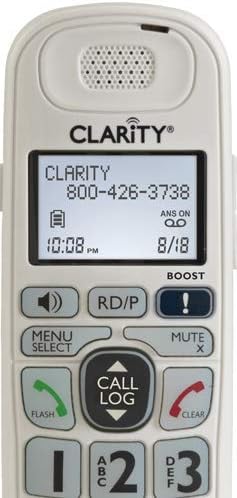
ภาพที่ 3: A close-up of the Clarity D704HS cordless handset keypad. It features large, high-contrast numbers and contoured keys for comfortable dialing. Function buttons such as Menu/Select, Call Log, Flash, Clear, and Mute are also visible.

ภาพที่ 4: รายละเอียด view of the Clarity D704HS handset's backlit display. It shows the Clarity brand, a sample phone number, current time, battery indicator, and answering machine status (ANS ON).
- หน้าจอแสดงผล: Shows caller ID, menu options, time, and battery status.
- ปุ่มกดตัวเลข: Large, backlit keys for dialing.
- เมนู/เลือก: Accesses menu options and confirms selections.
- CALL LOG (Up/Down Arrows): Navigates through the call log.
- FLASH (Green Button): Answers an incoming call or initiates a call waiting flash.
- CLEAR (Red Button): Ends a call or cancels an operation.
- MUTE X: ปิดเสียงไมโครโฟนระหว่างการโทร
- บูสต์: เปิดใช้งาน amplification for increased listening volume.
- RD/P (Redial/Pause): Redials the last number or inserts a pause during dialing.
- ปุ่มลำโพงโทรศัพท์: Toggles speakerphone mode.
Handset Side Controls

ภาพที่ 5: ด้านข้าง view of the Clarity D704HS handset, highlighting the headset jack and tone adjustment buttons. This allows for direct connection of assistive listening devices or a headset, and customization of audio tone.
- HEADSET Jack (2.5mm): For connecting a compatible headset or assistive listening device.
- TONE Buttons: Adjusts the audio tone for personalized listening.
การตั้งค่า
Follow these steps to set up your Clarity telephone system:
- แกะ: นำส่วนประกอบทั้งหมดออกจากบรรจุภัณฑ์อย่างระมัดระวัง
- เชื่อมต่อหน่วยฐาน:
- Plug one end of the telephone line cord into the base unit's TEL LINE jack and the other end into a wall telephone jack.
- Plug the AC power adapter into the base unit's POWER jack and then into a standard electrical outlet.
- ติดตั้งแบตเตอรี่โทรศัพท์มือถือ:
- เปิดฝาช่องใส่แบตเตอรี่ที่ด้านหลังของโทรศัพท์มือถือแต่ละเครื่อง
- Insert the rechargeable batteries, ensuring correct polarity (+ and -).
- ปิดฝาช่องใส่แบตเตอรี่ให้แน่น
- ชาร์จโทรศัพท์มือถือ: Place each handset in its respective charging cradle. The handset display will indicate that it is charging. Allow at least 12-16 hours for the initial charge to ensure optimal battery performance.
- ตั้งวันที่และเวลา: After the initial charge, follow the on-screen prompts on the handset display or navigate through the handset menu to set the current date and time. This is essential for accurate caller ID records and answering machine timestamps.
คำแนะนำการใช้งาน
การโทรออกและรับสาย
- ในการโทรออก: Press the green FLASH button, then dial the desired number. Alternatively, you can dial the number first and then press FLASH.
- เพื่อรับสาย: Press the green FLASH button or any numeric key when the phone rings.
- วิธีวางสาย: Press the red CLEAR button or place the handset back in its charging cradle.
- สปีกเกอร์โฟน: During an active call, press the speakerphone button on the handset to toggle speakerphone mode on or off.
- Amplification (BOOST): Press the BOOST button on the handset during a call to significantly increase the listening volume. Press it again to deactivate the ampการทำให้เป็นกรด
- การปรับโทนเสียง: Use the TONE buttons located on the side of the handset to adjust the audio frequency for personalized and clearer listening.
การระบุหมายเลขผู้โทร
- When an incoming call is received, the caller's information (name and number, if available) will be displayed on the handset screen.
- Press the CALL LOG (up/down arrows) on the handset to review a list of past incoming calls.
- To call back a number from the call log, select the desired entry and press the green FLASH button.
เครื่องตอบรับอัตโนมัติ
- การเปิด/ปิด: Use the Power Button on the base unit to activate or deactivate the answering machine function.
- ข้อความที่กำลังเล่น: Press the Play/Stop button on the base unit to listen to recorded messages. Use the PREV and NEXT buttons to skip between messages.
- การลบข้อความ: During message playback, press the DEL X button on the base unit to delete the current message.
- การบันทึกข้อความขาออก (OGM): Refer to the handset menu for options to record a personalized outgoing message or select a pre-recorded one.
- การเข้าถึงระยะไกล: You can access your answering machine remotely by calling your home number and entering a pre-set PIN. Consult the full product manual for detailed instructions on setting up and using remote access.
อินเตอร์คอม (สำหรับโทรศัพท์มือถือหลายเครื่อง)
- If you have multiple D704HS handsets, you can use the intercom feature to communicate between them. Press the INTERCOM button (if available) or follow the menu prompts on your handset to select the desired internal handset to call.
การซ่อมบำรุง
Proper care ensures the longevity and optimal performance of your telephone system:
- การทำความสะอาด: เช็ดโทรศัพท์และฐานวางด้วยผ้าเนื้อนุ่มที่ชุบน้ำเล็กน้อยamp cloth. Avoid using harsh chemicals, abrasive cleaners, or solvents, as these can damage the surfaces.
- การดูแลแบตเตอรี่ Replace handset batteries when they no longer hold a charge effectively or when the handset indicates low battery frequently. Always use only approved rechargeable batteries specified for this model.
- สภาพแวดล้อม : Avoid exposing the telephone system to extreme temperatures, direct sunlight, high humidity, or moisture. Keep it away from sources of heat and water.
การแก้ไขปัญหา
If you encounter issues with your Clarity telephone system, refer to the table below for common problems and their solutions:
| ปัญหา | สารละลาย |
|---|---|
| ไม่มีเสียงโทรออก | ตรวจสอบให้แน่ใจว่าสายโทรศัพท์เชื่อมต่อกับตัวเครื่องหลักและเต้ารับที่ผนังอย่างแน่นหนาแล้ว ตรวจสอบว่าโทรศัพท์เครื่องอื่นในสายเดียวกันใช้งานได้หรือไม่ |
| โทรศัพท์มือถือไม่ชาร์จ | Verify the handset is correctly seated in the charging cradle. Ensure the base unit's power adapter is plugged into a live electrical outlet. Clean the charging contacts on both the handset and cradle with a dry cloth. |
| คุณภาพเสียงไม่ดี / สัญญาณรบกวน | Move the handset closer to the base unit. Avoid placing the base unit near other electronic devices that may cause interference (e.g., Wi-Fi routers, microwaves, computers). Check the telephone line cord for any damage. |
| เครื่องตอบรับอัตโนมัติไม่บันทึกเสียง | Ensure the answering machine is turned on via the base unit's power button. Check if the memory is full; delete old messages if necessary. |
| ไม่แสดงหมายเลขผู้โทร | Confirm you have Caller ID service activated with your telephone service provider. Ensure the date and time are set correctly on the phone system. |
ข้อมูลจำเพาะ
- เทคโนโลยี: DECT6.0 ภาษาไทย
- สี: สีขาว
- วัสดุ: พลาสติก
- แหล่งพลังงาน: สายไฟ (หน่วยฐาน)
- Handset Batteries: 4 AA rechargeable batteries required (per handset, type may vary)
- ประเภทระบบตอบรับ: ดิจิตอล
- แจ็คหูฟัง: 2.5มม.
- Tone Settings: 4 customizable tone settings
- แสดง: Large font, high contrast, backlit LCD
- ปุ่มกด: Backlit, contoured keys with large numbers
การรับประกันและการสนับสนุน
For detailed warranty information and technical support, please refer to the official Clarity website or contact Clarity customer service directly. It is recommended to keep your purchase receipt as proof of purchase for any warranty claims.
ผู้ผลิต: ความชัดเจน
วันที่เข้าใช้งานครั้งแรก: 25 เมษายน 2019
For further assistance and the most up-to-date support information, please visit the manufacturer's webเว็บไซต์: www.clarityproducts.com