
1. บทนำ
This manual provides detailed instructions for the installation, operation, and maintenance of your SANSI 18W LED Motion Sensor Outdoor Flood Light, Model C2440-GW. Please read this manual thoroughly before installation and use to ensure proper function and safety.
2. ข้อมูลด้านความปลอดภัย
- Always turn off power at the circuit breaker before installing or servicing the fixture.
- ปรึกษาช่างไฟฟ้าที่มีคุณสมบัติเหมาะสมหากคุณไม่แน่ใจเกี่ยวกับกระบวนการติดตั้ง
- ตรวจสอบให้แน่ใจว่าการเชื่อมต่อไฟฟ้าทั้งหมดเป็นไปตามกฎหมายและข้อบังคับท้องถิ่น
- ห้ามติดตั้งบนพื้นผิวที่ไม่มั่นคงหรือมีแนวโน้มที่จะสั่นสะเทือน
- This product is designed for outdoor use and is IP65 waterproof.
- อย่าจ้องมองไปที่แหล่งกำเนิดแสง LED โดยตรงเมื่อไฟสว่างขึ้น เพราะอาจทำให้ปวดตาได้
3. เนื้อหาบรรจุภัณฑ์
ตรวจสอบว่าส่วนประกอบทั้งหมดมีอยู่ก่อนเริ่มการติดตั้ง:
- 1x SANSI 18W LED Security Light (White)
- 1x Installation Kit (screws, wire nuts)
- 1x คู่มือการใช้งาน
4. คุณสมบัติของผลิตภัณฑ์
The SANSI 18W LED Motion Sensor Outdoor Flood Light is designed for efficient and reliable outdoor illumination with advanced features:
- การประหยัดพลังงาน: 18 Watts, 1800 Lumens, equivalent to 200W traditional halogen lights, reducing electricity consumption by over 90%.
- หลายโหมด: AUTO (Motion Sensor), Dusk to Dawn, and On-Time modes for versatile control.
- อายุการใช้งานยาวนานขึ้น: Utilizes SANSI's patented ceramic temperature control system for superior heat dissipation, extending product life to over 50,000 hours.
- ทนทานและทนต่อสภาพอากาศ: Constructed with high-quality PC material, offering good anti-ultraviolet, flame-retardant, and anti-corrosion properties. IP65 waterproof rating ensures stable operation in various weather conditions.
- การออกแบบที่ปรับได้: Light heads and motion sensor are adjustable for optimal coverage and detection.

Image: Comparison of SANSI's ceramic heat dissipation technology with traditional designs.

ภาพ: เหนือview of key features including adjustability, sensing distance, brightness, and waterproof rating.

ภาพ: อดีตamples of the flood light installed in different outdoor environments.
5. คู่มือการติดตั้ง
Follow these steps for proper installation of your SANSI flood light:
- เตรียมความพร้อมสำหรับการติดตั้ง: Turn off power at the circuit breaker. Ensure the mounting surface is secure and can support the fixture.
- Fix the Mounting Plate: ยึดแผ่นยึดเข้ากับกล่องเชื่อมต่อโดยใช้สกรูที่ให้มา
- เชื่อมต่อสายไฟ: Connect the black (hot) wire, white (negative) wire, and green (ground) wire from the fixture to your household wiring using wire nuts. Ensure connections are tight and secure.
- ติดตั้งโคมไฟ: Attach the LED light fixture to the mounting plate.
- Choose the Working Mode: Select your desired operating mode (Auto, On-Time, D2D) using the switch on the motion sensor.
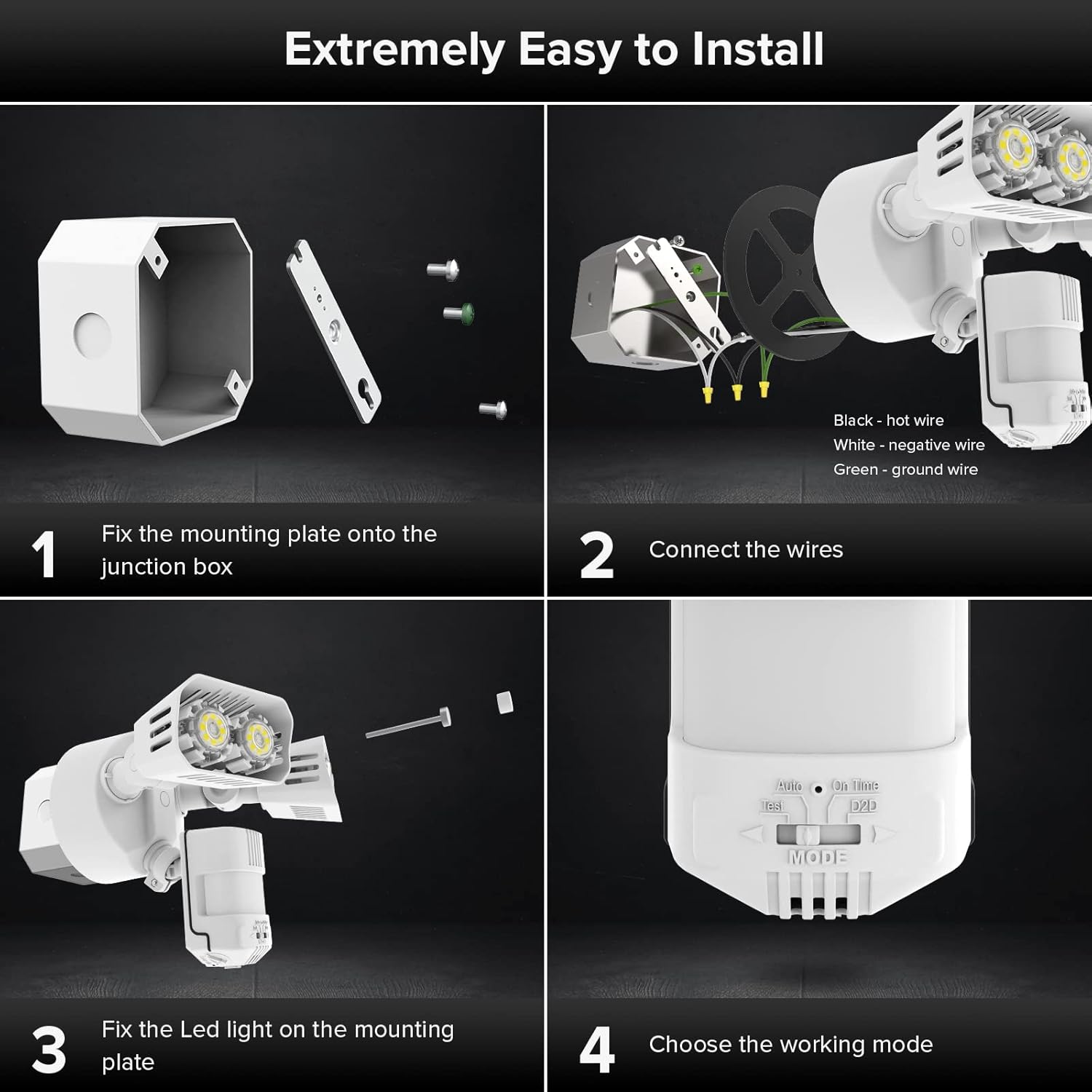
ภาพ: คู่มือภาพประกอบขั้นตอนการติดตั้ง
6. โหมดการทำงาน
The SANSI flood light offers three primary operating modes, selectable via a switch on the motion sensor:
- อัตโนมัติ (โหมดเซ็นเซอร์ตรวจจับความเคลื่อนไหว): The light turns on for 1-10 minutes at night when motion is detected. It stays off during the day.
- โหมด Dusk to Dawn: ไฟจะเปิดโดยอัตโนมัติเมื่อพลบค่ำและปิดเมื่อรุ่งเช้า ให้แสงสว่างต่อเนื่องตลอดทั้งคืน
- โหมดตรงเวลา: The light functions like a normal light, controlled manually by a wall switch. It stays on until manually turned off.
- โหมดทดสอบ: For verifying proper function during installation. The light turns on for 5 seconds during daytime or night once it detects motion.

Image: Visual representation of Auto and Dusk to Dawn operating modes.
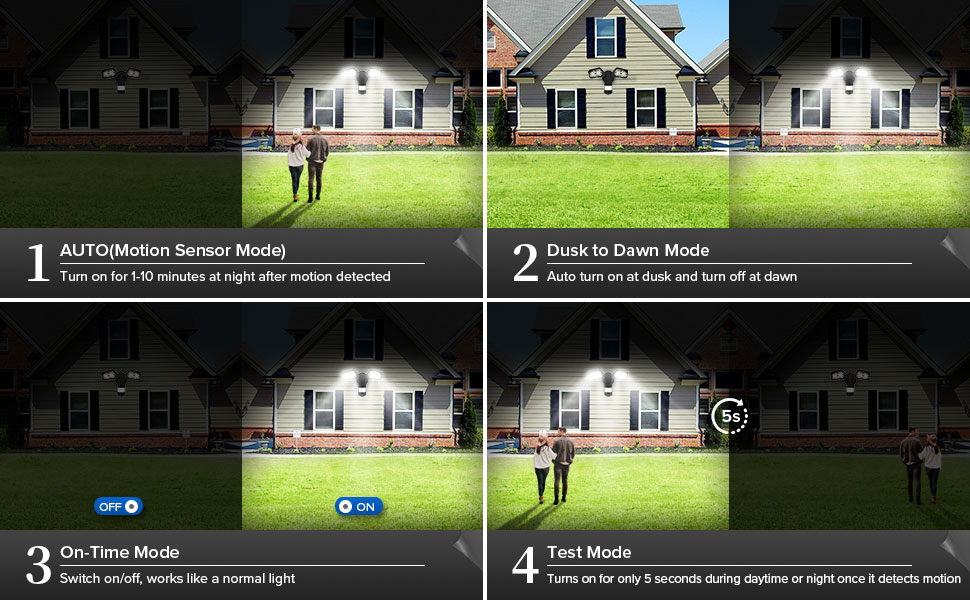
Image: Close-up of the mode selection switch.
Video: Official SANSI video demonstrating the operating modes of the 18W Motion Sensor Outdoor Light.
7. การปรับเปลี่ยน
The motion sensor and light heads are adjustable to customize performance:
- การปรับเซนเซอร์จับความเคลื่อนไหว: The sensor head can be adjusted 180° horizontally and 90° vertically to optimize detection area. Use the adjustment screws to loosen, position, and tighten.
- การปรับหัวแสง: Each light head can be adjusted 180° horizontally and 90° vertically to direct illumination where needed. Loosen the screws, position the heads, and tighten securely.
- LUX (ความไวต่อความสว่าง): Adjusts the ambient light level at which the motion sensor becomes active. Turn towards '0' for activation in darker conditions, towards 'infinity' for activation in brighter conditions. A halfway setting is often recommended.
- เวลา: Sets the duration the light stays on after motion is detected, typically from 1 to 10 minutes.
- พิสัย: Adjusts the motion detection distance, up to a maximum of 72 feet.

Image: Motion sensor detection range and adjustment dials.

ภาพ: รายละเอียด view of the LUX, Time, and Range adjustment controls.
8. การบำรุงรักษา
To ensure optimal performance and longevity of your flood light:
- การทำความสะอาด: ทำความสะอาดอุปกรณ์เป็นระยะด้วยผ้านุ่มๆamp ผ้า ห้ามใช้สารทำความสะอาดที่มีฤทธิ์กัดกร่อนหรือตัวทำละลาย
- การตรวจสอบ: Regularly check for any loose connections, damaged wiring, or signs of wear. Address any issues promptly.
- พื้นที่เซ็นเซอร์: Keep the motion sensor lens clear of obstructions (e.g., dirt, spiderwebs) to maintain accurate detection.
9 การแก้ไขปัญหา
| ปัญหา | สาเหตุที่เป็นไปได้ | สารละลาย |
|---|---|---|
| ไฟไม่เปิด | No power; incorrect wiring; sensor setting too low (LUX); bulb failure. | Check circuit breaker. Verify wiring connections. Adjust LUX setting. Contact support if LEDs are faulty. |
| ไฟติดสว่างต่อเนื่อง | Mode set to On-Time or D2D; continuous motion detected; sensor malfunction. | Check mode switch. Ensure no constant motion in detection area. Adjust sensitivity. |
| ไฟเปิดเองโดยไม่มีสาเหตุชัดเจน (การทำงานผิดพลาด) | High sensitivity; environmental factors (wind, small animals, heat sources); sensor obstructed. | Reduce Range and/or LUX sensitivity. Clear obstructions from sensor. Reposition sensor if necessary. |
| Motion detection range is too short. | Low sensitivity; sensor obstructed; incorrect sensor angle. | Increase Range sensitivity. Clear obstructions. Adjust sensor angle. |
10. ข้อมูลจำเพาะ
| คุณสมบัติ | รายละเอียด |
|---|---|
| ยี่ห้อ | Sansi |
| หมายเลขรุ่น | C2440-GW |
| วัดtage | 18 วัตต์ |
| ความสว่าง | 1800 ลูเมน |
| สีอ่อน | 5000K (เดย์ไลท์ไวท์) |
| เล่มที่tage | 120 โวลต์ |
| วัสดุ | Ceramic, Plastic (Acrylonitrile Butadiene Styrene) |
| การใช้งานภายใน/ภายนอกอาคาร | กลางแจ้ง |
| ระดับความต้านทานต่อน้ำ | กันน้ำระดับ IP65 |
| ระยะตรวจจับเซ็นเซอร์ตรวจจับความเคลื่อนไหว | Max 72 FT |
| มุมตรวจจับการเคลื่อนไหวเซนเซอร์ | 120° |
| อายุการใช้งาน | 50,000 ชั่วโมง |
| น้ำหนักสินค้า | 1.5 ปอนด์ |
| ขนาดรายการ (ยาว x กว้าง x สูง) | ยาว 13.7 นิ้ว x กว้าง 21.1 นิ้ว x สูง 29.2 นิ้ว |
11. การรับประกันและการสนับสนุน
SANSI ให้บริการ รับประกัน 5 ปี for this product, ensuring quality and safety. Additionally, a 30-day refund or replacement policy is available. For any issues or inquiries, please contact the professional customer service team via Amazon Message. Your satisfaction is our priority.
หากต้องการความช่วยเหลือเพิ่มเติม โปรดไปที่ SANSI Store on Amazon.