
1. บทนำ
This manual provides comprehensive instructions for the installation, operation, and maintenance of the Chacon DI-O 54515 Universal Dimmer White. This device allows you to wirelessly control your lighting, integrating seamlessly with existing light switches and the DiO 1.0 ecosystem.
The DI-O 54515 micro-module is designed to be installed behind your existing light switch, enabling wireless ON-OFF control of your lights. It supports control via the physical switch, a remote control, or automatically through compatible motion or opening sensors. When connected to a LiteBox or DiO Home+ hub, it offers smartphone app control, timers, and scenario programming, including voice control via Amazon Echo or Google Home.
2. ข้อมูลด้านความปลอดภัย
โปรดอ่านคำแนะนำด้านความปลอดภัยทั้งหมดอย่างละเอียดก่อนการติดตั้งและการใช้งาน การไม่ปฏิบัติตามคำแนะนำเหล่านี้อาจส่งผลให้เกิดไฟฟ้าช็อต ไฟไหม้ หรืออันตรายอื่นๆ
- การติดตั้งต้องดำเนินการโดยช่างไฟฟ้าที่มีคุณสมบัติเหมาะสม หรือเป็นไปตามข้อกำหนดด้านไฟฟ้าของท้องถิ่น
- ควรตัดกระแสไฟที่เบรกเกอร์ทุกครั้งก่อนติดตั้งหรือซ่อมบำรุงอุปกรณ์
- ห้ามใช้งานเกินพิกัดน้ำหนักสูงสุดที่ระบุไว้ในข้อกำหนดทางเทคนิค
- อุปกรณ์นี้ได้รับการออกแบบสำหรับใช้ภายในอาคารเท่านั้น
- เก็บอุปกรณ์ให้ห่างจากน้ำ ความชื้น และอุณหภูมิที่สูงเกินไป
- ตรวจสอบให้แน่ใจว่าการเชื่อมต่อทั้งหมดมีความปลอดภัยและมีฉนวนป้องกันอย่างเหมาะสม
3. เนื้อหาบรรจุภัณฑ์
บรรจุภัณฑ์ควรมีรายการต่อไปนี้:
- Chacon DI-O 54515 Universal Dimmer White Module
- คู่มือการใช้งาน (เอกสารนี้)

Image 1: The Chacon DI-O 54515 Universal Dimmer White module, showing its compact design and wiring terminals.
4. คุณสมบัติของผลิตภัณฑ์
- การควบคุมแบบไร้สาย: Enables wireless ON-OFF control of lights when installed behind an existing switch.
- ตัวเลือกการควบคุมหลายแบบ: Compatible with existing physical switches, DiO 1.0 remote controls, wireless switches, motion sensors, and opening sensors.
- การรวมระบบบ้านอัจฉริยะ: Connects to LiteBox or DiO Home+ for smartphone app control, timers, and scenario programming.
- การควบคุมด้วยเสียง: Supports voice commands via Amazon Echo or Google Home when integrated with DiO Home+.
- ติดตั้งง่าย: Designed for simple connection behind an existing light switch, requiring no neutral wire.
- การออกแบบที่กะทัดรัด: Dimensions (L x W x H): 41 x 42 x 13 mm, allowing it to fit into standard electrical boxes.
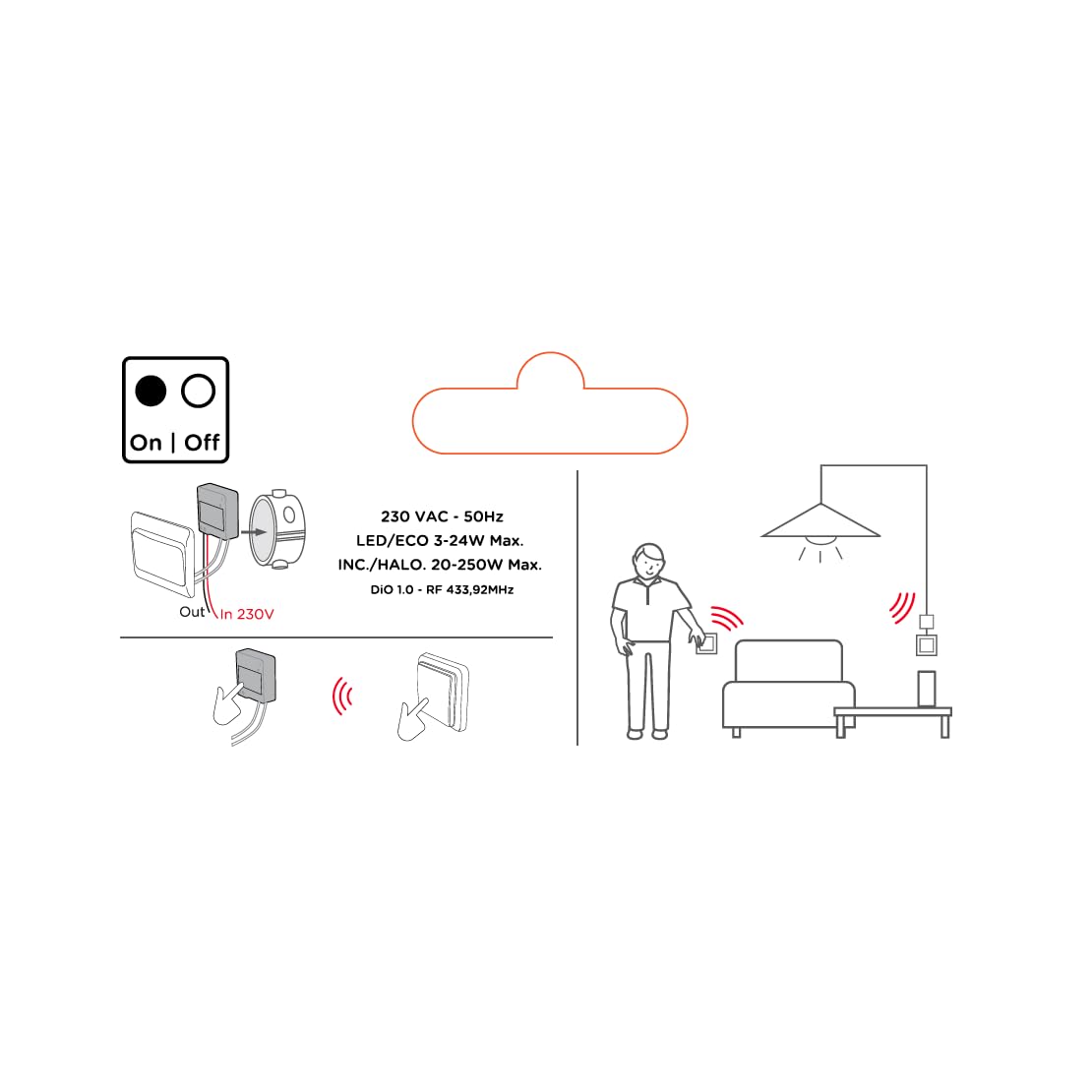
Image 2: An illustrative diagram detailing the wireless control capabilities and key electrical specifications of the module.
5. การตั้งค่าและการติดตั้ง
The installation of the Chacon DI-O 54515 module is designed to be straightforward. However, if you are unsure, consult a qualified electrician.
5.1 คำแนะนำในการเดินสายไฟ
- ตัดการเชื่อมต่อไฟฟ้า: Before starting any electrical work, ensure the power supply to the circuit is turned off at the main circuit breaker.
- กล่องสวิตช์ควบคุมการเข้าถึง: Carefully remove your existing light switch from the wall box.
- โมดูลการเชื่อมต่อ:
- Connect the Live (L) wire from your electrical supply to the 'L' terminal on the DiO module.
- Connect the wire going to your light fixture to the output terminal (often marked with a wave symbol or 'OUT') on the DiO module.
- Connect the two wires from your existing light switch to the designated switch input terminals on the DiO module. This module does not require a neutral wire for operation.
- โมดูลตำแหน่ง: Carefully place the DiO module into the wall box behind your existing light switch. Ensure wires are not pinched.
- Reinstall Switch: Reattach your existing light switch to the wall box.
- คืนค่าพลัง: เปิดไฟที่เบรกเกอร์อีกครั้ง

Image 3: A visual representation of the DiO module being installed within a standard electrical wall box, positioned behind an existing light switch.

ภาพที่ 4: รายละเอียด view of the Chacon DI-O 54515 module, highlighting its wiring terminals for proper connection.
5.2 Pairing with DiO 1.0 Controls
To enable wireless control, you need to pair the module with a compatible DiO 1.0 remote control, wireless switch, or sensor.
- เข้าสู่โหมดจับคู่: Refer to the specific instructions for your DiO 1.0 control device to put it into pairing mode. Typically, this involves pressing a pairing button on the module or performing a specific sequence with the existing switch.
- Activate Control: Once the module is in pairing mode, activate your DiO 1.0 control (e.g., press the 'ON' button on a remote or wireless switch).
- การยืนยัน: The light connected to the module should flash or turn on/off to confirm successful pairing.
- Repeat for Multiple Controls: You can pair multiple DiO 1.0 controls to the same module if desired.
6. คู่มือการใช้งาน
Once installed and paired, the Chacon DI-O 54515 module offers several ways to control your lighting:
- Existing Light Switch: You can continue to use your traditional wall switch to turn the lights on and off.
- DiO 1.0 Remote Control/Wireless Switch: Use any paired DiO 1.0 remote control or wireless switch to toggle the lights.
- DiO 1.0 Sensors: If paired with a DiO motion or opening sensor, the lights can be triggered automatically based on detected activity.
- Smartphone App (via DiO Home+ / LiteBox):
- Connect your DiO module to a DiO Home+ or LiteBox hub (sold separately).
- Download the free DiO smartphone app.
- Follow the app's instructions to add and configure your module.
- From the app, you can turn lights on/off, set timers, and create custom scenarios.
- Voice Control (via DiO Home+ and Smart Speaker):
- Ensure your DiO Home+ hub is integrated with Amazon Echo or Google Home.
- Use voice commands such as "Alexa, turn on the living room light" or "Hey Google, turn off the kitchen light."
7. การบำรุงรักษา
The Chacon DI-O 54515 module requires minimal maintenance. Follow these guidelines to ensure optimal performance:
- การทำความสะอาด: If necessary, gently wipe the module with a dry, soft cloth. Do not use liquid cleaners or solvents.
- การตรวจสอบ: Periodically check the wiring connections to ensure they remain secure. Always disconnect power before inspection.
- อัพเดตเฟิร์มแวร์: If using with a DiO Home+ or LiteBox, ensure your hub's firmware and the smartphone app are kept up to date for the best performance and security.
8 การแก้ไขปัญหา
| ปัญหา | สาเหตุที่เป็นไปได้ | สารละลาย |
|---|---|---|
| ไฟไม่เปิด/ปิด. | No power to the module, incorrect wiring, module not paired, faulty bulb. | Check circuit breaker. Verify wiring according to Section 5.1. Re-pair the module with the control device (Section 5.2). Test with a known working bulb. |
| Wireless control not working. | Module not paired, control device out of range, battery low in remote/sensor. | Ensure module is correctly paired (Section 5.2). Move control device closer to the module. Replace batteries in remote/sensor. |
| Module indicator light flashing red. | ตรวจพบการโอเวอร์โหลดหรือไฟฟ้าลัดวงจร | Immediately disconnect power. Check the connected load does not exceed specifications. Inspect wiring for any short circuits. Consult a qualified electrician if the problem persists. |
| ระบบควบคุมด้วยเสียงไม่ตอบสนอง | DiO Home+ hub not connected, incorrect voice command, smart speaker issue. | Ensure DiO Home+ is online and linked to your smart speaker account. Verify the correct device name is used in commands. Check smart speaker's internet connection. |
9. ข้อมูลจำเพาะ
| คุณสมบัติ | รายละเอียด |
|---|---|
| หมายเลขรุ่น | 54515 |
| ยี่ห้อ | ดิโอ |
| โหมดการทำงาน | เปิดปิด |
| คะแนนปัจจุบัน | 10 Amps |
| ประเภทสวิตซ์ | สวิตซ์หรี่ไฟ |
| ประเภทการติดตั้ง | ติดผนัง |
| ประเภทตัวกระตุ้น | รีโมทคอนโทรล |
| การให้คะแนนการคุ้มครองระหว่างประเทศ | IP44 |
| ประเภทตัวควบคุม | อเมซอนอเล็กซา |
| วิธีการควบคุม | ระยะไกล |
| สี | สีขาว |
| ขนาด (กว้าง x ยาว x สูง) | 41 x 42 x 13 มม. |
| การรับประกัน | 2 ปี |
Note on Dimming Functionality: While the product title includes "Dimmer" and "Switch Type" is listed as "Dimmer Switch", the official specifications list "Operation mode: ON-OFF". Some user reviews also indicate that newer versions of this module function as a simple ON/OFF switch rather than a dimmer. Please verify the specific functionality of your module upon receipt.
10. การรับประกันและการสนับสนุน
This Chacon DI-O 54515 Universal Dimmer White module comes with a รับประกัน 2 ปี ตั้งแต่วันที่ซื้อ ครอบคลุมถึงข้อบกพร่องในการผลิต
For technical support, troubleshooting assistance, or warranty claims, please contact your retailer or visit the official Dio website for contact information. Please have your proof of purchase and model number (54515) ready when contacting support.