
Aokeo AO-504
Aokeo Professional Microphone Isolation Shield
คู่มือการใช้งาน
สินค้าเกินview
The Aokeo Professional Microphone Isolation Shield (Model AO-504) is designed to enhance recording quality by minimizing unwanted acoustic interference. It features a multi-layer design with sound-absorbing cotton and a metal ventilation back panel, effectively reducing sound reflection and ambient noise during vocal and instrument recording.

Image: The Aokeo Microphone Isolation Shield, showcasing its curved, foldable design with sound-absorbing foam on the interior and various mounting accessories.
This shield is ideal for professional studio recording, personal recording setups, and music studios, providing a cleaner and more focused sound capture. Its compact and foldable design ensures portability and ease of storage.
การติดตั้งและการตั้งค่า
The Aokeo Microphone Isolation Shield offers versatile installation options, allowing it to be used on a desktop or mounted on a microphone stand.
เนื้อหาแพ็คเกจ:
- 1 x Isolation Shield (with two feet, an adapter, a nut, an iron box)
- 1 x Long Connecting Rod
- 1 x Short Connecting Rod
- อะแดปเตอร์ 1 ตัว
- 1 x เครื่องซักผ้า
- 1 x คานประตู
- 1 x คู่มือผู้ใช้
ขั้นตอนการติดตั้ง:
- การใช้เดสก์ท็อป: For desktop placement, simply unfold the shield and ensure the two feet are securely attached to the bottom. Place it on a flat, stable surface.
- Microphone Stand Mounting:
- Attach the crossbar to the bottom of the isolation shield using the provided screws.
- Depending on your microphone stand's thread size, use the appropriate adapter (3/8" internal to 5/8" external thread adapter is included).
- Screw the shield assembly onto your microphone stand. Ensure it is tightened securely to prevent wobbling.
- The shield can also be fixed to the back clip of certain microphone stands for added stability. The back clamp features scratch-proof sponge to protect your stand.
- ตำแหน่งการวางไมโครโฟน: Position your microphone within the isolation shield. The shield is designed to accommodate various microphone types, including condenser microphones.
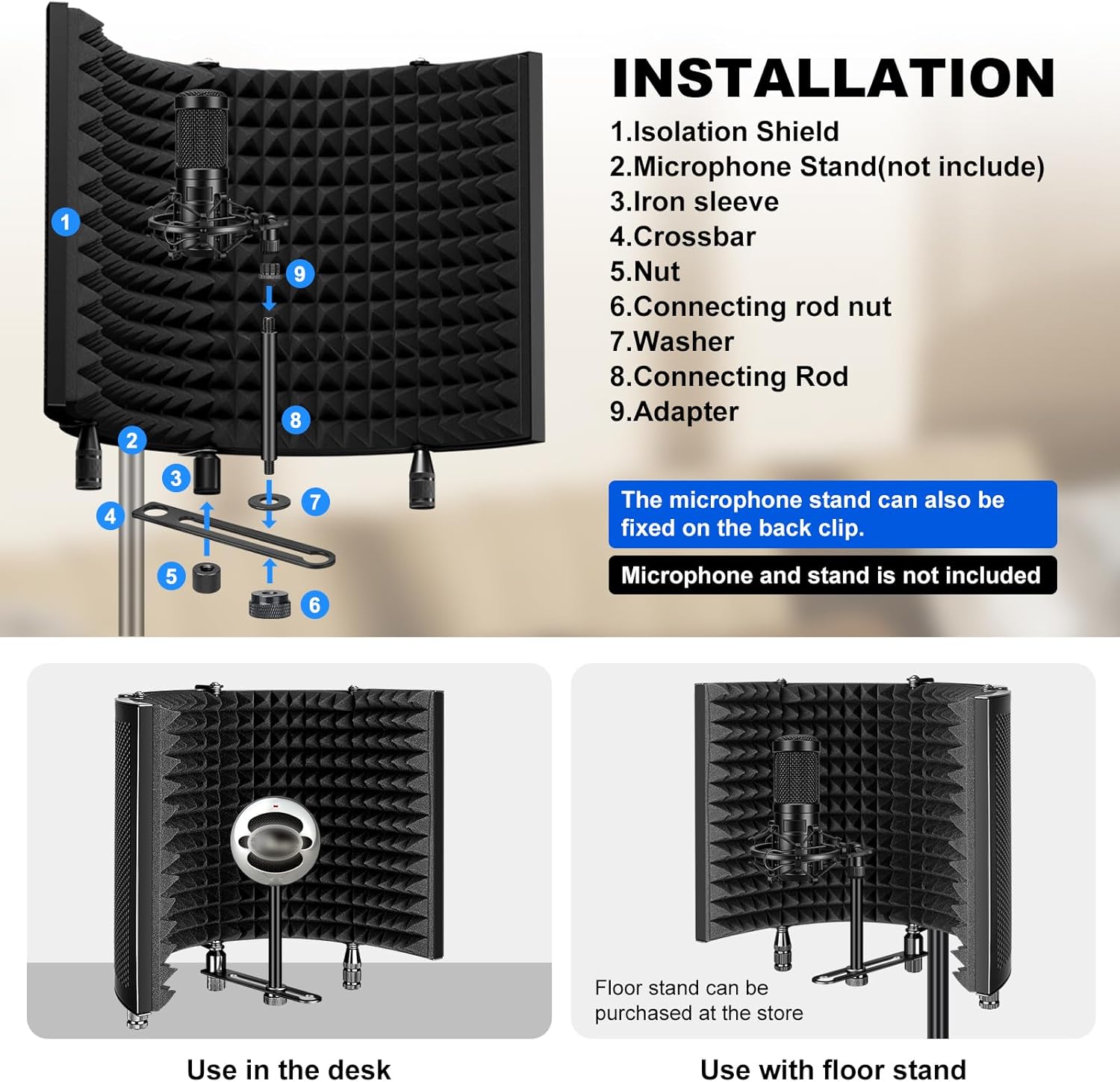
Image: Detailed diagram illustrating the components and assembly process for the Aokeo Microphone Isolation Shield, including parts for both desktop and stand mounting.

ภาพ: ภาพระยะใกล้ view of the back clamp mechanism on the Aokeo Isolation Shield, showing how it attaches to a microphone stand and the protective sponge to prevent scratches.
Note: Microphones, headphones, and microphone stands are not included with the isolation shield and must be purchased separately.
คำแนะนำการใช้งาน
The Aokeo Microphone Isolation Shield is designed for optimal sound absorption and reflection reduction. Follow these guidelines for best performance:
Noise Reduction Mechanism:
The shield features a multi-layer design to effectively manage sound. The inner layer consists of sound-absorbing cotton material, which reduces sound reflection during recording. The outer metal ventilation panel helps dissipate sound waves, preventing unwanted noise from entering your microphone.

Image: A diagram showing the multi-layer construction of the shield (absorbing, filter, reflective layers) and how it prevents outside noise reflection, leading to clearer sound capture.
Adjustability and Flexibility:
The isolation shield features foldable panels that allow for angle adjustments. You can fold the side panels inward by 180 degrees to create a more enclosed space around the microphone, further enhancing sound isolation. This flexibility allows you to optimize the shield's position for different recording environments and microphone setups.
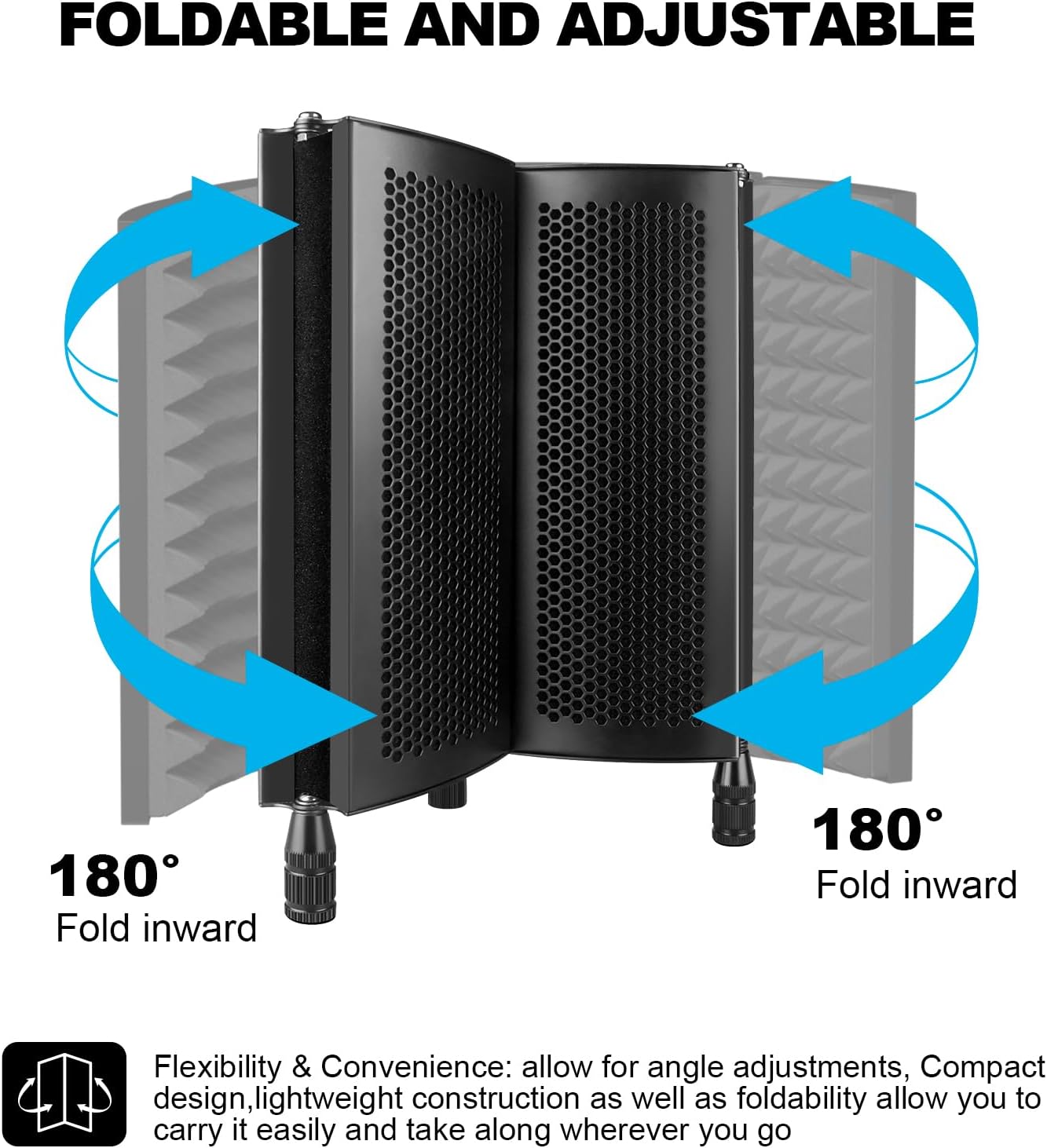
Image: The Aokeo Isolation Shield with arrows indicating its 180-degree inward folding capability, highlighting its adjustable and portable design.
คำแนะนำการใช้งาน:
- บันทึกเสียงร้อง: Position the shield directly behind or around the microphone to minimize room reflections and external noise, ensuring clear vocal capture.
- การบันทึกเครื่องดนตรี: Use the shield to isolate instruments, reducing bleed from other sound sources in a multi-instrument recording setup.
- Podcasting/Streaming: Improve audio quality for podcasts, live streams, and voiceovers by creating a more controlled acoustic environment.
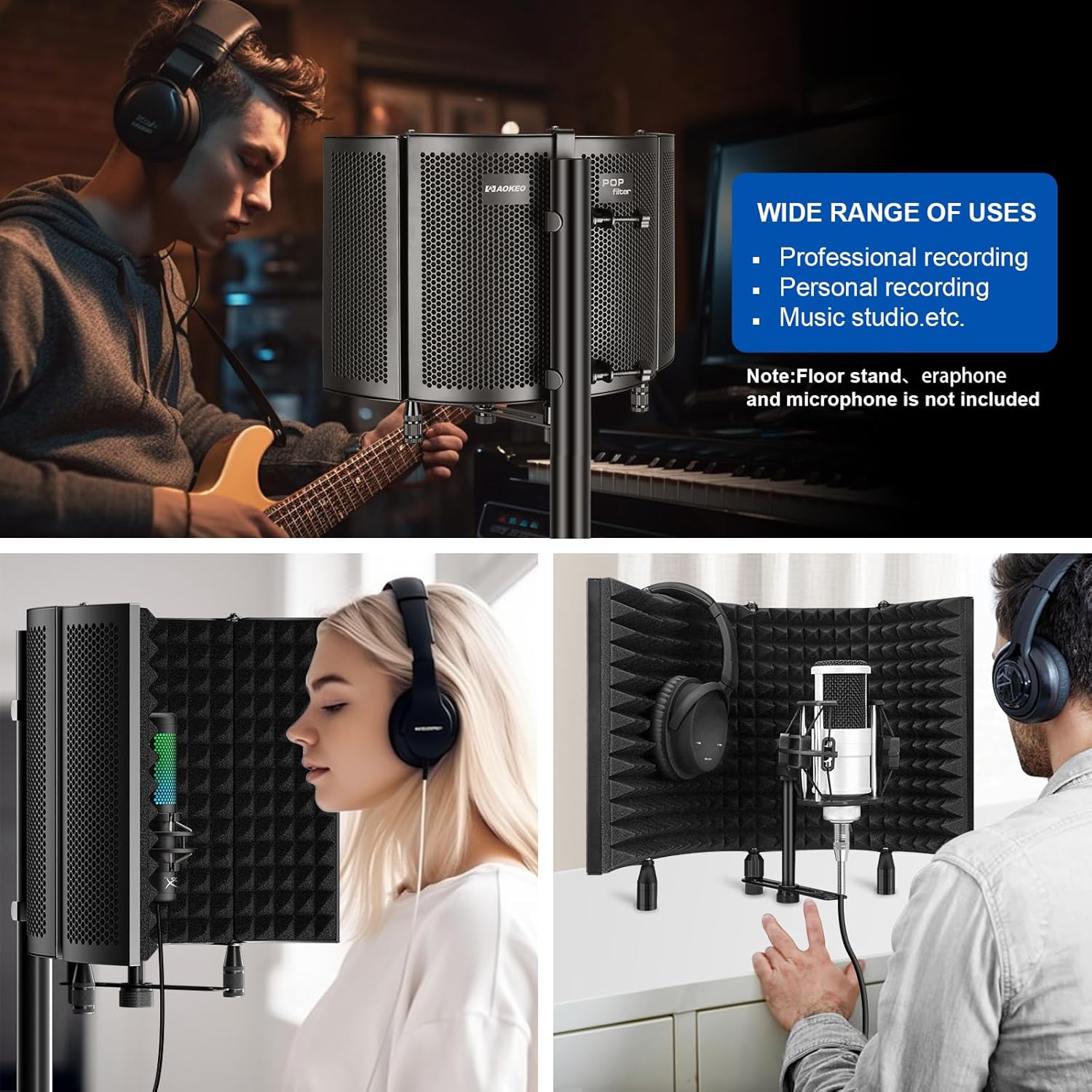
Image: A collage demonstrating the wide range of uses for the Aokeo Microphone Isolation Shield, including professional recording, personal recording, and music studio applications, showing it in use with a guitarist and vocalists.
การซ่อมบำรุง
To ensure the longevity and optimal performance of your Aokeo Microphone Isolation Shield, follow these simple maintenance guidelines:
- การทำความสะอาด: Gently wipe the metal surfaces with a soft, dry cloth to remove dust. For the foam interior, use a soft brush or a vacuum cleaner with a brush attachment to remove any accumulated dust or debris. Avoid using liquid cleaners directly on the foam.
- พื้นที่จัดเก็บ: When not in use, fold the shield to its compact size and store it in a dry, cool place away from direct sunlight and excessive humidity.
- การจัดการ: Handle the shield with care to prevent damage to the foam or bending of the metal panels. Avoid dropping the unit.
การแก้ไขปัญหา
If you encounter any issues while using your Aokeo Microphone Isolation Shield, consider the following common troubleshooting tips:
- การกันเสียงไม่ดี:
- Ensure the shield is properly positioned around your microphone. The microphone should be placed within the curved area of the shield.
- Adjust the angle of the foldable panels to create a more enclosed space, especially if there are significant reflections from the sides.
- Check for any gaps between the shield and the microphone stand (if mounted) that might allow sound to bypass the shield.
- Shield Instability:
- If using on a desktop, ensure the surface is flat and stable.
- If mounted on a stand, verify that all screws and adapters are securely tightened. Ensure your microphone stand is robust enough to support the shield and microphone's weight.
- Damaged Foam:
- Avoid pressing or poking the foam aggressively. Minor indentations may recover over time. Significant damage may affect performance.
หากปัญหายังคงอยู่ โปรดดูส่วนการรับประกันและการสนับสนุนเพื่อขอความช่วยเหลือเพิ่มเติม
ข้อมูลจำเพาะ
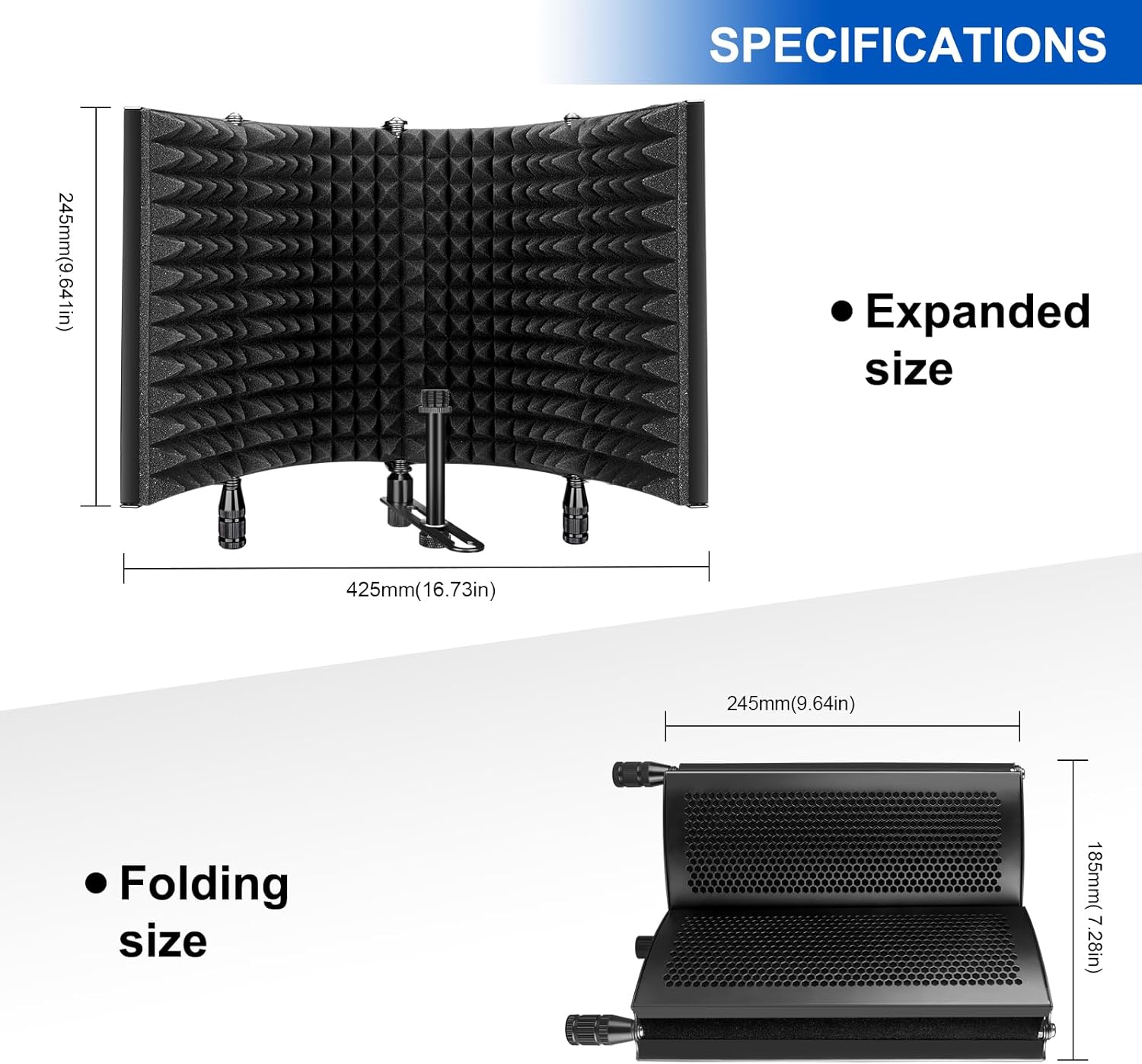
Image: A diagram showing the expanded dimensions (425mm width, 245mm height) and folded dimensions (245mm width, 185mm height) of the Aokeo Microphone Isolation Shield.
| คุณสมบัติ | รายละเอียด |
|---|---|
| หมายเลขรุ่น | เอโอ-504 |
| วัสดุ | Metal (panels), Sound-absorbing cotton (interior) |
| Expanded Dimensions (L x H) | 425 มม. (16.73 นิ้ว) x 245 มม. (9.64 นิ้ว) |
| ขนาดเมื่อพับ (ยาว x สูง) | 245 มม. (9.64 นิ้ว) x 185 มม. (7.28 นิ้ว) |
| น้ำหนักสินค้า | 1.5 กิโลกรัม |
| เทคโนโลยีการเชื่อมต่อ | Wired (for microphone connection, not shield itself) |
| คุณสมบัติพิเศษ | Prevents noise from entering your microphone |
| อุปกรณ์ที่รองรับ | Microphones (various types) |
| ส่วนประกอบที่รวมอยู่ | Isolation shield, user manual, various adapters and rods |
| การใช้ที่แนะนำ | Gaming, Streaming, Singing, Recording |
การรับประกันและการสนับสนุน
Aokeo is committed to providing quality products and services. For your Aokeo Microphone Isolation Shield (Model AO-504), one year of after-sales service is provided free of charge from the date of purchase.
การรับประกันนี้ครอบคลุมถึงข้อบกพร่องจากการผลิตและปัญหาที่เกิดขึ้นจากการใช้งานปกติ ไม่ครอบคลุมถึงความเสียหายที่เกิดจากการใช้งานผิดวิธี อุบัติเหตุ การดัดแปลงโดยไม่ได้รับอนุญาต หรือการบำรุงรักษาที่ไม่เหมาะสม
For technical support, warranty claims, or any inquiries regarding your product, please contact Aokeo customer service through the official channels provided at the point of purchase or on the Aokeo official website. Please have your product model number (AO-504) and proof of purchase ready when contacting support.
Ask a question about this manual
Ask about setup, troubleshooting, compatibility, parts, safety, or missing instructions. Manuals+ will review the question and use this page’s manual context to help answer it.