
1. บทนำ
Thank you for choosing the STF Joy Portable Wireless Speaker. This manual provides essential information for the proper setup, operation, and maintenance of your device. Please read it thoroughly before use and retain it for future reference.
2. เนื้อหาบรรจุภัณฑ์
ตรวจสอบว่ารายการทั้งหมดที่ระบุไว้ด้านล่างนี้รวมอยู่ในแพ็คเกจของคุณ:
- 1 x STF Joy Wireless Speaker
- 1 x USB เข้ากับสายชาร์จ Micro USB
- สายสัญญาณเสียงเสริม 3.5 มม. จำนวน 1 เส้น
- 1 x คู่มือผู้ใช้ (เอกสารนี้)

Image: The STF Joy speaker packaging, illustrating the included speaker, USB charging cable, auxiliary cable, and user manual.
3. สินค้าหมดview
The STF Joy Portable Wireless Speaker features a compact design with multiple connectivity options for versatile audio playback.
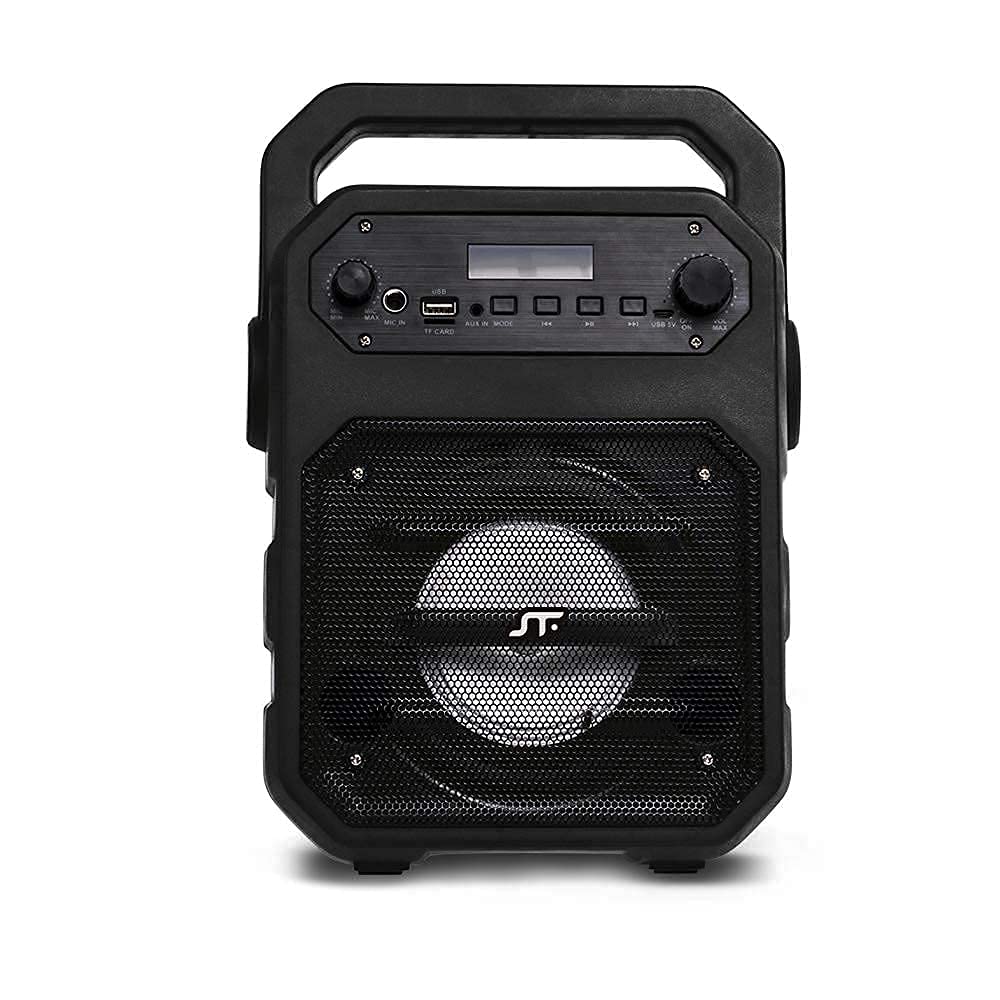
ภาพ: ด้านหน้า view of the STF Joy Portable Wireless Speaker, highlighting its main components including the speaker grille, top-mounted control panel, and integrated carrying handle.

Image: A diagram illustrating the key features of the STF Joy speaker, such as wireless audio, rechargeable battery, Micro SD card slot, USB port, 3.5mm auxiliary input, LED lighting, approximately 3 hours of battery life, and FM Radio functionality.
4. การตั้งค่า
4.1 การชาร์จลำโพง
Before first use, fully charge the speaker. Use the provided USB to Micro USB cable to connect the speaker's charging port to a USB power source (e.g., computer, USB wall adapter). The charging indicator light will illuminate during charging and turn off when fully charged. A full charge takes approximately 3 hours.
4.2 เปิด/ปิดเครื่อง
- To power on: Press and hold the Power button until the indicator light illuminates and you hear an audible prompt.
- To power off: Press and hold the Power button until the indicator light turns off and you hear an audible prompt.
5. คู่มือการใช้งาน
5.1 การจับคู่บลูทูธ
- Ensure the speaker is powered on and in Bluetooth mode. The Bluetooth indicator light will flash, indicating it is ready for pairing.
- บนอุปกรณ์ของคุณ (สมาร์ทโฟน แท็บเล็ต แล็ปท็อป) เปิดใช้งาน Bluetooth และค้นหาอุปกรณ์ที่มีอยู่
- Select "STF Joy" from the list of devices.
- Once paired, the Bluetooth indicator light will remain solid, and you will hear a confirmation tone.
- ลำโพงจะเชื่อมต่อกับอุปกรณ์ที่จับคู่ไว้ล่าสุดโดยอัตโนมัติเมื่อเปิดเครื่อง หากอุปกรณ์อยู่ในระยะและเปิดใช้งาน Bluetooth ไว้
5.2 Micro SD / USB Playback
- Insert a Micro SD card or USB flash drive into the corresponding slot on the speaker.
- ลำโพงจะตรวจจับอุปกรณ์จัดเก็บข้อมูลโดยอัตโนมัติและเริ่มเล่นเสียง files.
- Use the control buttons on the speaker to play/pause, skip tracks, or adjust volume.
5.3 ช่องเสียบอินพุตเสริม (AUX)
- Connect one end of the 3.5mm auxiliary cable to the AUX port on the speaker.
- ต่อปลายอีกด้านหนึ่งเข้ากับช่องเสียบเอาต์พุตเสียงของอุปกรณ์ภายนอกของคุณ
- ลำโพงจะเปลี่ยนเป็นโหมด AUX โดยอัตโนมัติ
- ควบคุมการเล่นและระดับเสียงจากอุปกรณ์ที่เชื่อมต่อของคุณ
5.4 วิทยุ FM
- กดปุ่ม Mode เพื่อเปลี่ยนเป็นโหมดวิทยุ FM
- กดปุ่มเล่น/หยุดชั่วคราวค้างไว้เพื่อสแกนและบันทึกสถานี FM ที่มีอยู่โดยอัตโนมัติ
- ใช้ปุ่ม "ถัดไป/ก่อนหน้า" เพื่อเลื่อนดูสถานีที่บันทึกไว้
5.5 การใช้งานไมโครโฟน
- เชื่อมต่อไมโครโฟน (ไม่รวมอยู่ด้วย) เข้ากับพอร์ตอินพุตไมโครโฟนบนลำโพง
- ปรับระดับเสียงไมโครโฟนโดยใช้ปุ่มหมุนเฉพาะบนแผงควบคุม
6 การแก้ไขปัญหา
| ปัญหา | สารละลาย |
|---|---|
| ลำโพงไม่เปิดเครื่อง | ตรวจสอบให้แน่ใจว่าแบตเตอรี่ชาร์จเต็มแล้ว เชื่อมต่อลำโพงเข้ากับแหล่งจ่ายไฟโดยใช้สาย USB |
| ไม่มีเสียง. | Check the volume level on both the speaker and the connected device. Ensure the correct input mode (Bluetooth, AUX, USB, SD) is selected. |
| การจับคู่บลูทูธล้มเหลว | Ensure the speaker is in pairing mode (flashing indicator). Turn off and on Bluetooth on your device. Move the speaker closer to your device. |
| การรับสัญญาณวิทยุ FM ไม่ดี | Move the speaker to an open area away from obstructions or other electronic devices that may cause interference. |
7. ข้อมูลจำเพาะ
| ชื่อรุ่น | ความสุข |
| ประเภทลำโพง | ซับวูฟเฟอร์ |
| เทคโนโลยีการเชื่อมต่อ | Bluetooth, USB, อุปกรณ์เสริม |
| อุปกรณ์ที่รองรับ | สมาร์ทโฟน, แท็บเล็ต, แล็ปท็อป |
| สี | สีดำ |
| อิมพีแดนซ์ | 2 โอห์ม |
| วิธีการควบคุม | ปุ่มสัมผัส |
| ขนาดลำโพง | 4 นิ้ว |
| แหล่งพลังงาน | แบตเตอรี่ |
| กำลังขับสูงสุดของลำโพง | 9 วัตต์ |
| อายุการใช้งานแบตเตอรี่โดยเฉลี่ย | 3 ชั่วโมง |
| ความจุของแบตเตอรี่ | 1200 มิลลิแอมป์ |
| อินพุต Voltage | 5 โวลต์ |
| โหมดเอาต์พุตเสียง | สเตอริโอ |
8. ข้อมูลด้านความปลอดภัย
- Do not expose the speaker to extreme temperatures, direct sunlight, or humidity.
- หลีกเลี่ยงการทำตกหรือให้ลำโพงได้รับแรงกระแทกรุนแรง
- ห้ามถอดประกอบหรือพยายามซ่อมลำโพงด้วยตนเอง การกระทำดังกล่าวจะทำให้การรับประกันเป็นโมฆะ
- เก็บลำโพงให้ห่างจากน้ำและของเหลวอื่นๆ
- ใช้เฉพาะสายชาร์จที่ให้มาหรือที่เทียบเท่าที่ได้รับการรับรองเท่านั้น
- เช็ดทำความสะอาดลำโพงด้วยผ้าแห้งเนื้อนุ่ม ห้ามใช้สารทำความสะอาดที่มีฤทธิ์กัดกร่อน
9. การรับประกันและการสนับสนุน
The STF Joy Portable Wireless Speaker comes with a รับประกันจำกัด 1 ปี นับจากวันที่ซื้อสินค้า การรับประกันนี้ครอบคลุมถึงข้อบกพร่องจากการผลิตและฝีมือการผลิตภายใต้การใช้งานปกติ ไม่ครอบคลุมถึงความเสียหายที่เกิดจากการใช้งานผิดวิธี อุบัติเหตุ การดัดแปลงโดยไม่ได้รับอนุญาต หรือการสึกหรอตามปกติ
For warranty claims or technical support, please contact STF customer service through the official STF website or your retailer. Please have your proof of purchase ready.