
1. บทนำ
ขอบคุณสำหรับการซื้อasing the WamGra BY28 P Bluetooth Speaker Night Light Alarm Clock. This device combines a high-quality Bluetooth speaker, a versatile night light with touch control, a digital alarm clock, and an MP3 player, offering multiple functionalities in one compact unit. Please read this manual carefully to ensure proper use and optimal performance.

ภาพที่ 1.1: The WamGra BY28 P Bluetooth Speaker Night Light Alarm Clock, showcasing its main design and available color variations.
2. เนื้อหาบรรจุภัณฑ์
กรุณาตรวจสอบแพ็คเกจสำหรับรายการต่อไปนี้:
- WamGra BY28 P Bluetooth Speaker Night Light Alarm Clock x 1
- คู่มือการใช้งาน x 1
3. สินค้าหมดview
Familiarize yourself with the various parts and controls of your device.

ภาพที่ 3.1: เกินview of the device's features, including the control panel, Bluetooth connectivity, hands-free call function, and various input ports.
แผงควบคุม (ด้านบน)
- Touch Mesh Net: Controls light modes and brightness.
- ปุ่มเปิด/ปิด: Turns the device on/off, displays time when light is off.
- ปุ่มโหมด: Switches between Bluetooth, MP3, AUX, and Clock modes.
- ปุ่มเพิ่มเสียง/ปุ่มเปลี่ยนเพลงถัดไป: เพิ่มระดับเสียง ข้ามไปยังแทร็กถัดไป
- ปุ่มลดเสียง/ปุ่มเล่นเพลงก่อนหน้า: ลดระดับเสียง และข้ามไปยังแทร็กก่อนหน้า
- ปุ่มเล่น/หยุดชั่วคราว/โทรออก: เล่น/หยุดเพลง รับ/วางสายโทรศัพท์
พอร์ตด้านหลัง
- ช่องเสียบการ์ด Micro SD: สำหรับเล่นไฟล์ MP3 files from a micro SD card.
- พอร์ตโฮสต์ USB: สำหรับเล่นไฟล์ MP3 fileจากแฟลชไดรฟ์ USB
- พอร์ต AUX-IN: สำหรับเชื่อมต่ออุปกรณ์เสียงภายนอกผ่านสายสัญญาณเสียงขนาด 3.5 มม.
- USB DC 5V Charging Port: สำหรับการชาร์จอุปกรณ์
- สวิตช์เปิด/ปิด: สวิตช์ไฟหลัก
4. การตั้งค่าเริ่มต้น
4.1 การชาร์จอุปกรณ์
- ก่อนใช้งานครั้งแรก ควรชาร์จอุปกรณ์ให้เต็ม
- Connect the provided USB charging cable to the USB DC 5V charging port on the back of the speaker.
- ต่อปลายอีกด้านของสายเคเบิลเข้ากับอะแดปเตอร์แปลงไฟ USB (ไม่ได้รวมอยู่ในชุด) หรือพอร์ต USB ของคอมพิวเตอร์
- ไฟแสดงสถานะการชาร์จจะสว่างขึ้น การชาร์จเต็มใช้เวลาประมาณ 6 ชั่วโมง
- Once fully charged, the indicator light will turn off or change color.
The built-in rechargeable battery provides approximately 8 hours of operation, depending on usage (volume, light brightness).
4.2 เปิด/ปิดเครื่อง
- To power on, slide the ON/OFF switch on the back of the device to the 'ON' position. The display will light up.
- หากต้องการปิดเครื่อง ให้เลื่อนสวิตช์เปิด/ปิดไปที่ตำแหน่ง 'ปิด'
5. โหมดการทำงาน
5.1 โหมดลำโพงบลูทูธ
The device functions as a Bluetooth 4.0 speaker, allowing wireless audio streaming from compatible devices up to 10 meters (32.81 feet).
- ตรวจสอบให้แน่ใจว่าอุปกรณ์เปิดอยู่
- กดปุ่ม โหมด button until you hear a voice prompt indicating Bluetooth mode. The Bluetooth indicator will flash.
- บนสมาร์ทโฟน แท็บเล็ต หรืออุปกรณ์อื่นๆ ที่เปิดใช้งาน Bluetooth ของคุณ ให้เปิดใช้งาน Bluetooth และค้นหาอุปกรณ์ที่มีอยู่
- Select "BY28 P" from the list to pair. Once paired, you will hear a confirmation sound, and the Bluetooth indicator will stop flashing.
- You can now play audio from your connected device.
การโทรแบบแฮนด์ฟรี
- When a call comes in during Bluetooth mode, press the เล่น / หยุดชั่วคราว / โทร ปุ่มที่จะตอบ
- กดปุ่ม เล่น / หยุดชั่วคราว / โทร อีกครั้งเพื่อวางสาย
- กดปุ่มค้างไว้ เล่น / หยุดชั่วคราว / โทร ปุ่มเพื่อปฏิเสธสายเรียกเข้า
5.2 โหมดแสงกลางคืน
The device features a touch-activated lamp with warm white and color-changing light options.
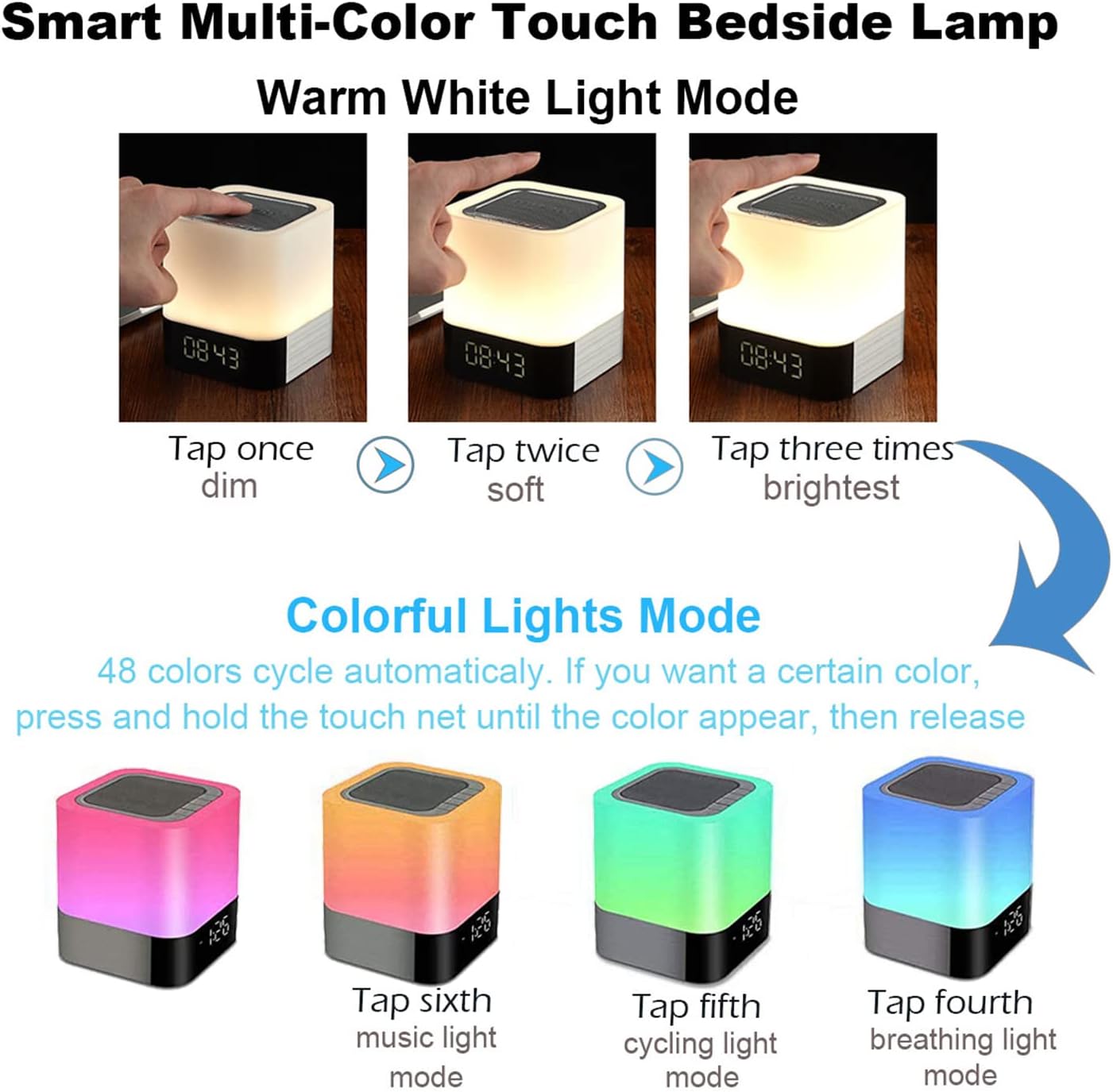
ภาพที่ 5.1: Visual guide for controlling the warm white and colorful light modes using the touch mesh net.
โหมดแสงวอร์มไวท์
- Tap the top mesh net once to turn on the dim warm white light.
- Tap a second time for soft warm white light.
- Tap a third time for the brightest warm white light.
- Tap a fourth time to turn off the warm white light.
Colorful Lights Mode (48 Colors)
- From any warm white light setting, press and hold the top mesh net until the light switches to the colorful mode.
- The colors will cycle automatically.
- To select a specific color, press and hold the touch net again when your desired color appears, then release. The light will stay on that color.
- To switch back to automatic color cycling, tap the mesh net.
- To turn off the colorful light, tap the mesh net until the light turns off.
5.3 โหมดนาฬิกาปลุก
The device features a digital alarm clock with snooze function and the ability to set custom alarm sounds.
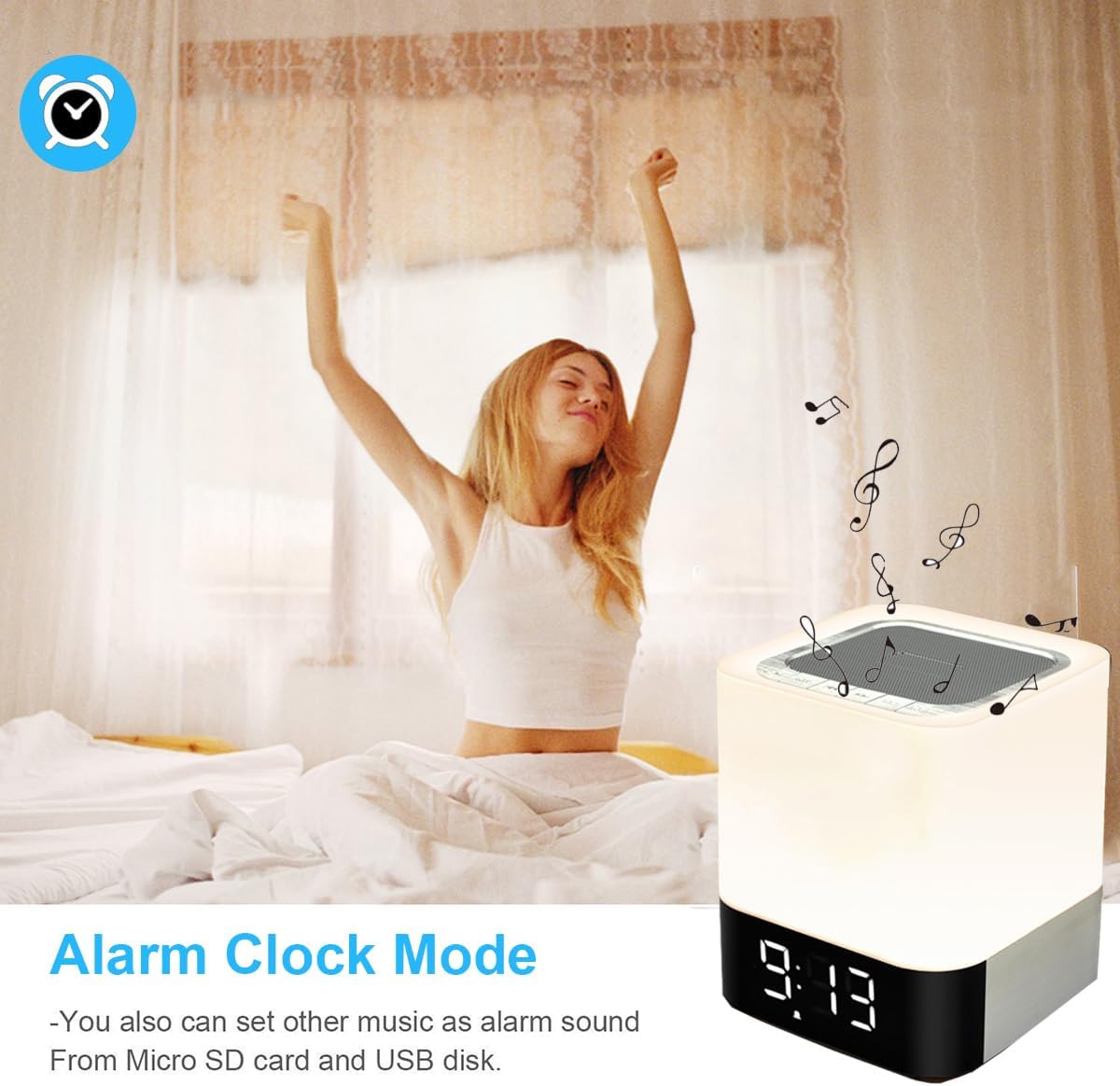
ภาพที่ 5.2: The alarm clock mode, highlighting the option to use custom MP3 songs as alarm sounds.
การตั้งเวลา
- กดปุ่ม โหมด button until the clock display is active.
- กดปุ่มค้างไว้ โหมด กดปุ่มค้างไว้จนกว่าตัวเลขชั่วโมงจะเริ่มกระพริบ
- ใช้ เพิ่มเสียง/เพลงถัดไป และ ลดเสียง/เพลงก่อนหน้า ปุ่มเพื่อปรับชั่วโมง
- กดปุ่ม โหมด button again to switch to minute adjustment. Adjust minutes using the volume buttons.
- กดปุ่ม โหมด button a third time to confirm the time setting.
การตั้งปลุก
- In clock display mode, press the นาฬิกาปลุก button (usually indicated by an alarm icon, or a long press of the Mode button after time setting).
- The alarm hour digits will flash. Use the เพิ่มเสียง/เพลงถัดไป และ ลดเสียง/เพลงก่อนหน้า ปุ่มสำหรับตั้งเวลาปลุก
- กดปุ่ม นาฬิกาปลุก button again to switch to minute adjustment. Adjust minutes using the volume buttons.
- กดปุ่ม นาฬิกาปลุก button a third time to confirm the alarm setting. The alarm icon will appear on the display.
Custom Alarm Sound (MP3)
- To use your favorite song as an alarm, save an MP3 file to a micro SD card or USB flash drive.
- Create a folder named "ALARM" on the root directory of your micro SD card or USB flash drive and place your desired MP3 file(s) inside.
- Insert the micro SD card or USB flash drive into the corresponding port on the device.
- The device will automatically use the MP3 file(s) in the "ALARM" folder as the alarm sound.
ฟังก์ชั่นการพักชั่วคราว
- When the alarm rings, tap the top mesh net once to activate the snooze function. The alarm will ring again after 5 minutes.
- To stop the alarm completely, quickly tap the top mesh net twice.
5.4 MP3 Player Mode
Play music directly from a micro SD card or USB flash drive.
- Insert a micro SD card or USB flash drive containing MP3 fileเข้าสู่พอร์ตที่สอดคล้องกัน
- กดปุ่ม โหมด button until you hear a voice prompt indicating MP3 mode (or card/USB mode).
- The device will automatically start playing the MP3 files.
- ใช้ เพิ่มเสียง/เพลงถัดไป และ ลดเสียง/เพลงก่อนหน้า ปุ่มสำหรับการนำทางเพลง
- ใช้ เล่น/หยุดชั่วคราว ปุ่มเพื่อหยุดชั่วคราวหรือเล่นต่อ
5.5 โหมด AUX-IN
เชื่อมต่ออุปกรณ์เสียงภายนอกโดยใช้สายสัญญาณเสียงขนาด 3.5 มม.
- Connect one end of a 3.5mm audio cable (not included) to the AUX-IN port on the back of the speaker.
- ต่อปลายอีกด้านหนึ่งเข้ากับช่องเสียบเอาต์พุตเสียงของอุปกรณ์ภายนอกของคุณ (เช่น เครื่องเล่น MP3, แล็ปท็อป)
- กดปุ่ม โหมด button until you hear a voice prompt indicating AUX mode.
- เล่นเสียงจากอุปกรณ์ภายนอกของคุณ สามารถควบคุมระดับเสียงได้ทั้งจากลำโพงและอุปกรณ์ภายนอก
6. การบำรุงรักษา
- ทำความสะอาดอุปกรณ์ด้วยผ้านุ่มและแห้ง ห้ามใช้น้ำยาทำความสะอาดหรือสารละลายที่มีฤทธิ์กัดกร่อน
- Keep the device away from water and excessive moisture. Although it has some water resistance, it is not fully waterproof.
- หลีกเลี่ยงการให้อุปกรณ์สัมผัสกับอุณหภูมิที่ร้อนจัดหรือโดนแสงแดดโดยตรง
- หากไม่ได้ใช้งานเป็นเวลานาน ควรชาร์จแบตเตอรี่อย่างน้อยทุกสามเดือนเพื่อยืดอายุการใช้งาน
7 การแก้ไขปัญหา
| ปัญหา | วิธีแก้ปัญหาที่เป็นไปได้ |
|---|---|
| อุปกรณ์ไม่เปิดเครื่อง | Ensure the ON/OFF switch is in the 'ON' position. Check battery level and charge the device if necessary. |
| ไม่มีเสียงจากลำโพง | Check volume levels on both the speaker and the connected device. Ensure the correct mode (Bluetooth, MP3, AUX) is selected. For Bluetooth, ensure successful pairing. |
| การจับคู่บลูทูธล้มเหลว | Ensure the speaker is in Bluetooth mode and discoverable. Turn off and on Bluetooth on your device. Move the speaker closer to your device. |
| แสงไม่ตอบสนองต่อการสัมผัส | Ensure the device is powered on. Try tapping the mesh net firmly. |
| สัญญาณเตือนภัยไม่ดัง | Verify the alarm time is set correctly and the alarm function is activated (alarm icon visible). Ensure MP3 files for custom alarms are correctly placed in an "ALARM" folder on the root directory of the storage device. |
8. ข้อมูลจำเพาะ
| คุณสมบัติ | รายละเอียด |
|---|---|
| ชื่อรุ่น | BY28 P |
| ยี่ห้อ | แวมกรา |
| ขนาดสินค้า | ลึก 3.9 นิ้ว x กว้าง 3.9 นิ้ว x สูง 4.4 นิ้ว (ลึก 10 ซม. x กว้าง 10 ซม. x สูง 11.2 ซม.) |
| น้ำหนักสินค้า | 1.35 ปอนด์ (0.61 กก.) |
| ประเภทลำโพง | ลำโพงบลูทูธแบบพกพา |
| กำลังขับสูงสุดของลำโพง | 5 วัตต์ |
| เทคโนโลยีการสื่อสารไร้สาย | บลูทูธ 4.0 |
| ช่วงบลูทูธ | 10 เมตร (32.81 ฟุต) |
| เทคโนโลยีการเชื่อมต่อ | บลูทูธ, เสริม (3.5มม.), USB |
| วิธีการควบคุม | สัมผัส |
| แหล่งพลังงาน | ใช้พลังงานจากแบตเตอรี่ (รวมแบตเตอรี่ลิเธียมไอออน 1 ก้อน) |
| ความจุของแบตเตอรี่ | 4400 มิลลิแอมป์ |
| เวลาในการชาร์จ | ประมาณ 6 ชั่วโมง |
| คุณสมบัติพิเศษ | Color Changing Light, Dimmable Light, Rechargeable, MP3 Player, Hands-Free Call |
9. การรับประกันและการสนับสนุน
This product comes with a limited warranty. Please refer to the warranty information provided at the time of purchase for details regarding coverage and duration.
For technical support, troubleshooting assistance, or warranty claims, please contact your retailer or the manufacturer directly. Contact information can typically be found on the product packaging or the brand's official webเว็บไซต์.