
1. ข้อมูลด้านความปลอดภัยที่สำคัญ
Read all instructions before assembly and use of the Baybee Electric Baby Swing Cradle. Keep this manual for future reference.
- This product is EN Certified, meeting stringent European safety standards for babies and toddlers.
- Suitable for newborns and infants.
- Maximum weight capacity: 15 Kilograms. อย่าเกินน้ำหนักจำกัดนี้
- Always ensure the cradle is placed on a flat, stable, and non-slip surface to prevent tipping.
- Never leave your child unattended in the swing.
- Ensure all components are securely assembled before placing a child in the cradle.
- เก็บชิ้นส่วนเล็ก ๆ ให้ห่างจากเด็กในระหว่างการประกอบ
2. Product Components and Structure
The Baybee Electric Baby Swing Cradle is designed with durable and comfortable materials for your baby's safety and comfort.


3. การติดตั้งและการประกอบ
Follow these steps to assemble your Baybee Electric Baby Swing Cradle.
- Unpack all components from the packaging. Verify all parts are present according to the packing list (not provided in this manual).
- Assemble the main frame using the thick steel pipes, ensuring all connections are secure.
- Attach the cradle basket to the assembled frame, making sure it is firmly connected and balanced.
- Install the mosquito net over the cradle basket.
- The cradle features a folding bracket for easy transport and storage. Ensure it is fully extended and locked into place for use.
For a visual guide, an assembly video is available online: https://www.youtube.com/watch?v=nhtNjmcNWpw
4. คู่มือการใช้งาน
4.1 Powering the Cradle
The cradle can be powered via a low voltage power adapter or batteries (not included). Connect the power adapter to the designated port or insert the required batteries according to the polarity markings.
4.2 แผงควบคุมและฟังก์ชันระยะไกล


4.3 Swing Speed Adjustment
The cradle offers six adjustable swing speeds, corresponding to swing angles from 10 to 30 degrees. Use the swing speed selector buttons on the control panel or remote to choose the desired speed. Six LED lights indicate the current speed setting (1-6).

4.4 Music and Nature Sounds
The cradle includes built-in nature sounds and music. Press the TOGGLE button on the control panel or the Music button on the remote to cycle through three nature sounds and seven musical tunes. These will play automatically for two cycles.
Extra Music (TF Card): To play additional music, insert a TF card with music files before powering on the device. Only music files on the TF card will play. Press the TOGGLE button to advance to the next track.
4.5 ฟังก์ชันการตั้งเวลา
Press the TIMING button on the control panel or the Timer button on the remote to set the operating time to 15, 30, or 45 minutes. After the selected time, all functions will stop automatically. If no timing is set, the module will automatically stop after one hour of continuous operation.
5. การบำรุงรักษา
- การทำความสะอาด: The fabric components of the cradle are washable. Follow the product care instructions for hand washing only.
- Regularly inspect all parts for wear and tear, especially the frame, fabric, and electronic components.
- Ensure the mosquito net is clean and free from damage.
- Keep the control panel and remote clean and dry.
6 การแก้ไขปัญหา
If you encounter issues with your Baybee Electric Baby Swing Cradle, consider the following:
- Cradle Not Swinging:
- ตรวจสอบว่าอะแดปเตอร์แปลงไฟเสียบแน่นดีแล้ว หรือใส่แบตเตอรี่ถูกต้องและไม่หมดไฟ
- Ensure the ON/OFF button has been pressed.
- Verify that the swing speed is set to a level above 0.
- รีโมทคอนโทรลไม่ทำงาน:
- เปลี่ยนแบตเตอรี่รีโมทคอนโทรล
- Ensure there are no obstructions between the remote and the cradle's receiver.
- ไม่มีเสียง/ดนตรี:
- ตรวจสอบระดับเสียง
- If using a TF card, ensure it is inserted correctly and contains valid music files.
หากปัญหายังคงมีอยู่ โปรดติดต่อฝ่ายสนับสนุนลูกค้า
7. ข้อมูลจำเพาะ
| ยี่ห้อ | BAYBEE |
|---|---|
| หมายเลขรุ่น | B07PFX2V5F |
| สี | สีน้ำตาล |
| วัสดุ | ABS, Cotton |
| คำแนะนำน้ำหนักสูงสุด | 15 กิโลกรัม |
| คำแนะนำอายุขั้นต่ำ | 0 เดือนขึ้นไป |
| น้ำหนักสินค้า | 8 กก. 200 ก. |
| ขนาดแพ็คเกจ | 93 x 46.6 x 12.8 ซม. |
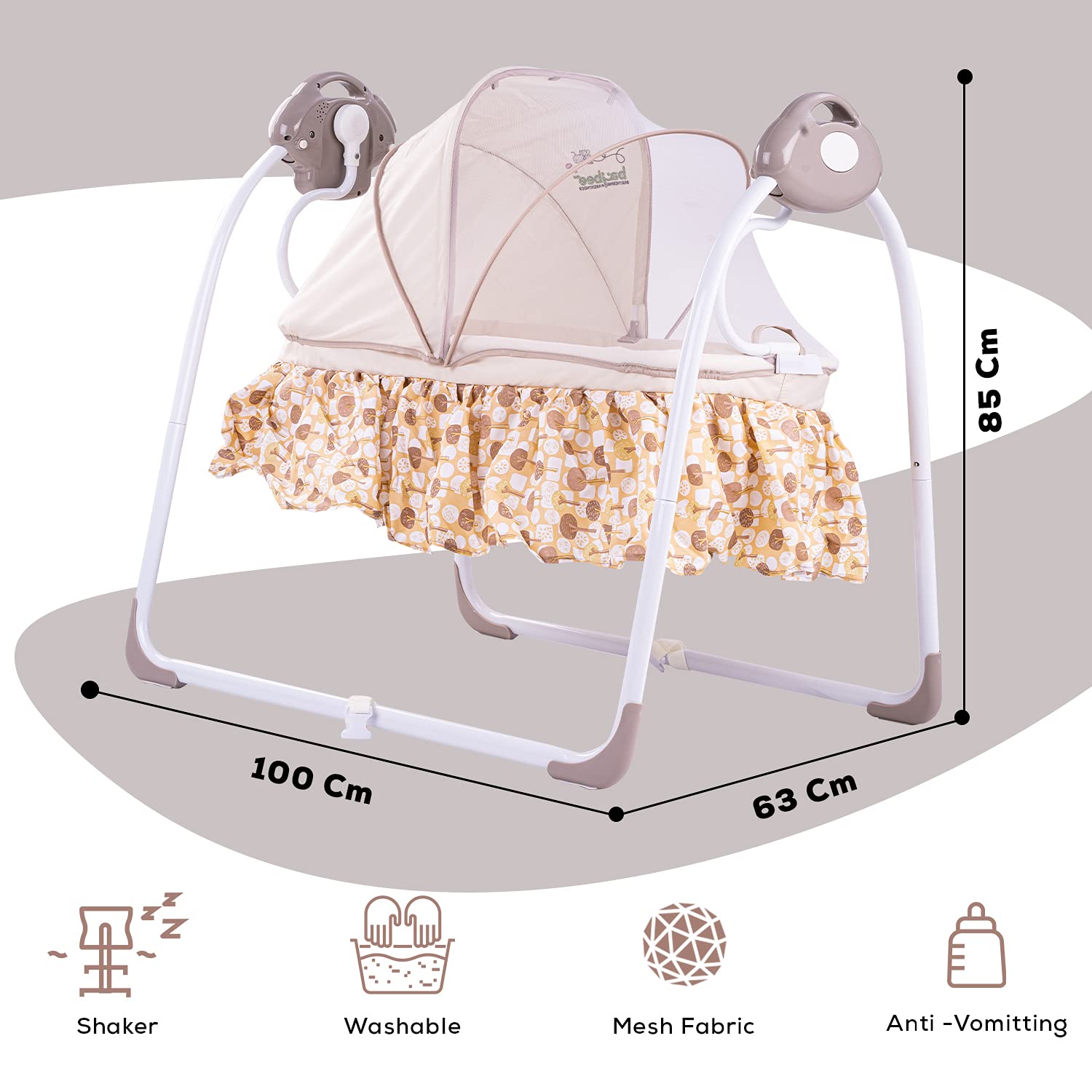
| ขนาดสินค้า (โดยประมาณ) | 100 ซม. (ยาว) x 63 ซม. (กว้าง) x 85 ซม. (สูง) |
| แบตเตอรี่ที่จำเป็น | No (for main unit, remote may require batteries) |
| ฟอร์มแฟกเตอร์ | การพับได้ |
| งานเฟอร์นิเจอร์สำเร็จรูป | เคลือบด้าน |
8. การรับประกันและการสนับสนุน
Warranty information for this product is not explicitly provided in the available product details. For any warranty claims, technical support, or service inquiries, please contact the manufacturer directly.
Manufacturer: BAYBEE