
1. บทนำ
The Walfront Bside AST01 is a professional automatic electrical socket tester designed for quick and accurate verification of socket wiring conditions and RCD (Residual Current Device) functionality. This device helps ensure electrical safety in various environments by identifying common wiring faults.
It is suitable for electrical maintenance testing, office electricity safety testing, home improvement electrical safety testing, and general wall socket checks.

Image 1: The Walfront Bside AST01 Socket Tester, its packaging, and the included user manual.
2. ข้อมูลด้านความปลอดภัย
- Always ensure the device is used in accordance with local electrical safety regulations.
- ห้ามใช้เครื่องทดสอบหากพบว่าชำรุดหรือมีข้อบกพร่อง
- This device is designed for 220-250V AC, 50-60Hz EU plug sockets. Do not use with incompatible voltage or plug types.
- The RCD test button should only be pressed when testing RCD functionality. Be aware that pressing this button will trip the RCD, cutting power to the circuit.
- If any wiring fault is detected, consult a qualified electrician immediately. Do not attempt to fix electrical wiring unless you are qualified to do so.
- เก็บให้พ้นจากมือเด็ก
3. สินค้าหมดview
The Bside AST01 socket tester features a compact design with indicator lights and an RCD test button. The device is equipped with double-layer insulation protection for enhanced safety.
- ไฟแสดงสถานะ: Three LED lights (left, middle, right) display the wiring status.
- RCD Test Button: Used to test the functionality of Residual Current Devices.
- หมายเลขรุ่น: AST01ER (printed on the device).
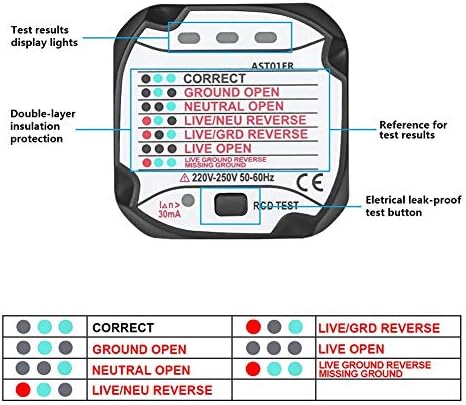
ภาพที่ 2: รายละเอียด view of the AST01ER tester, highlighting its indicator lights and RCD test button.
4. การตั้งค่า
The Walfront Bside AST01 socket tester requires no batteries or complex setup. It is ready for use directly out of the box.
- Ensure the socket you intend to test is a standard 220-250V AC, 50-60Hz EU type.
- Visually inspect the tester for any signs of damage before plugging it in.
- Insert the tester firmly into the wall socket.
Upon insertion, the indicator lights on the tester will illuminate according to the current wiring status of the socket. Refer to the 'Operating Instructions' and 'Troubleshooting' sections for interpretation.
5. คู่มือการใช้งาน
5.1. Socket Wiring Test
After plugging the tester into the socket, observe the pattern of the three indicator lights. The meaning of each pattern is detailed in the table below:
| รูปแบบตัวบ่งชี้ | สถานะการเดินสายไฟ | คำอธิบาย |
|---|---|---|
| ● ● ● | ถูกต้อง | The wiring is correct. Live, Neutral, and Ground connections are properly established. |
| ● ● ● | GROUND OPEN | The ground wire is disconnected or not present. This is a serious safety hazard. |
| ● ● ● | NEUTRAL OPEN | The neutral wire is disconnected or not present. This can cause appliances to malfunction or pose a shock risk. |
| ● ● ● | สด/ใหม่ย้อนกลับ | The live and neutral wires are reversed. This is a safety hazard and can damage appliances. |
| ● ● ● | สด/GRD ย้อนกลับ | The live and ground wires are reversed. This is a very dangerous condition, as the appliance casing could become live. |
| ● ● ● | LIVE OPEN | The live wire is disconnected or not present. The socket will not provide power. |
| ● ● ● | LIVE GROUND REVERSE MISSING GROUND | A combination of live/ground reverse and missing ground. Extremely hazardous. |
บันทึก: ● indicates a green light, ● indicates a red light, ● indicates an unlit light.
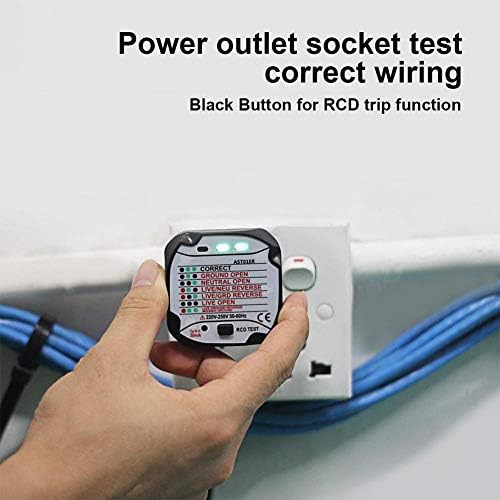
Image 3: The tester indicating correct wiring with two green lights illuminated.
5.2. RCD Leakage Switch Test
The RCD test function verifies if your Residual Current Device (RCD) is working correctly. An RCD is a vital safety component designed to prevent electric shock by quickly disconnecting power if an earth fault is detected.
- Plug the AST01 tester into a socket that is protected by an RCD.
- Ensure the socket wiring is correct (two green lights illuminated) before proceeding with the RCD test.
- Press the black RCD test button located on the tester.
- If the RCD is functioning correctly, it should trip (switch off) within milliseconds, cutting power to the circuit.
- If the RCD does not trip, it indicates a fault with the RCD or the wiring. Do not use the socket and consult a qualified electrician immediately.
- To restore power, reset the RCD at your consumer unit/fuse box.
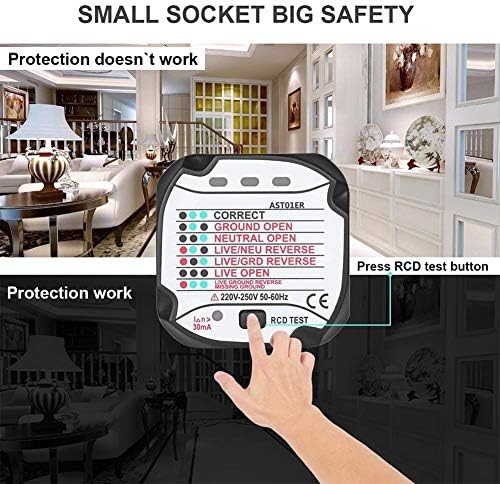
Image 4: A hand demonstrating the pressing of the RCD test button on the socket tester.
6 การแก้ไขปัญหา
The Bside AST01 tester provides immediate visual feedback for common wiring issues. Refer to the table in Section 5.1 for specific light patterns and their meanings.
- ไม่มีไฟ: If no lights illuminate when plugged in, check if the socket is live (e.g., with another appliance). If the socket is live, the tester may be faulty, or there might be a complete circuit break (Live Open).
- Incorrect Wiring Indication: If the tester indicates any fault other than 'CORRECT', it means there is a wiring issue. These issues can be dangerous.
- RCD Does Not Trip: If the RCD test button is pressed and the RCD does not trip, the RCD itself may be faulty, or there could be a wiring problem preventing it from functioning correctly.
In all cases of detected wiring faults or RCD malfunction, it is crucial to stop using the affected socket and consult a qualified electrician for diagnosis and repair.
7. ข้อมูลจำเพาะ
| คุณสมบัติ | ข้อมูลจำเพาะ |
|---|---|
| หมายเลขรุ่น | AST01ER |
| ยี่ห้อ | Walfront |
| เล่มที่tagอี เรนจ์ | 220-250V น |
| ความถี่ | 50-60เฮิรตซ์ |
| กระแสไฟฟ้าตกค้างที่กำหนด | 5มิลลิแอมป์ |
| ประเภทปลั๊ก | ปลั๊ก EU |
| ขนาดสินค้า | 5.8 x 5.3 x 5.3 ซม. (2.28 x 2.09 x 2.09 นิ้ว) |
| น้ำหนักสินค้า | 61 กรัม |
| สี | สีดำ |
| การรับรอง | มอก.61010-1 |
| แบตเตอรี่ที่จำเป็น | เลขที่ |

Image 5: Dimensional drawing of the AST01ER socket tester.
8. การบำรุงรักษา
- รักษาอุปกรณ์ให้สะอาดและแห้ง เช็ดด้วยผ้านุ่มๆamp ผ้าถ้าจำเป็น ห้ามใช้น้ำยาทำความสะอาดที่มีฤทธิ์กัดกร่อนหรือตัวทำละลาย
- เก็บเครื่องทดสอบไว้ในที่แห้งและเย็น หลีกเลี่ยงแสงแดดโดยตรงและอุณหภูมิที่สูงหรือต่ำเกินไป
- Regularly inspect the tester for any physical damage, such as cracks in the casing or bent pins. Do not use if damaged.
9. การรับประกันและการสนับสนุน
For warranty information or technical support, please refer to the documentation provided with your purchase or contact the seller directly. Keep your proof of purchase for warranty claims.