
Walfront IR01D
Walfront IR01D Digital Infrared Thermometer Instruction Manual
Model: IR01D | Brand: Walfront
1. บทนำ
The Walfront IR01D is a non-contact digital infrared thermometer designed for industrial applications. It provides quick and accurate temperature measurements of surfaces from a distance. This manual provides essential information for the safe and effective operation, maintenance, and troubleshooting of your device.
หมายเหตุสำคัญ: This device is intended for industrial use only and is not suitable for measuring human body temperature.
2. ข้อมูลด้านความปลอดภัย
- โปรดอ่านและทำความเข้าใจคู่มือนี้ก่อนใช้งานอุปกรณ์ทุกครั้ง
- Do not point the laser directly at eyes or reflective surfaces, as this may cause eye damage. The laser is Class 2 (<1mW/630-670nm).
- Do not use the thermometer in environments with explosive gas, vapor, or dust.
- เก็บอุปกรณ์ให้ห่างจากสนามแม่เหล็กไฟฟ้าที่มีความแรง
- ห้ามจุ่มอุปกรณ์ลงในน้ำหรือของเหลวอื่นๆ
- หากอุปกรณ์ชำรุดเสียหาย อย่าพยายามซ่อมแซมด้วยตนเอง โปรดติดต่อช่างผู้ชำนาญการ
- ทิ้งแบตเตอรี่ตามระเบียบข้อบังคับในท้องถิ่น
3. เนื้อหาบรรจุภัณฑ์
ตรวจสอบให้แน่ใจว่าสินค้าทุกชิ้นครบถ้วนและไม่เสียหายก่อนเปิดบรรจุภัณฑ์:
- 1 x Walfront IR01D Digital Infrared Thermometer
- 1 x คู่มือการใช้งาน (เอกสารนี้)
Note: 1.5V*2 AAA Batteries are not included and must be purchased separately.
4. สินค้าหมดview

รูปที่ 4.1 : ด้านหน้า view of the Walfront IR01D Infrared Thermometer, showing the trigger and measurement lens.

Figure 4.2: Close-up of the IR01D's LCD display, showing temperature readings, emissivity, and humidity.
4.1 ส่วนประกอบ
- Measurement Lens: Collects infrared radiation from the target.
- ตัวชี้เลเซอร์: Helps in aiming at the target (Class 2 laser).
- จอแสดงผล LCD: Shows temperature readings, settings, and other indicators.
- สิ่งกระตุ้น: เปิดใช้งานการวัดและเลเซอร์
- ปุ่มโหมด: Cycles through different settings and modes.
- ปุ่มขึ้น/ลง: Adjust settings like emissivity and alarm limits.
- ช่องใส่แบตเตอรี่: ใช้แบตเตอรี่ AAA สองก้อน
4.2 ตัวบ่งชี้บนจอ LCD
The LCD display provides various pieces of information:
- การอ่านอุณหภูมิ: Displays the measured temperature in Celsius (℃) or Fahrenheit (℉).
- Emissivity (E): Indicates the current emissivity setting (0.1 to 1.0).
- ความชื้น: Shows the environmental humidity percentage.
- อุณหภูมิสภาพแวดล้อม: Displays the ambient temperature.
- ตัวชี้เลเซอร์: Icon indicating the laser is active.
- ไฟแสดงสถานะแบตเตอรี่: แสดงอายุการใช้งานแบตเตอรี่ที่เหลืออยู่
- สัญญาณเตือน: Icons for high or low temperature alarms.
- การเก็บข้อมูล: Icon indicating the last reading is held on the display.
5. การตั้งค่า
5.1 การติดตั้งแบตเตอรี่
The IR01D thermometer requires two 1.5V AAA batteries (not included).
- หาฝาปิดช่องใส่แบตเตอรี่ที่ด้ามจับของอุปกรณ์
- เลื่อนหรือเปิดฝาช่องใส่แบตเตอรี่อย่างเบามือ
- ใส่แบตเตอรี่ AAA สองก้อน โดยตรวจสอบให้แน่ใจว่าขั้วถูกต้อง (+ และ -) ตามที่ระบุไว้ภายในช่องใส่แบตเตอรี่
- ปิดฝาช่องใส่แบตเตอรี่ให้แน่นจนกระทั่งล็อคเข้าที่

รูปที่ 5.1: View of the battery compartment with the cover open, showing where to insert AAA batteries.
6. คู่มือการใช้งาน
6.1 การวัดผล
- Point the thermometer at the target surface. Ensure the target is within the device's D:S (Distance to Spot) ratio of 12:1. For example, at 12 inches distance, the measurement spot is 1 inch in diameter.
- Press and hold the trigger. The laser pointer will activate to help you aim, and the display will show the real-time temperature reading.
- Release the trigger to hold the last measured temperature on the display. The device will automatically shut down after 30 seconds of inactivity to conserve battery life.
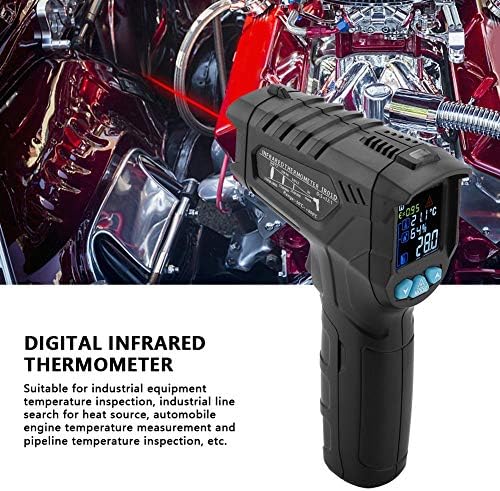
Figure 6.1: The thermometer being held, demonstrating the laser pointer for accurate targeting of the measurement area.
6.2 การปรับค่าการแผ่รังสี
Emissivity (E) is a measure of an object's ability to emit infrared energy. Different materials have different emissivity values. The IR01D allows adjustment from 0.1 to 1.0 for accurate readings on various surfaces.
- เมื่อเปิดเครื่องแล้ว ให้กดปุ่ม โหมด button until the emissivity (E) indicator flashes on the display.
- ใช้ UP และ ลง buttons to adjust the emissivity value. Refer to common emissivity tables for typical materials.
- กดปุ่ม โหมด button again to confirm the setting and exit emissivity adjustment mode.
6.3 Temperature Difference Alarm
The device features a temperature difference alarm, allowing you to set upper and lower temperature limits. If the measured temperature falls outside these limits, an alarm will sound or an indicator will appear.
- กดปุ่ม โหมด button repeatedly until the alarm setting mode is active (e.g., HI or LO alarm indicator flashes).
- ใช้ UP และ ลง buttons to set the desired high or low temperature limit.
- กดต่อไป โหมด to set the other limit or exit the alarm setting mode.
6.4 Unit Conversion (Celsius/Fahrenheit)
The IR01D can display temperatures in both Celsius (℃) and Fahrenheit (℉).
- ในขณะที่อุปกรณ์เปิดอยู่ ให้กดปุ่ม โหมด button until the temperature unit flashes.
- ใช้ UP or ลง button to toggle between ℃ and ℉.
- กด โหมด เพื่อยืนยันอีกครั้ง
7. การบำรุงรักษา
- การทำความสะอาด: เช็ดอุปกรณ์ให้สะอาดด้วยผ้าเนื้อนุ่มamp cloth. Do not use abrasive cleaners or solvents. Ensure the lens is clean for accurate readings.
- พื้นที่จัดเก็บ: Store the thermometer in a dry place, away from direct sunlight and extreme temperatures. The recommended storage temperature is -10℃ to 60℃ (14℉ to 140℉).
- การเปลี่ยนแบตเตอรี่: เปลี่ยนแบตเตอรี่เมื่อไฟแสดงสถานะแบตเตอรี่เหลือน้อยปรากฏขึ้นบนหน้าจอ ถอดแบตเตอรี่ออกหากไม่ได้ใช้งานอุปกรณ์เป็นเวลานานเพื่อป้องกันการรั่วไหล
8 การแก้ไขปัญหา
| ปัญหา | สาเหตุที่เป็นไปได้ | สารละลาย |
|---|---|---|
| อุปกรณ์ไม่เปิดเครื่อง | แบตเตอรี่หมดหรือติดตั้งไม่ถูกต้อง | ตรวจสอบขั้วแบตเตอรี่ เปลี่ยนแบตเตอรี่ AAA ใหม่ |
| การอ่านที่ไม่ถูกต้อง | Dirty lens; incorrect emissivity setting; target too far or too small. | Clean the lens. Adjust emissivity for the target material. Ensure target fills the measurement spot. |
| เลเซอร์ไม่ทำงาน | ฟังก์ชันเลเซอร์ถูกปิดใช้งาน อุปกรณ์ทำงานผิดปกติ | Ensure laser is enabled in settings (if applicable). If not, contact support. |
| Display shows "OL" or "LO". | อุณหภูมิอยู่นอกช่วงการวัด | Ensure the target temperature is within -50℃ to 800℃. |
9. ข้อมูลจำเพาะ
| พารามิเตอร์ | ค่า |
|---|---|
| แบบอย่าง | ไออาร์01ดี |
| ช่วงการวัดอุณหภูมิ | -50 ℃ถึง 800 ℃ (-58 ℉ถึง 1472 ℉) |
| ช่วงอุณหภูมิแวดล้อม | -10°C ถึง 60°C (14°F ถึง 140°F) |
| Environment Humidity Range | ความชื้นสัมพัทธ์ 0% ถึง 100% |
| อัตราส่วนระยะห่างต่อจุด (D:S) | 12:1 น. |
| emissivity | 0.1 ถึง 1.0 (ปรับได้) |
| สเปกตรัมการตอบสนอง | 8 ถึง 14µm |
| การวางตำแหน่ง | 12-point ring indicating temperature sensitive zone |
| พลังงานเลเซอร์ | <1mW/630-670nm (Class 2) |
| เวลาตอบสนอง | <0.5 วินาที |
| ปิดเครื่องอัตโนมัติ | 30 วินาที (โดยประมาณ) |
| การเก็บรักษาข้อมูล | ใช่ |
| อุณหภูมิการใช้งาน | 0 ℃ ถึง 40 ℃ (32 ℉ ถึง 104 ℉) |
| อุณหภูมิในการจัดเก็บ | -10°C ถึง 60°C (14°F ถึง 140°F) |
| แหล่งจ่ายไฟ | แบตเตอรี่ AAA 2 x 1.5V (ไม่รวม) |
| น้ำหนัก | ประมาณ. 204 ก. (7.2 ออนซ์) |
| ขนาด (กว้าง x ยาว x สูง) | ขนาดโดยประมาณ 140 x 95 x 42 มม. (5.5 x 3.7 x 1.7 นิ้ว) |
| ประเภทจอภาพ | จอ LCD (มีไฟแบ็คไลท์) |
| วัสดุ | พลาสติก |
10. การรับประกันและการสนับสนุน
Walfront products are designed for reliability and performance. For any questions, technical support, or warranty inquiries, please contact your retailer or visit the official Walfront store for assistance.
Official Walfront Store: Walfront Amazon Store
Ask a question about this manual
Ask about setup, troubleshooting, compatibility, parts, safety, or missing instructions. Manuals+ will review the question and use this page’s manual context to help answer it.