
การแนะนำ
This manual provides essential instructions for the setup, operation, and maintenance of your KOAMTAC KDC470Ci-BLE 2D Imager Barcode Sled Scanner combined with the Apple iPhone 7/8Plus SmartSled Charging Case. Please read this manual thoroughly before using the device to ensure proper functionality and to prevent damage.
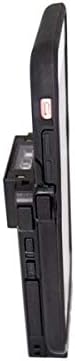
Image: The KOAMTAC KDC470Ci-BLE 2D Imager Barcode Sled Scanner integrated with an Apple iPhone 7/8Plus via the SmartSled Charging Case. This side view highlights the compact design and the connection points between the scanner and the smartphone case.
สินค้าเกินview
The KOAMTAC KDC470Ci-BLE is a robust 2D CMOS Imager Barcode Sled Scanner designed for mobile data collection. When paired with the Apple iPhone 7/8Plus SmartSled Charging Case, it transforms your smartphone into a comprehensive barcode scanning solution. Key features include:
- 2D CMOS Imager: Capable of reading various 2D barcodes.
- SmartSled Design: Allows for easy integration and removal of the iPhone 7/8Plus.
- การชาร์จพร้อมกัน: The SmartSled case enables simultaneous charging of both the KDC470Ci-BLE scanner and the iPhone 7/8Plus via a Micro USB cable or charging cradle.
- โครงสร้างทนทาน: IP65-rated for dust and water resistance, with a 5-foot drop specification.
- อายุการใช้งานแบตเตอรี่ที่ยาวนานขึ้น: Advanced power management features, including a hibernation mode, extend battery life beyond an average work shift. The built-in rechargeable battery can also serve as an external power source for the iPhone.
- ความเข้ากันได้ของซอฟต์แวร์: Includes KT Sync keyboard wedging software and an SDK for Android, Blackberry, iOS, and Windows platforms.
คำแนะนำการตั้งค่า
- การแกะกล่อง: Carefully remove all components from the packaging. Verify that you have the KDC470Ci-BLE scanner, the Apple iPhone 7/8Plus SmartSled Charging Case, and any included cables or accessories.
- ใส่ไอโฟน: Gently slide your Apple iPhone 7/8Plus into the SmartSled Charging Case until it is securely seated. Ensure all connectors align properly.
- Attach Scanner: Connect the KDC470Ci-BLE scanner to the SmartSled Charging Case. The scanner is designed to seamlessly attach to the back of the case, forming a single integrated unit.
- ค่าใช้จ่ายเริ่มต้น: Before first use, fully charge the integrated unit. Connect the Micro USB cable to the SmartSled Charging Case and then to a power source. The scanner and iPhone will charge simultaneously.
- การติดตั้งซอฟต์แวร์:
- For basic keyboard wedging functionality, install the KT Sync software on your host device (e.g., iPhone).
- For custom application development, utilize the provided SDK for your specific operating system (iOS in this case).
- Bluetooth Pairing (if not using direct connection):
- Power on the KDC470Ci-BLE scanner.
- On your iPhone, navigate to Bluetooth settings and search for available devices.
- Select the KDC470Ci-BLE from the list to pair. Follow any on-screen prompts.
คำแนะนำการใช้งาน
สแกนบาร์โค้ด
- เปิดเครื่อง: Ensure the KDC470Ci-BLE scanner is powered on.
- Target Barcode: หันช่องรับภาพของสแกนเนอร์ไปที่บาร์โค้ดที่คุณต้องการสแกน
- เปิดใช้งานการสแกน: Press the scan button located on the side of the KDC470Ci-BLE. A red aiming beam will appear.
- ยืนยันการสแกน: Once the barcode is successfully read, the scanner will typically emit an audible beep and/or vibrate, and the data will be transmitted to your connected iPhone application.
การชาร์จอุปกรณ์
The SmartSled Charging Case allows for convenient charging of both the KDC470Ci-BLE scanner and the iPhone 7/8Plus simultaneously.
- Connect a Micro USB cable to the charging port on the SmartSled case.
- ต่อปลายอีกด้านของสาย USB เข้ากับอะแดปเตอร์แปลงไฟ USB ที่ใช้งานร่วมกันได้ หรือพอร์ต USB ของคอมพิวเตอร์
- Alternatively, place the SmartSled unit into a compatible KOAMTAC charging cradle (sold separately) for simultaneous charging.
การจัดการพลังงาน
The KDC470Ci-BLE features advanced power management to conserve battery life. When not actively in use, the scanner enters a "hibernation mode" to extend operational time. To reactivate, simply press the scan button or interact with the device via your iPhone application.
การซ่อมบำรุง
- การทำความสะอาด: ใช้ผ้านุ่มไม่เป็นขุยเช็ดเล็กน้อยampened with water or a mild cleaning solution to clean the exterior of the scanner and case. Avoid harsh chemicals or abrasive materials. Do not spray liquids directly onto the device.
- พื้นที่จัดเก็บ: เก็บอุปกรณ์ไว้ในที่แห้งและเย็น หลีกเลี่ยงแสงแดดโดยตรงและอุณหภูมิที่สูงหรือต่ำเกินไป
- การดูแลแบตเตอรี่ To prolong battery life, avoid fully discharging the battery frequently. If storing for an extended period, ensure the battery is charged to approximately 50%.
- อัพเดตเฟิร์มแวร์: Periodically check the KOAMTAC website for firmware updates for your KDC470Ci-BLE scanner. Keeping the firmware updated ensures optimal performance and access to new features.
การแก้ไขปัญหา
| ปัญหา | สาเหตุที่เป็นไปได้ | สารละลาย |
|---|---|---|
| สแกนเนอร์ไม่เปิดเครื่อง | แบตเตอรี่ต่ำหรือหมด | Charge the device using the Micro USB cable or charging cradle. |
| Unable to scan barcodes. | Barcode damaged or unreadable; scanner not aimed correctly; incorrect symbology settings. | Ensure the barcode is clear. Aim the red beam directly across the barcode. Check scanner settings for supported symbologies. |
| No data transmitted to iPhone. | Bluetooth connection lost; application not configured correctly; iPhone not securely seated in SmartSled. | Verify Bluetooth connection. Restart the scanning application. Re-seat the iPhone in the SmartSled case. |
| อุปกรณ์ไม่ชาร์จ | Faulty cable or power adapter; charging port obstruction; iPhone not properly connected. | Try a different Micro USB cable and power adapter. Inspect the charging port for debris. Ensure the iPhone is fully seated in the SmartSled. |
ข้อมูลจำเพาะ
- หมายเลขรุ่น: 381150 (KDC470Ci-BLE)
- ประเภทเครื่องสแกนเนอร์: ตัวสร้างภาพ 2D CMOS
- ความเข้ากันได้: Apple iPhone 7/8Plus (with SmartSled Case), Desktop, Laptop, Smartphone
- การเชื่อมต่อ: Bluetooth Low Energy (BLE), USB Cable
- แหล่งพลังงาน: Battery Powered, USB Cable
- คะแนนด้านสิ่งแวดล้อม: IP65
- วางข้อกำหนด: 5 ฟุต (1.5 เมตร)
- น้ำหนักสินค้า: 8.8 ออนซ์ (ประมาณ 249 กรัม)
- ขนาดแพ็คเกจ: 6.1 x 4.2 x 1.5 นิ้ว (ประมาณ 15.5 x 10.7 x 3.8 ซม.)
- ผู้ผลิต: โคแอมแทค
- มีจำหน่ายครั้งแรก: 13 พฤศจิกายน 2018
การรับประกันและการสนับสนุน
For warranty information and technical support, please refer to the official KOAMTAC website or contact KOAMTAC customer service directly. Keep your purchase receipt as proof of purchase for warranty claims.
- ผู้ผลิต: โคแอมแทค
- Webเว็บไซต์: www.koamtac.com
- ติดต่อ: Refer to the KOAMTAC webไซต์สำหรับรายละเอียดการติดต่อและทรัพยากรสนับสนุน