
Walfront TM630A
Walfront TM630A Digital Timer Switch User Manual
รุ่น: TM630A
1. บทนำ
This manual provides detailed instructions for the installation, operation, and maintenance of the Walfront TM630A 12V DC Mini LCD Digital Microcomputer Control Power Timer Switch. This device is designed for precise control of various electrical equipment, offering automated on/off scheduling for enhanced efficiency and convenience. Please read this manual thoroughly before use to ensure proper operation and safety.
2. ข้อมูลด้านความปลอดภัย
- ตรวจสอบให้แน่ใจว่าแหล่งจ่ายไฟตรงกับปริมาตรtage requirements of the device (DC 12V).
- Installation should be performed by qualified personnel to prevent electric shock or damage.
- Do not expose the device to water, excessive humidity, or extreme temperatures.
- โปรดตัดกระแสไฟก่อนทำการเดินสายไฟหรือบำรุงรักษาใดๆ
- เก็บให้พ้นจากมือเด็ก
3. สินค้าหมดview
The Walfront TM630A is a high-precision digital timer switch featuring an industrial-grade chip for strong anti-interference. It includes a built-in 1.2V/40mA rechargeable battery to retain programming information during power outages. The device supports up to 17 on/off settings for flexible scheduling.
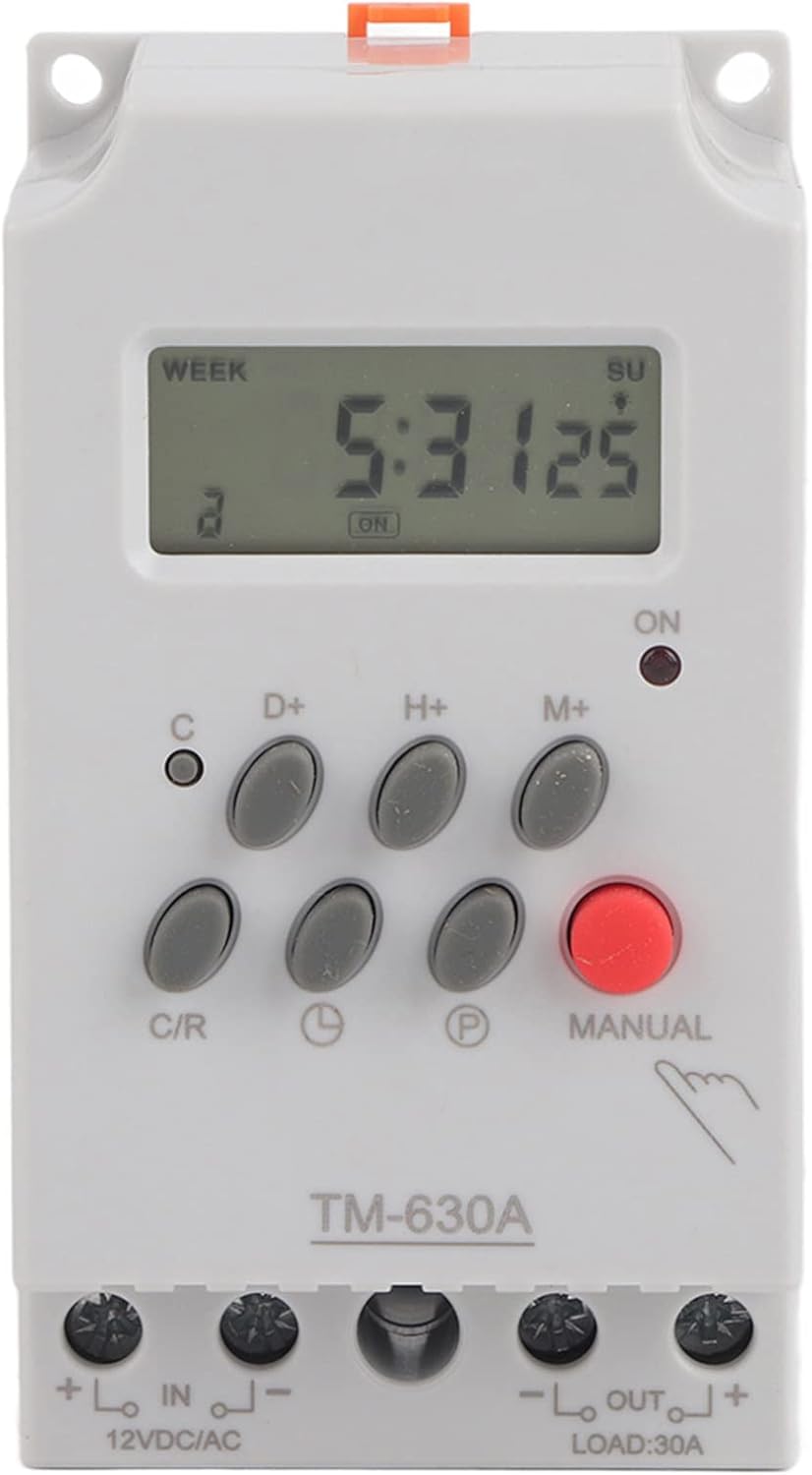
ด้านหน้า view of the TM630A digital timer switch, showing the LCD display and control buttons.
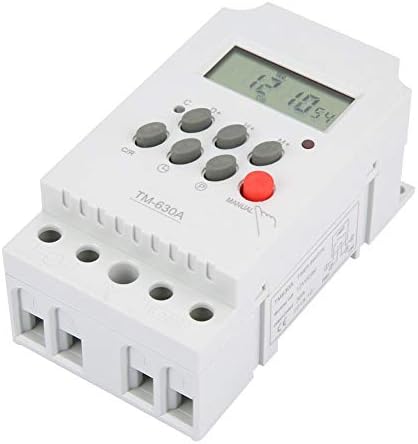
มุม view of the TM630A, highlighting its compact design and terminal blocks.

หลัง view of the TM630A, showing the DIN rail mounting clip.

Diagram illustrating the dimensions of the TM630A timer switch: 3.1 inches (depth), 2.2 inches (width), and 1.4 inches (height).
4. การติดตั้งและการเดินสายไฟ
The TM630A timer switch is designed for easy installation. It features two input terminals for power supply and two output terminals for the load. The wire slots accept wire sizes from 20AWG to 10AWG.
แผนผังสายไฟ:
Connect the 12V DC power supply to the 'IN' terminals (marked '+' and '-'). Connect the device to be controlled (load) to the 'OUT' terminals (marked '+' and '-'). Ensure correct polarity for DC applications.
Caution: Always ensure power is disconnected before wiring to prevent electric shock.
5. คู่มือการใช้งาน
ตั้งค่าเริ่มต้น:
- ปลดล็อคอุปกรณ์: Press the 'C/R' button four times to unlock the timer. The lock icon on the display will disappear.
- ตั้งเวลาปัจจุบัน:
- กดปุ่ม 'D+' เพื่อตั้งวันในสัปดาห์ปัจจุบัน
- กดปุ่ม 'H+' เพื่อตั้งชั่วโมงปัจจุบัน
- กดปุ่ม 'M+' เพื่อตั้งนาทีปัจจุบัน
Programming On/Off Times:
The timer supports up to 17 ON/OFF programs. Follow these steps to set a program:
- Press the 'P' button once. The display will show '1 ON'. This is the first 'ON' setting.
- Use 'D+', 'H+', 'M+' buttons to set the desired day(s), hour, and minute for the first 'ON' event.
- Press the 'P' button again. The display will show '1 OFF'. This is the first 'OFF' setting.
- Use 'D+', 'H+', 'M+' buttons to set the desired day(s), hour, and minute for the first 'OFF' event.
- ทำซ้ำขั้นตอนที่ 1-4 สำหรับโปรแกรมเปิด/ปิดเพิ่มเติม (สูงสุด 17 โปรแกรม)
- After setting all desired programs, press the clock icon button (usually labeled with a clock symbol) to return to the current time display.
ควบคุมด้วยมือ:
Press the 'MANUAL' button to cycle through different modes: ON, AUTO, OFF. In 'AUTO' mode, the timer will follow the programmed schedule. In 'ON' or 'OFF' mode, the output will remain continuously on or off, overriding the schedule.
6. การบำรุงรักษา
The Walfront TM630A timer switch requires minimal maintenance. Keep the device clean and free from dust. Do not use abrasive cleaners. The internal rechargeable battery is designed to maintain settings during power interruptions; however, if the device is stored for extended periods without power, the battery may discharge. Connect the timer to a power source to recharge the internal battery if it fails to retain settings.
7 การแก้ไขปัญหา
- Timer not responding or display is blank: Check power connections. Ensure the internal battery has sufficient charge by connecting the timer to power for several hours.
- Timer not executing programs:
- Ensure the device is unlocked (press 'C/R' four times).
- Verify that the timer is in 'AUTO' mode (check the 'MANUAL' button setting).
- Double-check programmed ON/OFF times for accuracy.
- แสดงเวลาไม่ถูกต้อง: Reset the current time using the 'D+', 'H+', 'M+' buttons.
- Device turns on/off unexpectedly: Review all programmed ON/OFF settings to identify any conflicts or unintended schedules.
8. ข้อมูลจำเพาะ
| คุณสมบัติ | ข้อมูลจำเพาะ |
|---|---|
| หมายเลขรุ่น | Wal front3g6nkvs20r-01 (TM630A) |
| อินพุต Voltage | กระแสตรง 12 โวลต์ |
| จำนวนโปรแกรม | 17 ON/OFF settings |
| แสดง | จอแอลซีดี |
| แบตเตอรี่ภายใน | 1.2V / 40mA rechargeable |
| ขนาด (D x W x H) | 3.1" x 2.2" x 1.4" |
| น้ำหนักสินค้า | 5.3 ออนซ์ (0.15 กิโลกรัม) |
| วัสดุ | พลาสติก |
| ยูพีซี | 783335809516 |
9. การรับประกันและการสนับสนุน
For warranty information and technical support, please refer to the Walfront official webหรือติดต่อผู้ค้าปลีกของคุณ เก็บใบเสร็จรับเงินไว้เพื่อใช้ในการเคลมประกัน
Ask a question about this manual
Ask about setup, troubleshooting, compatibility, parts, safety, or missing instructions. Manuals+ will review the question and use this page’s manual context to help answer it.