
1. บทนำ
The MOXA MGate MB3660-16-2DC is a high-performance 16-port Modbus gateway designed for converting between Modbus TCP and Modbus RTU/ASCII protocols. This device facilitates seamless communication between Modbus TCP hosts and Modbus RTU/ASCII serial devices. It features dual DC power inputs for enhanced reliability and redundancy, making it suitable for critical industrial automation applications.
This manual provides essential information for the proper installation, configuration, operation, and maintenance of your MGate MB3660-16-2DC gateway.
2. ข้อมูลด้านความปลอดภัย
Please read and understand all safety instructions before operating the device. Failure to do so may result in injury or damage to the equipment.
- ตรวจสอบแหล่งจ่ายไฟ voltage matches the device's requirements (dual DC input).
- Disconnect power before performing any installation or maintenance procedures.
- Install the device in a well-ventilated area to prevent overheating.
- ควรหลีกเลี่ยงการวางอุปกรณ์ไว้ในที่ที่มีความชื้น อุณหภูมิสูง หรือสภาพแวดล้อมที่มีฤทธิ์กัดกร่อน
- การติดตั้งและให้บริการควรกระทำโดยบุคลากรที่มีคุณสมบัติเท่านั้น
3. เนื้อหาบรรจุภัณฑ์
ตรวจสอบว่าแพ็คเกจของคุณมีรายการต่อไปนี้:
- MOXA MGate MB3660-16-2DC Modbus Gateway
- คู่มือการติดตั้งแบบด่วน
- บัตรรับประกัน
- บล็อกเทอร์มินัลสำหรับอินพุตไฟฟ้า
- DIN-rail mounting kit (if applicable)
หากสินค้าชิ้นใดชิ้นหนึ่งสูญหายหรือชำรุด โปรดติดต่อตัวแทนฝ่ายขายของคุณทันที
4. คำอธิบายฮาร์ดแวร์
The MGate MB3660-16-2DC features multiple ports and indicators for easy setup and monitoring.
4.1 แผงด้านหน้า
The front panel typically includes LED indicators for power, network activity, and serial port status.
- ไฟ LED PWR1/PWR2: Indicates status of primary/secondary DC power input.
- ไฟ LED แสดงข้อผิดพลาด: Indicates system errors or warnings.
- LAN1/LAN2 LEDs: Indicate Ethernet link and activity.
- Serial Port LEDs (1-16): Indicate data transmission/reception on each serial port.
4.2 Rear/Side Panels
These panels house the connection ports:
- กำลังไฟเข้า: Dual DC power input terminal blocks for redundant power.
- พอร์ตอีเธอร์เน็ต: RJ45 ports for Modbus TCP network connection.
- พอร์ตอนุกรม: 16 DB9 or terminal block connectors for Modbus RTU/ASCII devices.
- ปุ่มรีเซ็ต: สำหรับการคืนค่าเป็นการตั้งค่าเริ่มต้นจากโรงงาน
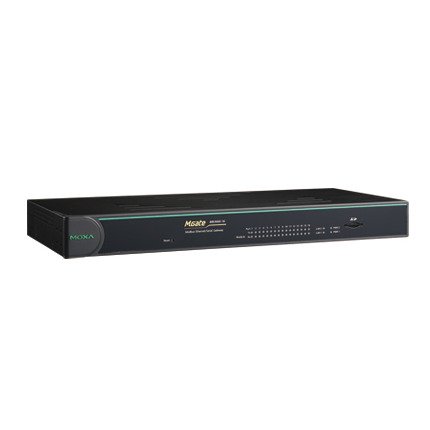
รูปที่ 1 : ด้านหน้า view of the MOXA MGate MB3660-16-2DC Modbus Gateway, showing LED indicators and general form factor.
5. การตั้งค่า
5.1 การติดตั้ง
The MGate MB3660-16-2DC can be mounted on a DIN-rail or wall-mounted using the provided kit.
- การติดตั้งราง DIN: Attach the DIN-rail clip to the back of the device and snap it onto a standard DIN-rail.
- การติดตั้งบนผนัง: Secure the wall-mount plates to the device, then use screws to fix the device to a wall or panel.
5.2 การเชื่อมต่อสายไฟ
Connect two independent DC power sources to the dual power input terminal blocks for redundancy. Ensure correct polarity.
- Connect the positive (+) wire to the V+ terminal.
- Connect the negative (-) wire to the V- terminal.
- Connect the ground wire to the ⊗ terminal.
5.3 การเชื่อมต่อเครือข่าย
Connect the Ethernet ports to your Modbus TCP network using standard RJ45 Ethernet cables.
5.4 การเชื่อมต่ออุปกรณ์อนุกรม
Connect your Modbus RTU/ASCII serial devices to the 16 serial ports. Configure the serial port settings (baud rate, data bits, parity, stop bits, mode) via the device's web console or utility to match your serial devices.
5.5 การกำหนดค่าเริ่มต้น
เข้าถึงอุปกรณ์ได้ web-based management interface by connecting a computer to the same network segment and entering the default IP address (refer to the Quick Installation Guide for the default IP). Configure network settings, Modbus mapping, and serial port parameters as required for your application.
6. การใช้งานเกตเวย์
Once configured, the MGate MB3660-16-2DC operates as a transparent Modbus gateway, converting requests between Modbus TCP masters and Modbus RTU/ASCII slaves.
6.1 Modbus Communication Flow
- Modbus TCP master sends a request to the gateway's IP address and configured TCP port.
- The gateway translates the Modbus TCP request into a Modbus RTU/ASCII request.
- The gateway sends the serial request to the designated Modbus RTU/ASCII slave device via the appropriate serial port.
- The slave device responds to the gateway.
- The gateway translates the serial response back to Modbus TCP and forwards it to the Modbus TCP master.
6.2 สถานะการตรวจสอบ
Regularly check the LED indicators on the front panel to monitor the device's operational status:
- พาวเวอร์ 1/พาวเวอร์ 2: Should be solid green when power is supplied.
- ความผิดพลาด: Should be off during normal operation. A red light indicates an error.
- ไฟ LED LAN: Solid green for link, blinking for activity.
- Serial Port LEDs: Blink when data is being transmitted or received on that port.
7. การบำรุงรักษา
To ensure optimal performance and longevity of your MGate MB3660-16-2DC, follow these maintenance guidelines:
- การทำความสะอาด: Periodically clean the device's exterior with a soft, dry cloth. Do not use liquid or aerosol cleaners.
- อัพเดตเฟิร์มแวร์: ตรวจสอบ MOXA website for the latest firmware versions. Apply updates as recommended to enhance features and security.
- การตรวจสอบสิ่งแวดล้อม: ตรวจสอบให้แน่ใจว่าสภาพแวดล้อมการทำงานยังคงอยู่ในช่วงอุณหภูมิและความชื้นที่กำหนด
- การตรวจสอบสายเคเบิล: Regularly inspect all connected cables for damage or loose connections.
8 การแก้ไขปัญหา
หัวข้อนี้ให้แนวทางแก้ไขปัญหาทั่วไปที่คุณอาจพบเจอ
| ปัญหา | สาเหตุที่เป็นไปได้ | สารละลาย |
|---|---|---|
| Device not powering on (PWR LEDs off) | No power supply; faulty power adapter; incorrect wiring. | Check power connections and source; verify power adapter functionality. |
| No network connectivity (LAN LEDs off) | Faulty Ethernet cable; incorrect network settings; switch/router issue. | Check Ethernet cable; verify IP settings; test with another network port. |
| ความล้มเหลวในการสื่อสารแบบอนุกรม | Incorrect serial port settings (baud rate, parity); wrong wiring; slave device issue. | Verify serial port settings match slave device; check serial cable wiring; test slave device independently. |
| FAULT LED is red | System error; hardware malfunction. | Consult the product manual for specific FAULT codes or contact technical support. Try power cycling the device. |
8.1 รีเซ็ตเป็นค่าโรงงาน
If issues persist, you may need to perform a factory reset. Locate the reset button (usually a small pinhole) and press it for 5-10 seconds while the device is powered on. This will restore all settings to their default values.
9. ข้อมูลจำเพาะ
| คุณสมบัติ | ข้อมูลจำเพาะ |
|---|---|
| แบบอย่าง | เอ็มเกท MB3660-16-2DC |
| พอร์ตซีเรียล | 16 (RS-232/422/485, software selectable) |
| พอร์ตอีเทอร์เน็ต | 2 x 10/100BaseT(X) auto-sensing RJ45 (typically for redundancy) |
| โปรโตคอลที่สนับสนุน | Modbus TCP, Modbus RTU, Modbus ASCII |
| กำลังไฟเข้า | Dual DC Power Input (e.g., 12-48 VDC, specific range may vary by model revision) |
| ความซ้ำซ้อน | Dual power inputs |
| อุณหภูมิในการทำงาน | Typically -40 to 75°C (Industrial Grade) |
| อุณหภูมิในการจัดเก็บ | Typically -40 to 85°C |
| ความชื้น | ความชื้นสัมพัทธ์ 5 ถึง 95% (ไม่ควบแน่น) |
| ขนาด (กว้าง x ลึก x สูง) | Specific dimensions vary, refer to product datasheet for exact measurements. |
| น้ำหนัก | ประมาณ 22 ปอนด์ (10 กก.) |
| ผู้ผลิต | ม็อกซ่า |
10. การรับประกันและการสนับสนุน
10.1 การรับประกันสินค้า
MOXA products typically come with a standard manufacturer's warranty. Please refer to the warranty card included in your package or visit the official MOXA website for detailed warranty terms and conditions specific to the MGate MB3660-16-2DC.
10.2 การสนับสนุนด้านเทคนิค
For technical assistance, troubleshooting, or further inquiries, please contact MOXA's technical support team. Support resources, including FAQs, drivers, and documentation, are available on the official MOXA webเว็บไซต์.
- ม็อกซ่า Webเว็บไซต์: www.moxa.com
- ติดต่อฝ่ายสนับสนุน: Refer to the 'Support' section on the MOXA webเว็บไซต์สำหรับข้อมูลการติดต่อในแต่ละภูมิภาค