
1. บทนำ
This manual provides essential information for the safe and efficient operation of your Strong SRT 32HB3003 32-inch HD LED TV. Please read these instructions carefully before using the television and retain them for future reference.
2. ข้อมูลด้านความปลอดภัย
ปฏิบัติตามข้อควรระวังด้านความปลอดภัยต่อไปนี้เสมอเพื่อป้องกันไฟฟ้าช็อต ไฟไหม้ หรือความเสียหายต่อโทรทัศน์:
- อย่าให้ทีวีโดนฝนหรือความชื้น
- อย่าเปิดทีวีasinง. ส่งต่อการบริการทั้งหมดให้กับบุคลากรที่มีคุณสมบัติ
- ตรวจสอบให้แน่ใจว่ามีการระบายอากาศที่เหมาะสมรอบๆ ทีวี
- ถอดปลั๊กทีวีในระหว่างที่มีพายุฝนฟ้าคะนองหรือเมื่อไม่ได้ใช้งานเป็นเวลานาน
- เก็บทีวีให้ห่างจากแหล่งความร้อนและแสงแดดโดยตรง
3. เนื้อหาบรรจุภัณฑ์
ตรวจสอบว่ามีสินค้าทั้งหมดอยู่ในบรรจุภัณฑ์:
- Strong SRT 32HB3003 LED TV
- รีโมทคอนโทรล
- แบตเตอรี่ AAA 2 ก้อน
- แท่นวางทีวี
- คู่มือการใช้งาน

Image: The Strong SRT 32HB3003 TV packaging, highlighting key features such as DVB-T2/C/S2 tuner, HDMI, USB, and Dolby Audio.
4. การตั้งค่า
4.1 การติดตั้งขาตั้ง
การติดตั้งขาตั้งทีวี:
- วางทีวีคว่ำหน้าลงบนพื้นผิวที่นุ่มและสะอาดอย่างระมัดระวังเพื่อป้องกันไม่ให้หน้าจอเสียหาย
- จัดวางฐานขาตั้งให้ตรงกับช่องที่ตรงกันที่ด้านล่างของทีวี
- ยึดขาตั้งโดยใช้สกรูที่ให้มา
4.2 การเชื่อมต่อ
เชื่อมต่ออุปกรณ์ภายนอกของคุณกับทีวีโดยใช้พอร์ตที่เหมาะสม
- เสาอากาศ/สายเคเบิล: Connect your DVB-T2 or DVB-C antenna/cable to the 'ANT IN' port.
- ดาวเทียม: Connect your satellite dish to the 'SATELLITE IN' port for DVB-S2 reception.
- อุปกรณ์ HDMI: Use HDMI ports for high-definition devices like Blu-ray players, game consoles, or set-top boxes. HDMI 1 supports ARC (Audio Return Channel).
- อุปกรณ์ยูเอสบี: เสียบไดรฟ์ USB เข้ากับพอร์ต USB 2.0 เพื่อเล่นสื่อ
- CI+ Module: Insert a CI+ module (Common Interface) into the CI+ slot for encrypted channels.
- เอาต์พุตเสียง: Use the Headphone jack for private listening or the Digital Optical Output (TOS-Link) for external audio systems.
- AV ใน: For older devices, use the AV IN port.

ภาพ: ด้านหลัง view of the Strong SRT 32HB3003 TV, illustrating the placement of connection ports including HDMI, USB, and antenna inputs.

Image: A diagram detailing the Common Interface (CI) slot and other connectivity options such as USB, headphone jack, AV IN, HDMI 1, HDMI 2, Satellite IN, and S/PDIF (digital optical audio out).
4.3 การติดตั้งครั้งแรก
After connecting the power cable and turning on the TV, the First Time Installation wizard will guide you through initial setup steps, including language selection, country, and channel scanning for DVB-T2, DVB-C, or DVB-S2.
5. ปฏิบัติการ
5.1 การควบคุมระยะไกลจบลงview
รีโมทคอนโทรลช่วยให้คุณเข้าถึงฟังก์ชั่นทั้งหมดของทีวีได้ ใส่แบตเตอรี่ AAA สองก้อนลงในรีโมทคอนโทรล ตรวจสอบให้แน่ใจว่าขั้วถูกต้อง

Image: The remote control for the Strong SRT 32HB3003 TV, featuring buttons for power, numerical input, volume control, channel selection, menu access, source input, and media playback functions.
5.2 ฟังก์ชั่นพื้นฐาน
- พลัง: กดปุ่ม ปุ่มเปิด/ปิดสีแดง เพื่อเปิดหรือปิดทีวี
- ปริมาณ: ใช้ ฉบับ +/- ปุ่มปรับระดับเสียง
- ช่อง: ใช้ ช +/- ปุ่มเปลี่ยนช่อง
- ปิดเสียง: กดปุ่ม MUTE ปุ่มสำหรับปิดเสียงชั่วคราว
5.3 การเลือกแหล่งที่มา
กดปุ่ม แหล่งที่มา button on the remote control to select the desired input source (e.g., HDMI 1, HDMI 2, DVB-T2, DVB-C, DVB-S2, AV).
5.4 การนำทางเมนู
กดปุ่ม เมนู กดปุ่มเพื่อเข้าสู่เมนูหลัก ใช้ปุ่มลูกศรเพื่อเลื่อนดูเมนู OK เพื่อยืนยันการเลือก กลับ button returns to the previous menu or exits the current menu.
5.5 การเล่นสื่อ (USB)
Insert a USB storage device into one of the USB ports. The TV supports playback of photos, videos, and music files. Access the media player through the main menu or by selecting the USB source.
5.6 คู่มือรายการอิเล็กทรอนิกส์ (EPG)
กดปุ่ม อีพีจี ปุ่มที่จะ view the Electronic Program Guide, which displays program schedules for digital channels.
5.7 โหมดโรงแรม
The TV features a Hotel Mode, which allows for restricted access to certain settings and functions, ideal for hospitality environments. Consult the advanced settings menu for Hotel Mode configuration.
6. การบำรุงรักษา
6.1 การทำความสะอาด
- ควรถอดปลั๊กทีวีทุกครั้งก่อนทำความสะอาด
- ใช้ผ้าแห้งนุ่มเช็ดหน้าจอและตู้
- สำหรับรอยฝังแน่น ให้เช็ดเบาๆampเทน้ำหรือน้ำยาทำความสะอาดอ่อนๆ ที่ไม่กัดกร่อน ซึ่งออกแบบมาสำหรับอุปกรณ์อิเล็กทรอนิกส์โดยเฉพาะ ลงบนผ้า
- Never spray cleaning liquids directly onto the TV.
6.2 พื้นที่จัดเก็บ
If storing the TV for an extended period, ensure it is kept in a cool, dry place, protected from dust and extreme temperatures. It is recommended to use the original packaging for storage.
7 การแก้ไขปัญหา
หากคุณประสบปัญหาเกี่ยวกับทีวี โปรดดูวิธีแก้ไขทั่วไปต่อไปนี้:
| ปัญหา | สาเหตุที่เป็นไปได้ / วิธีแก้ไข |
|---|---|
| ไม่มีไฟฟ้า | Check if the power cable is securely connected. Ensure the power outlet is functional. |
| ไม่มีภาพแต่มีเสียง | ตรวจสอบการเลือกแหล่งสัญญาณเข้า ตรวจสอบให้แน่ใจว่าอุปกรณ์ภายนอกเปิดใช้งานและเชื่อมต่ออย่างถูกต้อง |
| ไม่มีเสียงแต่มีภาพ | Check volume level and mute status. Verify audio settings in the menu. |
| รีโมตคอนโทรลไม่ทำงาน | Check and replace batteries. Ensure no obstructions between remote and TV sensor. |
| คุณภาพของภาพไม่ดี | Check antenna/cable connection. Adjust picture settings in the menu. |
8. ข้อมูลจำเพาะ
Detailed technical specifications for the Strong SRT 32HB3003 HD LED TV:
| คุณสมบัติ | ข้อมูลจำเพาะ |
|---|---|
| หมายเลขรุ่น | รฟท 32HB3003 |
| ขนาดหน้าจอ | 32 นิ้ว (80 ซม.) |
| ปณิธาน | 1366 x 768 pixels (HD-Ready) |
| เทคโนโลยีการแสดงผล | นำ |
| อัตราการรีเฟรช | 60 เฮิรตซ์ |
| เทคโนโลยีจูนเนอร์ | DVB-C, DVB-S2, DVB-T2 |
| พอร์ต HDMI | 2 (1x HDMI ARC) |
| พอร์ต USB 2.0 | 2 |
| ส่วนติดต่ออื่น ๆ | Headphone, Digital Optical Out (TOS-Link), CI+ interface, AV IN |
| คุณสมบัติพิเศษ | Electronic Program Guide (EPG), USB Media Playback, Parental Control, Hotel Mode |
| การใช้พลังงาน | 50 วัตต์ |
| ระดับประสิทธิภาพการใช้พลังงาน | A+ |
| การบริโภคพลังงานรายปี | 45 กิโลวัตต์ชั่วโมง/ปี |
| ขนาดผลิตภัณฑ์ (กว้าง x สูง x ลึก) | 73.2 x 43.5 x 7.78 ซม. |
| น้ำหนัก | 4.15 กก. |

Image: The energy efficiency label for the Strong SRT 32HB3003, indicating an A+ rating and an annual energy consumption of 45 kWh.
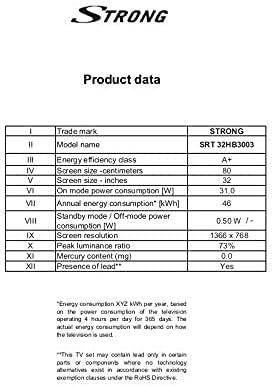
Image: A product data table providing detailed specifications for the Strong SRT 32HB3003, including screen size, resolution, and power consumption.
9. การรับประกันและการสนับสนุน
Your Strong SRT 32HB3003 TV comes with a limited warranty. For specific warranty terms and conditions, please refer to the warranty card included in your product packaging or visit the official Strong website. For technical support, troubleshooting assistance, or service inquiries, please contact Strong customer service through their official channels.
หากต้องการความช่วยเหลือเพิ่มเติม โปรดไปที่ Strong official webเว็บไซต์.