
1. บทนำ
This manual provides essential information for the safe and efficient operation of the Walfront AT3-1500X Variable Frequency Drive (VFD). The AT3-1500X is a high-performance 3-phase adjustable speed controller designed for motor speed control applications, offering a wide speed regulating range and robust performance. Please read this manual thoroughly before installation, operation, or maintenance.
2. ข้อควรระวังเพื่อความปลอดภัย
Failure to follow these safety instructions may result in death, severe injury, or property damage.
- โปรดตรวจสอบให้แน่ใจว่าได้ตัดการเชื่อมต่อแหล่งจ่ายไฟแล้วก่อนทำการเดินสายไฟหรือบำรุงรักษาใดๆ
- Do not connect the U/V/W output terminals directly to the AC power supply. This will cause internal damage to the inverter.
- The inverter must not be installed on flammable surfaces or near flammable materials to prevent fire hazards.
- ตรวจสอบให้แน่ใจว่าขั้วต่อกราวด์ของอินเวอร์เตอร์ได้รับการต่อลงดินอย่างถูกต้องและปลอดภัย
- Avoid installation in environments containing explosive gases to eliminate explosion risks.
- Only qualified professionals should perform wiring and internal inspections. The converter contains high voltage components; do not open the shell casually.

ภาพ: ด้านหน้า view ของ VFD ที่แสดงฉลากข้อควรระวังด้านความปลอดภัย
3. สินค้าหมดview
The Walfront AT3-1500X VFD utilizes a unique control method to achieve high performance and a wide speed regulating range. It features excellent anti-trip capabilities and resilience against power fluctuations, temperature, humidity, and dust interference, enhancing overall stability. Optimized PWM control technology and electromagnetic compatibility ensure low noise and minimal electromagnetic interference.

ภาพ: ด้านหน้า view of the Walfront AT3-1500X VFD, showing the display and control panel.
3.1 คุณสมบัติหลัก
- การป้องกันที่ครอบคลุม: รวมถึงระบบป้องกันกระแสเกินและแรงดันไฟเกินtage, over-heat, overload, under-voltage, and intelligent power module protection.
- โครงสร้างทนทาน: Made from heat and flame-retardant shell material for extended lifespan.
- การระบายความร้อนที่มีประสิทธิภาพ: Equipped with a high-efficiency fan for optimal heat dissipation, prolonging service life.
- ความต้านทานการรบกวน: Designed to resist interference from rough power, temperature, humidity, and dust, ensuring high reliability and stability.
- การทำงานที่ตอบสนองฉับไว: Fast start and stop response with high torque at low speeds.

ภาพ: ด้านข้าง view of the VFD, highlighting the heat sink fins for effective cooling.

ภาพ: ด้านหลัง view of the VFD, showing the cooling fans and product label with model information.
4. ข้อมูลจำเพาะ
| พารามิเตอร์ | ค่า |
|---|---|
| แบบอย่าง | AT3-1500X |
| ช่วงการใช้งาน | สากล |
| เฟสการจ่ายไฟฟ้า | สามเฟส |
| กระแสไฟฟ้าที่ได้รับการจัดอันดับ | 4A |
| จัดอันดับVoltage | AC380V (Three Phase) |
| กำลังมอเตอร์ที่เหมาะสม | 1.5 กิโลวัตต์ |
| กรอง | ฟิลเตอร์ในตัว |
| ซีพาวเวอร์ซัพพลาย | เล่มที่tagอี ประเภท |
| วิธีการควบคุม | V/F Closed Loop |
| ปริมาณการส่งออกtagวิธีที่ปรับได้ | การควบคุม PWM |
| ขนาด (กว้าง x ยาว x สูง) | ขนาดโดยประมาณ 18 x 12.5 x 12.5 ซม. (7 x 4.9 x 4.9 นิ้ว) |
| น้ำหนัก | ประมาณ 1431 กรัม (3.15 ปอนด์) |
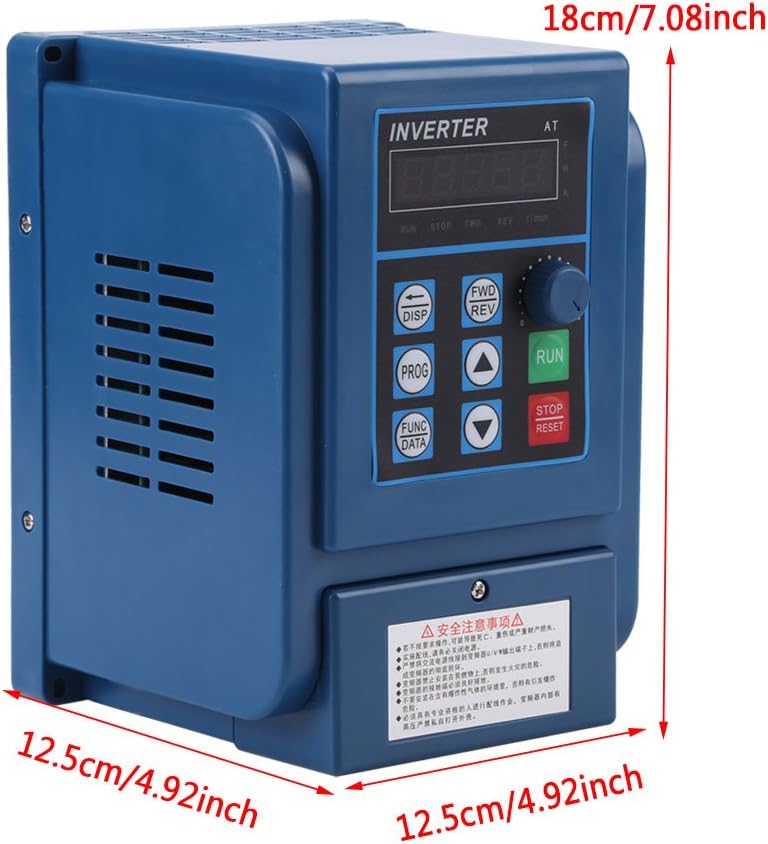
ภาพ: ด้านหน้า view of the VFD with key dimensions indicated.
5. การตั้งค่าและการติดตั้ง
5.1 ข้อพิจารณาด้านสิ่งแวดล้อม
- Install the VFD in a clean, dry, and well-ventilated area.
- Avoid direct sunlight, excessive dust, corrosive gases, and flammable materials.
- ตรวจสอบให้แน่ใจว่าอุณหภูมิแวดล้อมอยู่ในช่วงการทำงานที่กำหนดไว้
5.2 คำแนะนำในการเดินสายไฟ
Proper wiring is crucial for safe and correct operation. Refer to the wiring diagram below and ensure all connections are secure and correctly terminated. Always disconnect power before wiring.

ภาพ: ระยะใกล้ view of the VFD's input and output wiring terminals.

ภาพ: รายละเอียด view of the VFD's wiring terminals, showing input (380V) and three-phase motor connections (R, S, T, W, V, U).
- กำลังไฟเข้า (R, S, T): Connect the three-phase 380V AC power supply to these terminals.
- กำลังไฟฟ้าขาออกของมอเตอร์ (U, V, W): Connect the three-phase motor to these terminals.
- การต่อลงดิน: Ensure the ground terminal is connected to a reliable earth ground.
- ขั้วควบคุม: Refer to the detailed wiring diagram in the full product manual for specific control signal connections (if applicable).
6. คู่มือการใช้งาน
The VFD features a user-friendly control panel for easy operation and parameter adjustment.
6.1 ปุ่มแผงควบคุม

Image: Diagram illustrating the functions of each button on the VFD control panel.
- 5 Digits LED Display: Shows operational parameters and settings.
- DISP (Movement Key): Switches monitoring parameters in monitoring state; moves data frame to edit bit in the second-level menu.
- PROG (Programme Key): Exits the current state, switches to another state, mainly used to switch to the monitoring state.
- FUNC/DATA (Function/Save Key): Enters the menu step by step, saves the set parameters.
- ▼ (Minus Key): Short/Long press decreases data and function code.
- ▲ (Plus Key): Short/Long press increases data and function code.
- FWD/REV (CW/CCW Key): Press to run (CW operation), release to stop. For CCW operation, refer to advanced settings.
- ปุ่มหยุด/รีเซ็ต: Stops the operation of the VFD; recovers from previous wrong interface.
- RUN (Operation Key): เริ่มการดำเนินการ
6.2 Function Indicators

Image: Diagram explaining the various function indicators on the VFD display.
- ไปข้างหน้า: Indicates the VFD is operating in the Clockwise (CW) direction.
- รอบ: Indicates the VFD is operating in the Counter-Clockwise (CCW) direction.
- รอบ/นาที: Indicates that the motor's Revolutions Per Minute (RPM) is displayed.
- A: Indicates that the current (Amperes) is displayed.
7. การบำรุงรักษา
การบำรุงรักษาตามปกติจะช่วยให้ VFD ของคุณมีอายุการใช้งานยาวนานและมีประสิทธิภาพเหมาะสมที่สุด
- การทำความสะอาด: ควรทำความสะอาดภายนอกและครีบระบายความร้อนของ VFD เป็นระยะ เพื่อป้องกันฝุ่นละอองสะสม ซึ่งอาจขัดขวางการระบายความร้อน ใช้ผ้าแห้งเนื้อนุ่มเช็ดทำความสะอาด
- การตรวจสอบพัดลม: Check the cooling fan for proper operation and ensure it is free from obstructions. Replace if noisy or not functioning correctly.
- การตรวจสอบเทอร์มินัล: Regularly inspect wiring terminals for tightness and signs of corrosion. Loose connections can cause overheating and malfunction.
- การตรวจสอบสิ่งแวดล้อม: ตรวจสอบให้แน่ใจว่าสภาพแวดล้อมการทำงานยังคงอยู่ในขีดจำกัดอุณหภูมิและความชื้นที่กำหนด
- การตรวจสอบอย่างมืออาชีพ: For internal components, professional inspection is recommended at regular intervals.
8 การแก้ไขปัญหา
This section provides solutions for common issues. For complex problems, contact technical support.
| ปัญหา | สาเหตุที่เป็นไปได้ | สารละลาย |
|---|---|---|
| VFD ไม่ทำงาน | ไม่มีไฟเข้า; ฟิวส์ขาด; การเดินสายไฟไม่ถูกต้อง | Check power supply; Replace fuse; Verify wiring connections. |
| มอเตอร์ไม่ทำงาน | Incorrect motor wiring; Parameter settings incorrect; Overload condition | Check motor connections (U, V, W); Verify VFD parameters; Reduce motor load. |
| ความผิดพลาดของกระแสเกิน | มอเตอร์ทำงานหนักเกินไป; ไฟฟ้าลัดวงจรในมอเตอร์หรือสายไฟ; การเร่งความเร็ว/ลดความเร็วอย่างรวดเร็ว | Check motor load; Inspect motor and wiring; Adjust acceleration/deceleration times. |
| เกินปริมาณtagความผิดพลาด | ปริมาณอินพุตสูงtage; Rapid deceleration of high inertia load | ตรวจสอบอินพุต voltage; Increase deceleration time; Consider braking resistor if necessary. |
| Over-heat fault | Insufficient cooling; Blocked fan; High ambient temperature | Clean VFD and fan; Ensure proper ventilation; Reduce ambient temperature. |
9. การรับประกันและการสนับสนุน
Walfront products are designed for reliability and performance. For warranty information, please refer to the purchase documentation or contact your retailer. For technical assistance or support, please reach out to Walfront customer service through the official channels provided at the time of purchase.