
1. บทนำ
The OWON B41T+ is a high-precision 4 1/2 digit (21999 counts) True RMS digital multimeter designed for accurate electrical measurements. It features Bluetooth connectivity, allowing seamless integration with Android (4.3+) and iOS (7.0+) smartphones and tablets. This device supports various measurement functions including voltage, current, resistance, capacitance, frequency, duty cycle, and temperature. Advanced features include standalone data logging, graphical display of measurements on connected smart devices, and Japanese voice output for readings.
2. ข้อมูลด้านความปลอดภัย
Please read and understand all safety instructions before operating the OWON B41T+ Digital Multimeter. Failure to follow these instructions may result in electric shock, fire, or damage to the device.
- ตรวจสอบให้แน่ใจเสมอว่ามัลติมิเตอร์อยู่ในโหมดการทำงานที่ถูกต้องก่อนเชื่อมต่อสายวัดเข้ากับวงจร
- ห้ามป้อนค่าเกินขีดจำกัดสูงสุดสำหรับช่วงการวัดใดๆ
- Inspect test leads for damage before each use. Replace damaged leads immediately.
- ควรหลีกเลี่ยงการใช้มัลติมิเตอร์ในสภาพแวดล้อมที่เปียกชื้นหรือขณะเกิดพายุฝนฟ้าคะนอง
- ควรตัดกระแสไฟออกจากวงจรที่กำลังทดสอบทุกครั้งก่อนทำการวัดค่าความต้านทาน ความจุ หรือความต่อเนื่อง
- ใช้ความระมัดระวังเมื่อทำงานกับ voltagแรงดันไฟฟ้าที่สูงกว่า 30V AC RMS, 42V peak หรือ 60V DC นั้นเป็นอันตรายจากไฟฟ้าช็อตได้
3. สินค้าหมดview และส่วนประกอบ
The OWON B41T+ Digital Multimeter is designed for ease of use and durability. Below are the main components and included accessories.
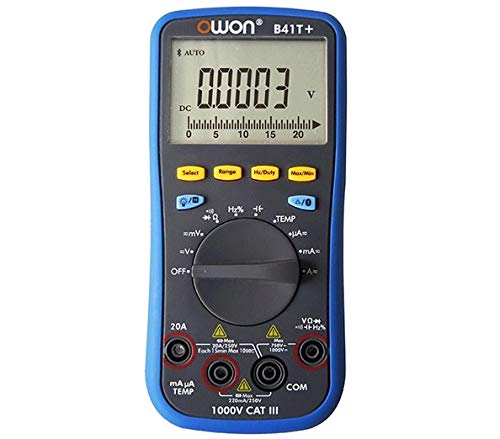
รูปที่ 3.1: ด้านหน้าและด้านข้าง view of the OWON B41T+ Digital Multimeter, showing the display, function dial, and input jacks.
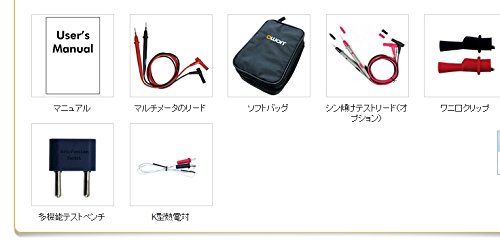
รูปที่ 3.2: Included accessories: User's Manual, Multimeter test leads, Soft bag, K-type thermocouple (temperature probe), and a multi-function test bench adapter.
4. การตั้งค่า
4.1 การติดตั้งแบตเตอรี่
The OWON B41T+ is powered by batteries. To install or replace batteries:
- ตรวจสอบให้แน่ใจว่ามัลติมิเตอร์ปิดอยู่
- ค้นหาฝาครอบช่องใส่แบตเตอรี่ที่ด้านหลังของอุปกรณ์
- ใช้ไขควงเปิดช่องใส่แบตเตอรี่
- ใส่แบตเตอรี่ให้ครบ โดยสังเกตขั้วให้ถูกต้อง
- ปิดฝาช่องใส่แบตเตอรี่ให้แน่น
4.2 การติดตั้งแอปและการจับคู่บลูทูธ
To utilize the smart device connectivity features, download the OWON multimeter application from your device's app store (compatible with Android 4.3+ and iOS 7.0+).
- Download and install the official OWON multimeter app on your smartphone or tablet.
- Turn on the OWON B41T+ multimeter.
- เปิดใช้งาน Bluetooth บนอุปกรณ์อัจฉริยะของคุณ
- Open the OWON app and follow the on-screen instructions to search for and pair with your B41T+ device. The Bluetooth icon on the multimeter display will indicate a successful connection.
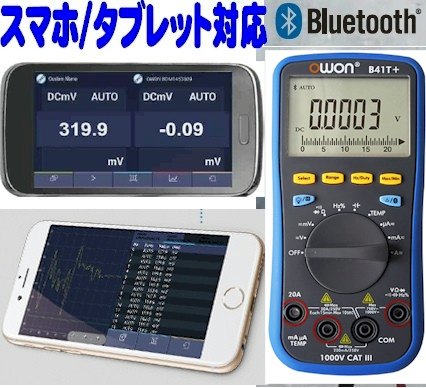
รูปที่ 4.1: The OWON B41T+ multimeter displaying a measurement, with a smartphone screen showing the corresponding app interface.
5. คู่มือการใช้งาน
The OWON B41T+ offers a wide range of measurement functions. Use the central rotary dial to select the desired measurement mode.
5.1 การวัดพื้นฐาน
เพื่อทำการวัดค่าพื้นฐาน:
- Select the appropriate function (e.g., V for voltage, A for current, Ω for resistance) using the rotary dial.
- Connect the test leads to the correct input jacks on the multimeter (e.g., COM and VΩmA for voltage/resistance, COM and 20A or mAμA for current).
- เชื่อมต่อสายวัดทดสอบเข้ากับวงจรหรือชิ้นส่วนที่ต้องการทดสอบ
- Read the measurement value on the multimeter's display.
5.2 Advanced Features with Bluetooth Connectivity
When connected to a smartphone or tablet via Bluetooth, the OWON B41T+ provides enhanced functionality:
- การบันทึกข้อมูล: Record measurement data over time directly to your smart device.
- จอแสดงผลแบบกราฟิก: View real-time measurement trends and historical data in graphical format.
- เอาต์พุตเสียง: The device can announce measurement readings in Japanese, allowing for hands-free operation.
- การจัดการข้อมูล: Save, store, print, and email measurement data (CSV format) directly from the app.
- การเชื่อมต่อหลายอุปกรณ์: Connect two OWON B41T+ units simultaneously to your smart device to monitor two different parameters (e.g., voltage and current, or voltage and resistance) on a dual-screen display.
- การทำงานระยะไกล: Utilize remote desktop applications like TeamViewer to control the connected smartphone/tablet from anywhere, enabling remote monitoring and operation of the multimeter.

รูปที่ 5.1: Illustration of advanced features including simultaneous measurement with two multimeters, data logging, graphical display, and voice output.
6. ข้อมูลจำเพาะ
The following table details the technical specifications of the OWON B41T+ Digital Multimeter.

รูปที่ 6.1: Detailed specifications including measurement ranges, resolution, and accuracy.
| พารามิเตอร์ | พิสัย | ปณิธาน | ความแม่นยำ |
|---|---|---|---|
| DC ฉบับที่tagอี (วี) | 220mV, 2.2V, 22V, 220V, 1000V | 0.01mV, 0.1mV, 1mV, 10mV, 0.1V | ±(0.05%+10dig) to ±(0.8%+25dig) |
| ฉบับ ACtagอี (วี) | 220mV, 2.2V, 22V, 220V, 750V | 0.01mV, 0.1mV, 1mV, 10mV, 0.1V | ±(1.0%+25ดิก) |
| กระแสไฟฟ้าตรง (A) | 220μA, 2200μA, 22mA, 220mA, 20A | 0.01μA, 0.1μA, 1μA, 10μA, 1mA | ±(0.8%+10dig) to ±(2.0%+25dig) |
| กระแสไฟ AC (A) | 220μA, 2200μA, 22mA, 220mA, 20A | 0.01μA, 0.1μA, 1μA, 10μA, 1mA | ±(1.5%+25dig) to ±(2.5%+35dig) |
| ความต้านทาน (Ω) | 220Ω, 2.2kΩ, 22kΩ, 220kΩ, 2.2MΩ, 22MΩ, 220MΩ | 0.01Ω, 0.1Ω, 1Ω, 10Ω, 100Ω, 1kΩ, 10kΩ | ±(0.4%+5dig) to ±(5%+10dig) |
| ความจุ (F) | 2.2nF, 22nF, 220nF, 2.2μF, 22μF, 220μF, 2.2mF, 22mF | 1pF, 10pF, 100pF, 1nF, 10nF, 100nF, 1μF, 10μF | ±(2.5%+15ดิก) |
| ความถี่ (เฮิรตซ์) | 220Hz, 2.2kHz, 22kHz, 220kHz, 2.2MHz, 22MHz | 0.01Hz, 0.1Hz, 1Hz, 10Hz, 100Hz, 1kHz | ±(0.1%+4ดิก) |
| รอบการทำงาน | 0.1% - 99.9% (>1kHz) | 0.1% | ±(1.2%+3ดิก) |
| อุณหภูมิ (°C / °F) | -50°C ถึง 400°C, -58°F ถึง 752°F | 0.1 องศาเซลเซียส, 0.1 องศาฟาเรนไฮต์ | ±(2.5%+3dig) to ±(1.2%+8dig) |
| จำนวนสูงสุด | 21999 | ||
| แสดง Sampหลิง | 3 ครั้ง / วินาที | ||
| ช่วงอัตโนมัติ | ใช่ | ||
| เครื่องบันทึกข้อมูล | 10 hours, 10,000 points | ||
| ค่า RMS ที่แท้จริง | ใช่ | ||
| แสงไฟแบ็คไลท์ | ใช่ | ||
| การทดสอบ Diode | ใช่ | ||
| การทดสอบความต่อเนื่อง | ใช่ | ||
| ระบบป้องกันกระแสไฟเกิน | CAT1000V, CAT600V แรงดันไฟฟ้า | ||
| แหล่งพลังงาน | 3V (1.5V x 2) AA Alkaline Batteries | ||
| บลูทูธ | Android 4.3 +, iOS 7.0 + | ||
| ขนาด | 85มม. x 185มม. x 30มม. | ||
| น้ำหนัก | ประมาณ 320กรัม | ||
7. การบำรุงรักษา
Proper maintenance ensures the longevity and accuracy of your OWON B41T+ Digital Multimeter.
- การทำความสะอาด: เช็ดอุปกรณ์ด้วยผ้าแห้งนุ่มๆ ห้ามใช้สารทำความสะอาดที่มีฤทธิ์กัดกร่อนหรือตัวทำละลาย
- การเปลี่ยนแบตเตอรี่: Replace batteries promptly when the low battery indicator appears on the display. Refer to Section 4.1 for battery installation instructions.
- พื้นที่จัดเก็บ: เก็บมัลติมิเตอร์ไว้ในที่แห้งและเย็น หลีกเลี่ยงแสงแดดโดยตรงและอุณหภูมิที่สูงหรือต่ำเกินไป หากเก็บรักษาเป็นเวลานาน ให้ถอดแบตเตอรี่ออกเพื่อป้องกันการรั่วไหล
- นำไปสู่การทดสอบ: Regularly inspect test leads for any signs of wear, cuts, or damage. Replace them if necessary to ensure safe and accurate measurements.
8 การแก้ไขปัญหา
If you encounter issues with your OWON B41T+ Digital Multimeter, refer to the following common problems and solutions:
| ปัญหา | สาเหตุที่เป็นไปได้ | สารละลาย |
|---|---|---|
| อุปกรณ์ไม่เปิดเครื่อง | แบตเตอรี่เสียหรือติดตั้งไม่ถูกต้อง | เปลี่ยนแบตเตอรี่โดยตรวจสอบให้แน่ใจว่าใส่ขั้วถูกต้อง |
| ไม่มีการแสดงค่าการอ่านหรือ 'OL' (โอเวอร์โหลด) | เลือกฟังก์ชันไม่ถูกต้อง วงจรเปิด หรือค่าที่วัดเกินช่วงที่กำหนด | Select the correct function. Check for proper circuit connection. Switch to a higher range if available. |
| การเชื่อมต่อบลูทูธล้มเหลว | Bluetooth not enabled, app not running, or device out of range. | Ensure Bluetooth is on for both devices. Restart the app. Move devices closer. Check app compatibility with OS version. |
| การอ่านที่ไม่ถูกต้อง | Damaged test leads, environmental interference, or incorrect measurement technique. | Inspect and replace test leads if damaged. Ensure proper connection. Avoid strong electromagnetic fields. |
9. การรับประกันและการสนับสนุน
For warranty information and technical support, please refer to the documentation included with your purchase or visit the official OWON website. If you require further assistance, contact OWON customer service through their designated support channels.