
การแนะนำ
The Fanvil X4S is an enterprise-grade VoIP IP phone designed for professional communication environments. It features a 2.8-inch main color screen and a secondary 2.4-inch DSS color screen, enhancing user experience and productivity. This manual provides detailed instructions for the proper setup, operation, and maintenance of your Fanvil X4S IP Phone.
เนื้อหาแพ็คเกจ
ก่อนดำเนินการติดตั้ง โปรดตรวจสอบให้แน่ใจว่ามีอุปกรณ์ครบถ้วนในบรรจุภัณฑ์:
- Fanvil X4S IP Phone Unit
- โทรศัพท์มือถือและสายโทรศัพท์มือถือ
- สายเคเบิลอีเทอร์เน็ต
- Power Adapter (X4S-AC model)
- ขาตั้งโต๊ะ
- คู่มือการติดตั้งแบบด่วน
ลักษณะทางกายภาพ
The Fanvil X4S features a modern design with dual color screens. The primary display is a 2.8-inch color screen for call information and menu navigation. A secondary 2.4-inch DSS color screen provides dynamic DSS/BLF functions, offering up to 30 virtualized DSS keys across five pages. The phone supports both desktop and wall-mount installation.
การตั้งค่า
1. การเชื่อมต่อไฟฟ้า
The Fanvil X4S IP Phone can be powered using either the included AC power adapter or Power over Ethernet (PoE).
- Using AC Power Adapter: Connect the small end of the power adapter cable to the DC 12V port on the back of the phone. Plug the other end of the power adapter into a standard electrical outlet.
- การใช้พลังงานผ่านอีเทอร์เน็ต (PoE): If your network switch supports PoE, connect an Ethernet cable from the network switch to the LAN port on the back of the phone. The phone will receive power directly through the Ethernet cable, eliminating the need for the AC power adapter.
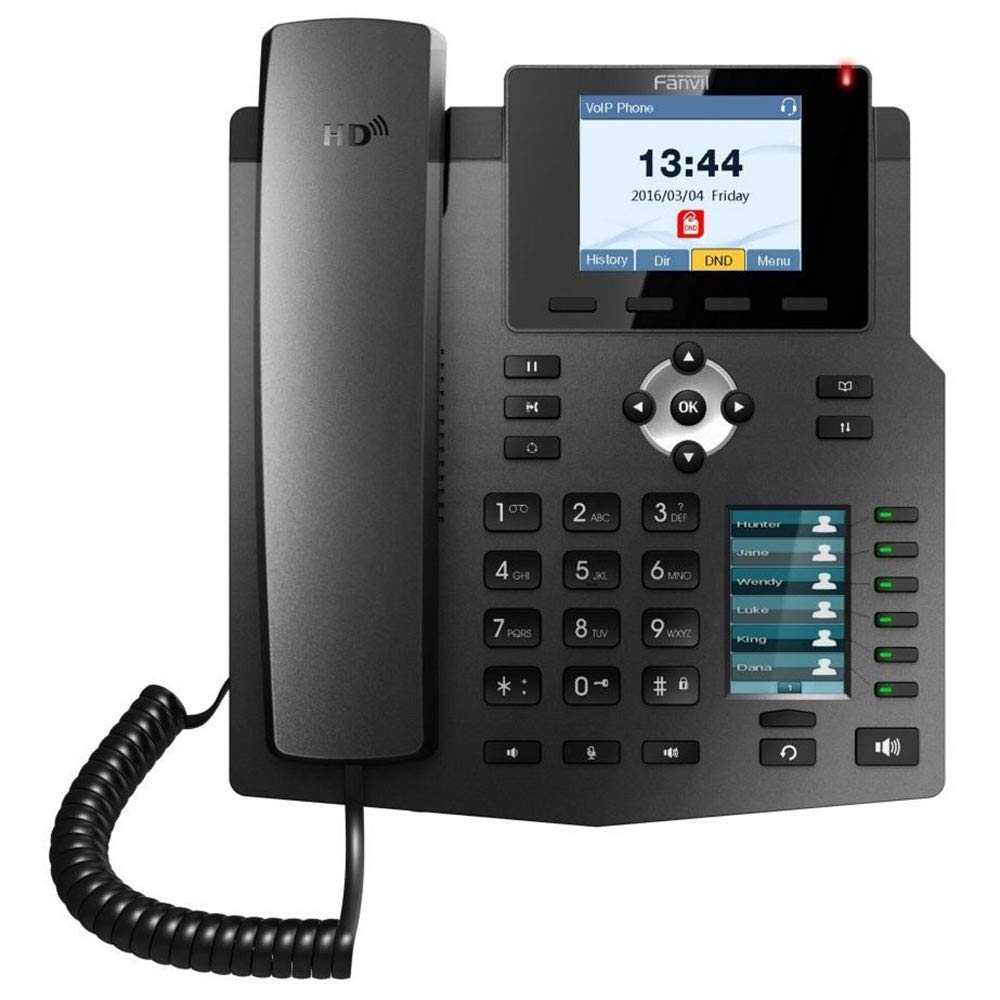
Image: The included AC power adapter for the Fanvil X4S IP Phone. This adapter is used to supply power to the device when PoE is not available.
2. การเชื่อมต่อเครือข่าย
Connect one end of the Ethernet cable to the LAN port on the back of the phone and the other end to an available port on your network switch or router. If you are connecting a computer through the phone, connect a second Ethernet cable from the PC port on the phone to your computer's Ethernet port.
3. Handset and Headset Connection
- โทรศัพท์มือถือ: Connect the coiled handset cord to the handset port on the side of the phone and to the handset itself.
- ชุดหูฟัง: For hands-free communication, connect a compatible headset to the headset port. The Fanvil X4S supports Electronic Hook Switch (EHS) for Plantronics headsets.
4. Desktop / Wall-Mount Installation
- Desktop: Attach the desk stand to the back of the phone unit. Adjust the stand to your preferred viewมุมอิง
- ติดผนัง: The phone can also be mounted on a wall. Refer to the separate wall-mount bracket instructions (if included) for proper installation.
คำแนะนำการใช้งาน
1. ฟังก์ชันการโทรพื้นฐาน
- การโทร: Lift the handset, press the speakerphone button, or press a line key. Dial the number and press the Dial soft key or wait a few seconds.
- รับสาย: ยกหูโทรศัพท์ กดปุ่มลำโพง หรือกดปุ่มรับสาย (ออปติคอลคีย์)
- การวางสาย: Replace the handset, press the speakerphone button, or press the End Call soft key.
- โทรซ้ำ: กดปุ่มโทรซ้ำเพื่อโทรออกหมายเลขล่าสุด
- ถือ: ระหว่างการสนทนา ให้กดปุ่มพักสาย (Hold) และกดปุ่มรับสาย (Resume) เพื่อกลับมาสนทนาต่อ
2. คีย์ดีเอสเอส
The secondary 2.4-inch DSS color screen displays programmable DSS (Direct Station Select) keys. These keys can be configured for various functions such as Speed Dial, Busy Lamp Field (BLF), Intercom, Call Park, and more. The phone supports up to 30 virtualized DSS keys across five pages, which can be navigated using the page navigation buttons.
3. สมุดโทรศัพท์
The Fanvil X4S supports a phonebook with the capacity to store up to 500 entries. Access the phonebook via the menu to add, edit, or search for contacts. You can also access call logs to view recent incoming, outgoing, and missed calls.
การซ่อมบำรุง
1. การทำความสะอาด
ในการทำความสะอาดโทรศัพท์ ให้ใช้ผ้านุ่มและแห้ง สำหรับรอยฝังแน่น ให้เช็ดเบาๆamp cloth with mild, non-abrasive cleaner can be used. Avoid using harsh chemicals, solvents, or abrasive materials, as these can damage the phone's surface and screens.
2. การจัดเก็บ
When not in use for extended periods, store the phone in a cool, dry place away from direct sunlight and extreme temperatures. Disconnect the power adapter and network cable before storage.
การแก้ไขปัญหา
This section addresses common issues you might encounter with your Fanvil X4S IP Phone.
- ไม่มีไฟฟ้า:
- Ensure the power adapter is securely connected to both the phone and a working electrical outlet.
- If using PoE, verify that the Ethernet cable is connected to a PoE-enabled port on your network switch and that the switch is powered on.
- ไม่มีเสียงสัญญาณโทรศัพท์:
- ตรวจสอบการเชื่อมต่อสายเคเบิลเครือข่ายกับพอร์ต LAN
- Verify that the phone has successfully registered with your VoIP server. Check the phone's display for registration status.
- Ensure the handset cord is properly connected.
- ไม่สามารถโทรออก/รับสายได้:
- ตรวจสอบการเชื่อมต่อเครือข่าย
- Check SIP account registration status on the phone's display.
- Contact your VoIP service provider or system administrator for assistance with account configuration.
- คุณภาพเสียงไม่ดี:
- ตรวจสอบความเสถียรของการเชื่อมต่อเครือข่าย
- ตรวจสอบให้แน่ใจว่าได้เชื่อมต่อโทรศัพท์หรือชุดหูฟังอย่างถูกต้องแล้ว
- ปรับการตั้งค่าระดับเสียงบนโทรศัพท์
For more complex issues, consult your system administrator or Fanvil technical support.
ข้อมูลจำเพาะ
| ยี่ห้อ | แฟนวิล |
| แบบอย่าง | เอ็กซ์4เอส |
| สาย SIP | 4 |
| จอแสดงผลหลัก | หน้าจอสีขนาด 2.8 นิ้ว |
| DSS Display | 2.4" Color Screen (30 virtual DSS keys across 5 pages) |
| พอร์ตอีเทอร์เน็ต | 2 x 10/100 Mbps (LAN, PC) |
| เสียง HD | ใช่ |
| การรองรับ PoE | ใช่ |
| แหล่งพลังงาน | Power Adapter (included) or PoE |
| ความจุสมุดโทรศัพท์ | 500 รายการ |
| การสนับสนุนด้าน EHS | For Plantronics headsets |
| การติดตั้ง | ตั้งโต๊ะ / ติดผนัง |
| ขนาด (กว้าง x ยาว x สูง) | 12 x 12 x 5 นิ้ว |
| การระบุผู้โทร | ใช่ |
| การทำงานแบบหลายบรรทัด | ใช่ |
| แพลตฟอร์มที่เข้ากันได้ | 3CX, Asterisk, Broadsoft, Elastix, Zycoo, etc. |
ข้อมูลการรับประกัน
Fanvil products typically come with a standard manufacturer's warranty. For specific warranty terms and conditions, including duration and coverage, please refer to the warranty card included with your product or visit the official Fanvil webไซต์ โปรดเก็บใบเสร็จรับเงินไว้เป็นหลักฐานการซื้อสำหรับการเรียกร้องการรับประกัน
สนับสนุน
For technical assistance, product inquiries, or further support, please contact your vendor or visit the official Fanvil support website. Online resources, FAQs, and firmware updates may also be available.
แฟนวิล ออฟฟิเชียล Webเว็บไซต์: www.fanvil.com