
MIATONE BOOMBOX
MIATONE BOOMBOX Bluetooth Speaker User Manual
Model: BOOMBOX
1. บทนำ
Thank you for choosing the MIATONE BOOMBOX Bluetooth Speaker. This portable and waterproof wireless speaker is designed to deliver high-quality audio for various environments, from indoor relaxation to outdoor adventures. Please read this manual carefully before using the product to ensure proper operation and to maximize its lifespan.

เสียงความละเอียดสูง: Experience crisp highs, rich mids, and deep bass with advanced DSP-enhanced sound technology.
2. ข้อมูลด้านความปลอดภัย
- Do not expose the speaker to extreme temperatures (heat or cold) or high humidity.
- หลีกเลี่ยงการทำตกหรือให้ลำโพงได้รับแรงกระแทกรุนแรง
- ห้ามถอดประกอบ ซ่อมแซม หรือดัดแปลงลำโพงด้วยตนเอง โปรดติดต่อช่างผู้ชำนาญการ
- ควรวางลำโพงให้ห่างจากอุปกรณ์ทางการแพทย์ เนื่องจากสนามแม่เหล็กของลำโพงอาจรบกวนการทำงานของอุปกรณ์เหล่านั้นได้
- Ensure the charging port cover is securely closed when using the speaker near water to maintain its waterproof rating.
- ใช้เฉพาะสายชาร์จที่ให้มาหรือที่เทียบเท่าที่ได้รับการรับรองเท่านั้น
- Do not listen at excessively high volumes for prolonged periods to prevent hearing damage.
3. เนื้อหาบรรจุภัณฑ์
กรุณาตรวจสอบแพ็คเกจสำหรับรายการต่อไปนี้:
- MIATONE BOOMBOX Bluetooth Speaker
- สายชาร์จไมโคร USB
- สายอินพุตเสริม
- คู่มือการใช้งาน
4. สินค้าหมดview
Familiarize yourself with the various parts and controls of your MIATONE BOOMBOX speaker.
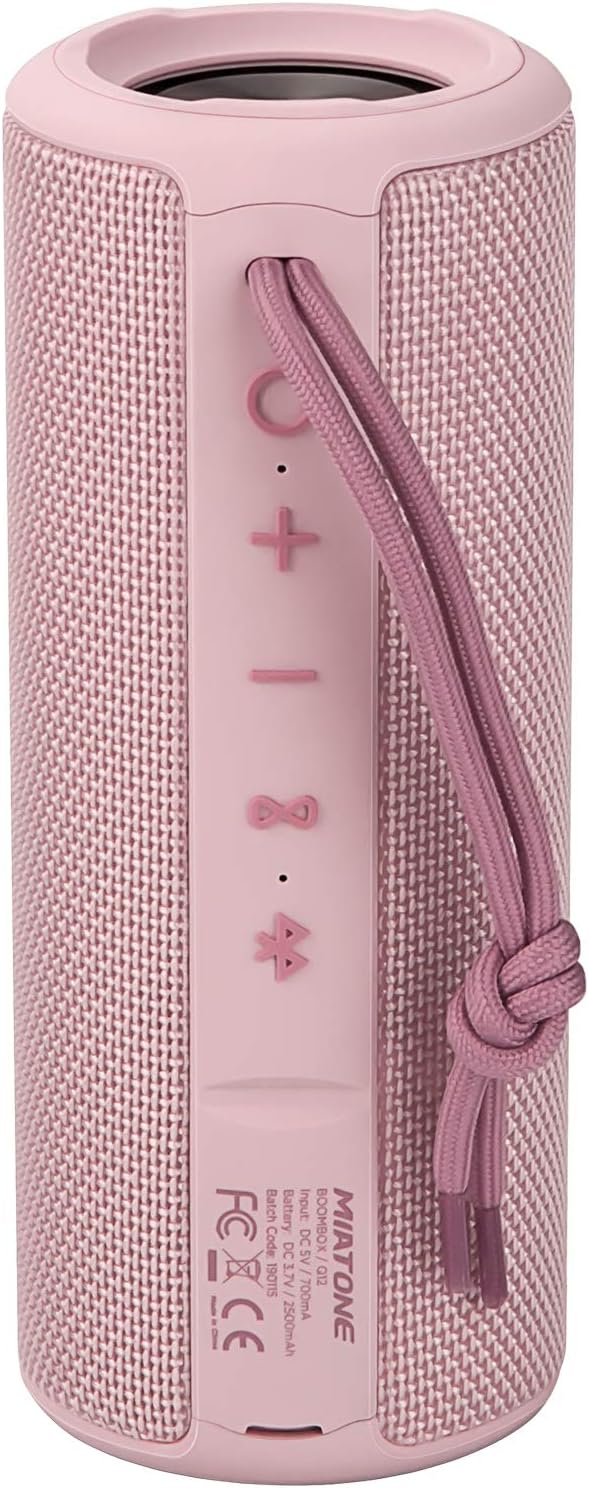
ด้านหน้า View: Shows the speaker grille and the MIATONE logo.

หลัง View: Displays the control buttons (+, -, Play/Pause, Bluetooth, TWS) and the charging/AUX ports under a protective flap.

Reinforced Silicone End Caps: The speaker features durable silicone bumpers on both ends to absorb impact and prevent slipping.
ปุ่มฟังก์ชั่น:
| ปุ่ม | การทำงาน |
|---|---|
| + | Short press: Volume Up; Long press: Next Track |
| - | Short press: Volume Down; Long press: Previous Track |
| เล่น/หยุดชั่วคราว | Short press: Play/Pause; Short press (incoming call): Answer/End Call; Long press (incoming call): Reject Call |
| ไอคอนบลูทูธ | Long press: Disconnect current Bluetooth device and enter pairing mode |
| ไอคอน TWS | Short press: Initiate TWS pairing (True Wireless Stereo) |
| ปุ่มเปิดปิด | กดค้าง: เปิด/ปิดเครื่อง |
5. การตั้งค่า
5.1 การชาร์จลำโพง
- Open the protective flap on the back of the speaker to reveal the charging port.
- Connect the Micro USB charging cable to the speaker's charging port and the other end to a USB power adapter (not included) or a computer's USB port.
- ไฟ LED จะแสดงสถานะการชาร์จ (เช่น สีแดงเมื่อกำลังชาร์จ และดับเมื่อชาร์จเต็มแล้ว)
- A full charge takes approximately 12 hours. Ensure the protective flap is sealed after charging.
5.2 การเปิด/ปิดเครื่อง
- เปิดเครื่อง: Long press the Power button until you hear a power-on prompt.
- หมดแรง: Long press the Power button until you hear a power-off prompt.
5.3 การจับคู่บลูทูธ
- Ensure the speaker is powered on and in Bluetooth pairing mode (indicated by a flashing blue LED). If not, long press the Bluetooth icon button.
- เปิดใช้งานบลูทูธบนอุปกรณ์ของคุณ (สมาร์ทโฟน แท็บเล็ต คอมพิวเตอร์)
- ค้นหา "BOOMBOX" in your device's Bluetooth list.
- Select "BOOMBOX" to connect. You will hear a confirmation sound once paired.
- ลำโพงจะเชื่อมต่อกับอุปกรณ์ที่จับคู่ไว้ล่าสุดโดยอัตโนมัติเมื่อเปิดเครื่อง หากอยู่ในระยะ

อัปเกรดเป็นบลูทูธ 5.3: Provides faster and more stable wireless connections.
การจับคู่ 5.4 TWS (True Wireless Stereo)
TWS allows you to pair two MIATONE BOOMBOX speakers together for a true stereo sound experience.
- Ensure both BOOMBOX speakers are powered on and not connected to any Bluetooth device.
- On one speaker (this will be the primary speaker), short press the TWS icon button. It will enter TWS pairing mode.
- The two speakers will automatically connect to each other. You will hear a confirmation sound once TWS pairing is successful.
- Once TWS paired, connect your device to the primary speaker via Bluetooth as described in section 5.3.
- To disconnect TWS, short press the TWS icon button on either speaker.
6. คู่มือการใช้งาน
6.1 การเล่นเพลง
- เล่น/หยุดชั่วคราว: กดปุ่มเล่น/หยุดชั่วคราว
- ปรับระดับเสียงขึ้น: กดสั้น ๆ + ปุ่ม.
- ลดเสียงลง: กดสั้น ๆ - ปุ่ม.
- เพลงถัดไป: กดค้างไว้ + ปุ่ม.
- แทร็กก่อนหน้า: กดค้างไว้ - ปุ่ม.
6.2 การโทรแบบแฮนด์ฟรี
- รับสาย: กดปุ่มเล่น/หยุดชั่วคราวสั้นๆ เมื่อมีสายเรียกเข้า
- วางสาย: กดปุ่มเล่น/หยุดชั่วคราวสั้นๆ ในระหว่างการโทร
- ปฏิเสธสาย: กดปุ่มเล่น/หยุดชั่วคราวค้างไว้เมื่อมีสายเรียกเข้า
6.3 Auxiliary Input (AUX Mode)
You can connect non-Bluetooth devices to the speaker using the provided 3.5mm auxiliary cable.
- เปิดแผ่นปิดป้องกันด้านหลังลำโพง
- ต่อสาย AUX ขนาด 3.5 มม. ด้านหนึ่งเข้ากับพอร์ต AUX ของลำโพง และอีกด้านหนึ่งเข้ากับแจ็คหูฟังของอุปกรณ์เสียงของคุณ
- ลำโพงจะเปลี่ยนเป็นโหมด AUX โดยอัตโนมัติ
- ควบคุมการเล่นและระดับเสียงจากอุปกรณ์ที่เชื่อมต่อของคุณ
- Ensure the protective flap is sealed after use to maintain water resistance.
7. การบำรุงรักษา
7.1 การทำความสะอาด
- เช็ดลำโพงด้วย d . นุ่มๆamp ผ้า.
- ห้ามใช้สารทำความสะอาดที่มีฤทธิ์กัดกร่อน แอลกอฮอล์ หรือตัวทำละลายเคมี
- โปรดตรวจสอบให้แน่ใจว่าลำโพงแห้งสนิทก่อนชาร์จหรือจัดเก็บ
7.2 พื้นที่จัดเก็บ
- เก็บลำโพงไว้ในที่แห้งและเย็น หลีกเลี่ยงแสงแดดโดยตรงและอุณหภูมิที่สูงหรือต่ำเกินไป
- If storing for a long period, charge the battery to about 50% every few months to preserve battery life.
7.3 การดูแลกันน้ำ (IPX6)
The MIATONE BOOMBOX is IPX6 waterproof, meaning it can withstand powerful water jets. It is not designed for submersion.
- Always ensure the charging port and AUX port protective flap is securely closed before exposing the speaker to water.
- If the speaker gets wet, wipe it dry with a clean cloth before opening the port flap or charging.
- Do not charge the speaker if the ports are wet.

IPX6 Waterproof Speaker: Designed to float and withstand water splashes, making it ideal for poolside or beach use.
8 การแก้ไขปัญหา
| ปัญหา | สาเหตุที่เป็นไปได้ | สารละลาย |
|---|---|---|
| ลำโพงจะไม่เปิด | แบตเตอรี่เหลือน้อยหรือหมด | ชาร์จลำโพงให้เต็ม |
| ไม่สามารถจับคู่กับอุปกรณ์บลูทูธได้ | Speaker is not in pairing mode; device's Bluetooth is off; speaker is already connected to another device; device list needs refresh. | Ensure speaker is in pairing mode (flashing blue LED). Turn device's Bluetooth off and on. Disconnect from other devices. Forget "BOOMBOX" on your device and re-scan. |
| ไม่มีเสียงหรือเสียงเบา | Volume too low on speaker or device; incorrect input mode; speaker not connected. | Increase volume on both speaker and device. Ensure correct input mode (Bluetooth/AUX). Re-establish Bluetooth connection. |
| ความผิดเพี้ยนของเสียง | ระดับเสียงสูงเกินไป, แบตเตอรี่อ่อน, มีสัญญาณรบกวน | Reduce volume. Charge the speaker. Move speaker closer to the device or away from other electronic devices. |
| การจับคู่ TWS ล้มเหลว | ลำโพงอยู่ห่างกันเกินไป และลำโพงตัวหนึ่งเชื่อมต่อกับอุปกรณ์อยู่แล้ว | โปรดตรวจสอบให้แน่ใจว่าลำโพงทั้งสองอยู่ใกล้กันและไม่ได้เชื่อมต่อกับอุปกรณ์บลูทูธใดๆ ก่อนเริ่มการจับคู่ TWS |
9. ข้อมูลจำเพาะ
| คุณสมบัติ | รายละเอียด |
|---|---|
| ชื่อรุ่น | BOOMBOX (Q12) |
| เทคโนโลยีการเชื่อมต่อ | บลูทูธ 5.3, USB, AUX |
| ประเภทลำโพง | Portable Speaker, Bluetooth Speaker |
| กำลังขับสูงสุด | 20 วัตต์ |
| การตอบสนองความถี่ | ความถี่ 20 กิโลเฮิรตซ์ |
| อายุการใช้งานแบตเตอรี่ | สูงสุด 17 ชั่วโมง (ที่ระดับเสียง 50%) |
| เวลาในการชาร์จ | 12 ชั่วโมง |
| ระดับการกันน้ำ | IPX6 |
| ช่วงบลูทูธ | สูงถึง 100 ฟุต (30.5 เมตร) |
| ขนาด (กว้าง x ยาว x สูง) | 7.11 x 7.11 x 18.54 ซม. (2.8 x 2.8 x 7.3 นิ้ว) |
| น้ำหนัก | 421.84 กรัม (0.93 ปอนด์) |
| วัสดุ | อลูมิเนียม |
| อุปกรณ์ที่รองรับ | คอมพิวเตอร์ส่วนบุคคล, แล็ปท็อป, แท็บเล็ต, สมาร์ทโฟน |

ระยะเวลาการเล่นที่ยาวนาน: Enjoy up to 17 hours of playback at 50% volume.
10. การรับประกันและการสนับสนุน
MIATONE products are designed and manufactured to the highest quality standards. For information regarding warranty coverage, technical support, or service inquiries, please refer to the contact information provided on the product packaging or visit the official MIATONE webเว็บไซต์.
โปรดเก็บหลักฐานการซื้อของคุณไว้เพื่อเรียกร้องการรับประกัน
Ask a question about this manual
Ask about setup, troubleshooting, compatibility, parts, safety, or missing instructions. Manuals+ will review the question and use this page’s manual context to help answer it.