
Walfront inskam115
Walfront Wireless Endoscope Camera Inskam 115 User Manual
Model: inskam115
1. สินค้าหมดview
The Walfront Wireless Endoscope Camera Inskam 115 is a versatile inspection tool designed for various applications, including vehicle inspection, pipeline inspection, air conditioning inspection, and object retrieval. It features a wireless WiFi connection for real-time video viewing, recording, and photo capture. The camera is equipped with a mini 8mm waterproof LED lens and boasts an IP67 waterproof rating for the lens and tube. Its 6 adjustable LED lights ensure clear visibility in dark environments. The portable design with a flexible extension tube makes it easy to operate.
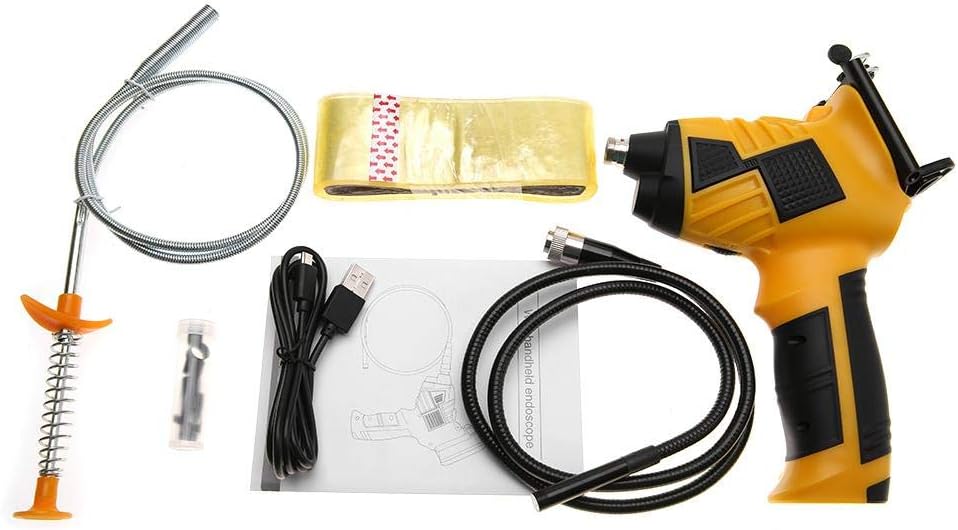
Figure 1: Walfront Inskam 115 Wireless Endoscope Camera and included accessories.
2. ข้อมูลด้านความปลอดภัย
- ห้ามใช้เครื่องมือนี้ในสภาพแวดล้อมที่อาจเกิดการระเบิดได้ เช่น บริเวณที่มีของเหลวไวไฟ ก๊าซ หรือฝุ่นละออง
- Keep the device away from water and other liquids, except for the waterproof camera lens and tube (IP67 rated). The main unit is not waterproof.
- ห้ามถอดประกอบหรือดัดแปลงอุปกรณ์ด้วยตนเอง การซ่อมแซมควรดำเนินการโดยบุคลากรที่มีคุณสมบัติเหมาะสมเท่านั้น
- โปรดตรวจสอบให้แน่ใจว่าอุปกรณ์ชาร์จเต็มแล้วก่อนใช้งาน เพื่อหลีกเลี่ยงการหยุดชะงักระหว่างการตรวจสอบ
- Avoid direct eye exposure to the LED lights, as they can be bright.
- เก็บอุปกรณ์ไว้ในที่แห้งและเย็นเมื่อไม่ใช้งาน
3. เนื้อหาบรรจุภัณฑ์
ตรวจสอบว่ามีสินค้าทั้งหมดที่ระบุไว้ด้านล่างอยู่ในแพ็คเกจของคุณ:
- 1 x Handle (Main Unit)
- 1 x Spool (for flexible cable storage)
- 1 x Transparent Adhesive (likely for mounting/securing)
- 1 x Stripper (unclear context, possibly a cable stripper or a tool for removing something)
- 1 x สาย USB (สำหรับชาร์จ)
- 1 x คู่มือผู้ใช้
- 1 x Magnet (attachment for camera tip)
- 1 x Hook (attachment for camera tip)
- 1 x Mirror (attachment for camera tip, for side viewไอเอ็นจี)
- 1 x Protective Cap (for camera lens)
Figure 2: Contents of the Walfront Inskam 115 package, including the main unit, flexible cable, USB cable, and various attachments.
4. ข้อมูลจำเพาะ
| คุณสมบัติ | คำอธิบาย |
|---|---|
| แบบอย่าง | อินสแคม115 |
| ตัวเลือกความยาวสายเคเบิล | 1 Meter (flexible), 3 Meter (flexible), 5 Meter (hard cable), 10 Meter (hard cable) |
| วัสดุ | ABS + โลหะ |
| เซ็นเซอร์รับภาพ | ซีมอส |
| ความละเอียดของกล้อง | 1920x1080, 1280x720, 640x480 |
| แนวนอน Viewอิงแองเกิล | 70° |
| ระยะโฟกัส | 40-5000มม. |
| ความถี่ในการส่งสัญญาณ | 2400-2483.5เมกะเฮิรตซ์ |
| แสงสว่างขั้นต่ำ | 0 ลักซ์ |
| แบตเตอรี่ | 1 x Lithium Battery, 3.7V, 2600mAh |
| ไฟ LED | 6 pcs (adjustable brightness) |
| ระยะการส่งสัญญาณ WiFi | 10ม. |
| ระดับการกันน้ำ | IP67 (สำหรับเลนส์/หลอดเท่านั้น) |
| เส้นผ่านศูนย์กลางเลนส์ | 8มม. |
| ระบบที่รองรับ | Android 4.2 / iOS 8.0 and higher |
| น้ำหนัก | 739g ~ 1174g (approx., depending on cable length) |
| ขนาดสินค้า | ขนาดบรรจุภัณฑ์ 24 x 18 x 11 ซม. |

Figure 3: Approximate dimensions of the Walfront Inskam 115 main unit.
5. การตั้งค่า
5.1 การชาร์จอุปกรณ์
Before first use, fully charge the endoscope. Connect the provided USB cable to the charging port on the handle and plug the other end into a standard USB power adapter (not included) or a computer USB port. The charging indicator light will show the charging status.
5.2 การติดตั้งแอพ
To use the endoscope, you need to download the compatible application on your smartphone or tablet. ค้นหา "Inskam" or refer to the QR code in the printed user manual (if available) in your device's app store (Google Play Store for Android, Apple App Store for iOS). Install the application.
5.3 การเชื่อมต่อหัววัดกล้อง
Carefully connect the endoscope camera probe cable to the designated port on the main handle unit. Ensure a secure connection. You can attach accessories like the magnet, hook, or mirror to the camera tip if needed for your inspection.
5.4 Attaching Your Smartphone (Optional)
The handle includes a phone holder. Extend the holder and securely place your smartphone or tablet into it. This allows for convenient viewกำลังเกิดขึ้นระหว่างการดำเนินการ

Figure 4: The endoscope handle with a smartphone securely mounted in the integrated holder.
6. คู่มือการใช้งาน
6.1 Powering On and WiFi Connection
- Press and hold the power button on the endoscope handle to turn it on. The WiFi indicator light will illuminate.
- On your smartphone/tablet, go to your WiFi settings.
- Locate and connect to the WiFi network named "Inskam_XXXX" (where XXXX is a unique identifier). No password is usually required.
- Once connected, open the Inskam application. The live video feed from the endoscope camera should appear on your screen.
6.2 การปรับความสว่าง LED
The endoscope features 6 adjustable LED lights around the camera lens. Use the brightness adjustment wheel or button on the handle (refer to the specific button layout in your printed manual) to increase or decrease the illumination as needed for clear viewing in dark areas.

Figure 5: The endoscope camera head with its 6 highly photosensitive LED lights, demonstrating adjustable brightness.
6.3 การถ่ายภาพและวิดีโอ
Within the Inskam application, you will find buttons for capturing images and recording videos. Press the respective button to take a still photo or start/stop video recording. Captured media will be saved directly to your smartphone's gallery or the app's designated folder.

Figure 6: Detail of the endoscope handle, highlighting the phone holder and the dedicated picture/video capture button.
6.4 ใบสมัครเช่นampเลส
The Walfront Inskam 115 is suitable for a wide range of inspection tasks:
- Automobile Inspection: Examining engine components, hard-to-reach areas under the hood, or inside vehicle doors.
- การตรวจสอบท่อส่ง: Checking for blockages, corrosion, or damage in drains, pipes, and conduits.
- Air Conditioning Inspection: Inspecting ducts, vents, and internal components of AC units.
- Object Search: Retrieving small lost items from confined spaces.
- การบำรุงรักษาอุปกรณ์: Visual inspection of machinery for wear and tear without extensive disassembly.
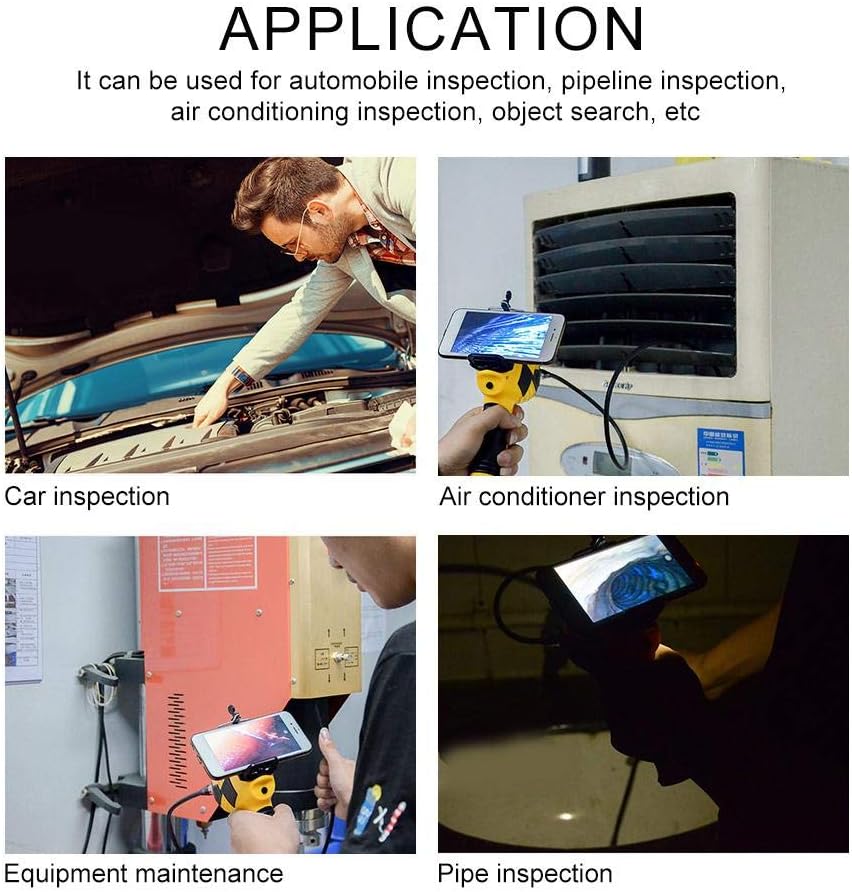
รูปที่ 7: อดีตamples of how the Walfront Inskam 115 can be used for various inspection and maintenance tasks.
7. การบำรุงรักษา
- การทำความสะอาด: After each use, especially in dirty or wet environments, gently wipe the camera lens and cable with a soft, damp cloth. For stubborn dirt, a mild detergent can be used. Ensure the lens is dry before storage. Do not submerge the main handle unit in water.
- พื้นที่จัดเก็บ: Store the endoscope and its accessories in a clean, dry place, away from direct sunlight and extreme temperatures. Use the provided spool to neatly coil the camera cable to prevent kinks or damage.
- การดูแลแบตเตอรี่ เพื่อยืดอายุการใช้งานแบตเตอรี่ ควรหลีกเลี่ยงการปล่อยให้แบตเตอรี่หมดเกลี้ยงบ่อยๆ หากเก็บรักษาเป็นเวลานาน ควรชาร์จแบตเตอรี่ให้ได้ประมาณ 50% ทุกๆ สองสามเดือน
8 การแก้ไขปัญหา
| ปัญหา | สาเหตุที่เป็นไปได้ | สารละลาย |
|---|---|---|
| No image on screen / App not connecting |
|
|
| คุณภาพของภาพไม่ดี / ภาพมืด |
|
|
| อุปกรณ์ไม่ชาร์จ |
|
|
9. การรับประกันและการสนับสนุน
Walfront products are manufactured to high-quality standards. For information regarding warranty coverage, please refer to the warranty card included with your purchase or contact your retailer. If you encounter any issues or require technical assistance, please contact Walfront customer support through their official webไซต์หรือข้อมูลการติดต่อที่ให้มาพร้อมกับผลิตภัณฑ์ของคุณ
For further assistance, you may visit the Walfront store on Amazon: Walfront Amazon Store
10. ข้อมูลการกำจัด
สัญลักษณ์นี้บนผลิตภัณฑ์หรือบรรจุภัณฑ์ระบุว่าผลิตภัณฑ์นี้ไม่ควรถูกกำจัดเป็นขยะในครัวเรือน แต่ควรนำไปทิ้งที่จุดรวบรวมที่เกี่ยวข้องเพื่อรีไซเคิลอุปกรณ์ไฟฟ้าและอิเล็กทรอนิกส์ การกำจัดผลิตภัณฑ์นี้อย่างถูกต้องจะช่วยป้องกันผลกระทบด้านลบที่อาจเกิดขึ้นต่อสิ่งแวดล้อมและสุขภาพของมนุษย์ ซึ่งอาจเกิดจากการจัดการขยะอย่างไม่เหมาะสม การรีไซเคิลวัสดุจะช่วยอนุรักษ์ทรัพยากรธรรมชาติ สำหรับข้อมูลเพิ่มเติมเกี่ยวกับการกำจัดผลิตภัณฑ์นี้ โปรดติดต่อสำนักงานเทศบาลในพื้นที่ของคุณ บริการกำจัดขยะในครัวเรือน หรือร้านค้าที่คุณซื้อผลิตภัณฑ์
Ask a question about this manual
Ask about setup, troubleshooting, compatibility, parts, safety, or missing instructions. Manuals+ will review the question and use this page’s manual context to help answer it.