
HANWHA HCV-6070R
Hanwha Techwin HCV-6070R 2MP Outdoor Vandal-Resistant Dome Camera User Manual
Model: HCV-6070R
การแนะนำ
This manual provides detailed instructions for the installation, operation, and maintenance of the Hanwha Techwin HCV-6070R 2MP Outdoor Vandal-Resistant Dome Camera. This camera is designed for outdoor security surveillance, offering 2-megapixel resolution, a 2.8-12mm manual varifocal lens, and night vision capabilities with a BNC connection.
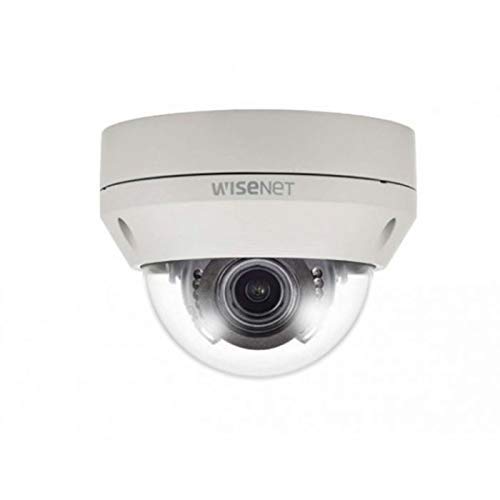
Figure 1: Hanwha Techwin HCV-6070R 2MP Outdoor Vandal-Resistant Dome Camera.
ข้อมูลด้านความปลอดภัย
Please read all safety instructions carefully before installing or operating the camera. Keep this manual for future reference.
- Ensure the power supply matches the camera's requirements to prevent electrical shock or fire.
- อย่าวางกล้องไว้ในที่ที่มีอุณหภูมิสูง ความชื้นสูง หรือสภาพแวดล้อมที่มีฤทธิ์กัดกร่อน
- การติดตั้งควรดำเนินการโดยบุคลากรที่มีคุณสมบัติเหมาะสมและเป็นไปตามข้อกำหนดด้านไฟฟ้าของท้องถิ่น
- ควรหลีกเลี่ยงการให้เลนส์สัมผัสกับแหล่งกำเนิดแสงที่สว่างจ้าโดยตรงเป็นเวลานาน
- ห้ามถอดประกอบหรือดัดแปลงกล้องโดยเด็ดขาด การกระทำดังกล่าวจะทำให้การรับประกันเป็นโมฆะ
เนื้อหาแพ็คเกจ
ตรวจสอบว่ามีรายการทั้งหมดอยู่ในแพ็คเกจ:
- Hanwha Techwin HCV-6070R Dome Camera (1 unit)
- สกรูยึดและตัวล็อค
- เทมเพลตการติดตั้ง
- คู่มือเริ่มต้นอย่างรวดเร็ว
- Waterproof Cap (if applicable)
การตั้งค่า
1. การติดตั้งกล้อง
The HCV-6070R is designed for wall mounting. Choose a suitable outdoor location that provides the desired surveillance coverage and is protected from direct impact.
- Use the provided installation template to mark the drilling holes on the wall.
- Drill holes according to the template and insert the wall anchors.
- ยึดฐานกล้องเข้ากับผนังโดยใช้สกรูยึด
- ปรับกล้อง viewing angle as needed before tightening all screws.
2 การเดินสายและการเชื่อมต่อ
The camera utilizes a BNC connection for video output and requires a separate power supply. Ensure all connections are secure and weatherproof for outdoor use.
- การเชื่อมต่อวิดีโอ: Connect a BNC cable from the camera's BNC port to the video input of your DVR (Digital Video Recorder).
- การเชื่อมต่อไฟฟ้า: Connect a 12V DC power adapter (not included) to the camera's power input. The camera operates at 8 watts.
- การเชื่อมต่อไร้สาย: The camera supports Wi-Fi for remote control and monitoring. Refer to the operating section for initial Wi-Fi setup.

รูปที่ 2: อดีตample of a BNC coaxial cable for video connection. Ensure a secure connection to the camera and DVR.
3. การกำหนดค่าเริ่มต้น
After physical installation and power-up, access the camera settings via your connected DVR or a compatible mobile application (Android controller type specified).
- ตั้งวันที่และเวลา
- Configure network settings for Wi-Fi connectivity.
- Adjust video quality and recording preferences.
การใช้งานกล้อง
1. การตรวจสอบและบันทึกวิดีโอ
The camera provides 2MP effective video resolution, capturing video at 1080p and a frame rate of 30 fps. Video is typically recorded in MPEG-4 format.
- เข้าถึงสด view และบันทึกเสียงtage through your connected DVR or the remote control application.
- Ensure your DVR is configured to record from the correct channel.
2. การปรับโฟกัสและซูม
The HCV-6070R features a 2.8-12mm manual varifocal lens with optical zoom. Adjustments are made manually on the camera body.
- Loosen the focus and zoom locking screws on the camera lens assembly.
- Adjust the zoom ring to achieve the desired field of view.
- Adjust the focus ring until the image is clear and sharp.
- Tighten the locking screws to secure the settings.
3. Night Vision and Low Light Performance
Equipped with night vision and "Night Color" low light technology, the camera automatically switches to infrared mode in low light conditions to provide clear surveillance footage. The light source type is LED.
- Ensure no obstructions block the infrared LEDs on the camera.
- The camera will automatically activate its infrared illuminators when ambient light levels drop.
4. การตรวจจับการเคลื่อนไหว
The camera supports motion-only alerts. Configure motion detection zones and sensitivity settings through your DVR or the remote control application.
- กำหนดพื้นที่เฉพาะภายในกล้อง view สำหรับการตรวจจับความเคลื่อนไหว
- Set the sensitivity level to minimize false alarms.
- Configure alert notifications (e.g., email, push notifications) via your DVR or application.
5. รีโมทคอนโทรล
The camera can be controlled remotely using a compatible Android application. Ensure the camera is connected to your Wi-Fi network.
- Download and install the Hanwha Techwin mobile application on your Android device.
- Follow the in-app instructions to add and connect to your HCV-6070R camera.
- ผ่านแอปคุณสามารถ view อยู่ footage, access recordings, and adjust certain camera settings.
การซ่อมบำรุง
การบำรุงรักษาตามปกติจะช่วยให้กล้องของคุณมีประสิทธิภาพสูงสุดและมีอายุการใช้งานยาวนาน
- การทำความสะอาดเลนส์: Gently wipe the camera lens with a soft, clean, lint-free cloth. For stubborn dirt, use a lens cleaning solution specifically designed for optical surfaces.
- การทำความสะอาดตัวเรือน: ทำความสะอาดตัวเรือนภายนอกของกล้องด้วยสารทำความสะอาดamp ผ้า. อย่าใช้สารเคมีที่รุนแรงหรือน้ำยาทำความสะอาดที่มีฤทธิ์กัดกร่อน
- การตรวจสอบสายเคเบิล: Periodically check all cables and connections for signs of wear, damage, or corrosion, especially for outdoor installations.
- อัพเดตเฟิร์มแวร์: Check the Hanwha Techwin website for any available firmware updates to ensure your camera has the latest features and security patches.
การแก้ไขปัญหา
| ปัญหา | สาเหตุที่เป็นไปได้ | สารละลาย |
|---|---|---|
| ไม่มีวิดีโอเอาท์พุต | No power; Loose BNC connection; Incorrect DVR input selected. | Check power supply; Secure BNC cable; Select correct channel on DVR. |
| ภาพไม่ชัดหรือเบลอ | Lens out of focus; Dirty lens. | Manually adjust focus (refer to Operating section); Clean the lens. |
| การมองเห็นตอนกลางคืนไม่ทำงาน | IR LEDs blocked; Insufficient power; Camera stuck in day mode. | Clear obstructions; Verify power supply; Restart camera. |
| การตรวจจับการเคลื่อนไหวไม่ทำงาน | Incorrect sensitivity settings; Motion detection zone not configured. | Adjust sensitivity; Configure motion detection zones in DVR/app. |
| Cannot connect via Wi-Fi | Incorrect Wi-Fi password; Camera out of range; Network issues. | Verify Wi-Fi credentials; Move camera closer to router; Check network status. |
ข้อมูลจำเพาะ
| แบบอย่าง | HCV-6070R |
| ยี่ห้อ | HANWHA Techwin |
| ความละเอียดวิดีโอที่มีประสิทธิภาพ | 2 ล้านพิกเซล (1080p) |
| อัตราเฟรม | 30 เฟรมต่อวินาที |
| ประเภทเลนส์ | 2.8-12mm Manual Varifocal Lens |
| ประเภทโฟกัส | โฟกัสแบบแมนนวล |
| ประเภทการซูม | ซูมออปติคอล |
| เทคโนโลยีการเชื่อมต่อ | Wireless (Wi-Fi), BNC Connection |
| แหล่งพลังงาน | Manual (requires external 12V DC power adapter) |
| วัดtage | 8 วัตต์ |
| การใช้งานภายใน/ภายนอกอาคาร | กลางแจ้ง |
| คุณสมบัติพิเศษ | Night Vision (Night Color low light technology) |
| ฟอร์มแฟกเตอร์ | โดม |
| ประเภทการติดตั้ง | ติดผนัง |
| อุปกรณ์ที่รองรับ | เครื่องบันทึกภาพ |
| วิธีการควบคุม | Remote (Android Controller Type) |
| การให้คะแนนการคุ้มครองระหว่างประเทศ | IP54 |
| เทคโนโลยีโฟโต้เซนเซอร์ | ซีมอส |
| รูปแบบการจับภาพวิดีโอ | MPEG-4 |
| ประเภทการแจ้งเตือน | การเคลื่อนไหวเท่านั้น |
การรับประกันและการสนับสนุน
For warranty information and technical support, please refer to the official Hanwha Techwin webหรือติดต่อฝ่ายบริการลูกค้าโดยตรง โปรดเก็บใบเสร็จรับเงินไว้เป็นหลักฐานการซื้อสำหรับการเรียกร้องการรับประกัน
ผู้ผลิต: ฮันฮวา
วันที่เข้าใช้งานครั้งแรก: 19 กุมภาพันธ์ 2019
Ask a question about this manual
Ask about setup, troubleshooting, compatibility, parts, safety, or missing instructions. Manuals+ will review the question and use this page’s manual context to help answer it.