
การแนะนำ
Thank you for choosing the NEC NP-MC372X Portable Projector. This manual provides essential information for the safe and efficient use of your projector. Please read these instructions thoroughly before operating the device and retain them for future reference. The NEC NP-MC372X is an XGA LCD projector designed for clear and bright presentations, offering 3700 lumens of brightness and a native resolution of 1024x768.
ข้อมูลด้านความปลอดภัย
ปฏิบัติตามข้อควรระวังด้านความปลอดภัยต่อไปนี้เสมอเพื่อป้องกันไฟไหม้ ไฟฟ้าช็อต หรือการบาดเจ็บ:
- อย่าปิดกั้นช่องระบายอากาศ ตรวจสอบให้แน่ใจว่ามีพื้นที่ว่างรอบโปรเจ็กเตอร์เพียงพอเพื่อให้มีการไหลเวียนของอากาศที่ดี
- อย่ามองตรงเข้าไปในเลนส์โปรเจ็กเตอร์เมื่อลamp เปิดอยู่เนื่องจากแสงที่สว่างเกินไปอาจทำให้ดวงตาเสียหายได้
- อย่าวางโปรเจ็กเตอร์บนรถเข็น ขาตั้ง หรือโต๊ะที่ไม่มั่นคง
- Unplug the projector from the power outlet before cleaning. Use a dry cloth for cleaning.
- ส่งต่อการบริการทั้งหมดไปยังบุคลากรบริการที่มีคุณสมบัติเหมาะสม
เนื้อหาแพ็คเกจ
ตรวจสอบว่ารายการทั้งหมดที่ระบุไว้ด้านล่างนี้รวมอยู่ในแพ็คเกจของคุณ:
- NEC NP-MC372X Portable Projector
- สายไฟ
- สาย HDMI
- รีโมทคอนโทรล
สินค้าเกินview
The NEC NP-MC372X is a versatile projector featuring an LCD display, 1024x768 native resolution, and 3700 lumens brightness. It includes a 1.2x zoom lens and offers a lamp life of up to 10,000 hours. Connectivity options include Dual HDMI, VGA, and USB.
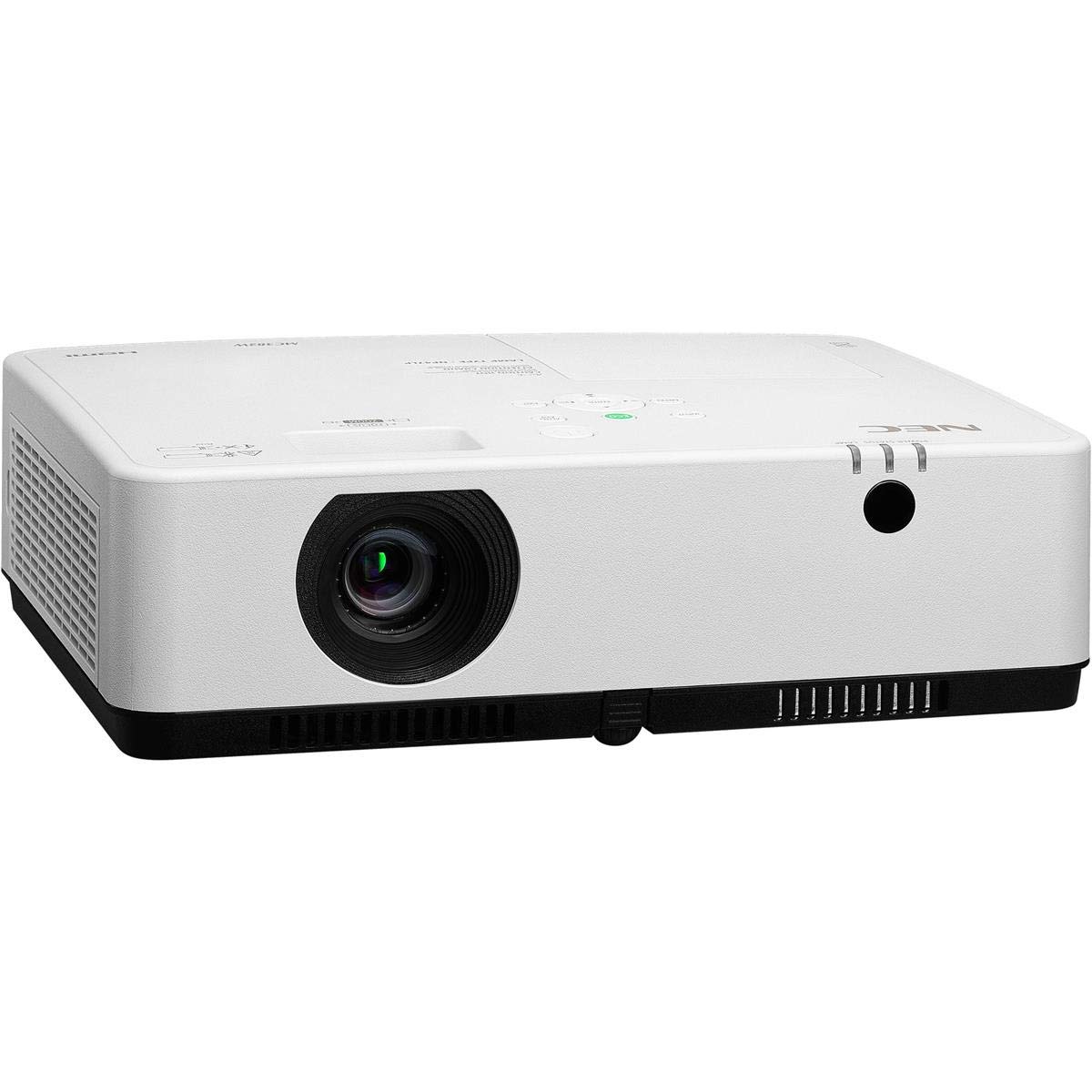
รูปที่ 1: ด้านหน้าและด้านบน view of the NEC NP-MC372X Portable Projector, showing the lens and control panel.

รูปที่ 2 : ด้านหน้า view of the projector, highlighting the projection lens.

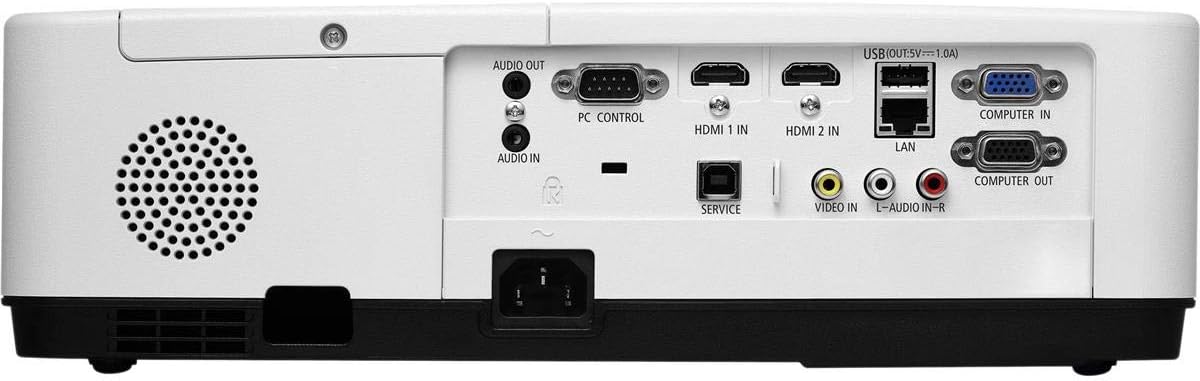
รูปที่ 3: ด้านหลัง view of the projector, displaying the various input and output ports including HDMI, VGA, USB, LAN, and audio connections.
รูปที่ 4: ด้านข้าง view of the projector, showing the ventilation grille for heat dissipation.
การตั้งค่า
ตำแหน่งทางกายภาพ
Place the projector on a stable, flat surface or mount it securely. Ensure the projector is positioned at an appropriate distance from the screen to achieve the desired image size. Maintain clear space around the projector for ventilation.
การเชื่อมต่ออุปกรณ์
Refer to Figure 3 for port locations. Connect your source device (e.g., laptop, gaming console) to the projector using one of the following methods:
- ช่องต่อ HDMI: Use an HDMI cable to connect to either HDMI 1 IN or HDMI 2 IN.
- VGA: Use a VGA cable to connect to COMPUTER IN. For audio, connect a 3.5mm audio cable to AUDIO IN.
- ยูเอสบี: Connect a USB device to the USB port for direct media playback.
- LAN: เชื่อมต่อสายอีเธอร์เน็ตเข้ากับพอร์ต LAN เพื่อเชื่อมต่อเครือข่าย
การเปิด/ปิดเครื่อง
1. Connect the power cable to the projector and a power outlet.
2. Press the power button on the projector or the remote control to turn on the projector.
3. To turn off, press the power button again. Confirm shutdown when prompted.
คำแนะนำการใช้งาน
Basic Operation with Remote Control
Use the included remote control to navigate menus, select input sources, and adjust settings. Point the remote control towards the projector's remote sensor.
การเลือกแหล่งที่มาของข้อมูล
Press the 'Input' button on the remote control or projector control panel to cycle through available input sources (HDMI 1, HDMI 2, Computer In, USB).
การปรับแต่งภาพ
- จุดสนใจ: หมุนวงแหวนปรับโฟกัสบนเลนส์จนกว่าภาพจะคมชัด
- ซูม: Use the zoom ring on the lens to adjust the image size without moving the projector. The projector features a 1.2x optical zoom.
- การแก้ไขคีย์สโตน: If the image appears trapezoidal, use the keystone correction function in the projector menu to square the image.
คุณสมบัติพิเศษ
- Multi Presenter: This feature allows multiple users to connect and display content wirelessly from their devices. Refer to the on-screen menu for setup instructions.
- ยูเอสบี Viewer Capability: Insert a USB drive into the USB port to directly view photos, videos, and documents without a connected computer.
- คำบรรยายปิด: Enable closed captioning for compatible video sources through the projector's menu settings.
การซ่อมบำรุง
Lamp การทดแทน
โปรเจ็กเตอร์ lamp has an operating life of up to 10,000 hours. When the lamp reaches the end of its life, a warning message will appear. Consult a qualified service technician for lamp การเปลี่ยนเพื่อให้มั่นใจในการติดตั้งและความปลอดภัยที่เหมาะสม
การทำความสะอาด
- ภายนอก: เช็ดโปรเจคเตอร์asing with a soft, dry, lint-free cloth. For stubborn marks, slightly dampเทน้ำลงบนผ้า
- เลนส์: Use a professional lens cleaning kit or a soft, dry cloth specifically designed for optical lenses. Avoid harsh chemicals.
- ตัวกรองอากาศ: Regularly check and clean the air filter to prevent dust buildup, which can affect performance and lamp life. Refer to the projector's on-screen menu for filter usage time.
การแก้ไขปัญหา
หากคุณพบปัญหา โปรดลองวิธีแก้ไขต่อไปนี้ก่อนติดต่อฝ่ายสนับสนุน:
- ไม่มีรูป: Ensure all cables are securely connected. Verify the correct input source is selected. Check if the lens cap is removed.
- ไม่มีเสียง: Confirm audio cables are connected (if applicable). Adjust volume on both the projector and the source device.
- รีโมทคอนโทรลไม่ทำงาน: Check the batteries in the remote. Ensure there are no obstructions between the remote and the projector's sensor.
- ภาพไม่ชัด: Adjust the focus ring on the lens. Ensure the projection surface is flat.
- คำเตือนความร้อนสูงเกินไป: Ensure ventilation openings are not blocked. Clean the air filter if necessary.
ข้อมูลจำเพาะ
| คุณสมบัติ | ข้อมูลจำเพาะ |
|---|---|
| ยี่ห้อ | เอ็นอีซี |
| ชื่อรุ่น | MC372X |
| หมายเลขรุ่น | NP-MC372X |
| ประเภทจอภาพ | จอแอลซีดี |
| ความละเอียดดั้งเดิม | 1024 x 768 (XGA) |
| ความสว่าง | 3700 ลูเมน |
| เทคโนโลยีการเชื่อมต่อ | HDMI, USB, VGA, LAN |
| ซูม | 1.2x ออปติคอล |
| อายุการใช้งานของแหล่งกำเนิดแสง | 10,000 ชั่วโมง |
| วัดtage | 267 watts (typical 120V) |
| ประเภทตัวควบคุม | รีโมทคอนโทรล |
| น้ำหนักสินค้า | 7.1 ปอนด์ |
| เล่มที่tage | 120 โวลต์ |
| ยูพีซี | 805736070248 |
การรับประกันและการสนับสนุน
The NEC NP-MC372X Portable Projector comes with a รับประกันจำกัด 3 ปี. For warranty claims or technical support, please contact NEC customer service. You can find contact information on the official NEC webไซต์หรือผ่านผู้ค้าปลีกผลิตภัณฑ์ของคุณ