
1. บทนำ
Thank you for choosing the Hoover H-Free 700 HF722AFG 011 Cordless Rechargeable Stick Vacuum Cleaner. This manual provides essential information for the safe and efficient use of your appliance. Please read these instructions carefully before use and keep them for future reference.

The Hoover H-Free 700 in a home setting, showcasing การออกแบบที่กะทัดรัด
2. คำแนะนำด้านความปลอดภัย
ควรปฏิบัติตามข้อควรระวังด้านความปลอดภัยขั้นพื้นฐานเสมอเมื่อใช้เครื่องใช้ไฟฟ้า เพื่อลดความเสี่ยงจากไฟไหม้ ไฟฟ้าช็อต หรือการบาดเจ็บ เครื่องใช้ไฟฟ้านี้มีไว้สำหรับใช้ในครัวเรือนเท่านั้น
- ห้ามใช้เครื่องกลางแจ้งหรือบนพื้นผิวที่เปียก
- อย่าให้เด็กเล่นเครื่องใช้ไฟฟ้า
- เก็บผม เสื้อผ้าที่หลวม นิ้ว และส่วนต่างๆ ของร่างกายให้ห่างจากช่องเปิดและชิ้นส่วนที่เคลื่อนไหว
- อย่าหยิบจับวัสดุที่ติดไฟได้ง่ายหรือไวไฟ หรือสิ่งใดก็ตามที่กำลังลุกไหม้หรือมีควัน
- ใช้เฉพาะตามที่อธิบายไว้ในคู่มือนี้เท่านั้น ใช้เฉพาะอุปกรณ์เสริมที่ผู้ผลิตแนะนำเท่านั้น
- Turn off the appliance before connecting or disconnecting the battery pack.
- Do not use with a damaged battery pack or charger.
3. เนื้อหาบรรจุภัณฑ์
ตรวจสอบว่ามีรายการทั้งหมดอยู่ในแพ็คเกจ:
- Hoover H-Free 700 Main Unit (Handheld Vacuum)
- ท่อต่อ
- หัวฉีดพื้นมอเตอร์
- Battery Pack (22 Volt)
- เครื่องชาร์จ
- 2-in-1 Large Tool (Crevice Tool and Dusting Brush)
- Wall Mount Bracket with Accessories Holder
- คู่มือการใช้งาน
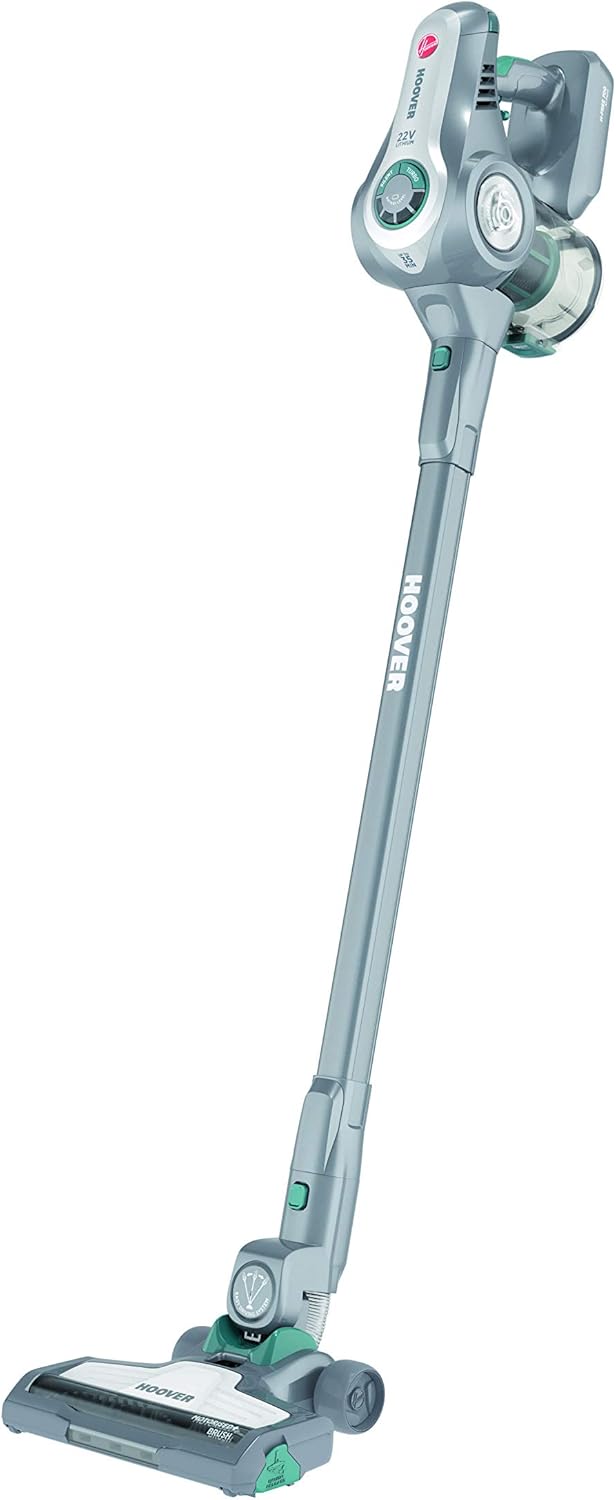
Main components of the Hoover H-Free 700.
4. การประกอบและการติดตั้ง
4.1 การประกอบเครื่องดูดฝุ่น
- เสียบท่อต่อเข้ากับตัวเครื่องหลักจนกระทั่งได้ยินเสียงคลิกและแน่นสนิท
- Attach the motorized floor nozzle to the other end of the extension tube, ensuring it clicks into place.
- ตรวจสอบให้แน่ใจว่าแบตเตอรี่ชาร์จเต็มแล้วก่อนใช้งานครั้งแรก
4.2 การชาร์จแบตเตอรี่
- เสียบที่ชาร์จเข้ากับเต้ารับไฟฟ้า
- Plug the charger into the charging port on the main unit or directly into the battery pack if removed.
- ไฟแสดงสถานะการชาร์จจะสว่างขึ้น โดยทั่วไปการชาร์จจนเต็มจะใช้เวลาประมาณ 2.5 ชั่วโมง
- The appliance provides up to 35 minutes of autonomy on a full charge.
4.3 การติดตั้งแบบติดผนัง
- Choose a suitable location near a power outlet for convenient charging.
- ทำเครื่องหมายจุดที่จะเจาะรูสำหรับติดตั้งขายึดติดผนัง
- Drill holes and secure the bracket to the wall using appropriate screws and wall plugs (not supplied).
- The wall mount includes an accessories holder for convenient storage.
5. คู่มือการใช้งาน
5.1 การเปิด/ปิดเครื่อง
- หากต้องการเริ่มการทำงานของเครื่องดูดฝุ่น ให้กดปุ่มเปิด/ปิดที่อยู่บนด้ามจับ
- To stop, press the power button again.
- For continuous operation without holding the trigger, engage the lock button.

Detail of the power trigger and continuous operation lock button.
5.2 การใช้อุปกรณ์เสริม
The H-Free 700 comes with versatile accessories for different cleaning tasks:
- 2-in-1 Large Tool: This tool combines a crevice tool for tight spaces and a dusting brush for delicate surfaces. Attach it directly to the main unit or the extension tube.

The 2-in-1 large tool in crevice mode.
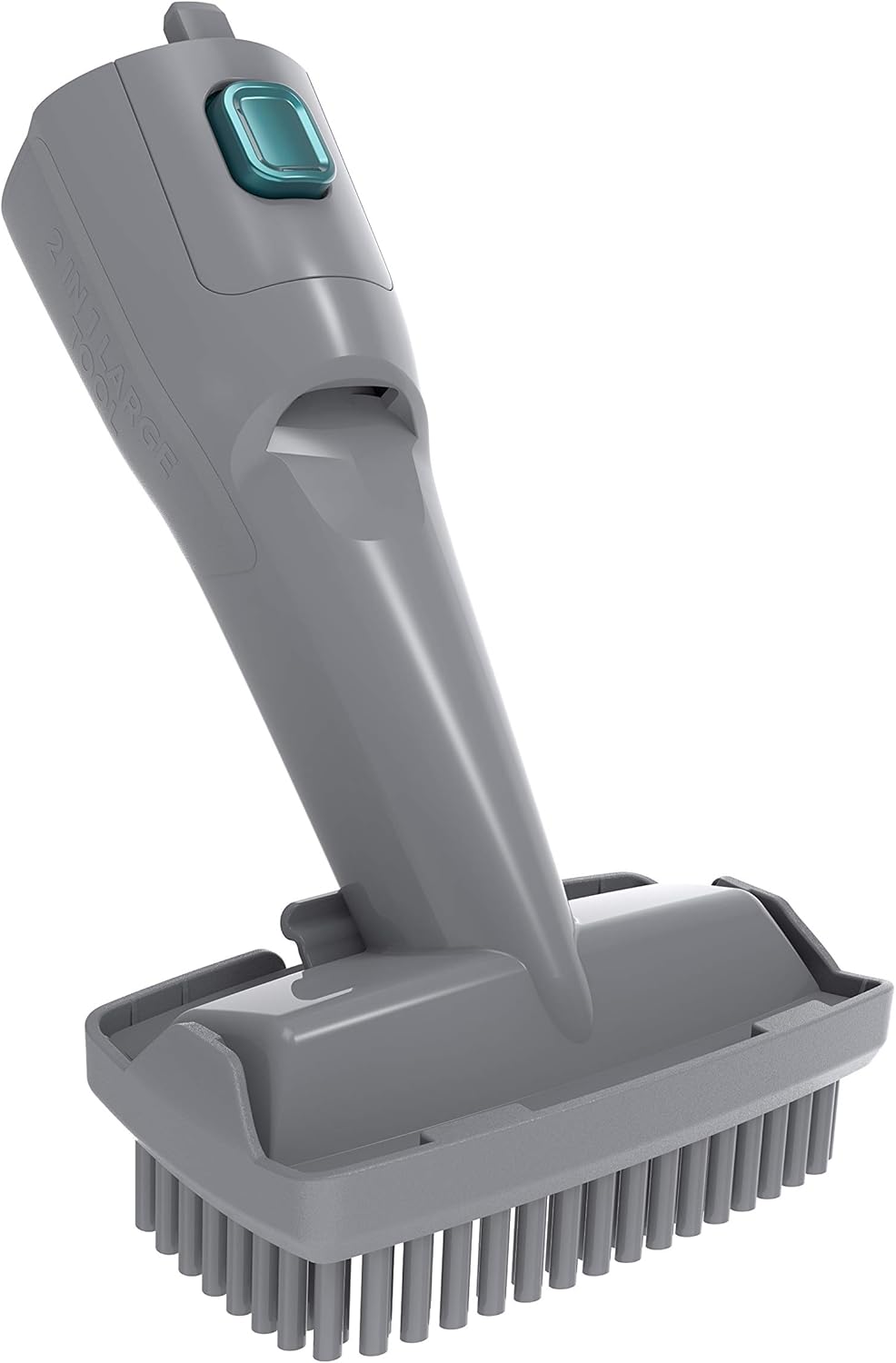
The 2-in-1 large tool with the dusting brush extended.
6. การบำรุงรักษาและการทำความสะอาด
การบำรุงรักษาตามปกติจะช่วยให้เครื่องดูดฝุ่นทำงานได้อย่างเหมาะสมที่สุดและยืดอายุการใช้งานของเครื่องดูดฝุ่นของคุณ
6.1 การล้างถังขยะ
- ตรวจสอบให้แน่ใจว่าปิดเครื่องดูดฝุ่นแล้ว
- กดปุ่มปลดล็อคถังเก็บฝุ่นและถอดถังเก็บฝุ่นออกจากตัวเครื่องหลัก
- เปิดฝาถังขยะและเทสิ่งของในถังลงในถังขยะทั่วไป
- The dustbin is designed for easy cleaning and emptying.

The dustbin of the Hoover H-Free 700 opened for emptying.
6.2 การทำความสะอาดตัวกรอง
- Remove the filter assembly from the dustbin.
- แตะตัวกรองเบาๆ เหนือถังขยะเพื่อกำจัดฝุ่นที่หลุดออกมา
- If necessary, rinse the filter under cold running water. Ensure it is completely dry before reassembling.
- The filter is a cloth type and should be cleaned regularly.
6.3 การทำความสะอาดแปรง
- Turn off the vacuum and disconnect the floor nozzle.
- Locate the brush bar release mechanism on the bottom of the nozzle.
- Remove the brush bar and clear any tangled hair or debris using scissors or a brush.
- Reinsert the brush bar and secure it.
7 การแก้ไขปัญหา
If you encounter issues with your Hoover H-Free 700, refer to the following table for common problems and solutions.
| ปัญหา | สาเหตุที่เป็นไปได้ | สารละลาย |
|---|---|---|
| เครื่องดูดฝุ่นไม่เปิดขึ้น | แบตเตอรี่ไม่ได้ชาร์จ; ใส่แบตเตอรี่ไม่ถูกต้อง | Charge the battery; Ensure battery is securely clicked into place |
| ลดพลังการดูด | Dustbin full; Filter clogged; Nozzle/tube blocked | Empty dustbin; Clean filter; Check and clear blockages |
| แปรงไม่หมุน | Brush bar jammed by debris; Nozzle not properly attached | Clean brush bar; Reattach nozzle securely |
| เวลาในการทำงานสั้น | Battery not fully charged; Battery life degraded | Ensure full charge; Contact customer support for battery replacement |
8. ข้อมูลจำเพาะ
- ยี่ห้อ: ฮูเวอร์
- แบบอย่าง: HF722AFG 011
- แหล่งพลังงาน: Battery powered (22 Volt)
- ความเป็นอิสระ: สูงสุด 35 นาที
- คุณสมบัติพิเศษ: Cordless, lightweight structure, bagless, lock button for continuous operation, easy to clean and empty, newly designed suction motor, wall mount with accessories.
- ประเภทตัวกรอง: ผ้า
- พื้นผิวที่แนะนำ: Dual action (suitable for various floor types)
- เครื่องประดับ: 2-in-1 Large Tool
9. การรับประกันและการสนับสนุน
For warranty information, technical support, or service inquiries, please refer to the warranty card included with your product or visit the official Hoover webไซต์นี้ โปรดเก็บหลักฐานการซื้อไว้เพื่อใช้ยืนยันการรับประกัน
คุณสามารถหาข้อมูลเพิ่มเติมและรายละเอียดการติดต่อได้ที่ ร้าน Hoover บน Amazon.